





SleekAI 2.0 is here, and it's a big one. We've rebuilt the plugin from the ground up using the same chat and agent framework that powers all other Sleek plugins. This release brings a new database architecture for better performance, a wizard mode that makes chatbot creation effortless, and meaningful improvements across every feature. Let's get into it.
Core Changes
New Chat Framework
SleekAI now shares the same chat and agent framework used across all Sleek plugins. This unified architecture means more consistent behavior, better stability, and a solid foundation for everything we're building next.
Database Performance
Chats are now stored in their own dedicated database table instead of WordPress post meta. This architectural change makes a real difference, especially for users with extensive chat histories or high-traffic chatbots. Everything feels snappier.
Deprecated Features
Some features didn't make the cut for 2.0. Here's what's changing and where to go from here.
Everywhere Mode
Everywhere mode was ahead of its time. The idea of prompting AI from any input field in WordPress was innovative, but after listening to user feedback, we realized the approach needed rethinking. The execution didn't quite match the vision.
Everywhere mode has been deprecated in SleekAI 2.0. Users who relied on it should transition to the new Agent Mode, which launches as a beta in this release. Agent mode takes the core concept and reimagines it with a proper interface that works across more environments. We're releasing it as a beta first to gather your feedback and make sure it meets your needs.
Plugin Mode
The original Plugin mode was useful but limited. It has been deprecated and moved into the new Agent panel, but this isn't just a relocation.
The new implementation brings a completely redesigned experience that's easier to use, better to manage, and directly connected to Agent mode for a seamless workflow between conversation and creation.
Chat
The core chat experience stays familiar, but gains new capabilities that make your AI conversations more flexible:
- Regenerate messages: Not happy with a response? Regenerate it with a single click to get a fresh take.
- Branch conversations: Start a new chat from any message in your history, creating branches to explore different directions.
- Media library integration: Include files directly from your WordPress Media Library as context, letting the AI analyze images, documents, and more.
These features turn chat from a linear experience into a dynamic workspace where you can iterate and refine your AI interactions.
Chatbots
Chatbots received a lot of attention in this release, with improvements across setup, context handling, and the widget experience.
Wizard Mode
Setting up a chatbot used to require understanding data variables, context formatting, and various technical concepts. Wizard Mode changes that.
Creating a chatbot is now as simple as:
- Select your post types (posts, pages, products, etc.)
- Choose which fields to include: post title, content, post meta, or any combination
- SleekAI generates the data variables and configuration automatically in the background
That's it. No manual variable setup, no complex configuration. Wizard mode handles 99% of chatbot use cases. For power users who need granular control, the advanced non-wizard mode remains available.
File-Based Context System (Replaces Assistant Mode)
If you were using Assistant mode, this section is for you. OpenAI deprecated their Assistants API, so we've migrated to the new Files API and Responses API.
The functionality remains the same: your data is saved to OpenAI's servers in a vector database, and when your chatbot receives a query, it searches these files intelligently instead of loading everything into context. This still supports up to 1GB per file and multiple sources for comprehensive knowledge bases.
Automatic File Regeneration
Here's where it gets interesting. If you're using the file-based context system, you can now configure files to regenerate on a schedule: daily, weekly, or any interval you choose.
Previously with Assistant mode, if your WordPress content changed, your chatbot's knowledge was stuck in the past. It was a one-time setup with no way to sync updates. Now, content changes are automatically picked up and synced to OpenAI. Your chatbot always reflects your current content without any manual intervention.
UX Improvements
Beyond the big features, chatbots have received extensive usability improvements throughout. The creation flow, management interface, and overall experience have all been refined.
Widget Upgrades
The chatbot widget is now built on the same foundation as the new chat experience. Your visitors can regenerate responses and start fresh conversations, giving them more control over their interactions.
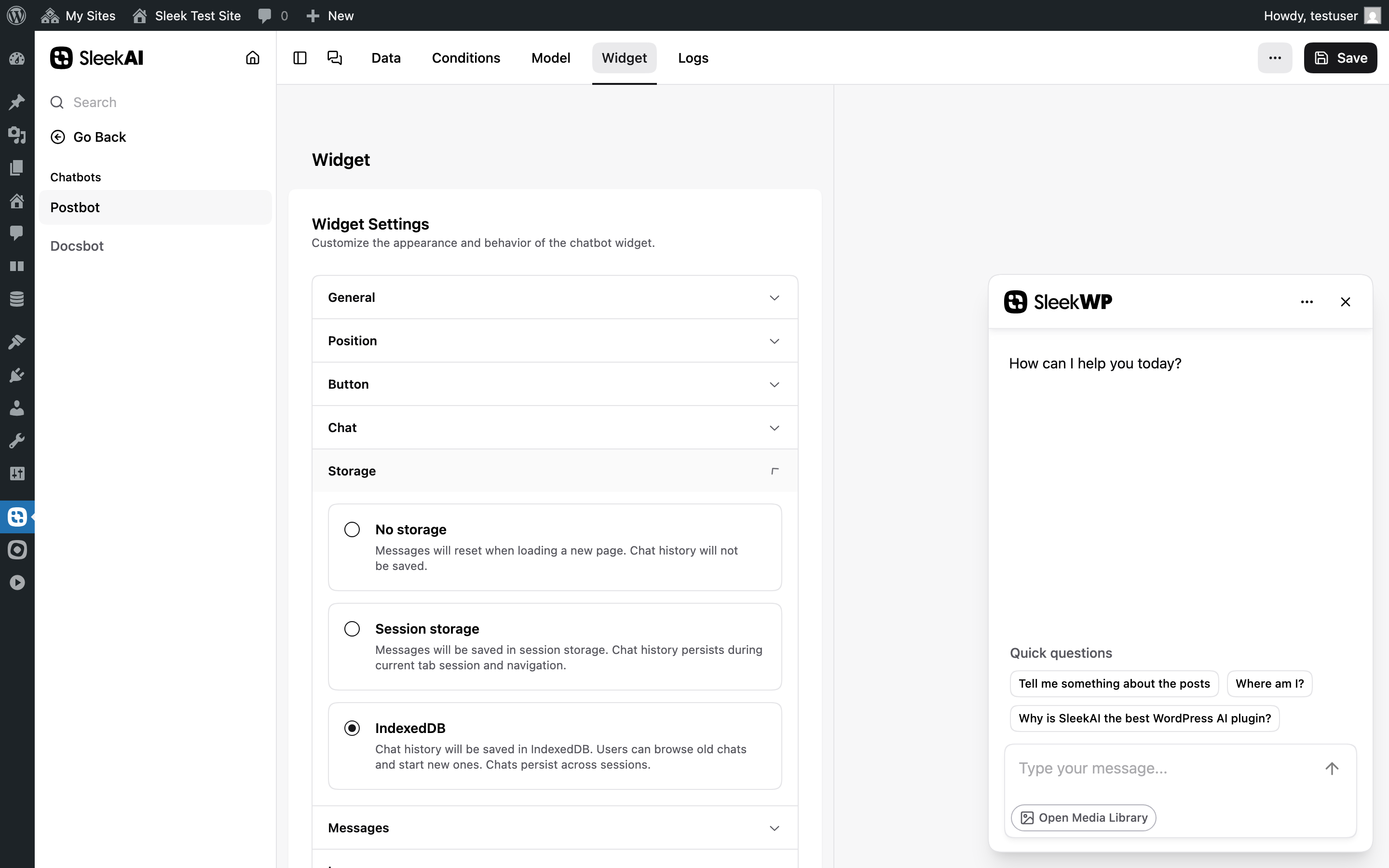
IndexedDB Storage
Beyond session storage (which persists messages between page loads), there's now an IndexedDB mode. This saves chat history directly in the browser's IndexedDB database, enabling virtually unlimited message persistence. Visitors can return days later and continue right where they left off.
Agent Mode (Beta)
Agent mode is the spiritual successor to Everywhere mode, but built the right way. Instead of trying to inject AI into every input field, Agent mode gives you a dedicated panel that can be launched from anywhere in WordPress with a single keyboard shortcut.
Launching Agent Mode
Press Meta + Shift + L to open the agent panel from anywhere in WordPress. The
shortcut can be customized in settings if it conflicts with other tools you use.
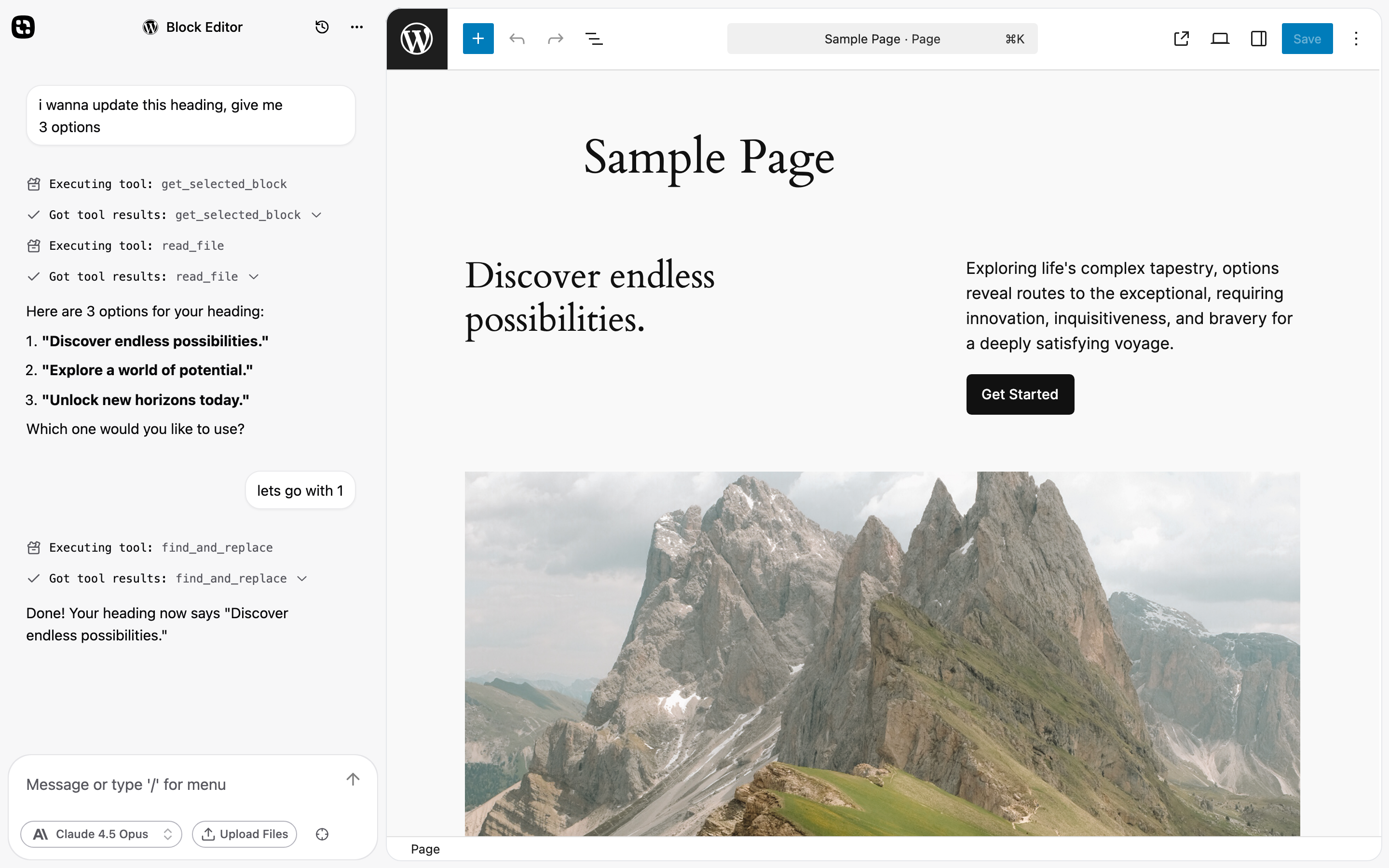
The interface follows a familiar pattern: chat on the left, content on the right. If you've used tools like Lovable, Cursor, or similar AI-powered development environments, you'll feel right at home. The key difference is that this runs directly inside WordPress, with full access to your admin context.
Built-in Modes
Agent mode ships with several pre-configured modes, each with its own capabilities and system instructions:
- Chat: A general AI assistant without any tools. Good for brainstorming, writing, and conversations that don't need to modify anything.
- Block Editor: An AI assistant specifically tuned for the WordPress block editor. It can execute JavaScript, read and modify blocks, and understands the Gutenberg environment.
- Plugin Mode: The successor to the old Plugin mode, now integrated directly into the agent panel. Create, edit, and manage WordPress plugins through conversation. Includes a file browser, code editor, and live preview.
Each mode has access to different tools. Block Editor mode, for example, can call
get_selected_block, read_file, and find_and_replace to surgically update
content in the editor. Plugin Mode can list files, read and write code, and deploy
plugins to your site.
Custom Modes
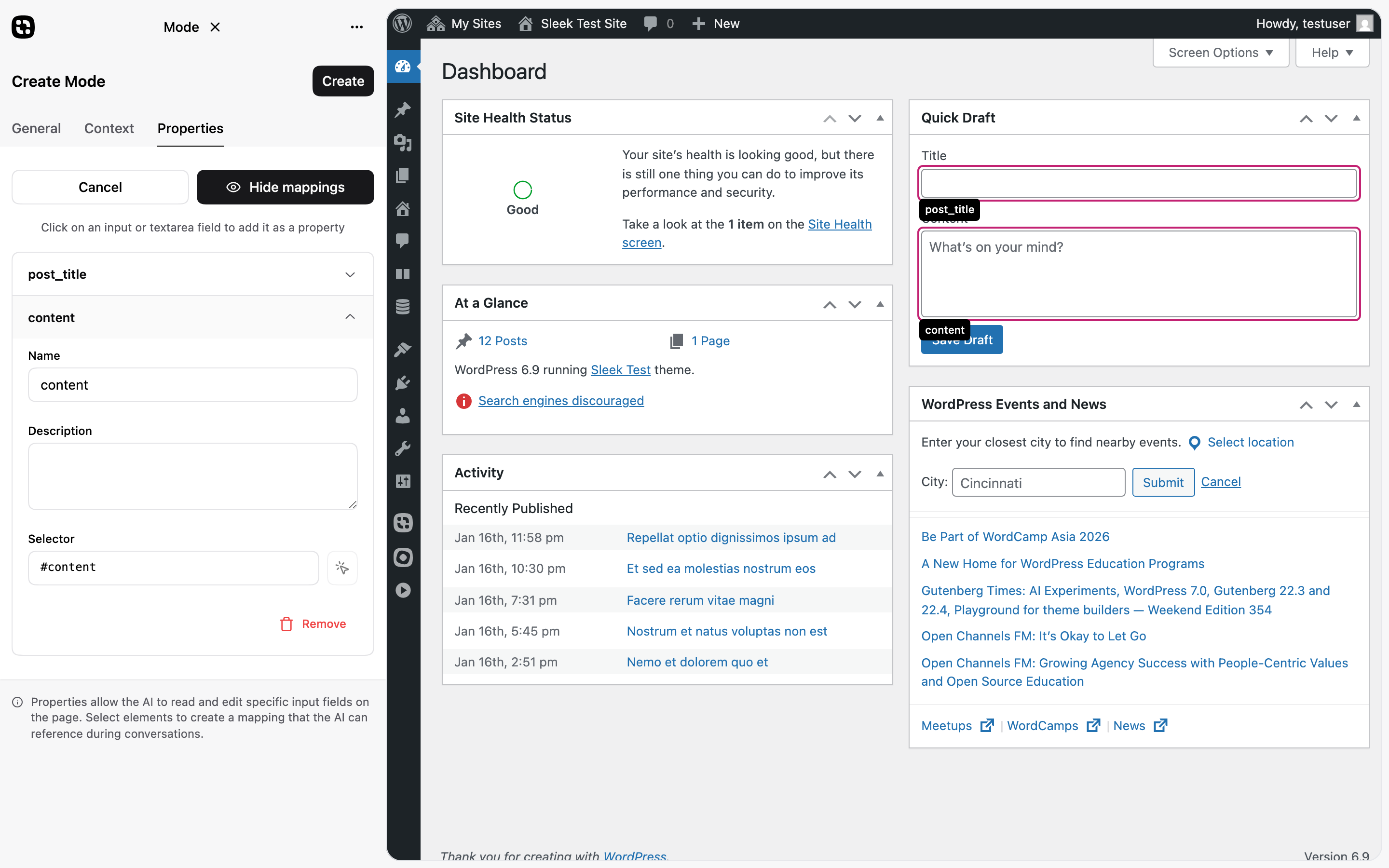
The built-in modes cover common use cases, but you can create your own. Custom modes let you define:
- System instructions: Tell the AI what it should do and how it should behave in this mode.
- Properties: Map form fields on the page to virtual files. The AI can read and update these fields directly.
This is powerful for repetitive workflows. Imagine a "Product Description" mode that maps your product title, price, and features fields. The agent sees these as files it can read and write, making surgical updates to exactly the fields you're working on.
Modes API
For developers who want to go further, SleekAI 2.0 includes a Modes API. This allows you to create fully custom modes with their own file systems, tools, and behaviors.
            use SleekAi\Agent\Agent;

    Agent::registerMode([
      'id' => 'my-custom-mode',
      'label' => 'My Custom Mode',
      'description' => 'AI assistant for my workflow',
      'category' => 'Custom',
      'agent' => [
        'systemInstruction' => 'You are a helpful assistant.',
        'canvas' => true,
        'executeJs' => false,
      ],
      'script' => plugins_url('script.js', __FILE__),
    ]);


                Copy
With a JavaScript extension, you can define custom file systems that map any data structure to virtual files, add custom tools, and create dynamic system instructions. The built-in Block Editor mode was created entirely using this API.
WordPress Abilities Integration
Agent mode integrates with WordPress 6.9's new Abilities API. This means your AI assistant can discover and execute registered WordPress abilities based on your user permissions.
- Discover abilities: The agent can search through all registered abilities to find what actions are available
- Execute with permission: Only abilities you have permission to use are accessible—the AI respects WordPress capabilities
- Extensible by plugins: Any plugin can register abilities that become available to the agent
This opens up powerful workflows. Ask the agent to "get the site title" or "list available abilities" and it will use the WordPress Abilities API to fulfill your request. As more plugins adopt the Abilities API, your agent becomes more capable automatically.
Why Beta?
We're releasing Agent mode as a beta because we want to get it right. The core functionality is solid, but we're actively working on:
- Expanding the environments where Agent mode works seamlessly
- Adding more built-in tools based on user feedback
- Refining the custom mode creation experience
- Improving tool reliability across different WordPress setups
Your feedback during the beta period will directly shape how Agent mode evolves. Enable it in settings and let us know what works, what doesn't, and what you'd like to see added.
Upgrading to 2.0
This is a major release with architectural changes. We've worked to ensure a smooth upgrade path, but we recommend:
- Backing up your site before updating
- Testing on a staging environment if possible
- Reviewing your chatbot configurations after upgrade, especially if you used Assistant mode
- Re-entering your API keys — SleekAI 2.0 uses a new database structure for API keys, so previous keys are not automatically migrated
Users of Everywhere mode and Plugin mode should plan to migrate to Agent mode, which provides improved functionality for both use cases.
SleekAI 2.0 is our biggest release yet. The new architecture, wizard mode, and file-based context system all work together to make AI more accessible and powerful in WordPress. We're excited to see what you build with it, and as always, your feedback drives our development. 🚀