





AI - Terminal
The terminal feature connects SleekByte to Claude Code, Anthropic's CLI for Claude. Instead of using the built-in chat, you get an interactive terminal session where Claude Code can read, edit, and create snippet files directly.
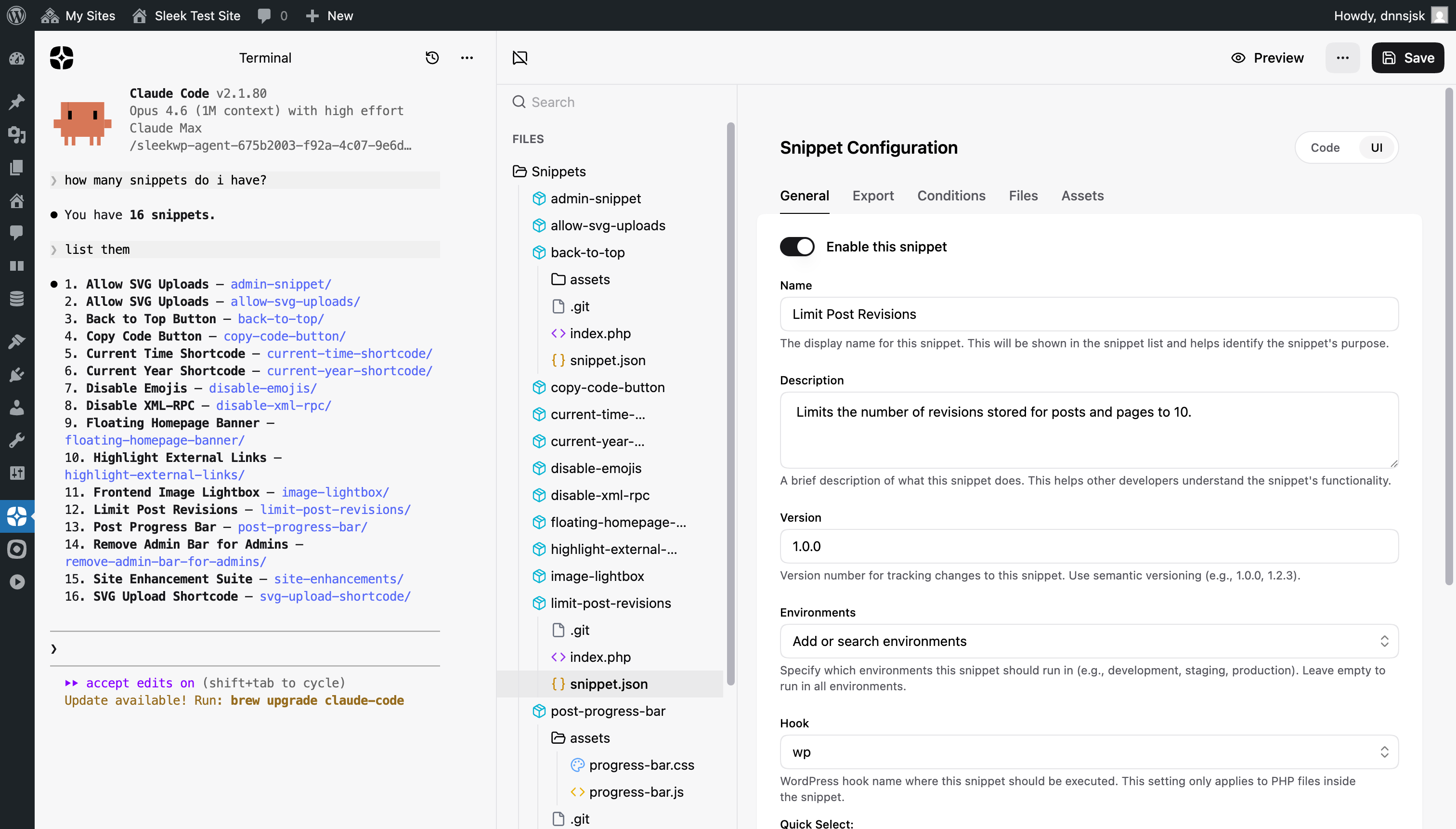
Why Claude Code
The built-in AI chat works through the OpenAI/Anthropic API and is great for quick tasks: generating snippets, fixing errors, asking questions. But it operates one message at a time and can only edit files through the canvas tools.
Claude Code is different. It runs as a full coding agent on your machine with
access to the filesystem. It can read multiple files, search across your
project, run commands, and make coordinated changes across files, all in a
single conversation. It understands project context through CLAUDE.md and
remembers previous conversations with --continue.
The terminal integration brings this power directly into the SleekByte interface. You don't need to leave WordPress or manually copy files around.
Architecture
The integration has three parts:
- @sleekwp/agent: A Node.js server running on your local machine. It manages temporary directories, spawns Claude Code via a pseudo-terminal (node-pty), watches for file changes, and communicates over WebSocket.
- SleekByte frontend: Connects to the agent via
ws://localhost:5733, renders the terminal using xterm.js with WebGL, and syncs file changes back to the canvas store. - Claude Code CLI: The actual AI agent, spawned by the agent server in a temp directory containing your snippet files and a generated
CLAUDE.md.
The data flow looks like this:
- You click New Terminal in SleekByte
- SleekByte sends all current snippet files to the agent via WebSocket
- The agent writes them to a temporary directory (e.g.,
/tmp/sleekwp-agent-{id}/) - The agent generates a
CLAUDE.mdfile describing your snippet structure - Claude Code spawns in that directory with
--permission-mode acceptEdits - Terminal output streams from Claude Code through the agent to your browser
- When Claude Code edits a file, chokidar detects the change and sends it back
- SleekByte updates the file in the editor immediately
- When you save in SleekByte, the files are written to WordPress via the REST API as usual
The agent server is stateless between sessions. It only holds the temporary directory and the running Claude Code process. All persistent state (snippet files, chat history) lives in WordPress and IndexedDB.
Requirements
- Claude Code CLI installed and authenticated on your machine
- Node.js 20 or higher
- @sleekwp/agent running locally
Claude Code requires its own authentication (Anthropic API key or Claude Pro/Max subscription). SleekByte does not handle Claude Code billing or API keys. You need a working Claude Code installation before using the terminal.
Setup
Start the agent server on your local machine:
        npx @sleekwp/agent


                Copy
The agent starts a WebSocket server on port 5733. SleekByte connects to it automatically when available. If the agent is not running, the New Terminal option does not appear in the menu.
You can also install it globally:
        npm install -g @sleekwp/agent
sleekwp-agent


                Copy
Starting a session
Open the menu (three dots icon in the header) and select New Terminal.
When a terminal session starts:
- All snippet files are synced to a temporary directory on your machine
- A
CLAUDE.mdfile is generated with your snippet structure and conventions - Claude Code spawns in that directory with
--permission-mode acceptEdits - Terminal I/O streams between the browser and the CLI via WebSocket
Claude Code sees your snippets as a regular project and can use all its standard tools: file reading, editing, searching, and executing commands.
The CLAUDE.md context file
SleekByte generates a CLAUDE.md file in the temporary directory that gives
Claude Code context about your project. It includes:
- An explanation that files are synced from a WordPress plugin
- The snippet folder structure (
snippet.json, PHP, CSS, JS, SCSS conventions) - The
snippet.jsonschema with all available fields - A list of current snippets with their names, contexts, hooks, and files
This means Claude Code understands the SleekByte conventions from the first
message. It knows how to create proper snippet.json configs, use the right
WordPress hooks, and organize files correctly.
File synchronization
Changes Claude Code makes to files appear immediately in the SleekByte file browser. The agent watches the temporary directory with chokidar and streams file changes back through the WebSocket connection.
When you reconnect to an existing session (after a page reload, for example), SleekByte sends the latest file state to the agent. Files that were deleted in SleekByte are removed from the temporary directory, and any changes you made in the editor are written before Claude Code resumes. This ensures the temporary directory always reflects the current state of your snippets.
Important: changes made by Claude Code are not automatically saved to WordPress. They appear in the editor as unsaved changes. You still need to click Save to persist them through the REST API.
Session resume
Terminal sessions persist across page reloads. The agent keeps the temporary
directory alive when you disconnect. When you navigate back to a terminal
chat, Claude Code resumes with --continue, picking up the conversation
where it left off.
This works because Claude Code stores conversation history in
~/.claude/projects/ keyed by the directory path. As long as the temporary
directory exists and has conversation data, the resume is seamless.
Theme
The terminal adapts to your current SleekByte theme. Light mode sets Claude
Code to its light theme before spawning by writing to ~/.claude.json. The
theme resets to your operating system preference after startup so other Claude
Code sessions are unaffected.
Chat history
Terminal sessions appear in the chat history alongside regular AI conversations. When both types exist, each entry shows an icon to distinguish between them. Terminal sessions use the same IndexedDB chat storage as regular chats.
Limitations
- The agent runs locally on your machine, not on the server. This means the terminal only works during local development, not in production.
- Claude Code requires its own subscription or API key. It is not covered by the OpenAI/Anthropic key you configure in SleekByte settings.
- The terminal renders in the browser using xterm.js. Complex TUI applications may not render identically to a native terminal.
- Only one agent server can run on port 5733 at a time.