





Snippets - History
SleekByte can track version history for each snippet using git. Every save creates a commit, giving you a complete timeline of changes with inline diffs.
Enabling history
Git history is disabled by default. Enable it with a WordPress filter:
        add_filter( 'sleekByte/snippets/git', '__return_true' );


                Copy
Add this to your theme's functions.php or a mu-plugin. Once enabled, a
virtual .git file appears in each snippet folder in the file tree.
How it works
History is powered by isomorphic-git running in the browser with IndexedDB as storage. When you save a snippet:
- The files are committed to a local git repository in IndexedDB
- The
.gitdirectory is exported and synced to your WordPress filesystem via the REST API - The result is a real git repository on disk
Because the .git directory lives on the server, you can also inspect it
with standard git tools over SSH:
        cd wp-content/uploads/sleek-byte/my-snippet
git log --oneline


                Copy
Viewing history
Click the .git file in any snippet folder to open the history viewer. The
viewer shows a split layout:
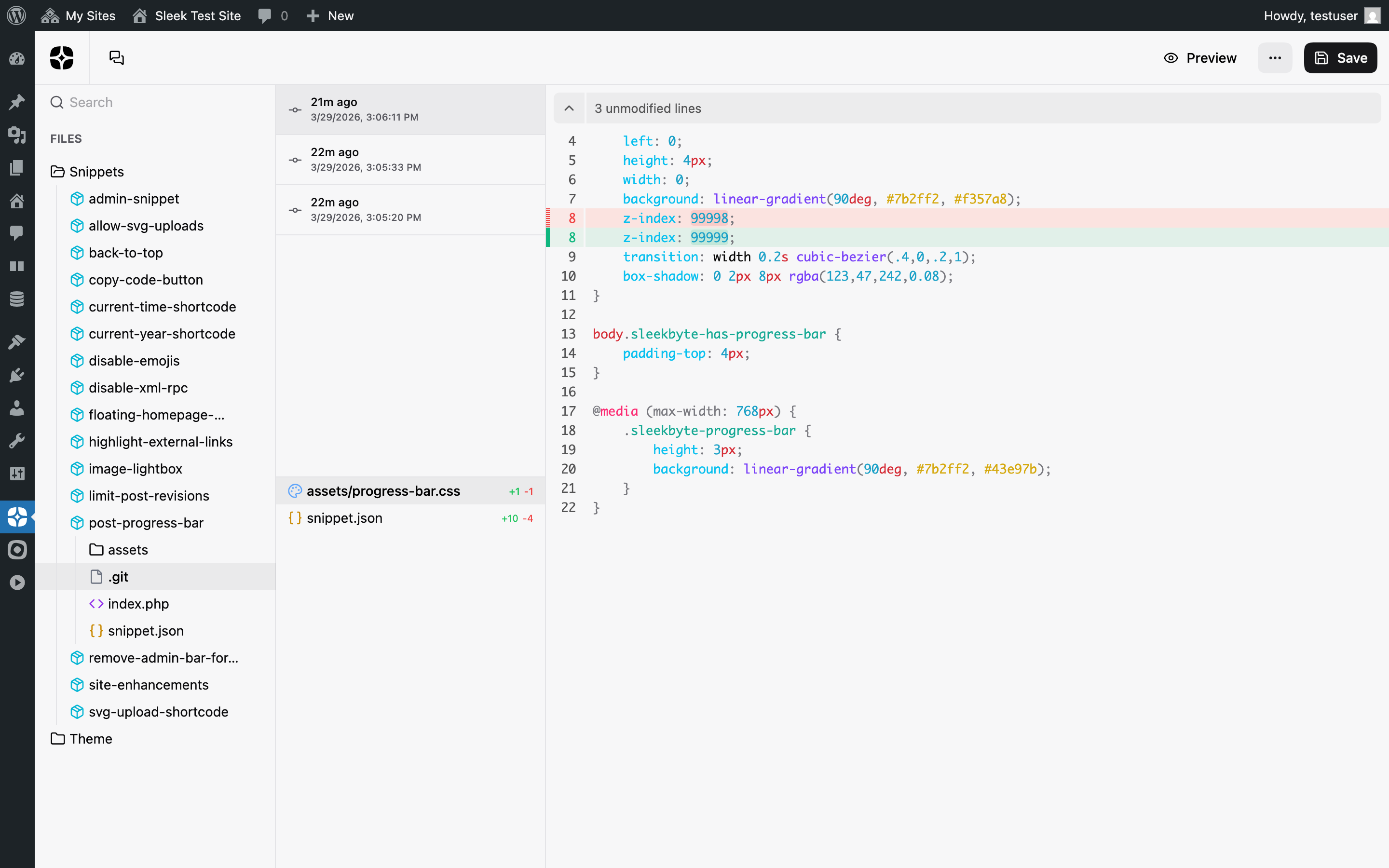
- Left panel (top): Commit list with relative timestamps and full dates. Each entry represents one save.
- Left panel (bottom): Changed files for the selected commit, showing file icons and added/removed line counts.
- Right panel: Inline diff with syntax highlighting for the selected file.
Each commit shows what changed compared to the previous save, not the cumulative difference from the current state. This matches the behavior you'd expect from tools like GitHub or VS Code.
File navigation
When switching between commits, the currently selected file stays active if it was also modified in the new commit. Otherwise, the first changed file is selected automatically. There is always a file selected when changes exist.
Storage
History data lives in two places:
- IndexedDB in the browser: used for fast git operations without network requests. Each snippet gets its own isolated database.
- WordPress filesystem: the
.gitdirectory is synced after each commit so history persists across browsers and devices.
When you open the history viewer, SleekByte checks IndexedDB first. If no
local data exists (first visit or cleared browser data), it fetches the
.git directory from the server and imports it.
REST API
Three endpoints support the git integration:
GET /sleek-byte/v1/actions/git-check: Returns which snippets have.gitdirectories on disk.GET /sleek-byte/v1/actions/git-read?snippet={name}: Returns all.gitfiles as base64-encoded content.POST /sleek-byte/v1/actions/git-write: Writes.gitfiles back to the server. Only paths starting with.git/are accepted.
All three endpoints require the sleekByte/snippets/git filter to return
true. When disabled, git-check returns { enabled: false } and the
other two return a 403 response.