






SleekAI 2.1 is here, bringing a new beta workflow for coding agents inside WordPress page builders.
This release focuses on making Claude Code useful for real page-building work. A coding agent needs more than a prompt. It needs page structure, content, CSS, selected element state, and enough context to understand where a change belongs. SleekAI now provides that through a mirrored page workspace. Let's get into it.
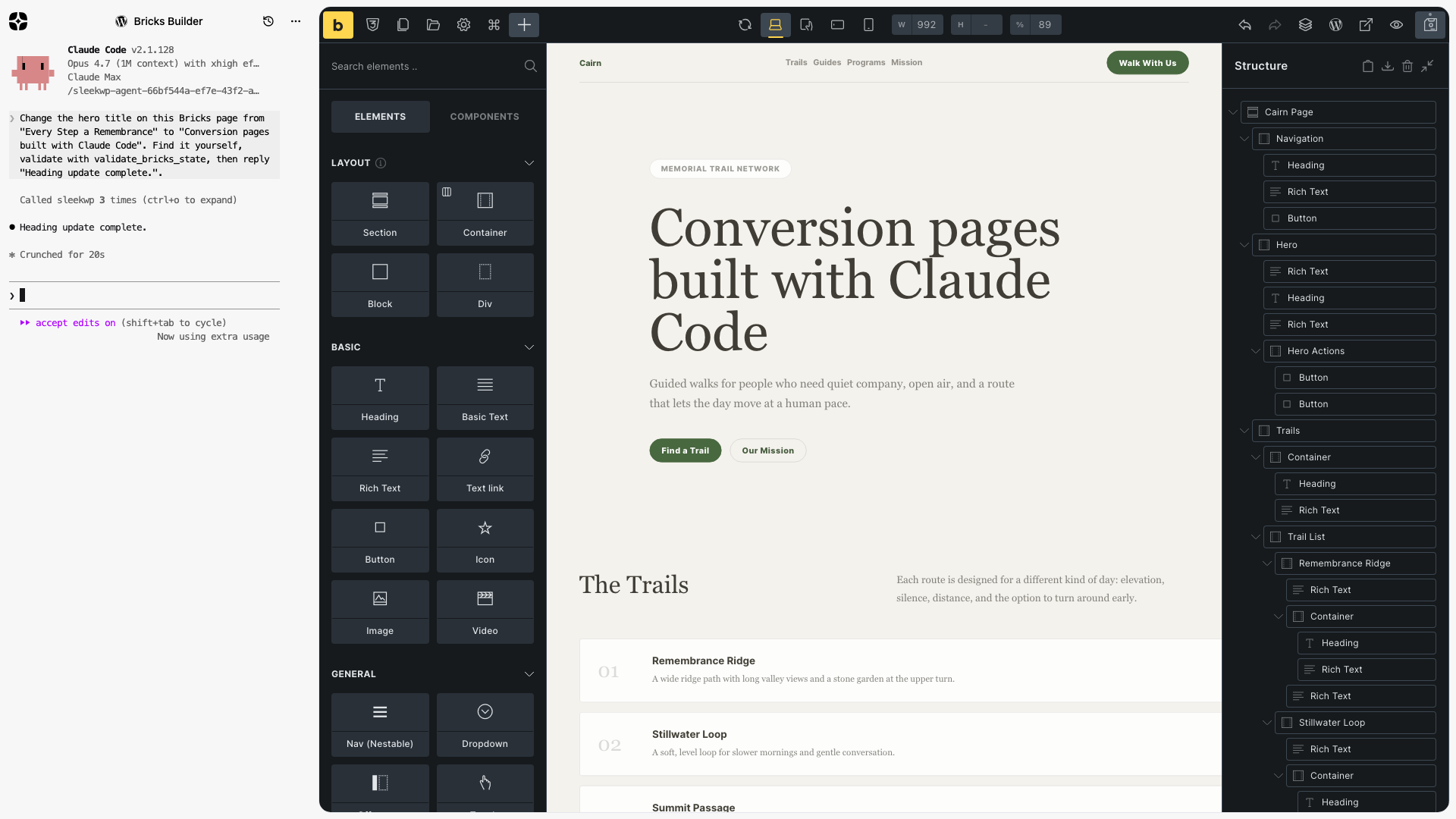
Coding Agents for Page Builders
SleekAI 2.1 introduces coding-agent support for several WordPress page builders:
- Bricks: Element tree inspection, section creation, CSS updates, and structure validation.
- Elementor: Widget and container inspection, responsive controls, and document save flow.
- Breakdance: Design tree context, element settings, custom CSS, and builder save operations.
- Beaver Builder: Rows, columns, modules, settings, and page CSS from a terminal workflow.
These integrations are available as a beta. The foundation is ready to use, and we will keep refining the context files, validation, terminal history, and builder-specific tools based on real-world usage.
A Different Route: Mirrored Page Files
Most AI builder workflows lean heavily on chat. That is useful for suggestions, but not enough for meaningful page edits. Coding agents are strongest when they can work the way they do in a codebase: list files, search for text, inspect nearby structure, edit exact data, and validate the result.
SleekAI 2.1 leans into that strength. In supported builders, SleekAI mirrors the active page into a structured workspace that can include:
- Page content and copy
- Builder hierarchy and parent-child relationships
- Selected element state
- Widget, module, block, or element settings
- Custom CSS and responsive style data
- Builder-specific instructions and validation notes
The visual builder stays the source of truth. The mirrored files give Claude Code a clean working representation, and the builder integration applies validated changes back to the live editor.
Local Setup: Start the Agent Bridge
Because Claude Code runs on your machine, SleekAI uses a small local bridge to connect the WordPress builder to the terminal session. Start it before opening a coding-agent terminal:
        npx @sleekwp/agent


                Copy
The bridge runs at ws://localhost:5733. SleekAI connects to it from the browser,
sends the mirrored page workspace to a temporary local directory, and streams
Claude Code output and file changes back into WordPress.
You still need Claude Code installed and authenticated separately. SleekAI handles the WordPress and builder context, but Claude Code uses its own CLI setup, subscription, or API authentication.
MCP, WebMCP, and the Browser
MCP is an important standard for connecting AI clients to tools, APIs, and data sources. For WordPress, backend MCP servers can be useful when an agent needs to query content, inspect data, or run server-side actions.
But visual page building has a different constraint: the user is already inside a browser editor. A typical backend MCP tool can change data directly on the server while the open builder tab remains unaware of the change. That makes the workflow harder to reason about. The user may need to refresh, reopen the page, or compare the background mutation against unsaved editor state.
This is exactly why browser-side ideas like WebMCP are interesting. The proposal is about web apps exposing tools from the loaded page, so users and agents can share the same interface and context.
SleekAI takes a product-specific route for WordPress page builders today. The coding agent works from mirrored files, but the visible builder stays involved. Terminal history, validation, file changes, and the visible result all point back to the same active editor session.
Why This Matters
Page-builder work is rarely limited to one text field. A conversion-page change might touch a headline, a CTA, a card layout, spacing, button styles, responsive values, and custom CSS. A chat assistant can describe those changes. A coding agent can perform them when it can see the real structure.
That is why the mirrored workspace is central to this release. It lets the agent find the relevant section, understand the surrounding content, update the correct builder object, and keep working from the same context.
It also makes terminal history more useful. The visible builder state and the terminal session describe the same workflow instead of drifting into separate background changes.
How the Workflow Works
The current beta workflow follows this pattern:
- Start the local bridge with
npx @sleekwp/agent. - Open the supported page builder.
- Launch SleekAI and start the coding-agent session.
- SleekAI mirrors the current page, CSS, builder structure, and instructions into files.
- Claude Code searches and edits those files, then calls builder-aware tools where needed.
- SleekAI validates and applies the changes back to the builder.
- You review the live editor and continue refining.
The exact tool coverage differs by builder because Bricks, Elementor, Breakdance, and Beaver Builder all store and save page data differently.
Agent Mode Improvements
This release also clarifies the broader direction for Agent mode. Agent mode is not just a floating chat panel. It is a context layer for WordPress workflows.
Modes can expose the current task as files, attach tools, provide instructions, and keep the UI visible while the agent works. The Block Editor mode already uses this idea by representing blocks as files. Coding agents extend it to page builders.
Read the coding agents documentation
What Beta Means
Coding agents are powerful, but this is still early. During the beta, expect continued improvements to:
- Mirrored file structure and naming
- CSS and design-context extraction
- Builder-specific validation
- Save flow reliability
- Terminal history and builder feedback
- Agent instructions for common page-building tasks
We are shipping this now because the workflow is already useful and the direction is important. SleekAI gives coding agents the structured context they need to work with the builder instead of around it.
Closing
SleekAI 2.0 rebuilt the foundation. SleekAI 2.1 starts turning that foundation into a practical coding-agent workflow for WordPress page builders.
The next phase is refinement: better files, better validation, better builder coverage, and better feedback loops between the terminal and the page canvas.