






SleekPixel for animal shelter
Every dog, cat, rabbit, and senior in care has a profile post with photos, age, temperament, and adoption fee. SleekPixel turns each profile into a 1080x1080 Instagram tile so adopters see real residents, not stock photos.
♾️ Lifetime License available
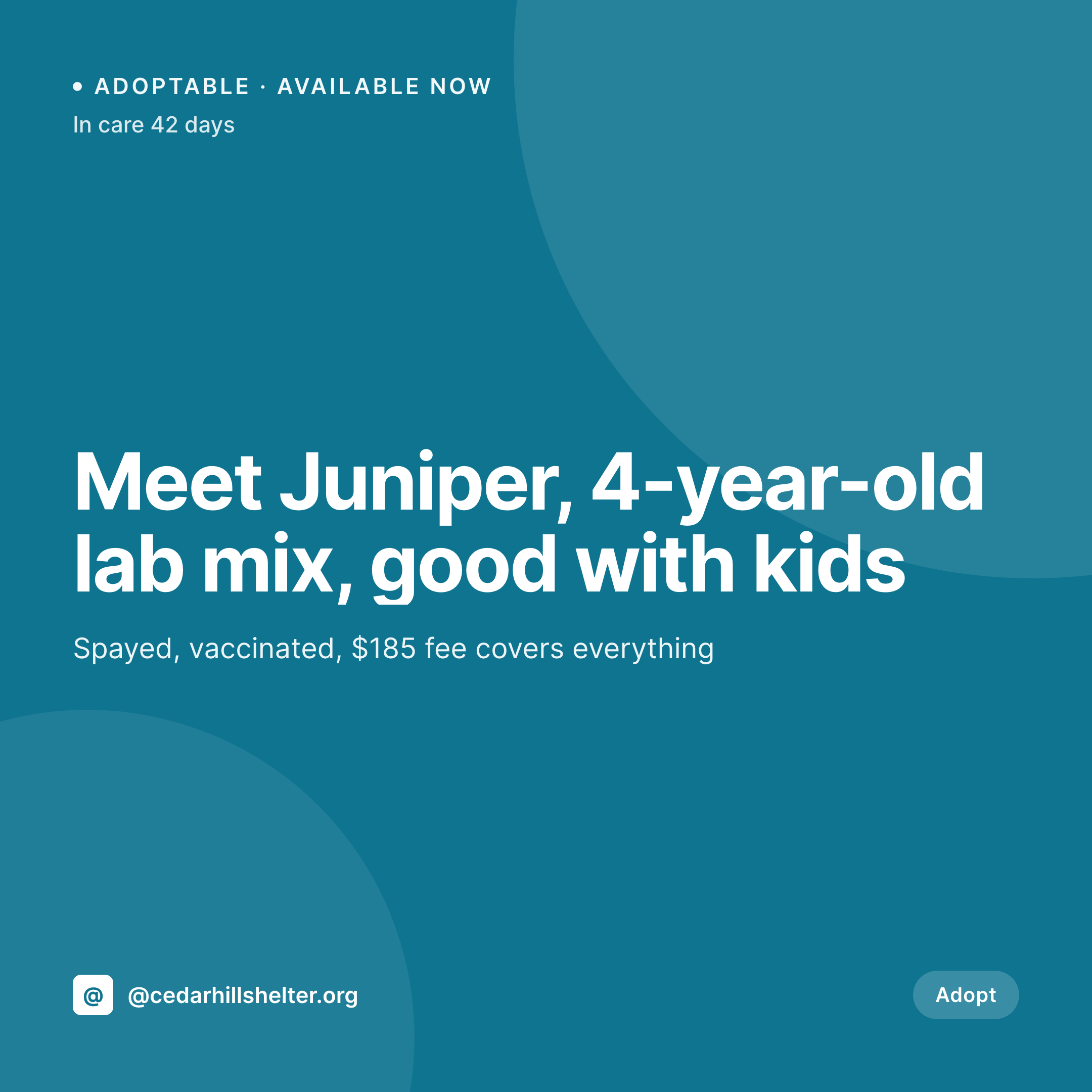
The adoptable-pet grid problem at a working shelter
An animal shelter's most powerful adoption tool is the daily adoptable-pet post. A four-year-old lab mix who's been in care 42 days, a senior cat looking for a quiet home, a litter of bottle-fed kittens almost ready. Each one needs a square image with the pet's name, age, kennel ID, and adoption fee, ready before the morning intake meeting.
The data is already in the shelter's WordPress site. Most shelters run an adoptable-animal CPT, sometimes a plugin like AdoptableSearch or 24PetConnect, with ACF fields for name, age, breed, temperament, intake date, and fee. Volunteers type it once when an animal arrives. The work that keeps repeating is opening Canva on a borrowed laptop and rebuilding the same Tuesday adoption tile.
SleekPixel turns the profile post into the tile. Save Juniper's profile with a kennel photo, age, and the $185 fee, the 1080x1080 PNG lands in uploads. Juniper's been here 42 days now, the days-in-care number ticks up on the next save. Volunteers download the tile from the Gutenberg sidebar between cleaning kennels and post. Adopters see real animals, real fees, real time in care, every day of the week.
Workflow
From kennel intake to posted tile
Map the animal fields
Design one tile template
Publish or update the profile
Post during the morning round
Output
What gets generated per animal
A 1080x1080 square card with the pet's photo, name, age, breed, kennel ID, days in care, and adoption fee, pulled live from the animal profile post.
Comparison
Default shelter image vs SleekPixel
Default shelter image
- Volunteers rebuild a Canva tile every time an animal's status changes
- Days-in-care number on the tile is stuck on whatever was typed last week
- Adoption fee on the image doesn't match the website
- Dog tiles and cat tiles drift into different brand fonts
- Multi-site rescues each post their own off-brand adoptable cards
SleekPixel
- Save the animal profile, the 1080x1080 tile lands in uploads
- Name, age, breed, kennel ID, and fee pulled from the profile fields
- Days-in-care ticks up automatically as the tile re-renders
- Volunteers download from the Gutenberg sidebar between kennel rounds
- One template across species keeps the shelter brand consistent
Features
What SleekPixel gives you for animal shelter
Tile per animal
Every dog, cat, rabbit, and senior in care saves with a square tile. The name, age, and fee come from the profile post, not a Canva file.
Days in care visible
The number of days an animal has been waiting renders on the image. Long-timers get visibility, and adopters see who's been overlooked.
Volunteer-friendly
A volunteer opens the animal's post on any phone, taps download in the Gutenberg sidebar, and posts. No design tools, no font drift.
Use cases
Who uses SleekPixel for animal shelters
Daily adoptable posts
Each morning's featured animal renders with name, age, and kennel ID. The grid shows real residents the public can come meet today.
Long-timer campaigns
Animals over 30 or 60 days in care render with their days-in-care number prominent, framed as a campaign for harder-to-place pets.
Adoption events
Saturday adoption fairs, low-fee weekends, and partner-rescue events render with their dates and featured animals pulled from the event post.
The bigger picture
Why shelter adoption rates rise when the grid stays current
An animal shelter's adoption rate is a function of how easy it is for an adopter to see the right animal at the right time. A grid full of last month's adopted dogs sends people to a different rescue, and animals who could have gone home in week three stay until week eight. Most shelters run on volunteer labor, often with one part-time staff member handling everything from intake forms to social media, between cleaning kennels and answering phones.
Building a fresh Canva tile every time an animal's status changes is the work that gets dropped first, and the grid quietly stops matching the kennel. Treating the tile as derived from the animal profile means every name, every age, every fee, every days-in-care number stays live with the database. Adopters see the cocker spaniel who arrived yesterday, the senior cat who's been waiting six weeks, the kittens almost ready.
The grid does the matchmaking the staff doesn't have time to.
Questions
Common questions about SleekPixel for animal shelter
Yes for any plugin that stores adoptable animals as WordPress posts. AdoptableSearch, 24PetConnect WP, and Petfinder feed plugins all expose animal records the template can read. External-only systems need a sync step that mirrors records into a WP CPT.
Yes. A scheduled task can update the days-in-care field nightly based on the intake date, which triggers SleekPixel to re-render the tile. The grid shows current waiting times rather than stale ones.
Marking the profile as adopted can either hide the tile, swap to an 'adopted!' celebration template, or freeze the tile as a success story. Template logic decides based on the status field on the post.
Yes. Templates can be conditional on species taxonomy, so dogs use one layout, cats another, and small animals or seniors a third. All pull from the same profile fields, styled per species.
Yes. An events CPT (Saturday adoption fair, low-fee weekend, partner-rescue event) renders into a tile pulling event date, location, and featured animals. The events tile and the daily adoptable tile share the same brand frame.
No. SleekPixel renders the PNG and saves it to uploads. Posting to Instagram, Facebook, or pet-listing networks is a manual step from the platform's app or a scheduling tool.
Yes. One save can produce a 1080x1080 grid tile, a 1080x1920 story for adoption pushes, and a 1200x630 OG image. Configure each format once and they all render together.
No. Generation runs on save in the admin. Adopters viewing the adoptable-pets page on the front end never trigger image rendering, they see the cached PNG. The og:image meta tag points at a static file.
Pricing
More than 1000+
happy customers
Explore our flexible licensing options tailored to your needs. Upgrade your license anytime to access more features, or opt for a lifetime license for ongoing value, including lifetime updates and lifetime support. Our hassle-free upgrade process ensures that our platform can grow with you, starting from whichever plan you choose.
Lifetime ♾️
Most popular
EUR
once
- Unlimited websites
- Lifetime updates
- Lifetime support
...or get the Bundle Deal
and save €250 🎁
💎 Want everything forever? The All Access Pass is going away on 01.08.2026.
The Bundle (unlimited sites)
Pay once, own it forever
Elevate your WordPress site with our exclusive plugin bundle that includes all of our premium plugins in one package. Enjoy lifetime updates and lifetime support. Save significantly compared to buying plugins individually.
What’s included
-
SleekAI
-
SleekByte
-
SleekMotion
-
SleekPixel
-
SleekRank
-
SleekView
€749
Continue to checkoutBrowse more
- Google review cards
- book recommendation cards
- tech stack card
- chart explainer card
- lecture cards
- domain launch card
- survey result card
- research report images
- announcement cards
- YouTube comment card
- explainer video thumbnails
- Stripe Atlas card
- roadmap update cards
- behind the build card
- restock alert cards
- Spotify podcast covers
- Klaviyo email headers
- Stan Store cover
- LinkedIn event banners
- Threads post cover
- X social cards
- Lemmy post images
- Discord server banners
- Bluesky link cards
- YouTube ad thumbnails
- Instagram grid tiles
- Bluesky profile banner
- Discord event cover
- Lemon Squeezy product covers
- KDP paperback cover