






SleekPixel for aquarium service
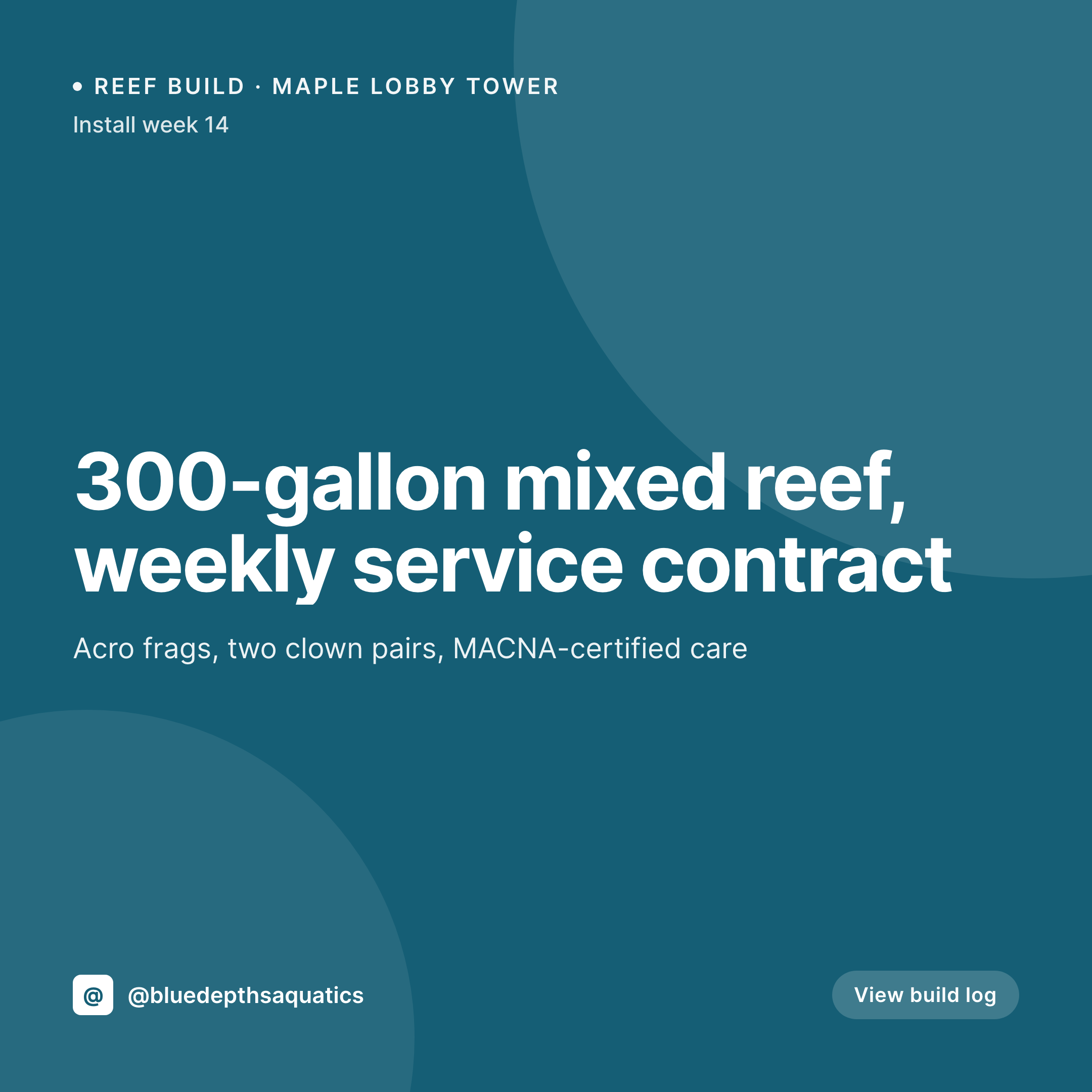
A 300-gallon office reef, a weekly maintenance route, a coral frag shipment. Each project or service post renders into a 1080x1080 tile with the tank size, stock list, and milestone on the image.
♾️ Lifetime License available
Reef builds, service routes, and the niche-client question
An aquarium service company sells to a small audience: offices, restaurants, dentist lobbies, and high-end collectors who want a 300-gallon reef they don't have to touch. The Instagram grid is the portfolio. Each post is a square image with the tank size, the livestock highlights, and a project milestone. Each one needs to look like a serious reef-keeping business, not a hobbyist account.
The data is on the company's WordPress site. Most aquarium services run a project CPT with fields for tank dimensions, gallonage, livestock list, lighting, equipment, and service frequency. The lead aquarist types it once during install. The repeat work is opening Canva to assemble a build-log card the third time this quarter.
SleekPixel turns the project post into the tile. Save the Maple Lobby 300-gallon mixed reef at install week 14, the 1080x1080 PNG lands in uploads. Livestock list updates with the new tang and the tile re-renders. The grid shows real builds with real stock lists, which is exactly the proof a procurement manager needs to sign a service contract.
Workflow
From project install to posted tile
Map the project fields
Design one tile template
Update the project log
Post after each service visit
Output
What gets generated per project
A 1080x1080 square card with the project name, tank size, livestock highlights, install week or service date, and the company's brand frame, pulled live from the project post.

Comparison
Default aquarium service image vs SleekPixel
Default aquarium service image
- Lead aquarist opens Canva to redo each build-log update
- Livestock list on the tile lags behind what was added last service
- Install-week number on the image is wherever it was last month
- Reef builds and freshwater installs use different brand templates
- Multi-tech routes post their own off-brand service updates
SleekPixel
- Save the project post, the 1080x1080 tile lands in uploads
- Tank size, livestock list, and milestone pulled from the project fields
- Tile re-renders as livestock and service updates change
- Aquarist downloads from the Gutenberg sidebar between visits
- One template across reef and freshwater keeps the brand consistent
Features
What SleekPixel gives you for aquarium service
Tile per project
Every reef build, freshwater planted tank, or office service contract saves with a square tile. Tank size and stock list come from the post.
Build log moments
Install week 1, fishless cycle complete, first coral additions, full stocking. Each milestone post renders into a tile with the week number on the image.
Field-friendly
A tech opens the project post on a phone after a service visit, taps download in the Gutenberg sidebar, and posts. No design tools in the van.
Use cases
Who uses SleekPixel for aquarium services
Commercial installs
Office lobbies, restaurant tanks, and dental waiting rooms each render with their gallonage and livestock list pulled from the project post.
Livestock arrivals
New frag shipments, rare wrasse arrivals, and quarantined-and-ready livestock each save with their own tile from the livestock CPT.
Service route updates
Weekly service-visit posts render with tank, client (or anonymous), and date so the grid documents actual maintenance work.
The bigger picture
Why aquarium services close contracts through a working portfolio
An aquarium service company sells to a tiny pool of buyers, mostly procurement managers and high-end collectors. They sign multi-year service contracts based on whether the portfolio reads as serious or hobby-level. A grid full of generic stock fish photos signals a hobbyist trying to scale.
A grid of real builds with tank sizes, livestock lists, and install-week numbers signals a working business with a route. Most aquarium services have one lead aquarist plus a couple of techs, and nobody has time to design social tiles between Saturday installs. Building a fresh Canva card every service visit is the work that gets dropped first, and the portfolio stops growing.
Treating the tile as derived from the project post means every install, every livestock add, every service milestone gets a tile that matches the build log. The portfolio reads as the working business it actually is, and procurement managers reach out.
Questions
Common questions about SleekPixel for aquarium service
Yes. Any CPT with fields for tank, livestock, install date, and service frequency works. ACF, Meta Box, and Pods groups attached to the project post type all map onto the template.
Yes. Templates can be conditional on post type, so livestock arrival posts use one layout while project build-log posts use another. Frag shipments, rare wrasse arrivals, and quarantine-ready stock each save with a tile designed for shop announcements.
Yes. Template fields are explicit, so client name can stay on the post for internal records and be replaced by a generic 'Office lobby' or project codename on the public image.
Yes. A scheduled task can update the install-week field weekly based on the install date, which triggers SleekPixel to re-render the tile. The portfolio shows current project timelines.
Yes. Templates can be conditional on tank-type taxonomy, so reef builds use one layout, freshwater planted tanks another, and pond installs a third. All pull from the same project fields, styled per type.
Yes. One save can produce a 1080x1080 grid tile, a 1080x1920 story for time-lapse builds, and a 1200x630 OG image. Configure each format once and they all render together.
No. SleekPixel renders the PNG and saves it to uploads. Posting to Instagram, Facebook, or LinkedIn is a manual step from the platform's app or a scheduling tool.
No. Generation runs on save in the admin. Prospects viewing the portfolio on the front end never trigger image rendering, they see the cached PNG. The og:image meta tag points at a static file.
Pricing
More than 1000+
happy customers
Explore our flexible licensing options tailored to your needs. Upgrade your license anytime to access more features, or opt for a lifetime license for ongoing value, including lifetime updates and lifetime support. Our hassle-free upgrade process ensures that our platform can grow with you, starting from whichever plan you choose.
Lifetime ♾️
Most popular
EUR
once
- Unlimited websites
- Lifetime updates
- Lifetime support
...or get the Bundle Deal
and save €250 🎁
💎 Want everything forever? The All Access Pass is going away on 01.08.2026.
The Bundle (unlimited sites)
Pay once, own it forever
Elevate your WordPress site with our exclusive plugin bundle that includes all of our premium plugins in one package. Enjoy lifetime updates and lifetime support. Save significantly compared to buying plugins individually.
What’s included
-
SleekAI
-
SleekByte
-
SleekMotion
-
SleekPixel
-
SleekRank
-
SleekView
€749
Continue to checkoutBrowse more
- Disqus Comment System
- LottieFiles animations
- Directories Pro
- All-in-One WP Migration
- BookingPress bookings
- Envira Gallery
- Wistia videos
- Dokan Multivendor
- Lemon Squeezy products
- WooCommerce PDF Invoices & Packing Slips
- Postmark emails
- Mautic campaigns
- SEOPress
- HT Easy Google Analytics
- Sucuri Security
- Snapchat snap images
- X Space banners
- Twitch overlay
- Klaviyo email headers
- Instagram stories
- Pinterest Idea Pins
- Audible audiobook cover
- Fansly banner
- Threads post cover
- Mailchimp email banner
- Twitch stream overlay images
- Discord event cover
- Mastodon post images
- YouTube ad thumbnails
- LinkedIn document post covers