






SleekPixel for barre studio
Class name, instructor, time, and waitlist status already live in Mindbody, Mariana Tek, or a custom schedule CPT. SleekPixel renders a 1080x1080 card on save so the week's posts ship without a Canva sprint.
♾️ Lifetime License available
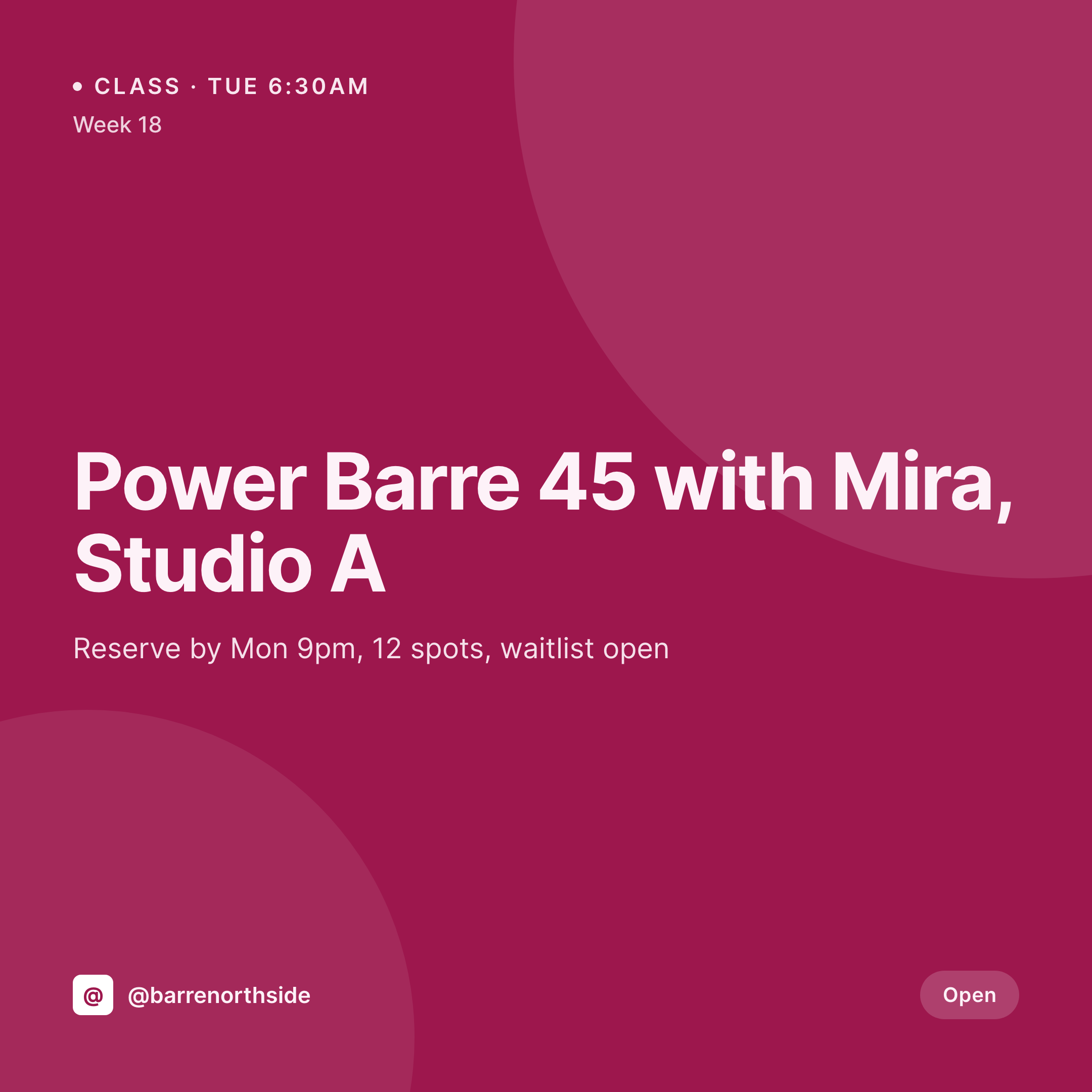
From schedule grid to Instagram grid
A barre studio's social feed lives off the weekly schedule. Power Barre at 6:30am with Mira, Barre Sculpt at noon with Ana, the Sunday recovery class with foam rollers and slow music. Each post is a square card with the class name, the instructor, the start time, and a quick line about whether spots are still open. The grid has to feel coordinated because clients are looking at the grid the same way they look at the schedule.
The data is already on the WordPress site. The studio runs Mindbody, Mariana Tek, WellnessLiving, or a custom class CPT with ACF fields. The class name, instructor, start time, duration, room, and reservation status are already structured. The hero photo of the studio room or instructor is in the media library. The gap is the 1080x1080 PNG that would otherwise get rebuilt by the marketing person every Sunday night.
SleekPixel renders that PNG on save. The class post updates, the card lands in uploads with the instructor and time already locked in. The studio posts the card from a phone the morning of the class, the OG image on the class page is wired to the same render, and the schedule page uses it as the class hero. The grid looks like one studio across a year of changing instructors and class names.
Workflow
From class schedule to grid card
Map class and instructor fields
Design one square template
Update the schedule
Post the night before
Output
What gets generated per class
A 1080x1080 square card with class name, instructor, start time, duration, and room, pulled from the schedule plugin or class CPT.

Comparison
Default barre studio image vs SleekPixel
Default barre studio image
- Marketing rebuilds class cards in Canva every Sunday night
- Instructor names get misspelled between the schedule and the card
- Class start times on the card drift from the booking system
- Sub-instructor swaps don't make it to the social post
- New class formats launch with mismatched typography across the week
SleekPixel
- Save the class post, the 1080x1080 card lands in uploads
- Class name, instructor, time, and room pulled live from the post
- Square format sized for Instagram and Facebook feeds
- Schedule page hero stays in sync with the social card automatically
- Sub-instructor edits regenerate the card without a manual redo
Features
What SleekPixel gives you for barre studio
Schedule-aware
Pull class name, instructor, time, and room from Mindbody, Mariana Tek, or a custom class CPT. Edit once, the card follows.
Instructor mapped
Instructor photo, name, and bio link route onto the card so the post reads like a real class card, not a generic studio promo.
Format palette
Power Barre, Sculpt, Recovery, Express can each map to its own accent color so the grid stays scannable by format.
Use cases
Who uses SleekPixel for barre studios
Single-location studios
One studio, a tight schedule, a coordinated weekly grid that doesn't need a Sunday-night design block to refresh.
Multi-location chains
Every location renders the same card style with its own room name and instructors, so the brand reads as one studio across cities.
Series and challenge promos
Six-week series, 21-day challenges, and special pop-ups route to variant cards with their own progress and end-date treatment.
The bigger picture
Why a coordinated schedule grid drives more class signups
Barre clients pick their week by skimming the schedule and the Instagram grid in the same sitting. If the grid posts match the schedule's class names, instructors, and times exactly, the click from feed to booking is short and confident. If they don't match, the client second-guesses whether the class still exists, whether Mira is still teaching the Tuesday 6:30, whether the room number on the post is the current one.
Templated cards rendered from the schedule post make the grid reflect the live schedule by default, which means fewer DMs asking whether a class is still on and more clients arriving with the right shoes for the right room.
Questions
Common questions about SleekPixel for barre studio
Yes. SleekPixel reads class fields from the WordPress mirror of Mindbody, Mariana Tek, or WellnessLiving, plus any ACF or Meta Box fields. The render fires when the WordPress post saves.
Yes. Both layouts can live as templates. An instructor card renders from the instructor CPT, a class card from the class CPT, both using the studio's palette.
If the instructor field updates on the class post, the card re-renders with the new instructor's name and photo. Many studios automate this on schedule sync.
Yes. Map a class format taxonomy term to an accent color, so Power Barre, Sculpt, Recovery, and Express each get their own palette automatically.
Yes. The class hero image and the social card are both wired to the same render, so editing the class refreshes both.
Yes. Series and challenges can have their own template variant with the start date, end date, and progress count rendered.
Status text on the card can be conditional. 'Open', 'Waitlist', or 'Full' renders from the reservation field automatically.
No. SleekPixel renders the image and saves it to uploads. Posting is a manual step from the app or a scheduling tool.
Pricing
More than 1000+
happy customers
Explore our flexible licensing options tailored to your needs. Upgrade your license anytime to access more features, or opt for a lifetime license for ongoing value, including lifetime updates and lifetime support. Our hassle-free upgrade process ensures that our platform can grow with you, starting from whichever plan you choose.
Lifetime ♾️
Most popular
EUR
once
- Unlimited websites
- Lifetime updates
- Lifetime support
...or get the Bundle Deal
and save €250 🎁
💎 Want everything forever? The All Access Pass is going away on 01.08.2026.
The Bundle (unlimited sites)
Pay once, own it forever
Elevate your WordPress site with our exclusive plugin bundle that includes all of our premium plugins in one package. Enjoy lifetime updates and lifetime support. Save significantly compared to buying plugins individually.
What’s included
-
SleekAI
-
SleekByte
-
SleekMotion
-
SleekPixel
-
SleekRank
-
SleekView
€749
Continue to checkoutBrowse more
- Ko-fi shop images
- Warpcast frame images
- Lens Protocol posts
- Bandcamp release cover
- Bluesky profile banner
- LinkedIn newsletter headers
- Discord stage banner
- GitHub README banners
- YouTube banner art
- LinkedIn banner images
- Threads profile banner
- Instagram collab post images
- Facebook ad images
- Bandcamp banner
- Instagram grid tiles