






SleekPixel for Botox clinic
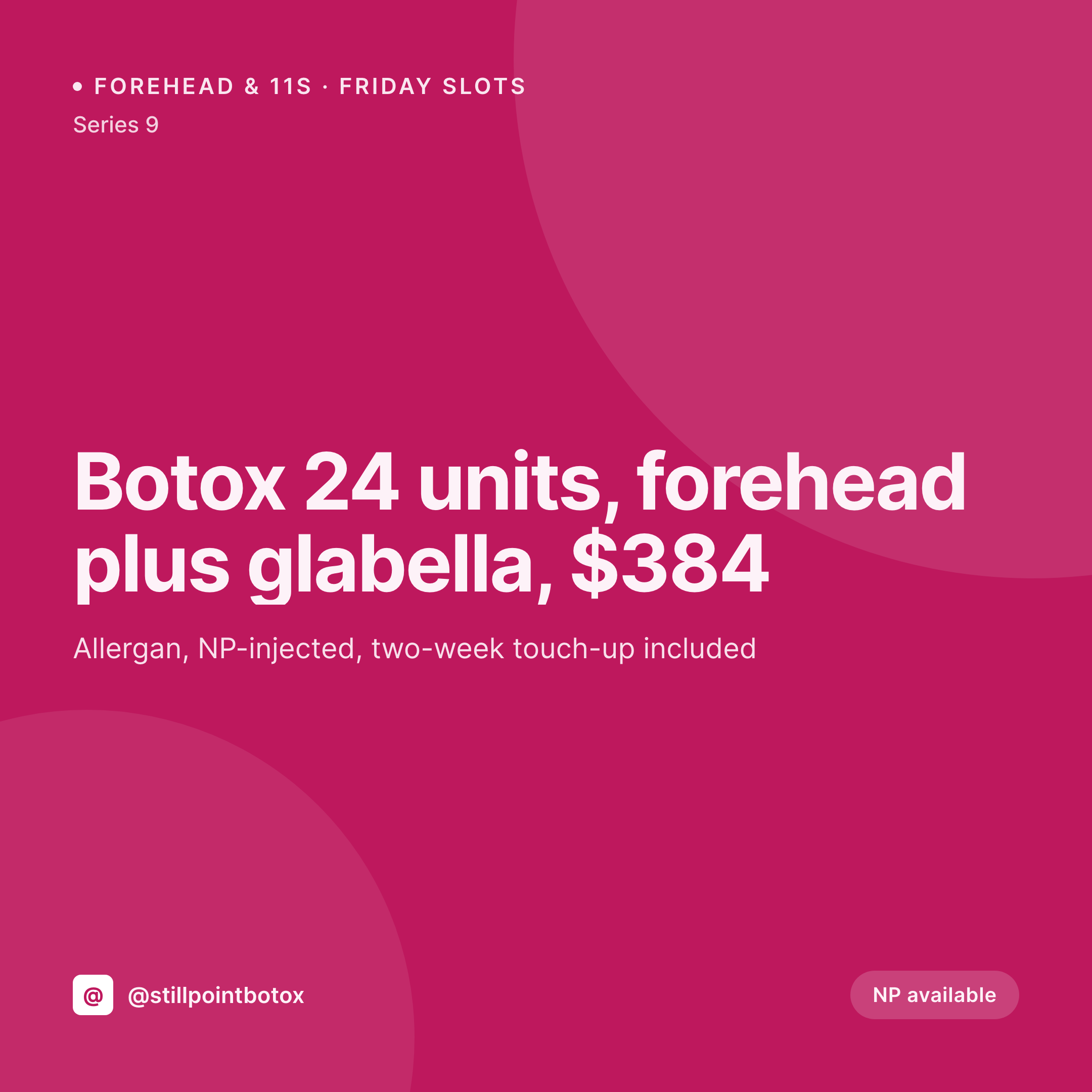
Forehead, 11s, crow's feet, masseter, bunny lines. Each Botox area on the clinic site renders into a 1080x1080 tile with the unit count, the injector, and the price pulled live from the post.
♾️ Lifetime License available
Botox pricing is unit-based, and units change per area, per injector, per supplier deal
A Botox clinic does not sell one product. It sells per-area treatments with different unit counts. Forehead is 10 to 20 units. The 11s are 20 to 30. Masseter shaping is 25 to 50 per side. Crow's feet is 12 to 24. Each area is priced separately, each injector charges differently, and the supplier deal on Allergan or Dysport shifts twice a year. The treatment menu on the site lists each area with its unit range, its price band, and the injector who handles it.
That structured menu already lives on the site. A treatments CPT or a Botox-specific page set with ACF for unit range, injector, supplier, and price. The OG image on the forehead-Botox page is supposed to read from those fields, and so is the Instagram tile when the clinic posts the link. In most clinics, those images are Canva files that drift two pricing rounds behind the page.
SleekPixel renders both from the post. Editing the forehead-Botox unit range saves a 1080x1080 tile and a 1200x630 share card with the new numbers. The forehead tile and the 11s tile carry the same brand frame but their own unit counts and prices. A new injector joining the clinic gets her own provider card without anyone opening Canva.
Workflow
From area menu to grid tile
Map the area fields
Design one clinic template
Edit the area
Post from the front desk
Output
What gets generated per treatment area
A 1080x1080 Instagram tile with the treatment area, unit range, injector, supplier, and price band pulled live from the Botox treatment post fields.


Comparison
Default Botox clinic image vs SleekPixel
Default Botox clinic image
- Forehead and masseter tiles use the same generic syringe photo on Instagram
- Per-area pricing on the page updates but the share card lags by a quarter
- New injector joins the clinic without a provider card for two months
- Holiday and seasonal campaigns block on a designer for the discount layout
- Multi-location clinics each post their own off-brand variants from the desk
SleekPixel
- Save the area post, the 1080x1080 tile lands in uploads with unit and price
- Per-area unit range pulled live from the treatment field
- Injector and supplier render from the providers and suppliers fields
- Sidebar download from Gutenberg posts the tile in seconds
- Bulk regenerate when seasonal pricing or new injectors launch
Features
What SleekPixel gives you for Botox clinic
Tile per area
Forehead, 11s, crow's feet, masseter each save with their own tile. Unit range and price come from the area's treatment post.
Injector parity
The injector name and credentials on the tile match the providers CPT. New injectors get their card the moment the post saves.
Supplier-aware
Allergan, Dysport, Daxxify, Jeuveau. Each supplier renders with its own product line note when the clinic shifts deals.
Use cases
Who uses SleekPixel for Botox clinics
Per-area menus
Each treatment area on the menu renders its own tile with the unit range and price. The grid carries a full area set that reads as one clinic.
First-time and return campaigns
First-Botox packages, three-area bundles, and return-client offers each get their own tile pulled from the campaign post.
Multi-location Botox chains
Locations share one template, each clinic's per-area card pulls its own injector roster, pricing, and address from the location post.
The bigger picture
Why per-area Botox cards make the difference
A Botox client is not buying Botox. She is buying a specific number of units in a specific area from a specific injector. A grid of generic syringe photos does not match how she shops.
She wants to see the forehead price, the 11s price, the masseter price, and the injector's bio before she calls. A clinic that posts a tile per area, with accurate units and a real injector, signals to the client that the clinic understands its own business. A clinic that posts one stock photo with 'Botox 20% off' reads as either desperate or careless.
Treating the tile as a derived render of the per-area post means the clinic's expertise shows up in every Instagram scroll. The injector's credentials, the supplier line, the actual unit range. The same numbers the consult will quote, already on the grid the client checks before booking.
Questions
Common questions about SleekPixel for Botox clinic
Yes. Each area is a post or a row in the treatments CPT. The template reads its unit range, price, and injector and renders the area's tile. Forehead, 11s, crow's feet, masseter, bunny lines each get their own card.
Yes. Supplier is a field on the treatment post. Templates can be conditional, so a Daxxify tile carries a different product line note than a Botox tile if the clinic wants to surface it.
Yes. A providers CPT with credentials, specialties, and headshot renders into a provider card. New injectors get their card the moment the providers post publishes.
Yes. A campaign post with the discount and the offer fields triggers a campaign layout in the template. The tile shows the strike-through and the new price, no design tool involved.
Yes. SleekPixel reads any post type and any field. A custom Botox treatments CPT with ACF, Meta Box, or Pods all map onto the template.
Yes. One save can produce a 1080x1080 tile, a 1080x1920 story, and a 1200x630 OG card. Configure each format once and every save renders all of them.
No. SleekPixel renders the image and saves it to uploads. Posting is a manual step from the platform app or a scheduling tool.
Yes if the photos are attached to the area post. The template can include a small pair, though many clinics keep before-and-after on the page and the tile focused on the units and price.
Pricing
More than 1000+
happy customers
Explore our flexible licensing options tailored to your needs. Upgrade your license anytime to access more features, or opt for a lifetime license for ongoing value, including lifetime updates and lifetime support. Our hassle-free upgrade process ensures that our platform can grow with you, starting from whichever plan you choose.
Lifetime ♾️
Most popular
EUR
once
- Unlimited websites
- Lifetime updates
- Lifetime support
...or get the Bundle Deal
and save €250 🎁
💎 Want everything forever? The All Access Pass is going away on 01.08.2026.
The Bundle (unlimited sites)
Pay once, own it forever
Elevate your WordPress site with our exclusive plugin bundle that includes all of our premium plugins in one package. Enjoy lifetime updates and lifetime support. Save significantly compared to buying plugins individually.
What’s included
-
SleekAI
-
SleekByte
-
SleekMotion
-
SleekPixel
-
SleekRank
-
SleekView
€749
Continue to checkoutBrowse more
- Twitter header banners
- Amazon Storefront banners
- Instagram carousel slides
- Bandcamp banner
- Telegram channel banner
- Odnoklassniki banners
- Pinterest video pin covers
- Stan Store cover
- LINE official account banners
- Pinterest Idea Pins
- Twitch offline banners
- Behance banner
- YouTube banner art
- Substack post thumbnail
- Snapchat Discover tiles