






SleekPixel for bundle deal cards
Shops selling bundles need the social square to spell out the items, the discount, and the savings. SleekPixel renders one card per bundle product in WordPress, generated from the product fields on save.
♾️ Lifetime License available
Bundles only sell when the bundle is visible
Bundles are a margin tool that only works if the shopper can see the deal before clicking. A bundle product page that loads with a hero photo of just one of the items, no discount badge, no item count, looks like any other single product, and the shopper scrolls past it in the feed or the email. The whole point of the bundle, the savings, the curation, the convenience, lives below the fold or behind another tap.
Most shops fix this by having a designer mock up a bundle hero in Canva, export it, and use that as the featured image. The first three bundles look great. The fourth ships during a busy launch and gets a recycled image, the fifth is wrong about the discount because the math changed at the last minute, the sixth uses a different font because the original Canva file is on someone's old laptop. The bundle program becomes a design backlog problem.
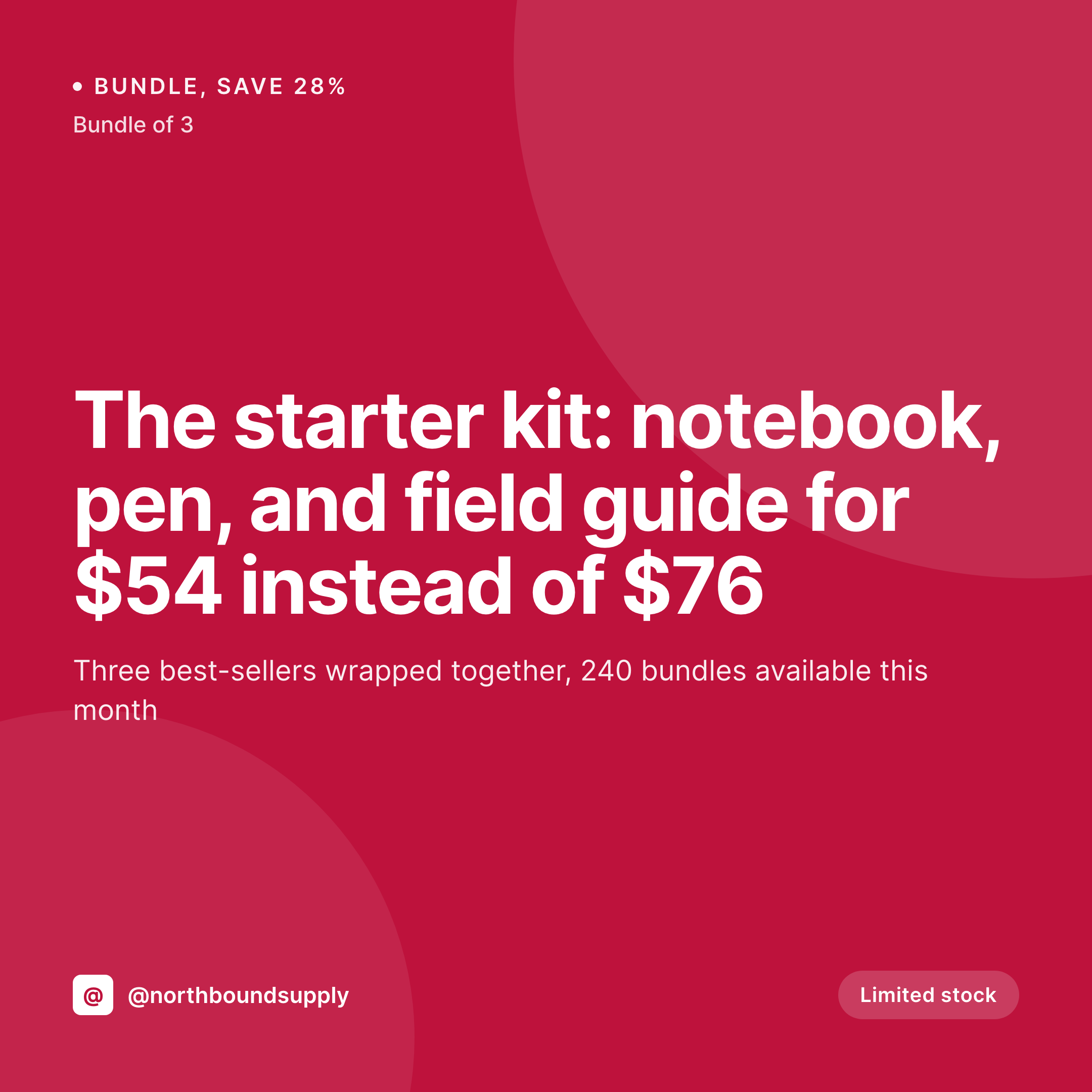
SleekPixel ties the bundle card to the bundle product. The bundle name, the item count, the discount, the bundle price, and the savings all bind to product fields. The square renders on save and powers the og:image, the Instagram-ready download, and the link preview in every place where the bundle URL travels. Add a fourth item to the bundle, save, the card updates.
Workflow
From bundle composition to a real share card in one save
Design the bundle template
Configure the bundle product
Save and publish
Run the campaign
Output
What a generated bundle card looks like
A 1080x1080 PNG with the bundle name, the items included, the discount, and the bundle price pulled from the product fields.

Comparison
Default bundle image vs SleekPixel
Default bundle deal image
- Bundle pages share the same hero photo as one component product
- Discount math in the Canva file goes stale when the bundle changes
- No item count visible in the share, the bundle reads as a single product
- Multiple designers produce slightly different bundle treatments
- No regeneration path when the bundle composition shifts
SleekPixel
- Render fires on save for every bundle product
- Bundle name, item count, discount, and savings come from product fields
- og:image and twitter:image meta tags written automatically
- Component product thumbnails can render in fixed slots inside the template
- Composition edits regenerate the card before the next campaign send
Features
What SleekPixel gives you for bundle deal cards
Discount baked into the share
Show the percent off or the dollar savings as part of the card, pulled from product fields. The shopper sees the value before clicking instead of after.
Component thumbnails in fixed slots
Render the first three component product images in template slots. The bundle composition is visible at a glance, no separate hero photo required.
Composition changes regenerate
Swap a product in the bundle, save, the card re-renders with the new thumbnails and the recalculated discount. The og:image overwrite makes the change live.
Use cases
Where bundle deal cards earn their keep
Apparel and accessory shops
Capsule bundles that travel through Instagram and TikTok feeds. The card shows the look in full, not a single garment cropped out of context.
Maker and craft shops
Starter kits, gift sets, and curated bundles. The card carries the kit name and the savings so the share converts off-platform readers.
Fitness and wellness bundles
Program + supplement + guide combos. Each bundle gets a card that spells out what is in the box, what it costs, and what it saves.
The bigger picture
Why bundles need a card, not just a featured image
A bundle is a curation, and a curation only sells if the buyer can see what was curated. The hero featured image on a bundle product is usually the photo of one of the items, which trains the shopper to read the bundle as a single product with a lower price, not as a kit with extra value. That misreading shows up in conversion: bundles sell at lower-than-expected rates not because shoppers do not want them, but because the share signal does not communicate what is inside.
A purpose-built bundle card with the item list, the savings, and the price flips that signal. SleekPixel makes that card a free byproduct of saving the bundle product, which means a store running ten or twenty bundles can keep them all visually consistent without standing up a design ops process. The result is more bundle sells per impression and fewer support tickets about which products were included.
Questions
Common questions about SleekPixel for bundle deal cards
Yes. Templates can reference a list of product IDs and render their featured images into fixed slots. The component thumbnails stay in proportion regardless of source crop.
SleekPixel reads whatever fields you configure: a percent-off field, a savings field, or a calculation from regular price minus bundle price. The math runs at render time.
If the bundle supports user-selected components, SleekPixel renders the default bundle on save. For variation-specific cards, configure a separate template per variation post type.
The render is static, so no live countdown, but a deadline date can be rendered as a fixed line in the template. Edit the date on the bundle and re-save to refresh the card.
Yes. SleekPixel reads the bundle product post and any custom meta written by the bundle plugin. Bundle item count, contents, and pricing can be bound to template fields.
Configure a conditional badge that swaps to "Sold out" when stock is zero. The card re-renders, og:image updates, and the next share scrape pulls the new status.
Only after a bulk regenerate. SleekPixel includes an admin action that re-renders every bundle under a chosen template, useful before a campaign or after a brand update.
Yes. Configure two templates against the same bundle product, a 1080x1080 for Instagram and a 1200x630 for OG. Both render on save and both are downloadable from the editor.
Pricing
More than 1000+
happy customers
Explore our flexible licensing options tailored to your needs. Upgrade your license anytime to access more features, or opt for a lifetime license for ongoing value, including lifetime updates and lifetime support. Our hassle-free upgrade process ensures that our platform can grow with you, starting from whichever plan you choose.
Lifetime ♾️
Most popular
EUR
once
- Unlimited websites
- Lifetime updates
- Lifetime support
...or get the Bundle Deal
and save €250 🎁
💎 Want everything forever? The All Access Pass is going away on 01.08.2026.
The Bundle (unlimited sites)
Pay once, own it forever
Elevate your WordPress site with our exclusive plugin bundle that includes all of our premium plugins in one package. Enjoy lifetime updates and lifetime support. Save significantly compared to buying plugins individually.
What’s included
-
SleekAI
-
SleekByte
-
SleekMotion
-
SleekPixel
-
SleekRank
-
SleekView
€749
Continue to checkoutBrowse more
- field notes card
- order confirmation cards
- investor update card
- deal of the day banners
- side project card
- founding customer card
- cheat sheet card
- panel discussion card
- restock alert cards
- compensation report cards
- sustainability report card
- customer story card
- hiring announcement images
- founder letter card
- playbook cards
- KDP hardcover cover
- Twitch profile banner
- Farcaster cast images
- Instagram carousel slides
- Notion page covers
- Audible audiobook cover
- Instagram Reels covers
- X ad images
- Linktree banner image
- Reddit subreddit banners
- YouTube playlist covers
- Discord event cover
- Rumble thumbnails
- Mastodon post images
- TikTok profile banners