






SleekPixel for startup
Every blog post, changelog entry and product page on your startup site already has a title, author and date. SleekPixel turns those fields into 1200x630 OG images on save. No external tool, no Figma round-trip.
♾️ Lifetime License available
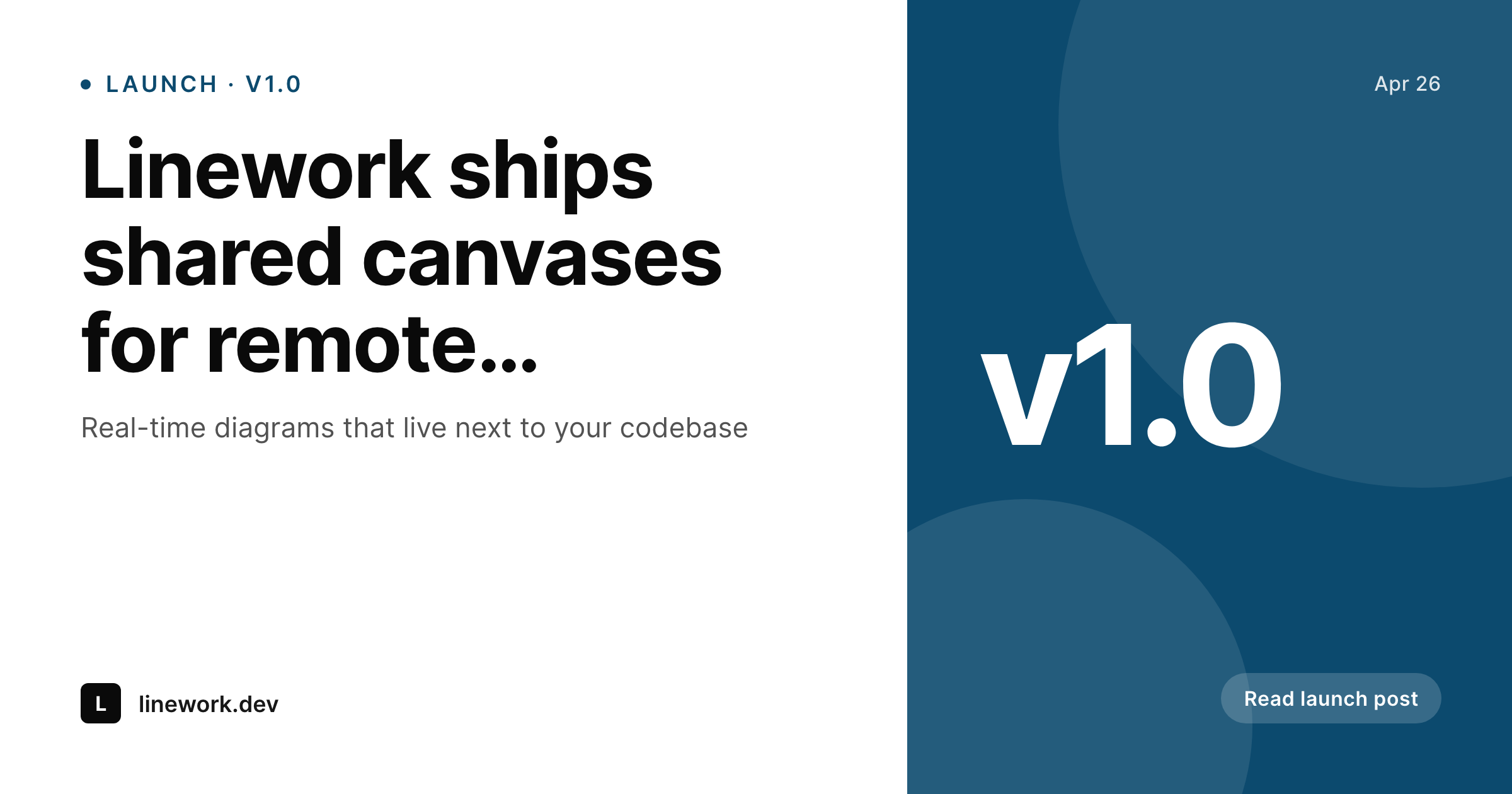
Share previews are part of the launch
A startup post is rarely just a blog post. It is a launch tweet, a Hacker News submission, a LinkedIn share, a Slack drop into the team channel, a forwarded link in an investor update. Each of those surfaces shows the OG image before anyone reads the headline. Yet in most early-stage stacks the OG image is whatever the founder happened to upload as a featured image, scaled wrong, with text that becomes illegible on the LinkedIn preview.
The patch most teams reach for is a Figma file with a launch template. The marketing person duplicates the frame, retypes the title, exports a PNG, drags it into WordPress, sets it as the social image. By the time the post is live the title in the image is already out of sync with the title in the headline because someone tweaked the H1. The next post repeats the cycle. Multiply by a year of changelog entries and the pattern is clear: the manual route stops working before the company hits its first hundred posts.
SleekPixel reads the post on save and renders the OG image using a template you ship once. Title comes from post_title, date from post_date, author from the user bio, version tag from a custom field. The PNG lands in uploads, the og:image tag goes in the head, and the next changelog entry already has its share image before the publish button is pressed. The marketing person stops being a render queue and ships actual writing.
Workflow
From draft to share-ready in one save
Build the launch template
Apply to post types
Write and save
Share with confidence
Output
What ships with every launch post
A 1200 by 630 OG image: launch headline, brand wordmark, version tag and date, ready to be the first impression on Twitter, LinkedIn and Slack.
Comparison
Figma exports vs auto-rendered OG images
Figma + manual export
- Marketing duplicates a Figma frame for every blog post and changelog entry
- Title in the image goes out of sync with the H1 after every edit
- Founders ship at midnight without a designer, OG falls back to nothing
- Each new author needs onboarding into a separate design tool
- External services like Bannerbear add an API hop and a monthly bill
SleekPixel
- OG image renders on save from post title, date and author
- Same template covers blog, changelog, careers, product pages
- Files stored in WordPress uploads, no third-party CDN dependency
- Edit the headline and the image re-renders, always in sync
- Bulk re-render the whole site when the brand updates
Features
What SleekPixel gives you for startup
Launch-ready posts
Every changelog entry and announcement post saves with a matching share image. No queue, no separate design tool to babysit.
Lives in WordPress
Templates are PHP and Twig, fields come from ACF or core, output is a real PNG in uploads. Engineers can review it like any code.
Re-render on edit
Change the post title and the image re-renders. The old file is replaced and the OG tag still points at the same URL.
Use cases
What startups generate with SleekPixel
Blog and launch posts
Every long-form post and announcement saves with a 1200x630 share image and matching Twitter card. No designer required.
Changelog entries
Version, date and headline render onto a clean changelog card so each weekly update has a real share preview.
Job listings
Careers pages share with a card showing role, team and location, instead of the generic homepage OG image.
The bigger picture
Why share images matter at the launch stage
Distribution at an early-stage startup is uneven. Some posts catch fire on Hacker News, some only get traction in a single Slack community. The team rarely knows in advance which one matters.
The cost of the OG image being wrong is therefore not predictable - it is occasionally enormous, when the post that does break out shares with a stretched logo or no preview at all. Manual processes break exactly when the team is busiest. A v1 launch ships with a hundred small fires, and the social image is the first thing that gets cut.
Auto-generated images remove that risk by making the share preview a property of the post, not a separate task. The second reason is positioning. Early-stage companies live or die on whether they look like real companies in feed previews.
A clean, consistent share image across every blog, changelog and careers post communicates that the team ships with care. The cumulative effect over a year of writing is a brand that reads as serious, even when the team is small. SleekPixel lets a founding marketer maintain that consistency without owning a separate design pipeline.
Questions
Common questions about SleekPixel for startup
Yes. Any post type registered in WordPress can be assigned a template. Most startup setups have CPTs for changelog, careers and customers, and SleekPixel handles each with its own template variant. Custom fields from ACF, Meta Box or core meta are all available as bindings inside the template.
If the screenshot is uploaded as an image field on the post, yes. SleekPixel can place that image into a slot in the template alongside the headline. For dynamic product screenshots that need to be captured live, you would generate them with a separate tool and upload them to the post.
Those are external API services. They cost monthly per render and add a network hop. SleekPixel is a WordPress plugin, runs on your own server, stores PNGs in your own uploads folder and has no per-render fee. The trade-off is you need a WordPress site, which is the same site that owns the post.
Yes. SleekPixel writes og:image, og:image:width, og:image:height and twitter:image into the post head. If you already use Yoast or RankMath, SleekPixel detects them and avoids duplicate tags. The rendered file is the canonical social image for the post.
Templates live as files in the theme or a plugin folder. They are normal PHP and Twig and can be committed to git. Marketing can also edit them through a UI for quick changes, but the canonical version stays in the codebase if your team prefers that.
SleekPixel does not run A/B tests by itself. You can build template variants and switch them per post via a custom field, then track click-through using whatever analytics you already use. The plugin focuses on rendering; experimentation lives in your existing stack.
Render runs asynchronously after save. The user sees the post update immediately; SleekPixel queues the render and writes the file in the background. On a typical post the render finishes in well under a second, so by the time someone shares the URL the file is in place.
Yes. The bulk re-render command walks every post that uses a given template and re-renders the image. File names stay the same, so existing OG URLs in caches are still valid. Brand updates that used to mean a week of design work become a single command.
Pricing
More than 1000+
happy customers
Explore our flexible licensing options tailored to your needs. Upgrade your license anytime to access more features, or opt for a lifetime license for ongoing value, including lifetime updates and lifetime support. Our hassle-free upgrade process ensures that our platform can grow with you, starting from whichever plan you choose.
Lifetime ♾️
Most popular
EUR
once
- Unlimited websites
- Lifetime updates
- Lifetime support
...or get the Bundle Deal
and save €250 🎁
💎 Want everything forever? The All Access Pass is going away on 01.08.2026.
The Bundle (unlimited sites)
Pay once, own it forever
Elevate your WordPress site with our exclusive plugin bundle that includes all of our premium plugins in one package. Enjoy lifetime updates and lifetime support. Save significantly compared to buying plugins individually.
What’s included
-
SleekAI
-
SleekByte
-
SleekMotion
-
SleekPixel
-
SleekRank
-
SleekView
€749
Continue to checkoutBrowse more
- Instagram ad images
- Warpcast frame images
- Threads post images
- YouTube podcast thumbnails
- Stan Store cover
- Shopify collection banners
- YouTube playlist covers
- Twitch stream overlay images
- Lemon Squeezy product covers
- Nostr note images
- Facebook Marketplace images
- Amazon Storefront banners
- Kick stream thumbnails
- Bluesky profile banner
- YouTube ad thumbnails