






SleekPixel for podcasters
Title, guest, episode number, duration, release date - all the per-episode metadata that already lives in WordPress, automatically rendered into shareable images at the right size for every platform.
♾️ Lifetime License available
From episode metadata to a social rollout, automatically
Podcasts ship on a deadline. Recording, editing, transcript, show notes, and then - at the worst possible moment - 'and now build the social images'. Most independent podcasters either skip the visuals (and lose the social bump) or burn another hour in Canva building cards that look slightly different every week.
SleekPixel turns the episode post in WordPress into the source of truth. The episode title, guest name, episode number, duration, release date, and cover art all live as fields on the post. Templates pull from those fields and render OG images for the website, square cards for Instagram feed, vertical cards for Stories and Reels.
Each new episode triggers all the renders at once. Open the post when you're ready to promote, hit download in the SleekPixel sidebar, and you have an entire social rollout in five clicks.
Workflow
Build the rollout once, ship it forever
Define your episode post type
Design the template family
Connect the fields
Promote
Output
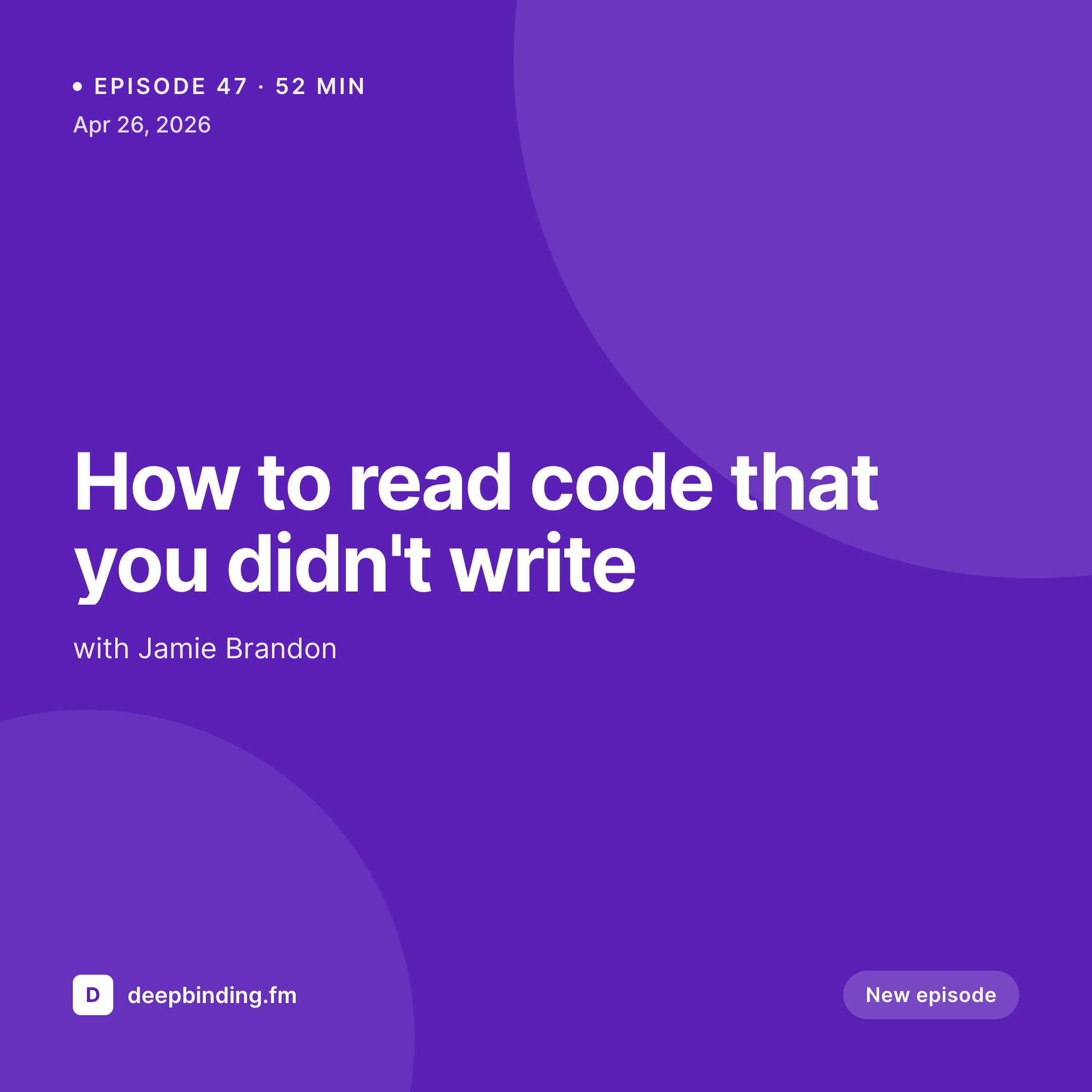
Sample square episode card
Instagram-feed sized 1080x1080 card, rendered from one episode post's metadata.
Comparison
Manual episode visuals vs SleekPixel for podcasters
Canva per episode
- Building three-to-five social images per episode by hand
- Visuals drift in style as the show ages
- Guest photos manually cropped, manually positioned
- Episode numbers wrong half the time
- Stories format is the first to get skipped when the deadline hits
SleekPixel
- OG, Instagram post, story, and Reels cover from the same episode post
- Pulls title, guest, episode number, duration, date automatically
- Templates designed once - every new episode inherits the system
- Bulk-regenerate after a brand update, every episode in one batch
- Guest avatars composited into the card from a custom field
Features
What SleekPixel gives you for podcasters
Per-episode templates
Different layouts for solo episodes, guest interviews, panel discussions, and bonus episodes. SleekPixel routes by show type automatically.
Multi-format from one source
Generate the OG image, the square Instagram card, and the vertical Story version simultaneously from the same template family.
Guest data baked in
Guest name, headshot, and short bio pull from a custom field on the episode post. No more cropping headshots in Photoshop.
Use cases
Where this fits podcast workflows
Indie shows on a tight schedule
The whole social rollout becomes a five-minute step instead of a half-hour design session.
Interview shows with rotating guests
New guest = new card automatically. Guest avatars, names, and bios pull from a per-episode custom field.
Network or studio podcasts
Multi-show networks get one template per show but consistent system-wide, so the network's visual identity holds across feeds.
The bigger picture
Why episode visuals decide growth
Apple Podcasts and Spotify don't drive much organic discovery. Most independent shows grow on Instagram, Twitter, and word-of-mouth, all of which are visual surfaces. The episode card is the only thing a potential listener sees before they decide to click - it has to communicate the show's identity, the guest's identity, and the topic's intrigue, all in a thumbnail.
Doing that consistently for every episode is the difference between a show that compounds an audience and one that has to start the marketing motion fresh every week. Templated, data-driven episode cards remove the friction so the visual rollout happens every episode, not just on the easy weeks.
Questions
Common questions about SleekPixel for podcasters
Yes. Plugin-specific fields (episode number, audio file, duration) are exposed as template variables. SSP, PowerPress, and Castos all work.
No - SleekPixel renders static images. Spotify Canvas requires looping video, which is a different workflow. The static cards are still useful for everywhere else.
Static images only. If you need animated stories, render the SleekPixel image and add motion in After Effects or CapCut as a final step.
SleekPixel doesn't touch the RSS feed - it works on the WordPress post side. Hosts like Buzzsprout or Transistor that pull from WordPress posts will see the new images automatically.
Add a custom 'guest_avatar' field to your episode post type. SleekPixel reads it, applies the template's avatar mask (round, rounded, square), and composits it into the card.
Yes - bulk regenerate from the admin runs through every episode and saves new images. Useful when launching a refreshed brand.
Long-form transcripts don't fit on a card, but pull-quote cards from a 'pull_quote' field work great. One quote per episode, one card per quote.
Not natively - you'd need an external tool to track click-through. SleekPixel can render variants by mapping a variant field; tracking is up to your analytics.
Pricing
More than 1000+
happy customers
Explore our flexible licensing options tailored to your needs. Upgrade your license anytime to access more features, or opt for a lifetime license for ongoing value, including lifetime updates and lifetime support. Our hassle-free upgrade process ensures that our platform can grow with you, starting from whichever plan you choose.
Lifetime ♾️
Most popular
EUR
once
- Unlimited websites
- Lifetime updates
- Lifetime support
...or get the Bundle Deal
and save €250 🎁
💎 Want everything forever? The All Access Pass is going away on 01.08.2026.
The Bundle (unlimited sites)
Pay once, own it forever
Elevate your WordPress site with our exclusive plugin bundle that includes all of our premium plugins in one package. Enjoy lifetime updates and lifetime support. Save significantly compared to buying plugins individually.
What’s included
-
SleekAI
-
SleekByte
-
SleekMotion
-
SleekPixel
-
SleekRank
-
SleekView
€749
Continue to checkoutBrowse more
- LinkedIn post images
- Mastodon link previews
- Bandcamp banner
- Warpcast frame images
- Pinterest video pin covers
- Rumble thumbnails
- Bluesky profile banners
- Facebook event covers
- Nostr note images
- GitHub social preview images
- Ko-fi banners
- WeChat Moments images
- podcast cover art
- Beacons.ai banner
- Amazon Storefront banners