






SleekPixel for waxing studio
Brazilian, bikini, full leg, brow, underarm. Each service or appointment post on the studio site renders into a 1080x1080 card with the service area, wax type, and rebook window already in place.
♾️ Lifetime License available
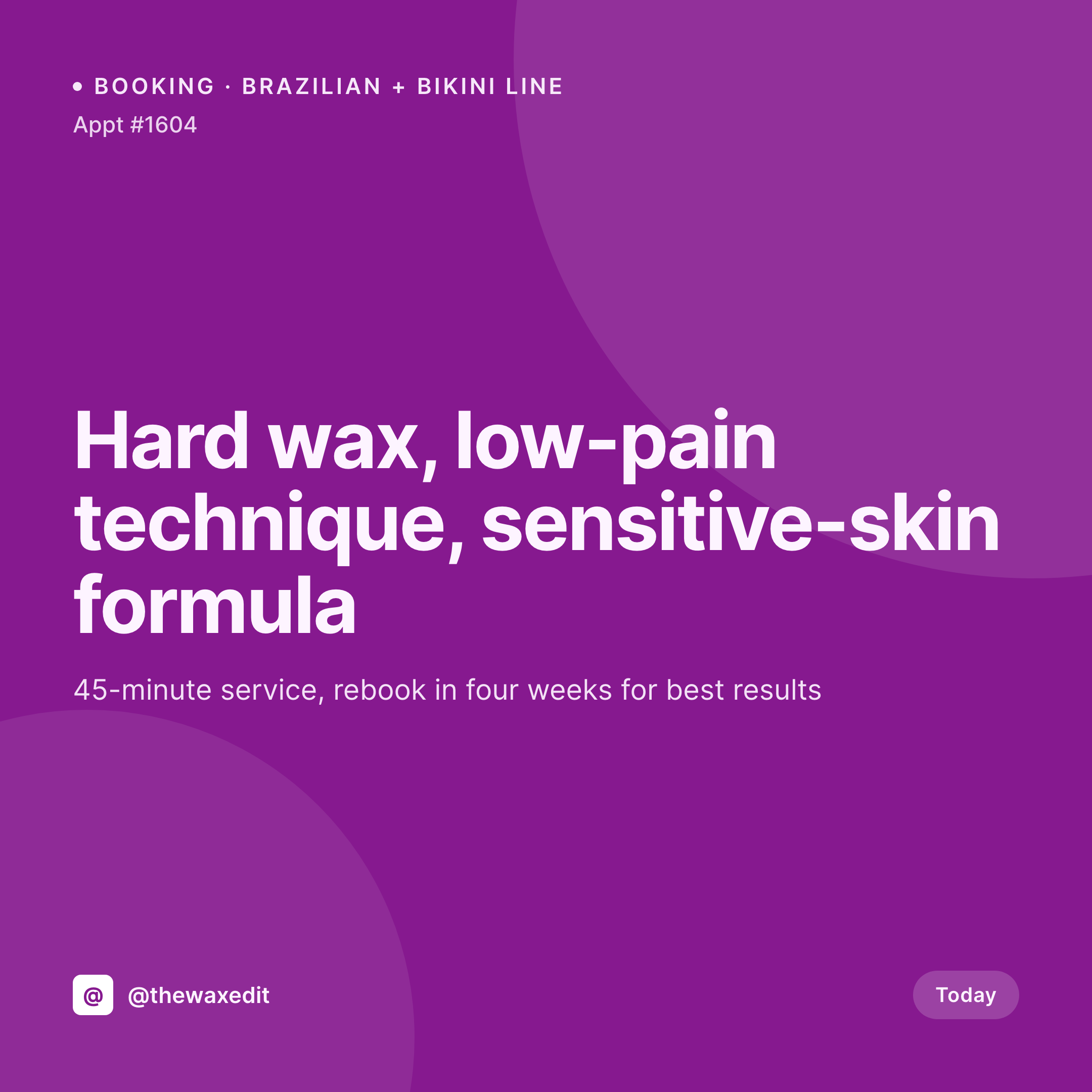
Bookings, rebooks, and a feed that does the awkward marketing without saying anything awkward
Waxing is one of the harder services to market visually. The work itself is not what gets posted to feed, and the photos that do post are usually room shots, product flat-lays, and rebook reminders. The studio whose feed does this well keeps the visual identity tight and the booking message clear without leaning on stock imagery. The studio whose feed sprawls into generic beauty graphics loses the cue that says this is a real, considered service.
The studio's WordPress site holds the structured data. A booking post or appointment CPT records the service area (Brazilian, bikini, full leg, brow, underarm, full face), the wax type (hard, soft, sensitive-skin formula), the rebook interval, and the technician. Service menu pages list every area with pricing. Promo posts for new-client offers live as scheduled events. The square card per service that ties the studio's actual offer into one image is the asset most studios end up rebuilding in Canva every week.
SleekPixel renders that card on save. Service area, wax type, and rebook window land on the image with the studio mark. The technician or front desk posts the card from Gutenberg, and the feed stays current with the studio's real services and rebook windows instead of generic beauty graphics.
Workflow
From appointment to feed-ready card
Map appointment and service fields
Design one square template
Save the appointment or service post
Post and route rebook
Output
What gets generated per appointment or service post
A 1080x1080 square card with the service area, the wax type, the rebook window, and the studio mark. Pulled live from the appointment or service post.
Comparison
Default waxing studio image vs SleekPixel
Default waxing studio image
- Service posts use stock beauty graphics that read as generic and not specific to the studio
- Rebook reminders built in Canva drift in typography and look like a different studio each month
- New-client promo cards get retyped and contradict the actual menu pricing
- Multi-technician studios end up with inconsistent cards per technician on the shared feed
- Service link previews share with no OG image and clients miss the message in DMs
SleekPixel
- Save the appointment post, the 1080x1080 card lands in uploads with the service and rebook window
- Service menu cards render straight from the studio's existing service pages
- New-client promo cards render with the actual offer text from the promo post
- Square format sized for Instagram, Threads, and Facebook studio pages
- One template across technicians keeps the studio feed consistent
Features
What SleekPixel gives you for waxing studio
Service-aware cards
Each service post renders with the service area, the wax type, and the rebook window. Updating the post re-renders the card.
Menu-driven variants
Service areas each get a template variant so the grid reads cleanly across body, face, and brow services.
Rebook timing
The rebook window renders on the card and as a separate reminder post the following month, with the booking link already attached.
Use cases
Who uses SleekPixel for waxing studios
Single-room waxing specialists
Solo specialists working from one room get a service card per appointment and a rebook card per follow-up, posted from the sidebar.
Multi-technician studios
Studios with several technicians run one template family with consistent service variants, so each technician's grid stays unified with the studio.
Beauty studios offering waxing alongside other services
Hybrid studios with lashes, brows, and waxing in one space get a waxing-specific card style that stays distinct from the other services.
The bigger picture
Why waxing studios live or die on the rebook cycle
Waxing is a four-week service. Clients who skip the rebook drift back to shaving or to whichever competitor stayed visible during the gap. The studio that wins the long-term client is the one whose feed shows up on the right week with the right message and the right service named clearly.
A grid full of generic beauty graphics fails because the client cannot tell whether the studio is even talking about her service. A grid built from the studio's actual service and appointment posts speaks specifically. Auto-rendered cards let the studio do this at the volume the business needs.
Saving the appointment renders the card, the technician or front desk posts it, and the rebook reminder renders four weeks out from the same data. The feed becomes a rebook engine instead of a marketing chore.
Questions
Common questions about SleekPixel for waxing studio
Yes. Service area (Brazilian, bikini, full leg, brow, underarm, full face, back, chest) is stored as a taxonomy or ACF field on the appointment post and renders on the card.
By default, client names and identifying fields stay off the rendered card. Only the service area, wax type, and rebook window render unless the template is changed.
Yes. A service taxonomy on the appointment post can switch the template variant, so brow waxing renders with a layout tuned to face services while Brazilian renders with body-service language.
SleekPixel reads WordPress post fields. Booking plugins like Amelia, LatePoint, and BookingPress that store appointment data as post meta map into the card cleanly.
Yes. A promo post type with the offer text and expiry date renders into a card matching the studio's template, with the promo language pulled live from the post.
Yes. The OG image meta is wired to the same render, so a client pasting a service link into a DM or text sees the card in the preview.
No. SleekPixel renders the image and saves it to uploads. Posting is a manual step from the platform app or a scheduler the studio already uses.
No. The room shot, product shot, or service photo uploaded to the post is what the card uses. SleekPixel composes typography and brand mark around it without altering the photograph.
Pricing
More than 1000+
happy customers
Explore our flexible licensing options tailored to your needs. Upgrade your license anytime to access more features, or opt for a lifetime license for ongoing value, including lifetime updates and lifetime support. Our hassle-free upgrade process ensures that our platform can grow with you, starting from whichever plan you choose.
Lifetime ♾️
Most popular
EUR
once
- Unlimited websites
- Lifetime updates
- Lifetime support
...or get the Bundle Deal
and save €250 🎁
💎 Want everything forever? The All Access Pass is going away on 01.08.2026.
The Bundle (unlimited sites)
Pay once, own it forever
Elevate your WordPress site with our exclusive plugin bundle that includes all of our premium plugins in one package. Enjoy lifetime updates and lifetime support. Save significantly compared to buying plugins individually.
What’s included
-
SleekAI
-
SleekByte
-
SleekMotion
-
SleekPixel
-
SleekRank
-
SleekView
€749
Continue to checkoutBrowse more
- certification announcement cards
- template download card
- webinar
- founder letter card
- pricing comparison cards
- policy update cards
- industry update cards
- waitlist cards
- lead magnet card
- team spotlight cards
- order confirmation cards
- webinar replay card
- team offsite card
- return to office card
- changelog cards
- Nostr note images
- Instagram bio link banners
- Snapchat snap images
- Douyin thumbnails
- Facebook Marketplace images
- SoundCloud banner
- Pinterest video pin covers
- Twitch overlay
- Twitch profile banner
- Instagram highlight covers
- Instagram ad images
- Facebook group banners
- Pinterest product pin covers
- Farcaster cast images
- X Space banners