






SleekPixel for real estate agent
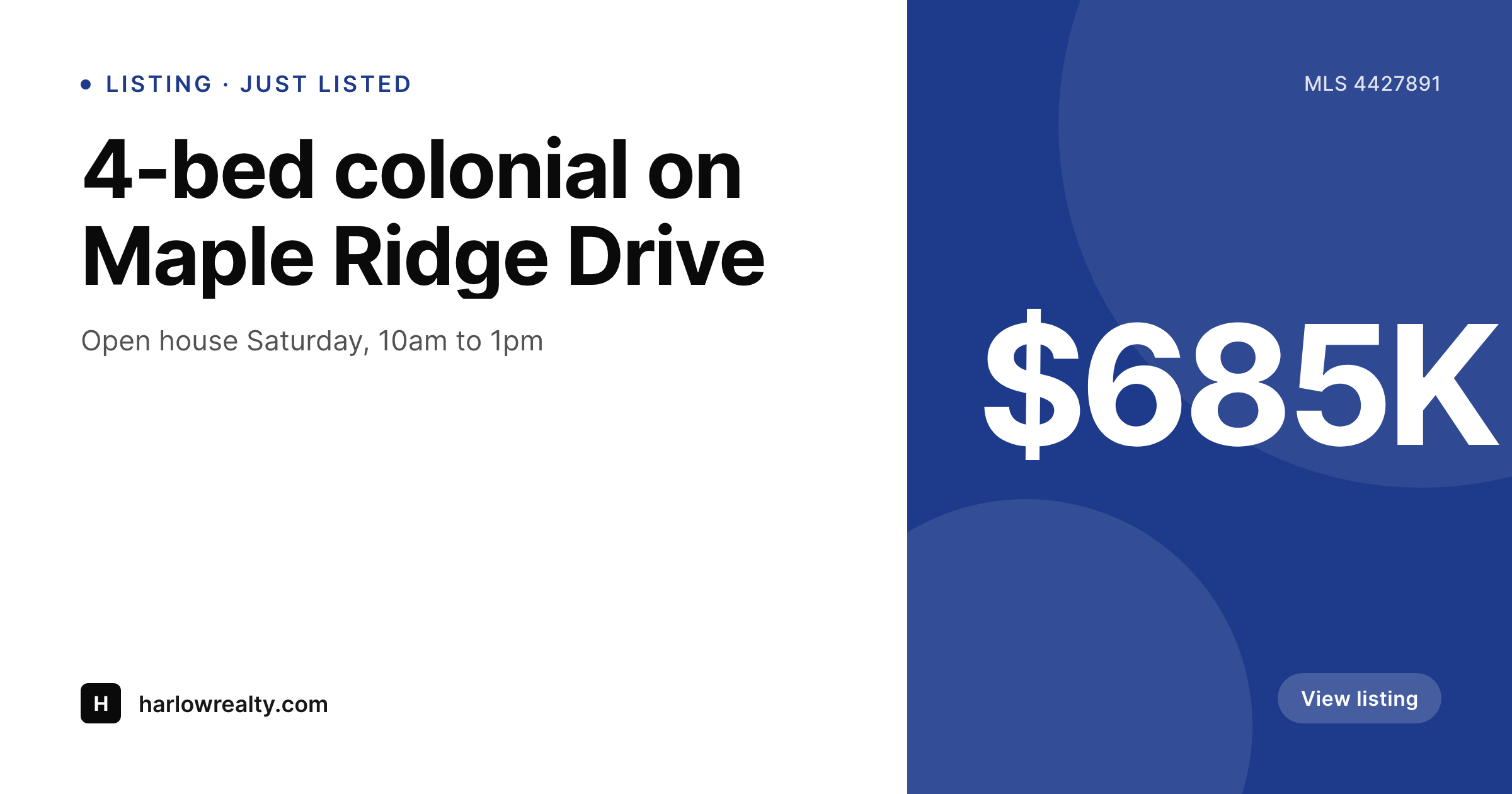
Address, list price, beds, baths, and MLS number live as fields on the listing post. SleekPixel renders a branded 1200x630 image on save, so Facebook and link previews look right immediately.
♾️ Lifetime License available
Listings hit the web faster than your design queue
A listing goes live the same day the seller signs. The agent posts the link to Facebook, drops it into a buyer's text thread, and emails it to a network of cooperating brokers. If the OG image is missing or generic, the link preview shows a tiny WordPress favicon and a truncated title - the most expensive shareable asset in the business looks like a broken page. Most agents work around this by manually exporting a Canva template, which means the marketing person is the bottleneck on every listing, and price reductions or status changes never get a refreshed image.
Listing data already lives in IDX feeds or custom fields. Address, list price, beds, baths, square footage, MLS number, and a hero photo are structured data on every property post. The same fields that drive the listing detail page should drive the OG image, the email header, and the Facebook share card. Doing this by hand means the agent or VA has to keep five separate assets in sync every time the price drops or the status flips to pending.
The fix is automation tied to the post itself. Define one branded template, map the listing fields, and the OG image regenerates whenever the listing data changes. Status flip from active to pending? The image updates. Price drop? The image updates. No Canva, no VA bottleneck, no stale shares.
Workflow
From new listing to live link preview
Map listing fields
Design the brokerage card
Add or edit a listing
Update price or status
Output
What gets generated per listing
A 1200x630 OG image showing the address, list price, beds and baths, MLS number, and the agent or brokerage brand pulled from listing fields.
Comparison
Canva exports vs auto-rendered listing cards
Manual / Canva / IDX default
- VA exports a fresh Canva file for every new listing and price drop
- Status flips to pending but the OG image still shouts active
- Address typos baked into a flat PNG mean re-exporting and re-uploading
- IDX default share images are unbranded and identical across the MLS
- Brokerage rebrand means redoing every listing image one by one
SleekPixel
- Every listing saves with an OG image rendered from its own fields
- Status, price, and address changes regenerate the image automatically
- 1200x630 PNG stored in uploads, wired into og:image and twitter:image
- Brokerage rebrand is a bulk regenerate, not weeks of Canva work
- Manual download in Gutenberg sidebar for email blasts and flyers
Features
What SleekPixel gives you for real estate agent
Per-listing OG
Address, price, beds, baths, MLS number rendered into a 1200x630 image on every save. Facebook, iMessage, and Slack previews all look right.
Auto-refresh on edit
Price drop, status change, or photo update triggers a fresh image. Buyers shared the listing yesterday? Today's preview is current.
Sidebar download
Need the listing card for an email blast or a co-broker text? One click in the Gutenberg sidebar grabs the PNG, ready to attach.
Use cases
Where listing cards earn their keep
Facebook and Instagram shares
When the agent posts the listing URL, the OG image shows the property card with price and beds, not a wordpress favicon.
Email and SMS previews
Cooperating brokers and buyers get a rich preview when the link drops into Gmail, iMessage, or Slack instead of a tiny placeholder.
Open house promotion
Generate a story-format image alongside the OG card so the same listing is ready for Instagram stories and Facebook events.
The bigger picture
Why listing OG images make or break the share funnel
Real estate is a sharing business. Most listing traffic comes from agents posting URLs into Facebook groups, sending links by text, and emailing co-brokers. The link preview is the entire pitch in a thumbnail - if it shows the property at a glance, with price and beds visible, the click happens.
If it shows a generic site favicon and a truncated title, the link gets scrolled past. Agents who win at digital marketing already know this and pay a marketing assistant to export a Canva file per listing, but that workflow breaks on the second day a property is listed. Price drops, pending status, photo swaps, open house dates - they all happen on the listing record, but the share image stays frozen at what the assistant exported on day one.
Multiply that across a brokerage with 200 active listings and the marketing team spends most of its week reproducing the same asset. Treating the OG image as derived data, generated from listing fields the same way the title tag is generated, removes the lag. The image is always current because the source of truth is the post.
Questions
Common questions about SleekPixel for real estate agent
Yes. Realtyna, Houzez, Estatik, Easy Property Listings, or a custom listing CPT all work. Map the fields you need - address, price, beds, baths, MLS number, hero photo - and SleekPixel reads them on every save. IDX feeds usually store data in post meta, which SleekPixel reads natively.
Editing any mapped field triggers a fresh render. The PNG file in uploads is replaced, so the next time someone shares the listing the preview shows the updated price. og:image and twitter:image meta tags point at the same file, so social platforms re-fetch when their cache expires.
Yes. Templates can be conditional on field values, so a pending listing can show a 'pending' ribbon, sold listings can show a 'sold' badge, and active listings get the standard layout. All three pull from the same listing fields.
It renders the formats you configure. Setting up an 8.5x11 print-ready format alongside the 1200x630 OG image is supported. Both are saved per listing in uploads, downloadable from the Gutenberg sidebar. Print color profiles and bleed marks are not part of the output - it is a flat PNG.
If the listing has an assigned agent (a custom field or user reference), SleekPixel can pull the agent's name and avatar into the template. Each listing's image then carries the right agent contact info, not the brokerage default.
Yes. Edit the template once, run a bulk regenerate, and every listing's OG image is replaced with the new branding. Logo swaps, color updates, or layout changes propagate across all listings without touching individual posts.
Yes. Different post types can have different templates - a vacation rental can show nightly rate and capacity, a commercial property can show cap rate and square footage. Each listing type pulls the fields that matter for its category.
No. SleekPixel renders images and writes them to your WordPress uploads with og:image meta tags. It does not push to MLS feeds, Zillow, Realtor.com, or other syndication networks - those use their own image fields and require their own integrations.
Pricing
More than 1000+
happy customers
Explore our flexible licensing options tailored to your needs. Upgrade your license anytime to access more features, or opt for a lifetime license for ongoing value, including lifetime updates and lifetime support. Our hassle-free upgrade process ensures that our platform can grow with you, starting from whichever plan you choose.
Lifetime ♾️
Most popular
EUR
once
- Unlimited websites
- Lifetime updates
- Lifetime support
...or get the Bundle Deal
and save €250 🎁
💎 Want everything forever? The All Access Pass is going away on 01.08.2026.
The Bundle (unlimited sites)
Pay once, own it forever
Elevate your WordPress site with our exclusive plugin bundle that includes all of our premium plugins in one package. Enjoy lifetime updates and lifetime support. Save significantly compared to buying plugins individually.
What’s included
-
SleekAI
-
SleekByte
-
SleekMotion
-
SleekPixel
-
SleekRank
-
SleekView
€749
Continue to checkoutBrowse more
- Mastodon link previews
- Mastodon profile header
- Facebook group banners
- Buy Me a Coffee banners
- LinkedIn banner images
- Snapchat Spotlight covers
- Facebook Shop product images
- Bluesky profile banners
- podcast cover art
- LinkedIn article covers
- Rumble thumbnails
- Gumroad product covers
- Substack podcast cover
- YouTube Shorts covers
- Lemon Squeezy product covers