






SleekPixel for preorder cards
Shops running preorders need the share image to carry the product name, ship date, and reservation status. SleekPixel renders one og:image per preorder product, generated from the post fields on save.
♾️ Lifetime License available
Preorder pages live or die on the first share
Preorders are a different commerce shape than in-stock products. The shopper is reading a forward-looking promise: this item will exist on this date, at this price, in this quantity. The page has to communicate confidence, and the share image that travels in newsletters, group chats, and DMs has to do the same job before anyone clicks. A blank or recycled featured image undercuts every word on the product page.
Most shops solve this by having a designer build a one-off preorder cover in Figma or Canva, export it, and upload it to the product. That works for the first launch. By the third or fourth wave the design files are scattered, the ship dates in the images have drifted from the ones on the page, and someone on the team is reminding the marketing person to update the social card before pushing the launch email.
SleekPixel binds the preorder card to the product post itself. Title, ship date, price, and reservation count come from product fields or custom meta. The render fires when the product is saved, writes the PNG to uploads, and serves it as og:image. Edit the ship date, save the product, the card updates everywhere the product URL gets re-scraped.
Workflow
From preorder product to a real share card in one save
Design the preorder template
Set up the product fields
Save and publish
Push the launch
Output
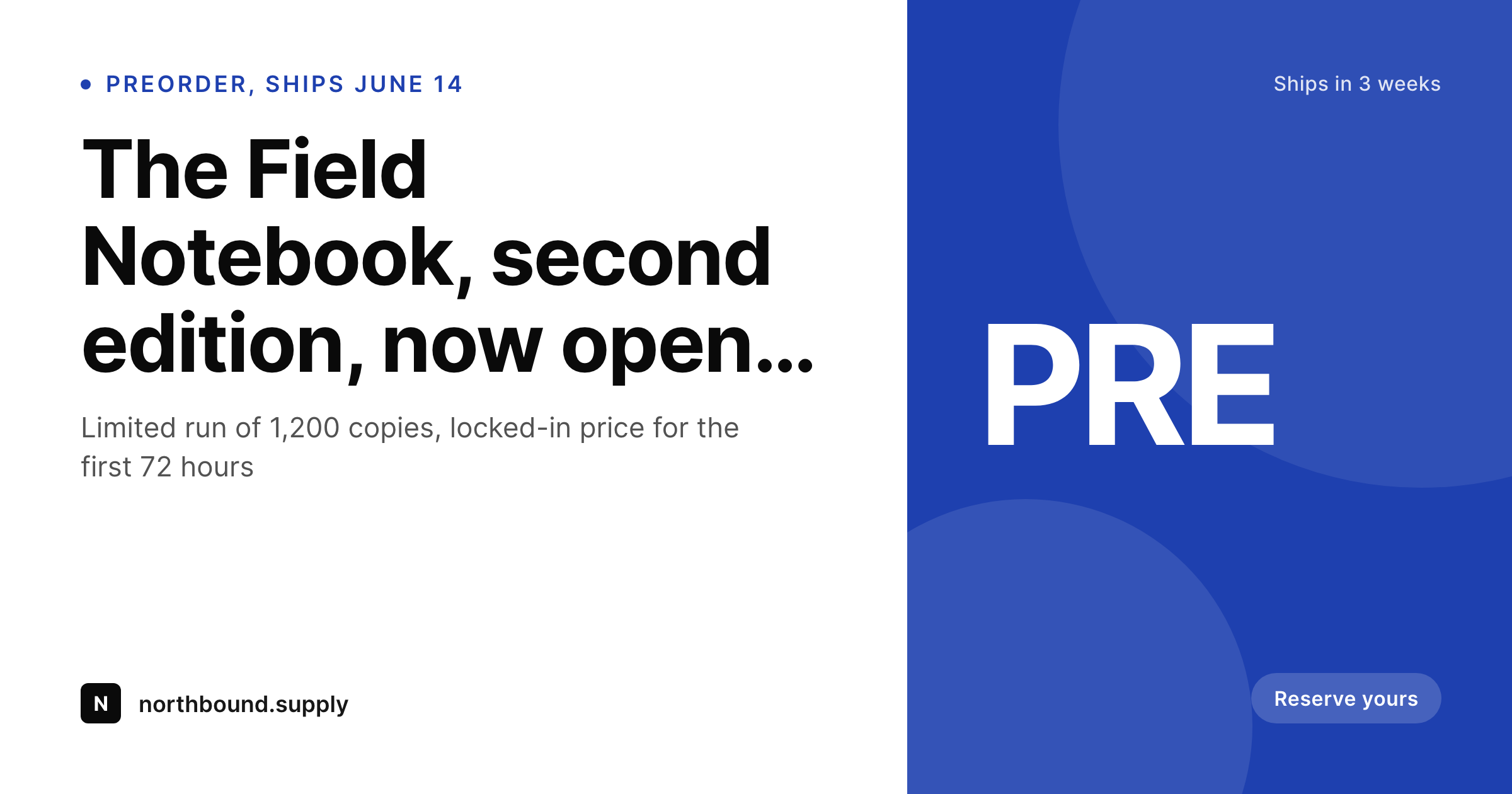
What a generated preorder card looks like
A 1200x630 share card with the product name, ship-by date, and reservation badge pulled from the product fields.
Comparison
Default preorder image vs SleekPixel
Default preorder image
- Same store-logo featured image on every preorder share
- Ship date in the social image goes stale after a delay
- Manual Canva files drift in style across launch waves
- Reservation count never reflects what the page actually says
- No regeneration path when the launch date changes
SleekPixel
- Render fires on save for every preorder product
- Product name, ship date, and price pulled from product fields
- og:image and twitter:image meta tags written automatically
- Reservation count badge bound to a custom field or live order count
- Date edits regenerate the card before the next share
Features
What SleekPixel gives you for preorder cards
Ship date stays current
Bind the ship-by line to a product meta field. If the date moves, save the product, the share card updates on the next render and on the next platform re-scrape.
Price baked into the share
Show the locked-in preorder price as part of the card. Buyers see the offer in the share itself instead of clicking through to find out whether it is the right tier.
Reservation count signals demand
Optional reservation badge can pull from a custom field or from a live order query. Sold-out preorder waves can swap the badge to a waitlist line without touching the template.
Use cases
Where preorder cards earn their keep
Physical product launches
Notebooks, hardware, apparel drops, anything with a real lead time. The share card carries the launch metadata so newsletters and group chats convert without extra copy.
Indie publishers and authors
Books and zines that open preorders weeks before printing. The share image holds title, cover detail, and ship date so the same link works in newsletter, social, and Slack.
Album and merch drops
Artists running preorder windows on records, prints, or capsule merch. SleekPixel renders one card per item so each drop has a real share asset, not a recycled tour photo.
The bigger picture
Why preorders need a real share card, not a placeholder
Preorders run on credibility and clock. A shopper is being asked to pay now for an item that will arrive in three to twelve weeks, sometimes longer, and every visible signal in the buying flow either reinforces or undermines that promise. The share image is the first signal.
If it is generic, the perception of the launch becomes generic, and the conversion drops before the page has loaded. If it carries the product name, the locked-in price, and a real ship-by date, the perception is that the launch is run by a team that thinks about details, and the conversion holds. Preorder waves usually run a small number of products through a high-traffic window, which is exactly the case where automating the share asset pays off most.
SleekPixel makes the asset a side effect of saving the product, which means the launch operator can spend the morning fixing copy, not exporting Canva files.
Questions
Common questions about SleekPixel for preorder cards
Yes. SleekPixel reads from the product post type and any meta keys you configure. If the preorder plugin writes the ship date to post meta, the template can bind to it directly.
Yes. Configure a conditional badge that swaps from "Reserve yours" to "Sold out, waitlist open" based on a stock or status meta field. The card re-renders when the field changes.
Edit the date on the product, save. SleekPixel re-renders the card, og:image is overwritten in uploads, and the next share scrape pulls the corrected version.
Yes. Per-category or per-tag templates let book preorders look different from apparel drops or hardware launches, while staying inside a consistent brand system.
Templates can read the active locale and pick a layout per language. Translated product titles and date formats render correctly without separate manual exports.
Templates can pull the WooCommerce featured image, place it in a fixed slot, and overlay the preorder badge. The image stays in proportion regardless of the source crop.
SleekPixel runs a headless render on save. For most templates this completes in under a second. The save returns as normal and the file lands in uploads in the background.
Yes. The admin includes a bulk regenerate action that re-renders every product under a chosen template. Useful before a new launch wave or after a logo update.
Pricing
More than 1000+
happy customers
Explore our flexible licensing options tailored to your needs. Upgrade your license anytime to access more features, or opt for a lifetime license for ongoing value, including lifetime updates and lifetime support. Our hassle-free upgrade process ensures that our platform can grow with you, starting from whichever plan you choose.
Lifetime ♾️
Most popular
EUR
once
- Unlimited websites
- Lifetime updates
- Lifetime support
...or get the Bundle Deal
and save €250 🎁
💎 Want everything forever? The All Access Pass is going away on 01.08.2026.
The Bundle (unlimited sites)
Pay once, own it forever
Elevate your WordPress site with our exclusive plugin bundle that includes all of our premium plugins in one package. Enjoy lifetime updates and lifetime support. Save significantly compared to buying plugins individually.
What’s included
-
SleekAI
-
SleekByte
-
SleekMotion
-
SleekPixel
-
SleekRank
-
SleekView
€749
Continue to checkoutBrowse more
- Etsy shop banners
- Notion page covers
- Snapchat snap images
- Behance project covers
- VK community cover photos
- Mastodon link previews
- Facebook cover photos
- Pinterest product pin covers
- X ad images
- Reddit subreddit banners
- Stan Store cover
- X list banners
- Weibo post images
- Substack post thumbnail
- Substack post headers