






SleekPixel for beekeepers
Hive ID, condition, brood frames, stores, queen status. The log entries you already keep on inspection day become cards for the feed, the apiary site, and the club newsletter, automatically.
♾️ Lifetime License available
Document the hive without leaving the inspection workflow
Beekeeping runs on inspection notes. Brood frames, honey stores, queen condition, mite drop, swarm signs, the date of the last requeening. Every serious beekeeper keeps these notes, on paper, in an app, or in a sheet. The notes are what makes the next inspection possible and what tells the story of a season after the bees have settled in for winter.
SleekPixel reads from the inspection post in WordPress. Hive ID, inspection date, brood count, stores, queen status, and any mite or disease observations live as custom fields on a per-inspection post type. The template family pulls those fields and renders a square card for the feed, a vertical for the story, and an OG image for the apiary archive on the site.
The apiary site shows a real-time view of the operation. Club members and customers see a steady run of hive cards. The beekeeper keeps documentation honest without adding a design step to a workday that often ends in a thunderstorm or a sting count.
Workflow
From inspection log to hive card, after every visit
Set up the inspection post type
Design the template family
Map the fields
Publish the log
Output
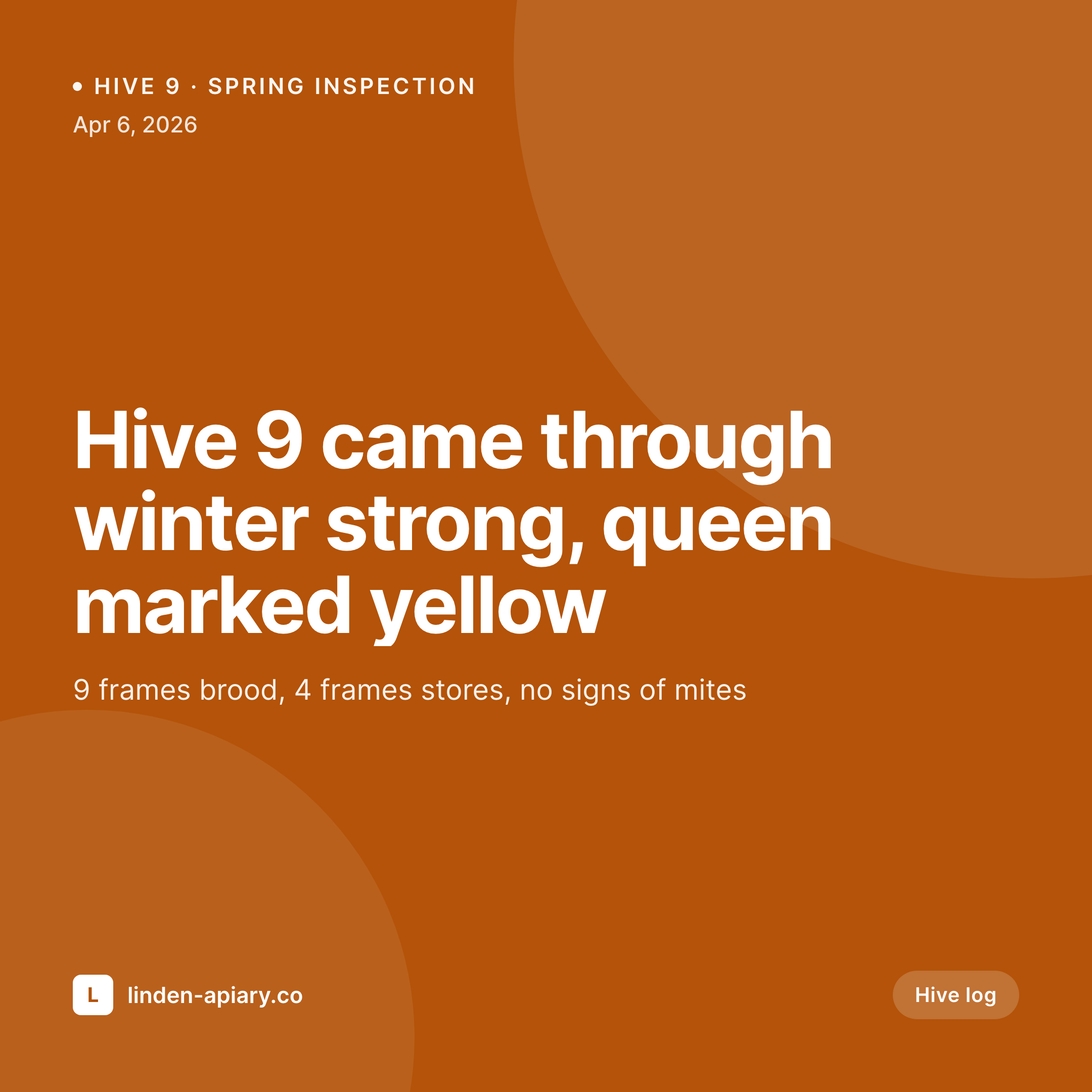
Sample hive inspection card
1080 square card from one inspection post: hive ID, date, brood frames, stores, queen status, and any short note from the day.

Comparison
Default beekeepers image vs SleekPixel
Default beekeepers image
- Inspection notes live in a notebook that nobody else sees
- Social posts are phone photos with no metric overlay
- Apiary site has no archive of how the season is going
- Newsletter to members lacks the visual that signals real work
- Honey jar pages share with a generic featured image, not a hive story
SleekPixel
- Hive ID, brood frames, and stores pulled from the inspection post
- Queen status renders as a labeled field, not buried in body copy
- Square, vertical, and OG image rendered from one template family
- Apiary archive reads as a uniform grid of hive cards by date
- Bulk regenerate the season's archive after a brand refresh
Features
What SleekPixel gives you for beekeepers
Hive-routed templates
Production hives, nucs, observation hives, and queen-rearing colonies can each have a layout variant. The card reflects the hive type automatically.
Inspection metrics in the image
Brood frames, stores frames, mite count per 300 bees. The numbers that decide management actions render into the card instead of staying in the notebook.
Queen status callouts
Marked, unmarked, virgin, supersedure underway. Queen status renders as a labeled callout, which is the detail that members and prospective customers actually want.
Use cases
Who uses SleekPixel for beekeepers
Backyard and sideline beekeepers
Two-yard to 30-hive operations selling honey and queens at the farmers market get every inspection documented without taking time off the comb.
Commercial honey operations
Mid-size apiaries with public-facing brands keep an inspection archive that reads as operational discipline, which doubles as evidence for wholesale buyers.
Beekeeping clubs and associations
Local clubs running a teaching apiary use the inspection cards in newsletters and on the public site so members see what is happening between meetings.
The bigger picture
Why visual hive logs matter for beekeepers
Beekeeping is one of the few small agricultural businesses where the customer cares deeply about the production conditions. Honey jar buyers ask where the bees forage, how the colonies winter, how the queens are reared. Most beekeepers know all this, but it lives in a notebook that the buyer never sees.
Visual hive logs make the answer legible. A run of inspection cards on the apiary site, each crediting the hive and the date, is the most efficient way to demonstrate active stewardship without writing long blog posts. The same archive matters for queen sales.
A buyer choosing between two queen producers wants to see the parent hive, the inspection history, and the marking. Templated card generation makes that history visible without adding a design step to inspection day, which is the only way the practice survives a working season.
Questions
Common questions about SleekPixel for beekeepers
No. Those apps handle the inspection workflow, treatment schedules, and yard mapping. SleekPixel only handles the rendered images. The inspection post in WordPress is where the log gets written publicly, and the card is built from that post.
Not directly. SleekPixel reads from WordPress post fields. If your app exports to a sheet that syncs into WordPress (manually or via integration), those fields become available to the template.
Queen-rearing posts can use a different template variant. Fields like graft_date, cell_count, mating_date, and laying_date render into the card, which makes the queen archive a real piece of evidence for queen buyers.
Yes. Swarm capture posts can use a swarm variant of the template. Date, location, estimated size, and the rescue story all bind to slots. Useful for beekeepers who do swarm removal as a service.
Yes. Add a photo field to the inspection post and bind it to a slot. Phone photos render cleanly within the apiary branding when placed inside a fixed frame in the template.
Use a harvest post type with fields like jars_filled, yield_pounds, varietal, and harvest_date. Same plugin, different template variant. The honey jar page on the site shares with that card automatically.
Yes. Add mite_count and method fields to the inspection post and bind them to slots. The numbers render as a small metric strip, which is the detail that signals serious management to club members and bee inspectors.
Yes. A separate banner-ratio template can aggregate from a season-end summary post. Total hives, swarms captured, honey harvested, queens reared. Useful for the year-end newsletter or the apiary annual report.
Pricing
More than 1000+
happy customers
Explore our flexible licensing options tailored to your needs. Upgrade your license anytime to access more features, or opt for a lifetime license for ongoing value, including lifetime updates and lifetime support. Our hassle-free upgrade process ensures that our platform can grow with you, starting from whichever plan you choose.
Lifetime ♾️
Most popular
EUR
once
- Unlimited websites
- Lifetime updates
- Lifetime support
...or get the Bundle Deal
and save €250 🎁
💎 Want everything forever? The All Access Pass is going away on 01.08.2026.
The Bundle (unlimited sites)
Pay once, own it forever
Elevate your WordPress site with our exclusive plugin bundle that includes all of our premium plugins in one package. Enjoy lifetime updates and lifetime support. Save significantly compared to buying plugins individually.
What’s included
-
SleekAI
-
SleekByte
-
SleekMotion
-
SleekPixel
-
SleekRank
-
SleekView
€749
Continue to checkoutBrowse more
- Twitch panel images
- Beacons.ai banner
- Instagram bio link banners
- Apple Music cover art
- Tidal cover art
- Shopify collection banners
- Depop listing images
- Facebook group banners
- YouTube channel banners
- Lemon8 post
- VK community cover photos
- YouTube end screens
- Instagram feed posts
- X social cards
- Twitch schedule banners