






SleekPixel for Event Tickets
Event Tickets adds RSVP and paid seating on top of The Events Calendar. SleekPixel reads the same event post fields and renders a Facebook-cover-sized card per event, so every share carries the date, price and venue on a branded surface.
♾️ Lifetime License available
Event Tickets makes the RSVP real, the share preview is still a blank
Event Tickets is the ticketing layer that sits on top of The Events Calendar. The combination is what most independent venues, workshops, conferences and meetups end up on, because it does the boring parts properly: recurring events, RSVPs, paid seats, attendee lists and check-in. The event itself is a WordPress custom post type with start time, end time, venue, capacity and ticket price as fields.
What the stack does not do is render a share card. When a host posts a workshop link to Facebook, the OG image is whatever WordPress fell back on. The date is buried in the page body, the price is in the ticket widget, the venue is in the sidebar. The preview that lands in someone's feed says none of it, so the post relies on the body copy to do all the work.
SleekPixel reads the same event fields that Event Tickets and The Events Calendar already populate. Title, date, time, venue, capacity and headline price slot into a 1200 by 630 card sized for Facebook event shares, Twitter cards and group posts. Every event the venue creates ends up with a share preview that says exactly what the event is, without anyone designing it.
Workflow
From event post to branded share card
Create the event in WordPress
Bind slots in SleekPixel
Render on save and on RSVP
Share to Facebook and beyond
Output
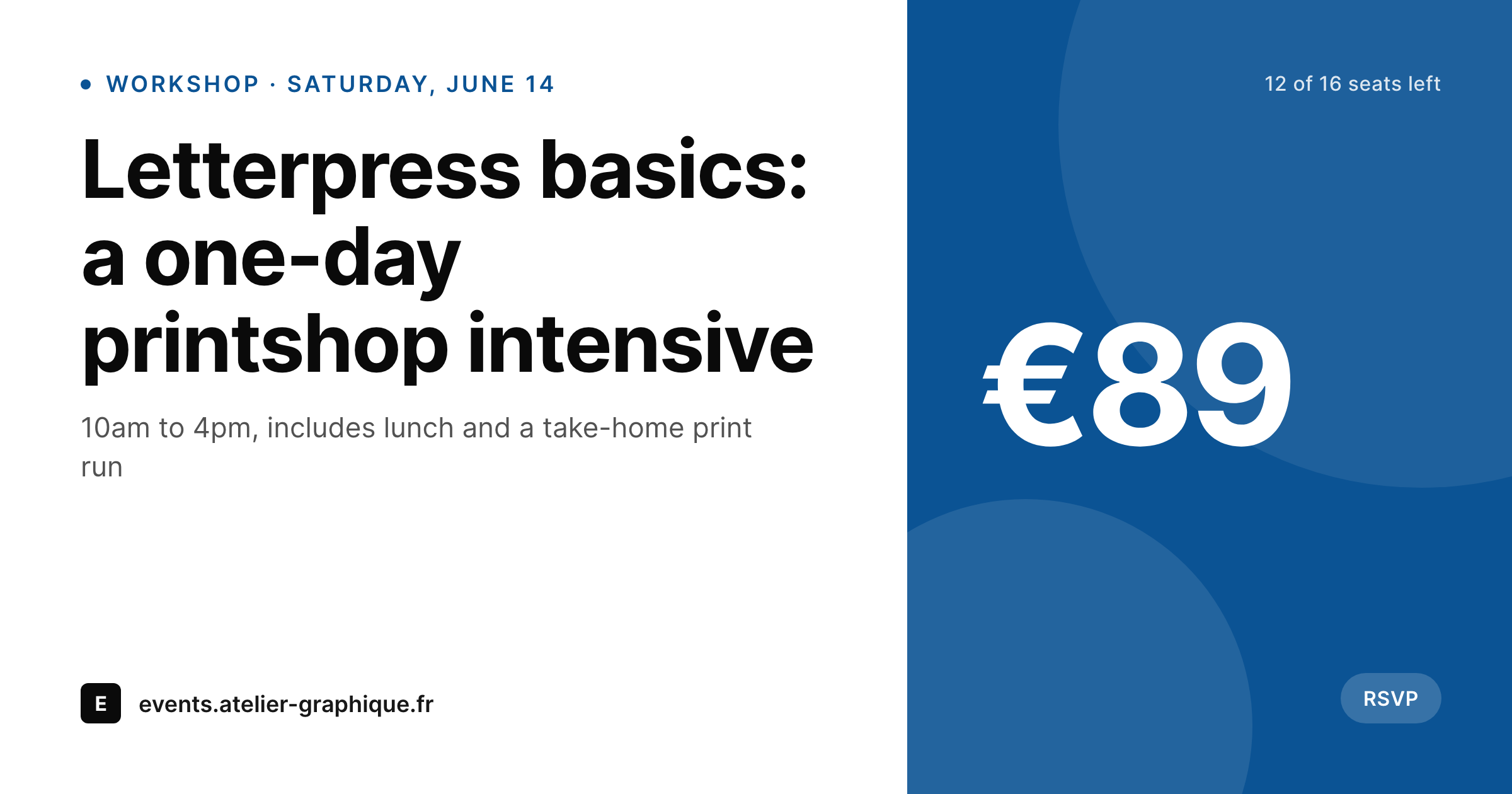
Sample event share card
A 1200 by 630 PNG: event title, date and time, venue, price and seats remaining, rendered from the WordPress event post.
Comparison
Default Event Tickets share vs SleekPixel card
Default theme OG image
- Event detail pages share with the same site-wide OG image
- Date, time and venue from the event post never appear on the preview
- Ticket price and seats remaining stay buried in the widget
- Recurring events all share with the same parent card
- Hand-drawn cards per event stop happening after the first season
SleekPixel
- Reads the same event fields Event Tickets already writes
- Per-event card with date, time, venue and headline price
- Recurring instances render their own cards from the recurrence data
- Seat counts and 'sold out' badges flip based on inventory
- Bulk re-render the whole calendar when the brand changes
Features
What SleekPixel gives you for Event Tickets
Event-aware slots
Title, start date and time, venue and price all bind to template slots. The card stays specific to each event instead of generic to the calendar.
Ticket status badges
Tickets available, last few left and sold out render as small badges driven by the live ticket count, so the share preview reflects reality.
Recurrence-aware
Recurring events show their next occurrence date on the card. Parent and individual instance URLs each render their own preview.
Use cases
Who uses SleekPixel for Event Tickets
Workshops and classes
Pottery studios, letterpress shops and cooking schools share per-class previews with date, price and seats remaining.
Music venues and clubs
Small venues running shows through Event Tickets ship per-show cards with headliner, date and door price.
Meetups and conferences
Community meetups and small conferences share per-event previews with date, venue and remaining RSVP slots.
The bigger picture
Why event shares deserve a real card
Local event marketing runs on shared links. A regular at a venue copies the next show's URL into a group chat, a workshop alum tweets the date of the next cohort, a meetup organizer pastes a link into a community Slack. Every one of those moments hands the share preview a job: say what the event is, when it happens and where, in the half second before the reader scrolls past.
The Event Tickets and Events Calendar stack already knows all of that, because it has to, in order to send confirmation emails and check people in at the door. SleekPixel just reads the same data and renders it as an image instead of leaving it as page body text the OG crawler ignores. The cost to the venue is zero, because the event post stays the source of truth.
The gain is that every share, from every regular and every alum, arrives looking like the venue actually cares what its links look like outside its own site.
Questions
Common questions about SleekPixel for Event Tickets
No. SleekPixel reads the standard event post fields that the free Events Calendar and Event Tickets plugins populate. Pro features like recurring events render their own cards if used, but the base plugins are enough.
Each instance has its own URL. SleekPixel renders a card per instance, with the correct date for that occurrence. Templates can also branch on instance vs parent for slightly different layouts.
Yes. Capacity and sold counts are post meta. The template can show a 'last few left' badge under a threshold and flip to 'sold out' when capacity is reached.
The template can either show the lowest price as 'from x' or render variations per tier. Most venues land on 'from' because the share is meant to drive a click, not replace the ticket widget.
Yes. Event Tickets ships ticket data as post meta regardless of the payment processor. SleekPixel reads the meta, not the processor, so any backend works.
Yes. Template selection can branch on event category, so concerts, workshops and classes get distinct treatments while sharing the same data binding.
Each event in the list links to its detail page, which is where the card matters. The calendar list view is rarely shared as a single URL, but if it is, it can have its own card too.
No. Rendering happens on save in the background. The visitor-facing event page serves the static PNG via the og:image tag, with no runtime rendering.
Pricing
More than 1000+
happy customers
Explore our flexible licensing options tailored to your needs. Upgrade your license anytime to access more features, or opt for a lifetime license for ongoing value, including lifetime updates and lifetime support. Our hassle-free upgrade process ensures that our platform can grow with you, starting from whichever plan you choose.
Lifetime ♾️
Most popular
EUR
once
- Unlimited websites
- Lifetime updates
- Lifetime support
...or get the Bundle Deal
and save €250 🎁
💎 Want everything forever? The All Access Pass is going away on 01.08.2026.
The Bundle (unlimited sites)
Pay once, own it forever
Elevate your WordPress site with our exclusive plugin bundle that includes all of our premium plugins in one package. Enjoy lifetime updates and lifetime support. Save significantly compared to buying plugins individually.
What’s included
-
SleekAI
-
SleekByte
-
SleekMotion
-
SleekPixel
-
SleekRank
-
SleekView
€749
Continue to checkoutBrowse more
- Telegram bot avatar
- YouTube Music cover art
- Fansly banner
- Mailchimp email headers
- Mailchimp email banner
- Depop listing images
- VSCO cover
- YouTube thumbnails
- Instagram collab post images
- YouTube ad thumbnails
- Mastodon post images
- Lens Protocol posts
- KakaoTalk channel banners
- Bandcamp release cover
- Instagram stories