






SleekPixel for year in numbers cards
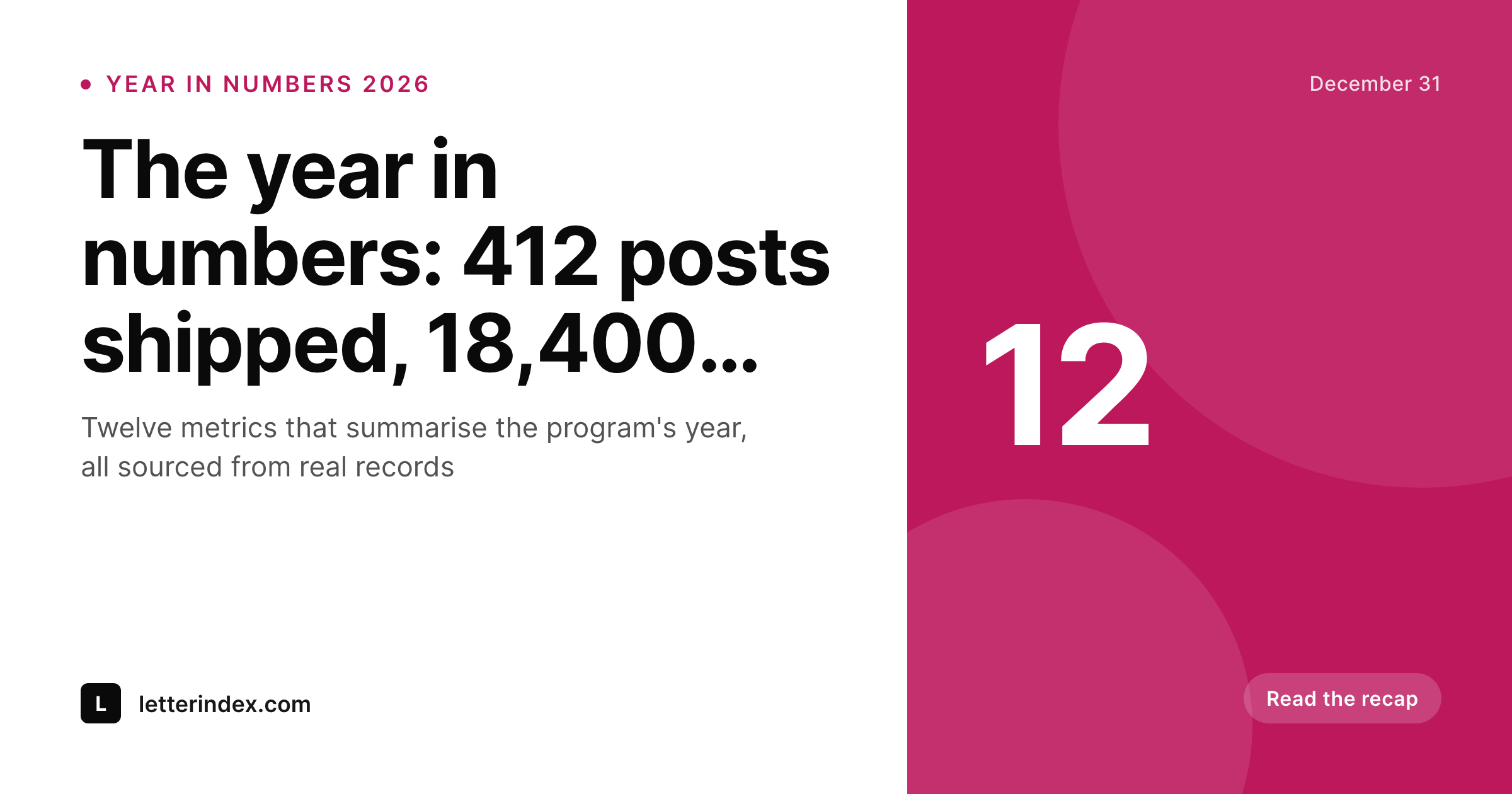
Every year-in-numbers recap in WordPress renders a card with the headline metric, the supporting metrics, the year and the brand mark baked in. Annual recaps ship with a card that summarises the year before the reader clicks through.
♾️ Lifetime License available
Year-in-numbers posts are dense, the card has to do the same
A year-in-numbers post tries to compress twelve months of work into a single readable summary. The post itself can run long with charts, callouts, and commentary. The OG card has to do something different: distill the recap to its most cite-worthy metrics in one image. Done well, the card becomes the most-shared artifact the program ships all year. Done badly, the card is a generic gradient and the recap sinks into the feed without leaving a trace.
SleekPixel pulls the recap structure from the post fields. Headline metric, two or three supporting metrics, year, and topic all live in fields the editor controls. The template encodes the brand layout with slots for the metrics in the right hierarchy. The card renders on save and lands on Twitter, LinkedIn, and the year-end roundup posts that link back to the program.
The headline metric stays prominent, the supporting metrics carry the context, and the year stamp anchors the card to the right window. Annual recaps from past years end up in an archive that reads as a coherent series with the metrics evolving year over year.
Workflow
From the year's data to a recap card that travels
Encode the recap template
Register the fields
Publish the recap
Refresh past recaps
Output
How a year-in-numbers card composes
An OG card with the headline metric, supporting metrics, year stamp, and brand mark, all drawn from the recap post fields.
Comparison
Default year in numbers cards image vs SleekPixel
Default year in numbers cards image
- Card shows the post title, the metrics are invisible
- Year stamp is missing, recaps blur together in the archive
- Supporting metrics are buried, the headline has no context
- Long figures overflow and the most important number disappears
- Brand refresh forces the program to rebuild every annual recap
SleekPixel
- Headline metric renders large and auto-fits the bounding box
- Two or three supporting metrics surface alongside it
- Year stamp anchors the card to the right window
- Topic chip keeps the recap series visually consistent
- Bulk regenerate refreshes the archive after a brand update
Features
What SleekPixel gives you for year in numbers cards
Headline metric slot
The one most cite-worthy number of the year renders in a large slot with auto-fit type. Short metrics and long metrics both read cleanly within the bounds.
Supporting metrics row
Two or three supporting metrics render below or beside the headline. The reader sees the context for the topline without opening the post.
Year stamp
The year renders as a clear stamp on the card. Recaps from past years end up in an archive that reads as a coherent series.
Use cases
Year-in-numbers formats this card supports
Newsletter year-in-review
A newsletter or publication's annual recap with subscriber count, post count, and revenue figures. The headline carries the topline, the row carries the context.
Community year-in-review
A community platform's recap with member count, event count, and activity metrics. The card travels into the community channels and the program's social feeds.
Indie program recaps
An indie maker's year-in-numbers covering MRR, customers, and launches. The card lands on Twitter and LinkedIn with the metrics doing the talking.
The bigger picture
Why a year-in-numbers card earns the share
The year-in-numbers post lands in a crowded December window. Every publication, indie maker, and platform ships their own version, and the reader's attention budget is short. The card decides whether the post gets read or scrolled past.
A card with a clear headline metric, two or three supporting metrics, and a year stamp tells the reader the recap is structured and the program is willing to put real numbers on the image. A card with a generic gradient and a vague headline tells them the recap is going to be commentary. Past the initial filter, the card has a longer life than most posts.
Year-in-numbers cards get screenshot into year-end roundup posts on rival publications, embedded in social feeds, and pasted into Slack channels with the link. Each of those uses encounters the card first and the post second. A card that carries the metrics travels into those contexts intact.
A card with only the post title forces the reader to open the link, and most readers will not. SleekPixel makes the metrics the headline on the image, so the recap leaves a real footprint instead of disappearing into the December scroll.
Questions
Common questions about SleekPixel for year in numbers cards
Any of them. The template handles whatever the field holds, with auto-fit type that scales between min and max bounds. A 92 percent renewal rate and a 4.2m revenue figure both render cleanly through one slot.
Typically two or three render cleanly without crowding the headline. The template can be tuned to handle more, but readability drops above four supporting metrics.
Either. The template renders whatever the field holds. A clean 2026 stamp or a Jan 2026 to Dec 2026 range both work through one slot.
Yes. Save the post after the revision and SleekPixel re-renders the card. The cache busts on the next request so social platforms pick up the new image when they refresh.
Yes. The 2025 recap and the 2026 recap can share one template with only the year stamp and the metrics changing. Visual continuity is part of the program's signal.
Yes. The admin has a one-click bulk regenerate that re-renders every card in the recap post type. Older years inherit the current layout in one pass.
If the template encodes it. Sparkline-style elements can render through SVG layers in the template, drawn from a series field on the post. Keep them small so the headline metric stays prominent.
SleekPixel reads from WordPress fields. If the metric comes from a third-party source, sync it into a WordPress field via the admin or an automation. The plugin renders from whatever the field holds.
Pricing
More than 1000+
happy customers
Explore our flexible licensing options tailored to your needs. Upgrade your license anytime to access more features, or opt for a lifetime license for ongoing value, including lifetime updates and lifetime support. Our hassle-free upgrade process ensures that our platform can grow with you, starting from whichever plan you choose.
Lifetime ♾️
Most popular
EUR
once
- Unlimited websites
- Lifetime updates
- Lifetime support
...or get the Bundle Deal
and save €250 🎁
💎 Want everything forever? The All Access Pass is going away on 01.08.2026.
The Bundle (unlimited sites)
Pay once, own it forever
Elevate your WordPress site with our exclusive plugin bundle that includes all of our premium plugins in one package. Enjoy lifetime updates and lifetime support. Save significantly compared to buying plugins individually.
What’s included
-
SleekAI
-
SleekByte
-
SleekMotion
-
SleekPixel
-
SleekRank
-
SleekView
€749
Continue to checkoutBrowse more
- GitHub social preview images
- TikTok Now image
- KDP hardcover cover
- Kick stream thumbnails
- LinkedIn event banners
- X ad images
- Bluesky profile banner
- Buy Me a Coffee banners
- Instagram collab post images
- Lemon Squeezy product covers
- Threads profile banners
- Ko-fi banners
- Beacons.ai banner
- Mailchimp email banner
- Twitch panel images