






SleekPixel for prediction cards
Every prediction post in WordPress renders a card with the call number, probability, topic tag and brand mark baked in. Readers see the structure before they click, and analysts cite the same image six months later when checking how the call held up.
♾️ Lifetime License available
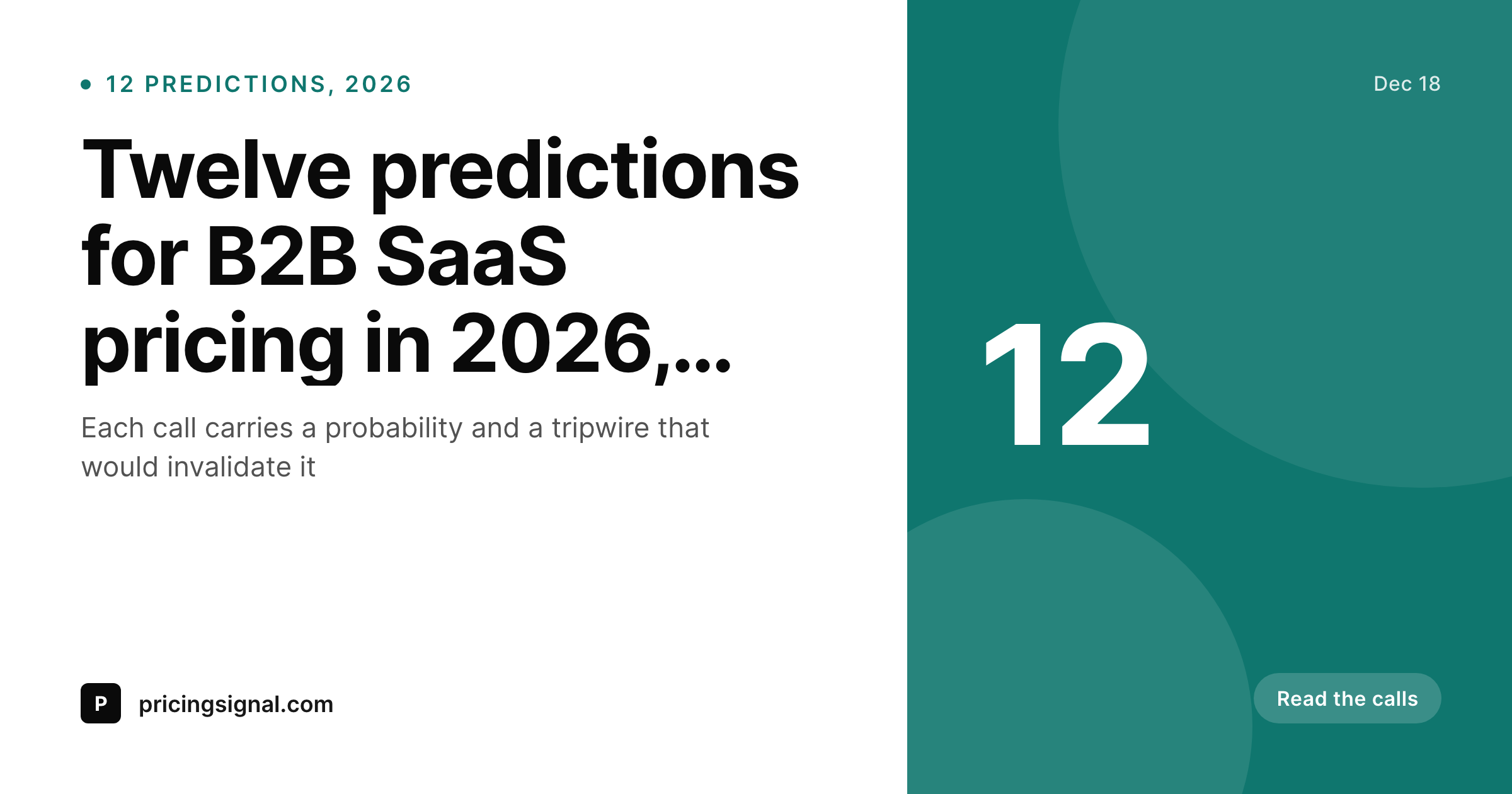
Predictions are public bets, the card sets the terms
Public predictions are not throwaway content. They are dated bets, and dated bets get re-read when the date arrives. A prediction post that ships in December gets cited the following December when someone wants to grade the call. The OG card on that prediction is the first thing the reader sees, and ideally it carries the structure of the bet: the prediction number, the probability the author assigned, the topic, and the date the call was made.
Most prediction posts ship without that structure on the card. The OG image is a generic gradient with the post title, no probability visible, no card number, no date band. Six months later the reader has to open the post to remember what the call even was. The card under-delivers on a piece of content that should be the most cite-worthy thing the publication ships all year.
SleekPixel ties the card to the prediction record. Call number, probability percentage, topic tag, and publish quarter come from custom fields. The template renders on save, the image goes to og:image, and the prediction becomes a tracked artifact, not just a paragraph.
Workflow
From a numbered call to a tracked card
Design the prediction template
Add the prediction fields
Publish the call
Grade it later
Output
How a prediction card composes
An OG card with the call number, probability, topic tag, and date stamp, all drawn from the prediction post fields.
Comparison
Default prediction cards image vs SleekPixel
Default prediction cards image
- Generic header image with no probability or call number visible
- Dates are not stamped, so old predictions lose context fast
- Topic tags live in the post body and never make it onto the share
- Long prediction titles get clipped and the headline number disappears
- Designer has to revisit every card when the brand refresh ships
SleekPixel
- Call number and probability render straight from custom fields
- Topic and quarter badges stay consistent across the prediction set
- Auto-fit type keeps long headlines inside the bounding box
- Bulk regenerate refreshes every prediction after a brand update
- Card and post share one source of truth, so citations stay accurate
Features
What SleekPixel gives you for prediction cards
Probability on the card
The percentage you assigned to the call lives on the image, not just in the body. Readers see the confidence level before they click, and the citation stays honest months later.
Topic tag band
A small tag for the prediction's topic (pricing, hiring, product, regulation) renders as a colored chip. The set of predictions becomes visually filterable on a feed.
Quarter stamp
Predictions are dated bets. The card carries the quarter and year, so a year-later reader knows what window the call was made in without opening the post.
Use cases
Prediction formats this card supports
Annual prediction sets
A December post with twelve numbered calls for the year ahead. Each call gets its own card, all sharing the same template and the same end-of-year date stamp.
Single-call predictions
One-off posts with a single dated bet on a market event. The card emphasises the probability and the topic, so the call reads as a standalone artifact.
Mid-year updates
A revisit post that checks an earlier prediction against new evidence. The original card and the update card share the same call number and stay visually linked.
The bigger picture
Why a prediction card outlives the post
Predictions are one of the few content formats that gain weight with time. A take published in December lives or dies on what happens by the following December. The author that grades their own predictions a year later builds enormous credibility, because most authors quietly hope their old calls disappear.
The card on the original post is the receipt. It needs to carry the call number, the probability, and the date in a way that a year-later reader can grade in one screenshot. A generic OG card with just the post title forces the reader to open the post, scroll, and reconstruct the bet, which most readers will not do.
A structured card with the probability and date visible is a citable artifact. Analysts paste it into LinkedIn posts when grading the year. Newsletters embed it in retrospectives.
Other journalists screenshot it. The card stops being decorative and starts doing the work the post was always trying to do: making the prediction count as a public bet.
Questions
Common questions about SleekPixel for prediction cards
Yes. Add a probability field on the prediction post type as a number or text field. The template renders the value directly, so a 70% call and a 35% call carry different markers without any manual design work.
Add a call number field. Predictions one through twelve in an annual set all share the template, but each renders with its own number. The reader sees call 07 of 12 at a glance without opening the post.
Yes. Map a topic taxonomy or custom field to a chip layer with per-topic colors. Pricing, hiring, regulation, and product predictions all become visually distinct on the same template.
Yes. Edit the probability field and save the post. SleekPixel re-renders the card so the latest value lives on the image. Older cached versions get replaced on the next request.
Yes. The admin offers a one-click bulk regenerate that re-renders every card in the prediction post type. Useful after a brand update or a layout change.
Create a separate post that links to the original prediction. You can reuse the same template with a grading flag so the card carries a result badge alongside the original probability.
Yes. The card sits in /uploads with a stable URL. Analysts can hotlink or screenshot, and the image itself carries the call number, probability, and date so the citation stands on its own.
Yes. There is no cap on the count. A set of fifty calls renders fifty cards, each with its own number. The template handles any integer in the call-number field.
Pricing
More than 1000+
happy customers
Explore our flexible licensing options tailored to your needs. Upgrade your license anytime to access more features, or opt for a lifetime license for ongoing value, including lifetime updates and lifetime support. Our hassle-free upgrade process ensures that our platform can grow with you, starting from whichever plan you choose.
Lifetime ♾️
Most popular
EUR
once
- Unlimited websites
- Lifetime updates
- Lifetime support
...or get the Bundle Deal
and save €250 🎁
💎 Want everything forever? The All Access Pass is going away on 01.08.2026.
The Bundle (unlimited sites)
Pay once, own it forever
Elevate your WordPress site with our exclusive plugin bundle that includes all of our premium plugins in one package. Enjoy lifetime updates and lifetime support. Save significantly compared to buying plugins individually.
What’s included
-
SleekAI
-
SleekByte
-
SleekMotion
-
SleekPixel
-
SleekRank
-
SleekView
€749
Continue to checkoutBrowse more
- Twitter card images
- Twitch panel images
- YouTube banner art
- Mailchimp email banner
- Discord server icon
- KDP hardcover cover
- Threads social images
- Twitch overlay
- Twitch camera frame
- Twitter header banners
- Patreon post thumbnails
- Behance banner
- Facebook post images
- Twitch offline banners
- YouTube Shorts thumbnails