






SleekPixel for YouTube banner art
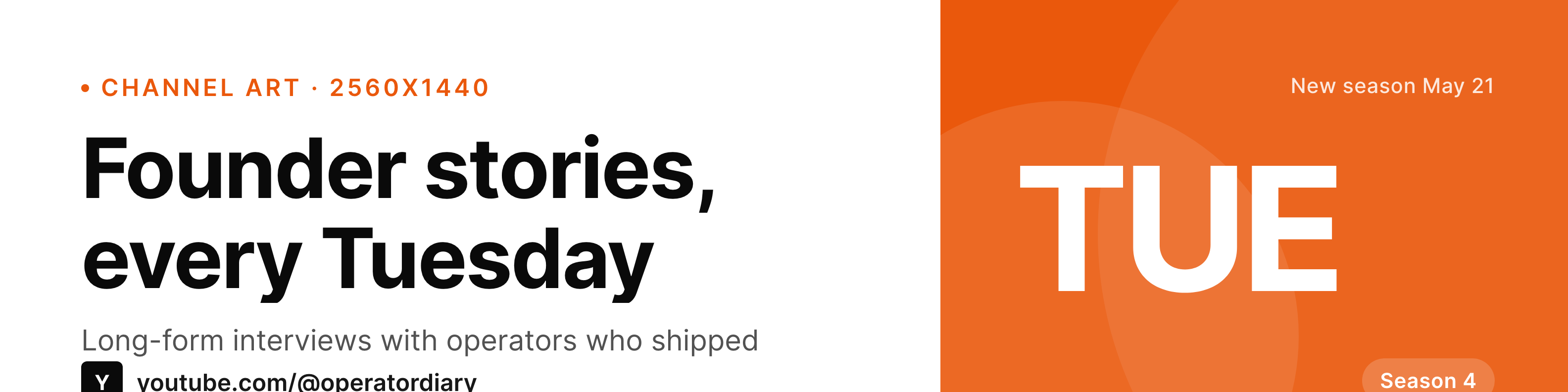
The 2560x1440 YouTube banner lives in a tight safe zone. SleekPixel renders it from a WordPress channel post, with the season, the schedule, and the tagline laid out so TV, desktop, and mobile crops all read.
♾️ Lifetime License available
Channel art is the only banner YouTube viewers actually look at
YouTube banner art has the worst safe-zone math of any social header. The full 2560x1440 image shows only on TV, desktop sees a wider crop, mobile sees a narrow strip in the middle. Channels that get the safe zones wrong end up with a banner where the schedule is cropped off on mobile, or the tagline gets cut at desktop width.
SleekPixel renders the banner from a WordPress channel post that owns the season number, the upload schedule, the tagline, and the show mark. The template places those fields inside the mobile safe zone first, then extends artwork into the desktop and TV crops.
When the season changes, the schedule shifts, or the channel takes a hiatus, updating the WordPress post regenerates the banner. The PNG goes back to YouTube Studio. The channel art tracks the channel state instead of going stale.
Workflow
From channel brief to banner art
Create a channel post in WordPress
Map the banner template
Save the post
Upload to YouTube Studio
Output
Sample YouTube banner art
2560x1440 PNG with tagline, schedule, and season number inside the mobile safe zone, extended artwork at desktop and TV crops.
Comparison
Default channel art vs SleekPixel
Static designer banner
- Channel art stays the same for months because updating it means a designer
- Safe zones get re-learned each time and breaks happen on mobile crop
- Schedule on the banner drifts from the actual upload cadence
- Season number rarely matches the current series
- No connection between the website's hero and the YouTube banner
SleekPixel
- 2560x1440 with mobile, desktop, and TV safe zones respected
- Reads season, schedule, tagline from a channel post
- Same source feeds the website hero and the email header
- Updating the post regenerates the banner
- Brand refresh hits the channel banner with one save
Features
What SleekPixel gives you for YouTube banner art
Mobile safe zone first
Critical text lands inside the 1546x423 mobile-visible region. Desktop and TV crops are extensions of the same composition.
Schedule and season live
Upload day and season number are fields on the channel post. Changing the schedule re-renders the banner.
Shared source with the site
The same channel post can drive the website hero, the email header, and the press kit. One brand state, every surface.
Use cases
Channels using SleekPixel for banner art
Season-based shows
Shows that ship in seasons. Season 4 launches, the banner art updates without a designer session, the channel page reads as current.
Multi-host channels
Channels with rotating hosts. The host slot on the banner changes per season, the rest of the layout holds.
Networks with multiple channels
Media networks running several YouTube channels. The template applies per channel with consistent network branding.
The bigger picture
Why channel art needs to track the channel state
Channel art is the only banner viewers see on a channel page, and the page is what new subscribers land on after a recommended video. A banner that says Season 2 when Season 4 is shipping signals that the channel is dormant, even if the upload cadence is healthy. The cost of updating channel art manually is high enough that most channels leave it alone for a year.
Treating the banner as a render of channel state, not a static design, removes that cost. The channel post in WordPress is the source, the PNG is an output, the banner stays current because the data did.
Questions
Common questions about SleekPixel for YouTube banner art
No. SleekPixel renders the PNG. The channel manager uploads it in YouTube Studio under Channel customization. A separate YouTube API integration could automate the upload.
The template extends artwork into the full 2560x1440 frame. TV viewers see the extended composition, mobile and desktop viewers see the safe-zone version.
YouTube's channel trailer is a separate feature, set in YouTube Studio. The banner can include a small mark pointing to the trailer, but the link itself is configured on YouTube.
Update the schedule field on the WordPress channel post. SleekPixel re-renders the banner. The channel manager re-uploads to YouTube Studio.
Yes. The template is reusable. Each channel post binds its own data, the layout and type system stay the same.
Yes. YouTube Music channel art uses the same 2560x1440 spec. The template renders fine, music-specific fields like genre and label can be added to the post.
Yes. Each banner render lands in WordPress media. Older versions stay attached to past channel-post revisions, so previous seasons can be re-uploaded if needed.
The template handles single-host channels. The face slot dominates, the schedule and tagline sit in support roles. No need for the host slot to be empty.
Pricing
More than 1000+
happy customers
Explore our flexible licensing options tailored to your needs. Upgrade your license anytime to access more features, or opt for a lifetime license for ongoing value, including lifetime updates and lifetime support. Our hassle-free upgrade process ensures that our platform can grow with you, starting from whichever plan you choose.
Lifetime ♾️
Most popular
EUR
once
- Unlimited websites
- Lifetime updates
- Lifetime support
...or get the Bundle Deal
and save €250 🎁
💎 Want everything forever? The All Access Pass is going away on 01.08.2026.
The Bundle (unlimited sites)
Pay once, own it forever
Elevate your WordPress site with our exclusive plugin bundle that includes all of our premium plugins in one package. Enjoy lifetime updates and lifetime support. Save significantly compared to buying plugins individually.
What’s included
-
SleekAI
-
SleekByte
-
SleekMotion
-
SleekPixel
-
SleekRank
-
SleekView
€749
Continue to checkoutBrowse more
- Snapchat Discover tiles
- Twitch overlay
- Twitch starting soon screen
- Facebook ad images
- YouTube Shorts covers
- Mastodon link previews
- LinkedIn newsletter headers
- Twitter/X header
- VK community cover photos
- X ad images
- Slack channel headers
- X list banners
- YouTube playlist covers
- Odnoklassniki banners
- Depop listing images