






SleekPixel for salary report cards
Every salary report in WordPress renders a card with the region, the role band, the headline figure and the sample size baked in. The card communicates the survey's structure before the reader clicks through to the data.
♾️ Lifetime License available
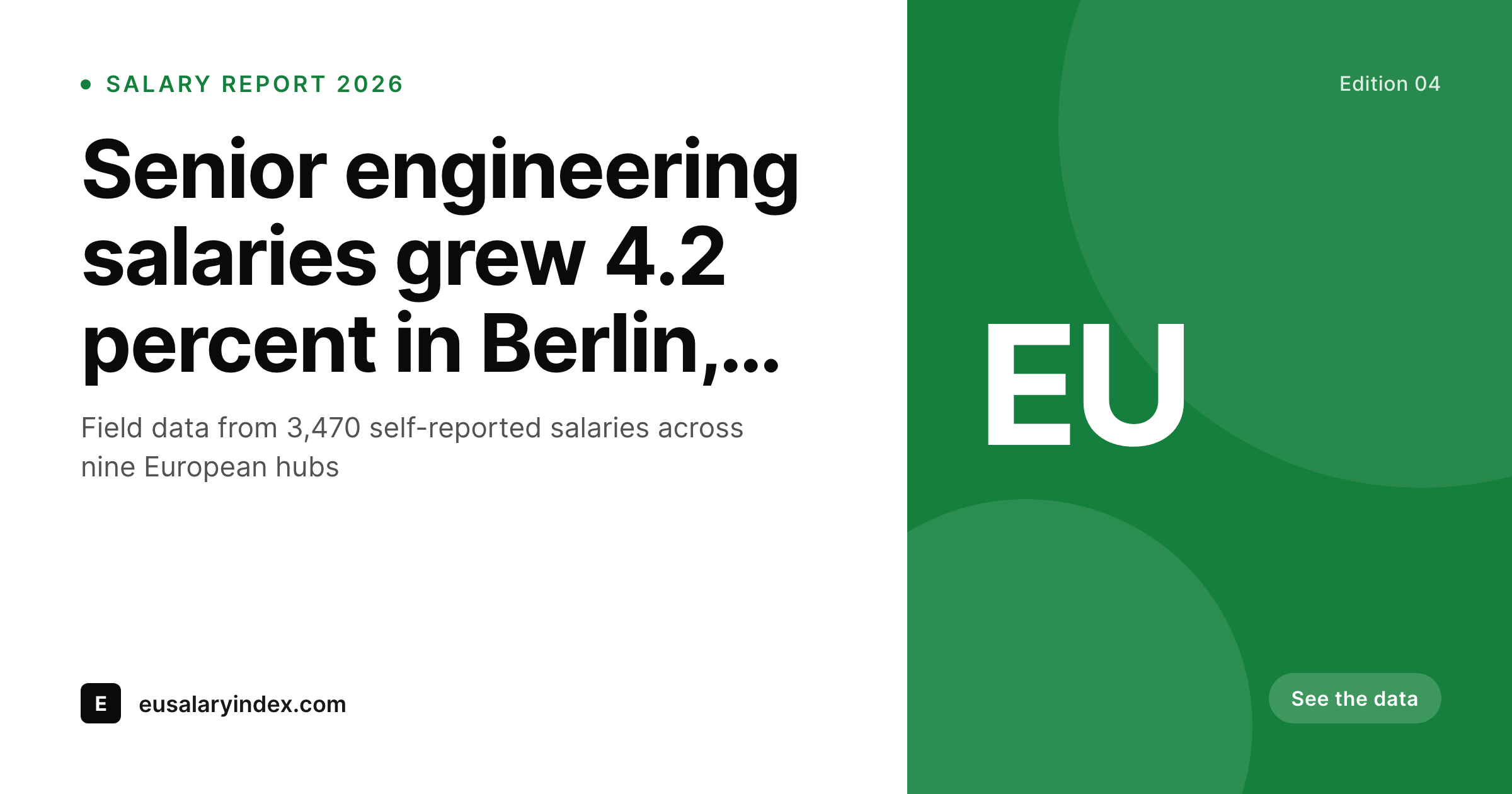
Salary reports get screenshot more than they get read
Salary reports are some of the most-shared posts a publication ships. Engineers paste the card into Slack to argue for a raise, recruiters drop it into outreach to anchor an offer, founders share it in board updates to justify a hiring budget. The card travels further than the post itself, which means the card has to carry the report on its own. Region, role band, headline figure, and sample size all need to be on the image, not just in the body.
Most salary report posts ship with a generic OG gradient and the post title. The card travels and lands in Slack with no anchor for the figure, no region, no role context. The reader scrolls past, or worse, screenshots the title and misquotes the data downstream.
SleekPixel pulls the structure from the salary report record. Region, role band, headline figure, sample size, and edition come from custom fields. The template encodes the brand layout once, and every new edition renders with the markers in the right place. The card stops being decorative and becomes a portable artifact that survives the journey to Slack.
Workflow
From the salary data to a card the reader trusts
Encode the card layout
Register the fields
Publish the report
Generate per-region cards
Output
How a salary report card composes
An OG card with the region, the role band, the headline figure, and the sample size, all drawn from the salary report fields.
Comparison
Default salary report cards image vs SleekPixel
Default salary report cards image
- Region is missing from the card, the figure has no anchor
- Role band is unclear, readers assume the wrong seniority level
- Sample size is buried in the methodology page
- Headline figure is reformatted differently from card to card
- Brand refresh forces a manual rebuild of every edition
SleekPixel
- Region tag renders from a controlled vocabulary, not free text
- Role band chip carries seniority so the figure has context
- Sample size on the card so the card travels honestly
- Headline figure formats consistently across editions
- Bulk regenerate refreshes editions after a brand update
Features
What SleekPixel gives you for salary report cards
Region tag
City, country, or region tags render from a controlled vocabulary. The card carries the geographic context so the figure does not get misquoted downstream.
Role band chip
Junior, mid, senior, and staff bands render with per-band colors. Readers see the seniority alongside the figure on the card, not just in the body.
Sample size marker
Respondent count travels on the card so a 3,470-salary edition and a 14,200-salary edition carry the right credibility signal.
Use cases
Salary report formats this card supports
Regional salary reports
A regional or country-level salary survey. The region tag leads, the role bands carry the figures across seniority levels.
Role-specific reports
A salary report focused on one role (e.g. senior engineer, product designer). The role chip leads the card with the headline figure beside it.
Annual compensation studies
A full annual study with multiple regions and bands. Each region or band renders its own card, all sharing the same template and the same edition stamp.
The bigger picture
Why salary cards travel further than the post
Salary reports are screenshot artifacts. The post is the canonical record, but the card is what circulates. It lands in private Slack channels where engineers argue for raises, in recruiter sequences where the figure anchors an offer, in hiring committee threads where the band sets a budget.
The reader of the card rarely opens the source post. They take the screenshot, paste it into a thread, and the next reader sees only the image. If the image carries the region, the role band, and the sample size, the figure stays honest as it travels.
If the image carries only the post title and a generic gradient, the figure gets misquoted and misapplied within hours. The publication that ships salary data has a responsibility to make the card carry the context, because the card is the artifact most people will encounter. SleekPixel keeps the card aligned with the report record, so the screenshot in Slack three months from now still reads exactly what the report said: region, band, figure, sample size, edition.
The reputation of the program rests on that detail.
Questions
Common questions about SleekPixel for salary report cards
Either. The template handles a single figure, a range, or a median with auto-fit type. A 95k figure and a 92k to 105k range both render cleanly in the same slot.
Add a currency field and the template renders the symbol or code beside the figure. EUR, USD, GBP, and INR reports all share one template with the right currency tag.
Yes. Register additional template variants for each cut. The report ships with one cover card plus one card per region or role, all rendered on save without manual export.
Yes. Sample size is a field on the post, and the template renders it as a marker. A 3,470-salary edition and a 14,200-salary edition carry the right credibility signal.
Yes. Map the seniority taxonomy to the band chip with per-band colors. Junior, mid, senior, and staff levels render distinctly across the archive.
Use template variants per region if you need a layout that differs (currency placement, label translation). Most programs share one template across regions for visual continuity.
Yes. The admin has a one-click bulk regenerate that re-renders every card in the salary report post type. Older editions pick up the new layout in one pass.
The PNG is high-resolution, so screenshots remain readable. The fields you put on the card (region, band, figure, sample size) stay legible at the sizes most readers paste into Slack.
Pricing
More than 1000+
happy customers
Explore our flexible licensing options tailored to your needs. Upgrade your license anytime to access more features, or opt for a lifetime license for ongoing value, including lifetime updates and lifetime support. Our hassle-free upgrade process ensures that our platform can grow with you, starting from whichever plan you choose.
Lifetime ♾️
Most popular
EUR
once
- Unlimited websites
- Lifetime updates
- Lifetime support
...or get the Bundle Deal
and save €250 🎁
💎 Want everything forever? The All Access Pass is going away on 01.08.2026.
The Bundle (unlimited sites)
Pay once, own it forever
Elevate your WordPress site with our exclusive plugin bundle that includes all of our premium plugins in one package. Enjoy lifetime updates and lifetime support. Save significantly compared to buying plugins individually.
What’s included
-
SleekAI
-
SleekByte
-
SleekMotion
-
SleekPixel
-
SleekRank
-
SleekView
€749
Continue to checkoutBrowse more
- Kick stream thumbnails
- LINE official account banners
- Vimeo thumbnails
- X community banners
- Lens Protocol posts
- Facebook event covers
- Gumroad product covers
- Pinterest board covers
- Instagram highlight covers
- Open Graph images
- Amazon A+ content images
- Twitch schedule banners
- YouTube ad thumbnails
- KDP paperback cover
- Instagram ad images