






SleekPixel for weekly recap cards
Publications running a weekly recap want the LinkedIn share to carry the week number, the story count, and the lead headline, not a recycled logo. SleekPixel renders one card per recap post in WordPress, generated from the post fields on save.
♾️ Lifetime License available
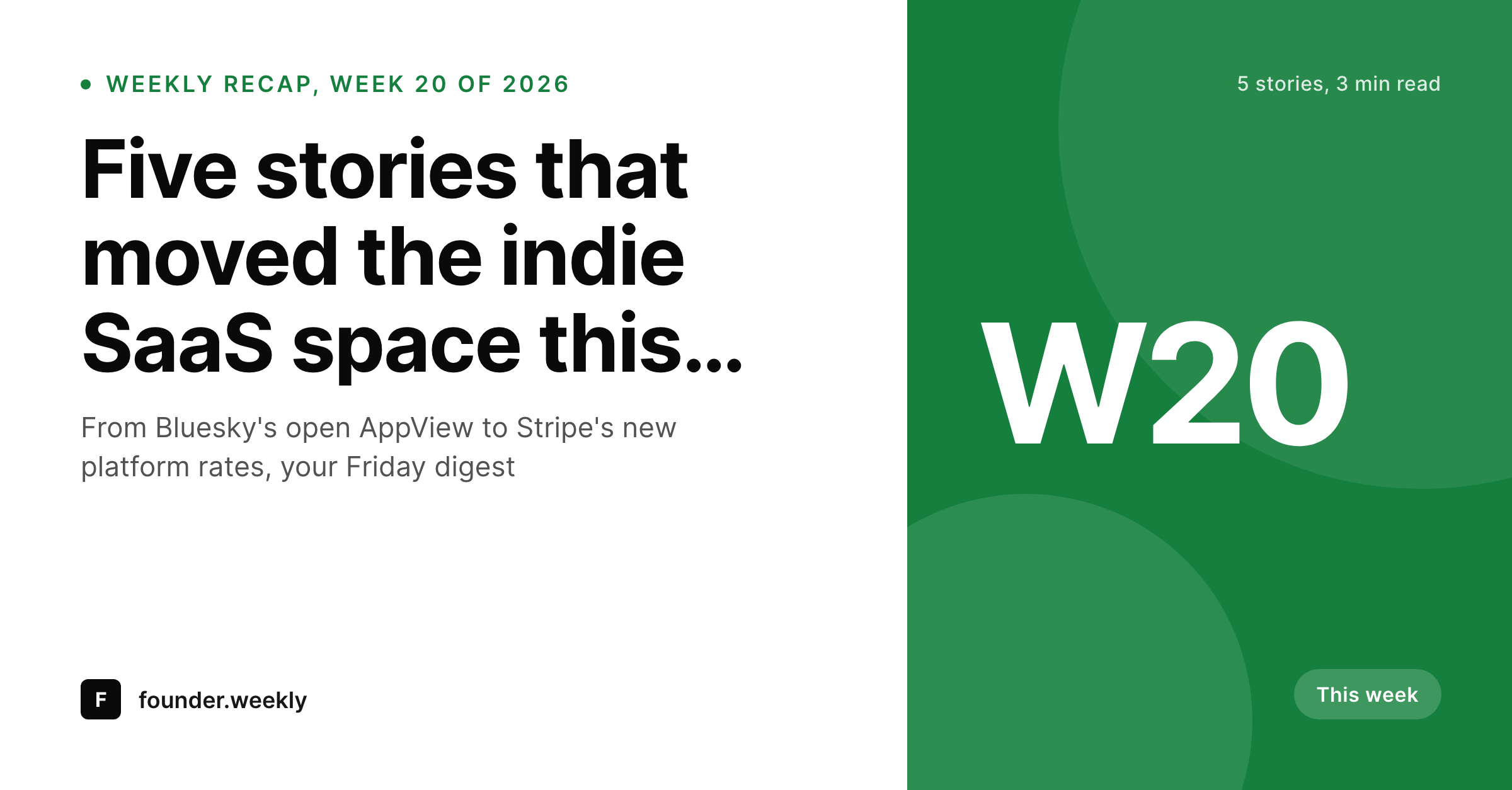
Recap posts are recurring, so the card has to be recurring too
Weekly recaps are a publishing format defined by repetition. The reader expects something every Friday or Monday, expects roughly the same shape, and over time develops a habit of looking for it. The share card is the visual anchor of that habit. When the recap shows up in LinkedIn with the week number clearly marked, the story count visible, and the lead headline readable in the preview, the reader recognizes the format and clicks. When the card is the generic publication logo, the recap reads as just another link.
The trap with weekly recaps is that they look easy to design. Editors build a Canva template, duplicate it each week, change the date, change the headline, export, upload. After six months the duplicated files are out of sync, the week numbering has skipped a week somewhere, and three different editors have made three different small tweaks that the team did not coordinate on. The recap card stops looking like the same series.
SleekPixel binds the recap card to the post. Week number from a meta field or post date, story count from a counted list or meta, lead headline from a custom field or the post title. The render fires on save and writes the 1200x627 LinkedIn-shaped card to uploads. Edit a headline after a fact-check, save, the card updates everywhere the URL gets re-scraped.
Workflow
From a week of stories to a recap card in one save
Design the recap template
Write the recap
Save and publish
Push the digest
Output
What a generated weekly recap card looks like
A 1200x627 LinkedIn-optimized card with the week number, the story count, the lead headline, and a short subhead pulled from the post fields.
Comparison
Default weekly recap image vs SleekPixel
Default weekly recap image
- Same publication logo on every weekly recap share
- Week number on the Canva file drifts from the published week
- Lead headline on the card goes stale after edits
- Multiple editors produce inconsistent recap treatments
- No regeneration path when a headline is corrected
SleekPixel
- Render fires on save for every weekly recap post
- Week number, story count, and lead headline pulled from post fields
- og:image and twitter:image meta tags written automatically
- LinkedIn-optimized 1200x627 aspect for the cleanest preview crop
- Bulk regenerate after a brand refresh or template tweak
Features
What SleekPixel gives you for weekly recap cards
Week number stays correct
Bind the week label to a meta field or compute it from the post date. The recap card always shows the week the reader expects, with no manual counter to maintain.
Story count visible
Render the number of stories or items as part of the card. Readers see the scope of the recap in the preview, which sets the right expectation before the click.
Headline edits propagate
Correct the lead headline after a fact-check, save the post, the card re-renders. LinkedIn, Slack, and newsletter previews pull the corrected card on the next request.
Use cases
Where weekly recap cards earn their keep
Industry newsletters
Weekly digests covering a vertical like SaaS, climate, or ecommerce. Each issue gets a card that signals the week and the lead story so subscribers and forwards both convert.
Community and association recaps
Membership organizations sending a weekly community digest. The card carries the week and headline so the recap reads as a structured publication on LinkedIn.
Product and engineering changelogs
Teams publishing a weekly changelog as a blog post want a consistent card per release. Same template, fresh week, no design queue between engineering and publish.
The bigger picture
Why a weekly digest needs a card that earns the weekly habit
Weekly recaps are one of the few publishing formats that compounds with consistency rather than with novelty. The reader is choosing to come back, week after week, because the format keeps the same shape. The card on LinkedIn is the visual signal of that shape.
When the recap arrives in the feed with the same layout, the same accent color, the same place for the week number and the story count, the reader recognizes the publication before they read the headline. Recognition becomes a click, and a click becomes a habit. Manual exports break this loop in two ways.
First, drift, where the card slowly stops looking like itself. Second, latency, where a Friday recap has to wait on a Thursday design pass. SleekPixel removes both by making the card a structural output of the post.
The editor writes the recap, saves, the card is there. The format keeps its shape because the template keeps its shape, and the habit compounds.
Questions
Common questions about SleekPixel for weekly recap cards
Yes. The template can pull ISO week from the published date, or read a manual override from a meta field. Holiday weeks and double issues can use the override.
Per-tag or per-category templates let the year-in-review render with a distinct layout while staying inside the same brand system as the weekly cards.
Yes. A grid of three small thumbnails can render in the card, pulled from related post featured images or a meta image array. Useful for visual recaps.
Yes. If the count is bound to a meta field, edit it on save and the card re-renders. If it is bound to a counted list of related posts, the count updates automatically.
Yes. Per-category accents let product, marketing, and engineering recaps render with distinct colors while keeping a consistent layout.
Auto-fit type shrinks long headlines and wraps to a second line if needed. The renderer enforces a minimum readable size to keep previews legible in the mobile feed.
Yes. The og:image is the standard tag that newsletter senders, Slack, LinkedIn, and Twitter all read. No special integration required on the sender side.
Yes. The bulk regenerate action runs across all posts in the recap category. An archive of 100 past recaps gets fresh, consistent cards in one pass.
Pricing
More than 1000+
happy customers
Explore our flexible licensing options tailored to your needs. Upgrade your license anytime to access more features, or opt for a lifetime license for ongoing value, including lifetime updates and lifetime support. Our hassle-free upgrade process ensures that our platform can grow with you, starting from whichever plan you choose.
Lifetime ♾️
Most popular
EUR
once
- Unlimited websites
- Lifetime updates
- Lifetime support
...or get the Bundle Deal
and save €250 🎁
💎 Want everything forever? The All Access Pass is going away on 01.08.2026.
The Bundle (unlimited sites)
Pay once, own it forever
Elevate your WordPress site with our exclusive plugin bundle that includes all of our premium plugins in one package. Enjoy lifetime updates and lifetime support. Save significantly compared to buying plugins individually.
What’s included
-
SleekAI
-
SleekByte
-
SleekMotion
-
SleekPixel
-
SleekRank
-
SleekView
€749
Continue to checkoutBrowse more
- TikTok cover images
- Odnoklassniki banners
- Threads story-style images
- LinkedIn document post covers
- YouTube Music cover art
- VSCO cover
- Snapchat ad images
- X community banners
- Warpcast frame images
- Rumble thumbnails
- X Space banners
- Instagram stories
- Mailchimp email headers
- Signal sticker pack
- Facebook Marketplace images