






SleekPixel for Google review cards
Local businesses sharing Google reviews want the share image to lead with the customer's words, framed in their own brand. SleekPixel renders one card per imported Google review in WordPress, built from the fields on save.
♾️ Lifetime License available
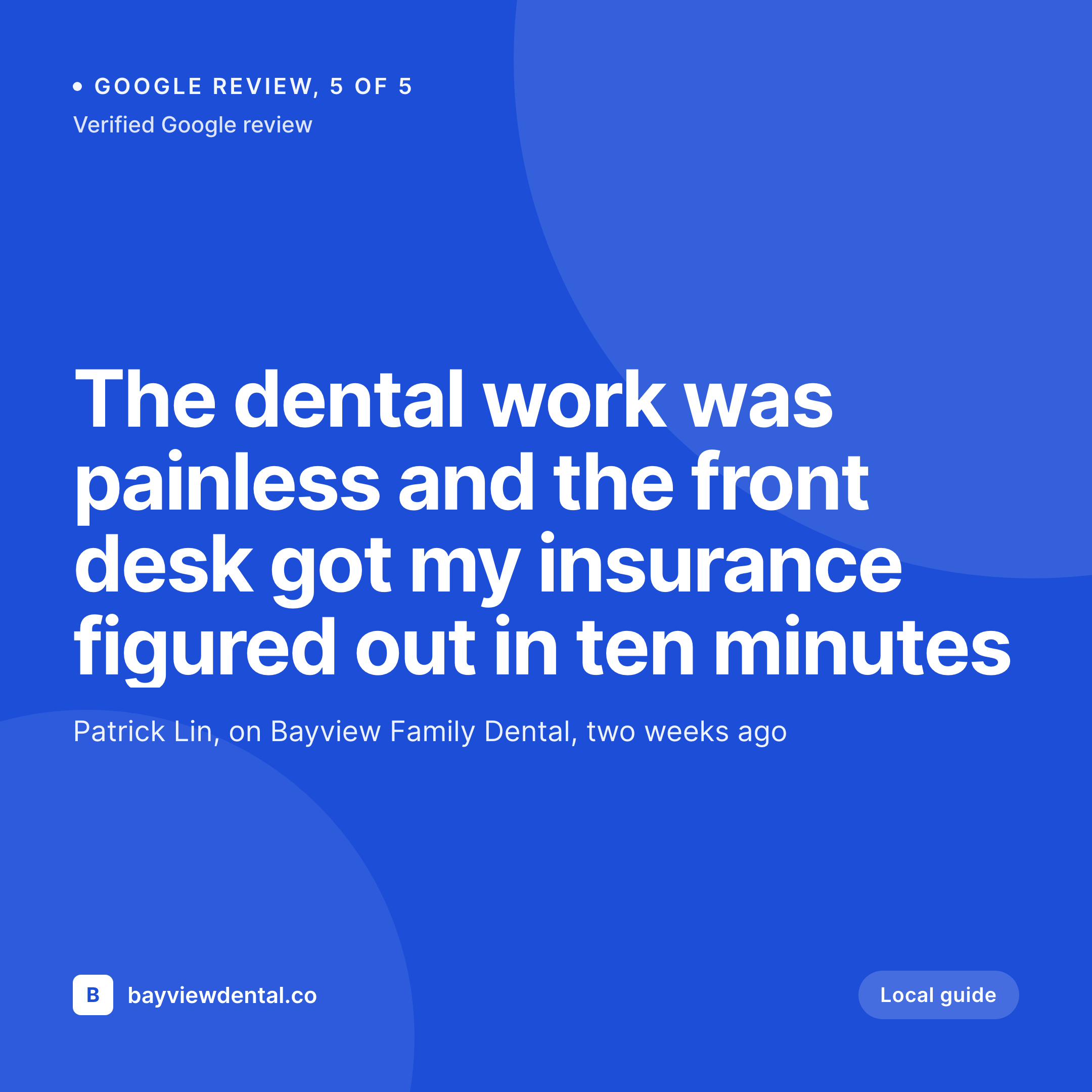
Local businesses live and die on Google reviews
For a local business, Google reviews are the marketing asset. They drive map pack rankings, they show up first on a search, and they carry more weight than almost any other channel. The reviews themselves are usually short, specific, and warm. The problem is that they live inside Google Maps, and any time the business wants to surface a review on Instagram, a newsletter, or the website itself, the asset is a screenshot of a Google card on a phone, with the brand of Google leading and the brand of the business as a postscript.
The fix is the same template path that works for any review source. Pull the review text into the website. Frame it with the business's typography and colors. Render a card per review at a size that fits Instagram, Facebook, or a website testimonial section. Keep a small Google mark as the source, with the link to the original review available for any visitor who wants verification. Build the template once, ship a fresh card every time a new review comes in.
SleekPixel binds the card to a review post that mirrors what Google's API or a paste from the dashboard provides. Review body, reviewer name, date, star rating, and source URL come from fields. The render fires on save, writes the PNG to uploads, and serves it as og:image. New review on Google Maps, paste into a review post, save, and the share asset is ready.
Workflow
From Google review to share card in one save
Import or paste the review
Design the review template
Save the review post
Post on Instagram or Facebook
Output
What a generated Google review card looks like
A 1080x1080 Instagram-ready card with the review body, the reviewer name, the date, the star rating, and a Google source mark.

Comparison
Google Maps screenshot vs SleekPixel
Google Maps screenshot
- Phone-screen screenshot puts Google's UI first, your brand last
- Aspect ratio never matches Instagram or Facebook share sizes
- Reviewer photo and date get cropped out of most screenshots
- Different phones produce different screenshot styles week to week
- No regeneration path when a review is updated or extended
SleekPixel
- Render fires on save for every imported Google review post
- Review body, reviewer, rating, and date pulled from fields
- Google source mark in a fixed corner slot, source URL preserved
- og:image and twitter:image meta tags written automatically
- New reviews each week ship as share cards without a design step
Features
What SleekPixel gives you for Google review cards
Local-business voice
The template carries the business's typography, colors, and small details that signal the place. A neighborhood cafe and a downtown clinic each render reviews in their own visual voice rather than in Google's generic one.
Location and date in the frame
The review date and an optional location line render in fixed slots. The card communicates not just what was said, but when and where, which is the context local reviews depend on.
Source mark, not source frame
A small Google G in the corner names the source without taking over the layout. Anyone who wants to verify the review can follow the link on the post page.
Use cases
Where Google review cards earn their keep
Local cafes, restaurants, and shops
Spots that lean on Google reviews for foot traffic. Each new five-star review turns into an Instagram-ready card without a Canva detour.
Local service providers
Dentists, vets, hairdressers, and clinics that publish reviews on their site to support booking pages. Templated cards keep the same brand frame across hundreds of reviews.
Home services and trades
Plumbers, electricians, landscapers, and movers. The card surfaces the specific job context that local reviews tend to mention, which is what new customers scan for.
The bigger picture
Why local businesses need a Google review card workflow
Local businesses run on word of mouth and Google reviews are the digital version of that. A review that shows up once on Google Maps will help map pack rankings, but a review that also shows up as a clean share card on Instagram, on the website, and in a follow-up text to a hesitant customer does several jobs at once. The bottleneck is design time.
Most local operators do not have a designer on staff and any workflow that takes more than two minutes per review will stop happening after the first week. Templated cards remove the bottleneck. The card renders on save, the visual stays consistent, and the brand owns the frame the review travels in.
Over a year of accumulated reviews, the visual continuity becomes part of the business's identity in a way that scattered Maps screenshots never can.
Questions
Common questions about SleekPixel for Google review cards
The Google Business Profile API exposes reviews to verified owners. A small importer or a Zapier flow can write each new review into a WordPress post automatically, then SleekPixel renders the card on save.
Update the body in the post and save. SleekPixel re-renders the card. The og:image overwrite means the next share scrape pulls the corrected version.
If you import the Google profile photo URL as a meta field, the template can render it in an avatar slot. Missing photos fall back to a monogram from the reviewer's name.
No. Sharing reviews off-platform with proper attribution is encouraged. The template keeps a Google source mark and the post page links to the original review for verification.
Yes. Each location can have its own review post type or a meta field that drives a per-location template. The same SleekPixel install can render reviews for an entire chain.
Optional. A second slot can render the business's reply underneath the review. Useful for cases where the response is part of the story you want to share.
Headless render on save, usually under a second. Bulk imports can fire a queued render so the import does not block.
Yes. The bulk regenerate action re-renders every review post under a chosen template. New brand, same reviews, refreshed cards in one pass.
Pricing
More than 1000+
happy customers
Explore our flexible licensing options tailored to your needs. Upgrade your license anytime to access more features, or opt for a lifetime license for ongoing value, including lifetime updates and lifetime support. Our hassle-free upgrade process ensures that our platform can grow with you, starting from whichever plan you choose.
Lifetime ♾️
Most popular
EUR
once
- Unlimited websites
- Lifetime updates
- Lifetime support
...or get the Bundle Deal
and save €250 🎁
💎 Want everything forever? The All Access Pass is going away on 01.08.2026.
The Bundle (unlimited sites)
Pay once, own it forever
Elevate your WordPress site with our exclusive plugin bundle that includes all of our premium plugins in one package. Enjoy lifetime updates and lifetime support. Save significantly compared to buying plugins individually.
What’s included
-
SleekAI
-
SleekByte
-
SleekMotion
-
SleekPixel
-
SleekRank
-
SleekView
€749
Continue to checkoutBrowse more
- acquisition announcement cards
- privacy update cards
- merger card
- year-end recap card
- SOC 2 announcement card
- indie hacker cards
- doors closing card
- data point card
- growth experiment card
- rating cards
- certification announcement cards
- flash sale banners
- holiday greeting cards
- founder story cards
- podcast clip cards
- Twitch panel images
- Facebook cover photos
- LinkedIn document post covers
- LINE official account banners
- Etsy shop banners
- Vimeo channel banners
- Ko-fi shop images
- Pinterest video pin covers
- Twitch overlay
- Klaviyo email headers
- Linktree banner image
- X social cards
- LinkedIn event banners
- kbin post images
- Shopify collection banners