






SleekPixel for rating cards
Shops and service sites need a clean way to share an aggregate rating, not just one quote. SleekPixel renders one card per rated item in WordPress, generated from the score and the count on save.
♾️ Lifetime License available
Aggregate ratings deserve their own card, not a sentence
An average rating is one of the strongest social signals a product page can carry, and almost no one designs for it. Most sites bury the number inside a comments block, or list it next to the buy button in a font small enough that a phone shopper has to zoom. When the rating travels off the page, into a newsletter, a launch post, or a comparison table, it usually arrives as a plain sentence: rated 4.8 out of 5 by over a thousand buyers, with no visual weight at all.
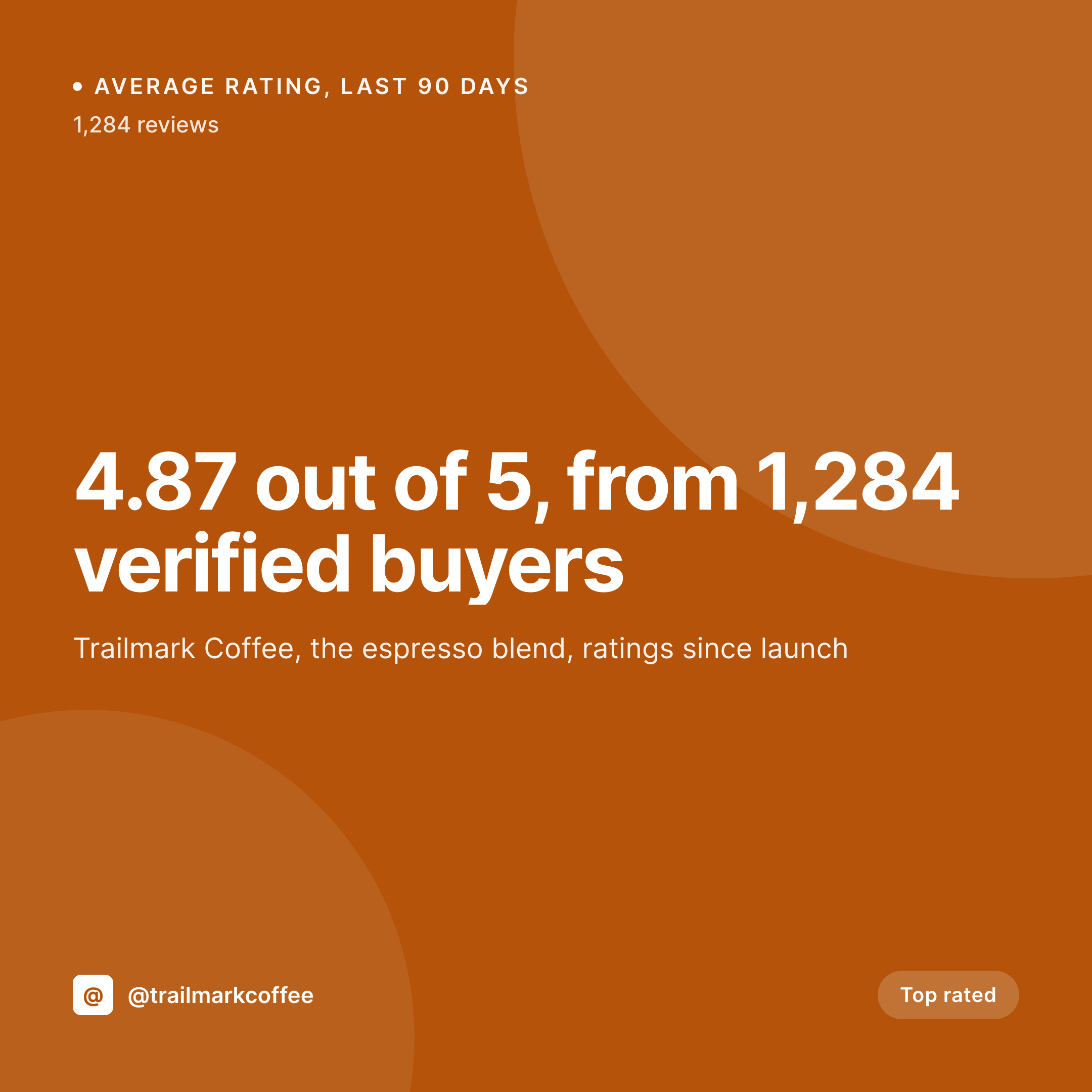
The fix is the same one publishers learned for quotes a decade ago. Give the number its own frame. A square card with the score in display size, the count next to it, the name of the rated item underneath, and a star bar that reads at thumbnail. Read in two seconds, share in one click. Build this in Canva and you keep it consistent for a week; build it as a template that binds to product fields and you keep it consistent forever.
SleekPixel ties the rating card to the rated post, whether that is a WooCommerce product, a service page, or a custom post type. Average score, review count, and item name come from fields. The render fires on save, writes the PNG to uploads, and serves it as og:image. Reviews come in, the average shifts, the card updates on the next save.
Workflow
From rating data to a share card in one save
Design the rating template
Connect the rating source
Save the post
Push the share
Output
What a generated rating card looks like
A 1080x1080 PNG with the average score in display size, the review count, and the rated item, all pulled from the product fields.

Comparison
Default rating image vs SleekPixel
Default rating image
- Average score appears only as a small line of body text
- Review count never travels with the score in shared images
- Manual Canva files drift in style across product categories
- Top-rated badges hard-coded into hero images go stale fast
- No regeneration path when the average score updates
SleekPixel
- Render fires on save for every rated product or service
- Average score and review count pulled from product fields
- og:image and twitter:image meta tags written automatically
- Star bar renders as a visual not a numeric string
- Score recalculation triggers a refreshed card on next save
Features
What SleekPixel gives you for rating cards
Score in display size
The average rating renders as the largest element on the card, which is the part that has to read at thumbnail size in a feed. The decimal value comes straight from the product meta.
Review count carries weight
A 4.8 from twelve reviewers reads very differently than a 4.8 from a thousand. The template surfaces the count next to the score so the social proof has the right shape.
Top-rated badge by rule
An optional badge flips on when the average crosses a threshold and the count clears a minimum. The rule lives in the template config so the badge never needs manual toggling.
Use cases
Where rating cards earn their keep
Shops with verified review programs
Stores running a verified review system on their products. Each product page carries a rating card that updates as the reviews accumulate, useful for newsletter sends and launch posts.
Courses and digital products
Online courses, ebooks, and templates with student or buyer ratings. The aggregate score becomes its own piece of marketing copy that fits in a single share.
Service providers and agencies
Agencies and freelancers running a client rating system. The rolling average across projects becomes a share card that anchors a portfolio or a sales page.
The bigger picture
Why aggregate ratings deserve a dedicated share asset
An aggregate rating is the cheapest, most durable piece of social proof a product page has, and it is almost always presented in a way that wastes it. The number sits in a font size that a shopper has to zoom to read on a phone, the count is buried in a parenthesis, and the whole signal collapses into a single line of body text. A dedicated card flips the hierarchy.
The score becomes the dominant visual, the count gets the second-strongest treatment, and the rated item is named on the same canvas. The result is a share asset that does its job in a feed, in an email, and in a comparison table, without forcing the viewer to click through to find the proof. Templates make this consistent across hundreds of products without paying a designer per item, which is the only way to keep the practice in place once the catalog grows.
Questions
Common questions about SleekPixel for rating cards
Wherever your review system writes it. SleekPixel reads from any meta key, including the standard WooCommerce average rating, custom rating plugins, or a manually maintained meta field.
The card re-renders on save. If your review system updates the average meta on each new review and triggers a save, the card refreshes automatically. Otherwise, a daily scheduled regenerate covers the same ground.
Yes. The template can render both, with the numeric score in display size and the star bar in a smaller slot underneath. The star renderer accepts decimal values like 4.7.
Set a minimum count rule in the template. Below the threshold, the badge slot can show "Newly listed" instead of a score, or the template can render a fallback layout that skips the score entirely.
Yes. The post type is configurable. Any post or custom post type with rating meta can render a rating card, including service pages, portfolios, and course listings.
Rich results in search come from JSON-LD schema, not from og:image. SleekPixel handles the share image, your SEO plugin handles the schema. They complement each other rather than overlap.
Headless render on save, usually under a second. The save returns immediately and the PNG lands in uploads in the background. Page loads are not affected.
Yes. The bulk regenerate action in the admin re-renders every post under a chosen template. Useful after a brand refresh or when you change the score threshold for the top-rated badge.
Pricing
More than 1000+
happy customers
Explore our flexible licensing options tailored to your needs. Upgrade your license anytime to access more features, or opt for a lifetime license for ongoing value, including lifetime updates and lifetime support. Our hassle-free upgrade process ensures that our platform can grow with you, starting from whichever plan you choose.
Lifetime ♾️
Most popular
EUR
once
- Unlimited websites
- Lifetime updates
- Lifetime support
...or get the Bundle Deal
and save €250 🎁
💎 Want everything forever? The All Access Pass is going away on 01.08.2026.
The Bundle (unlimited sites)
Pay once, own it forever
Elevate your WordPress site with our exclusive plugin bundle that includes all of our premium plugins in one package. Enjoy lifetime updates and lifetime support. Save significantly compared to buying plugins individually.
What’s included
-
SleekAI
-
SleekByte
-
SleekMotion
-
SleekPixel
-
SleekRank
-
SleekView
€749
Continue to checkoutBrowse more
- checklist download card
- feature comparison cards
- good vs bad cards
- loyalty program cards
- release roadmap card
- pitch deck card
- do vs don't cards
- lifetime deal card
- conference recap card
- statistic cards
- case study quote cards
- customer spotlight cards
- sustainability report card
- longform article card
- feature launch images
- Amazon A+ content images
- LINE official account banners
- Weibo post images
- YouTube thumbnails
- Lemmy post images
- Ghost feature images
- Pinterest product pin covers
- YouTube end screens
- Linktree banner image
- Threads post images
- Beacons.ai banner
- Bluesky feed banner
- Threads profile banners
- Kindle book cover
- YouTube playlist covers