






SleekPixel for Scrivener projects
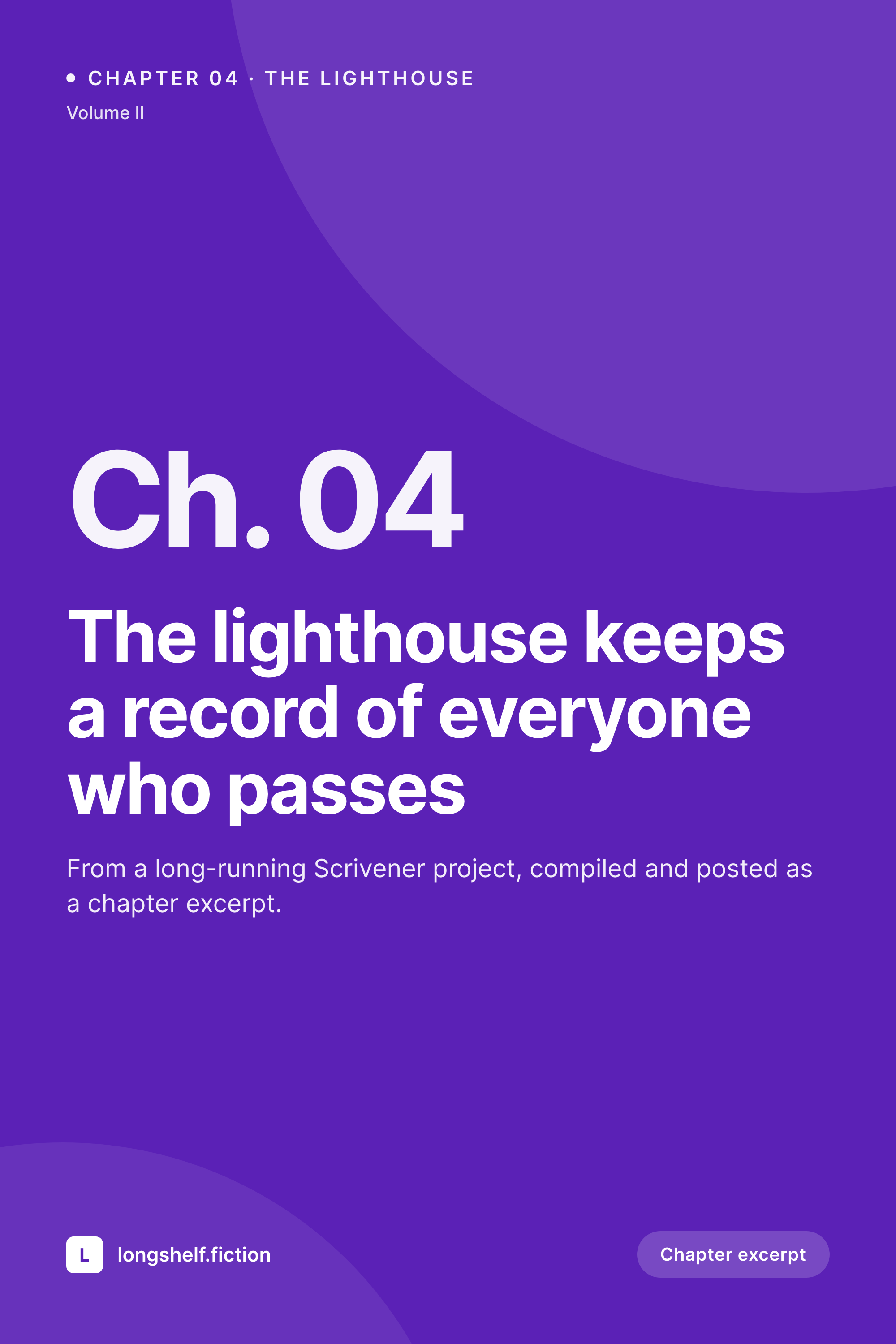
Writers running a Scrivener project for a novel or serialised fiction can publish chapter excerpts to WordPress and get a per-chapter Pinterest pin or OG card automatically, with the chapter number and volume visible on the unfurl.
♾️ Lifetime License available
Long projects need a public face that matches the structure
Scrivener is the long-form tool of choice for novelists, screenwriters, and academic writers, because it treats the project as the unit. Chapters, scenes, research notes, character bibles, and the manuscript itself all live inside a single Scrivener project, and the writer can compile a selection out to whatever output format the public destination needs. For writers who publish chapter excerpts to a WordPress site, the compile step typically produces a Markdown or HTML chapter that becomes a post.
The share image side is rarely solved at compile time. Scrivener cares about words, not pixels, and rightly so. The post lands in WordPress with the right title and body, but the share preview is missing or generic. SleekPixel addresses the missing piece on the WordPress side. When the chapter post saves, it reads the chapter number, the volume taxonomy, the project name, and renders a vertical Pinterest pin or a horizontal OG card depending on the template. The chapter number anchors the corner, the project name forms the brand mark, and the chapter title sits as the main composition.
For serialised fiction, the Pinterest pin format is often more useful than a flat OG card. Fiction readers save chapters to boards, build reading lists from them, and the vertical pin makes the chapter discoverable on Pinterest in a way no horizontal share card can. SleekPixel renders both per post, so the OG meta tag points at the horizontal card for Twitter and LinkedIn, while the Pinterest Save button picks up the vertical pin separately. Two assets, one save, no design tool in the loop.
Workflow
From Scrivener compile to share-ready chapter
Compile in Scrivener
Publish to WordPress
SleekPixel renders both assets
Pin and share
Output
What gets generated per Scrivener chapter post
A 1000 by 1500 vertical Pinterest pin with the chapter title, chapter number, volume, and project name. An optional horizontal OG card renders at the same time for non-Pinterest platforms.
Comparison
Compiled chapter alone versus SleekPixel
Scrivener compile + WordPress default
- Scrivener compile produces clean text but no share image
- Chapter posts unfurl with a generic theme image, breaking the project's visual identity
- Pinterest is the dominant referrer for fiction blogs and pins have to be made manually in Canva
- Chapter number and volume from Scrivener never appear on the unfurled link
- A 60-chapter archive means 60 manual exports if the writer wants consistent share artwork
SleekPixel
- Pinterest-shaped 1000 by 1500 pin renders on save from chapter post meta
- Chapter number, volume, and project name surface on the pin automatically
- Optional horizontal OG card renders in the same save for Twitter and LinkedIn unfurls
- Bulk regenerate covers an entire chapter archive after a cover refresh
- No Scrivener plugin needed, the rendering happens entirely on the WordPress side
Features
What SleekPixel gives you for Scrivener projects
Chapter-aware
Chapter number, volume, and project name flow into the template from WordPress post meta. The pin tells readers exactly where the excerpt sits inside the project.
Pinterest-ready
Vertical 1000 by 1500 composition with the title in the top third where Pinterest's mobile feed does not crop, and the chapter mark anchored bottom-right.
Two cards per save
Pinterest pin and OG card render in the same save. Fiction readers on Pinterest see the pin, Twitter and LinkedIn unfurls see the horizontal card.
Use cases
Where serialised writers gain ground
Serialised novels
Writers releasing one chapter at a time over months get a per-chapter share asset that respects the chapter number, the volume, and the project's identity, without leaving Scrivener.
Episodic short fiction
Anthology sites publishing themed shorts each season get a per-season visual signature on the share cards, with the season as the volume.
Academic project blogs
Long thesis or research projects compiled chapter-by-chapter to a WordPress companion site get clean share previews tied to the project, helpful for cohort and supervisor sharing.
The bigger picture
Why serialised fiction needs visible structure on share cards
A chapter pulled out of a long project loses context the moment it crosses into a public timeline. Readers seeing a single chapter excerpt on Pinterest or Twitter cannot tell if it is part of a series, what volume it sits in, or how it relates to anything else the writer has published. Without that context, the post reads as an isolated piece of writing, which is rarely what a serialised writer wants.
The first reason chapter-aware share artwork matters is that it lets the reader place the excerpt inside a larger structure. The second is that it builds a body of work in feeds dense with everything else. Sixty chapters published with sixty consistently composed share cards reads as a serious project, while sixty chapters published with sixty inconsistent share previews reads as scattered output.
Scrivener keeps doing what it does best, project management for long-form writing, and SleekPixel handles the share artwork on the public side, with chapter number and volume always visible. No design tool joins the publishing path.
Questions
Common questions about SleekPixel for Scrivener projects
No. SleekPixel only runs inside WordPress. Whatever path you use to get Scrivener chapters into WordPress is unchanged, and the rendering kicks in when the WordPress post saves.
Yes, as long as the chapter number lives in post meta or a custom field. SleekPixel reads any meta key by name and can place the value in the template corner.
Most serialised setups store volume as a custom taxonomy. SleekPixel reads taxonomy terms and renders them on the card. Volume II, Season 3, Anthology IV all work the same way.
Yes. SleekPixel supports any combination of templates per post type. Fiction sites that only care about Pinterest can run a single vertical template and skip the horizontal OG render.
Yes. The platform Scrivener runs on does not matter. Once a chapter lands as a WordPress post, the rendering happens entirely server-side on the WordPress host.
Every WordPress save regenerates both cards. Fix a typo in the chapter title or update the volume number, and the pin and OG card rebuild with the new values.
If those fields cross over into WordPress post meta during compile, yes. Most writers prefer to keep the share card composed from chapter-level fields rather than character-level detail, but the template can show whatever meta you map.
Yes. The WP-CLI bulk regenerate command iterates every post in a chosen category or taxonomy and renders fresh cards. A 60-chapter project rebuilds in a few minutes after a cover refresh.
Pricing
More than 1000+
happy customers
Explore our flexible licensing options tailored to your needs. Upgrade your license anytime to access more features, or opt for a lifetime license for ongoing value, including lifetime updates and lifetime support. Our hassle-free upgrade process ensures that our platform can grow with you, starting from whichever plan you choose.
Lifetime ♾️
Most popular
EUR
once
- Unlimited websites
- Lifetime updates
- Lifetime support
...or get the Bundle Deal
and save €250 🎁
💎 Want everything forever? The All Access Pass is going away on 01.08.2026.
The Bundle (unlimited sites)
Pay once, own it forever
Elevate your WordPress site with our exclusive plugin bundle that includes all of our premium plugins in one package. Enjoy lifetime updates and lifetime support. Save significantly compared to buying plugins individually.
What’s included
-
SleekAI
-
SleekByte
-
SleekMotion
-
SleekPixel
-
SleekRank
-
SleekView
€749
Continue to checkoutBrowse more
- Gumroad product covers
- SoundCloud track art
- Fanvue page banner
- Twitch alert
- Mailchimp email headers
- Twitch overlay
- Slack channel headers
- Klaviyo email banner
- Facebook Marketplace images
- Mastodon profile banners
- Twitch profile banner
- Lemon8 post
- Bandcamp release cover
- YouTube playlist covers
- Telegram bot avatar