






SleekPixel for Simply Schedule Appointments
Simply Schedule Appointments is a clean WordPress scheduling plugin used by B2B agencies, consultants and SaaS teams. SleekPixel renders a 1200 by 627 LinkedIn card per appointment type, so discovery-call links shared on LinkedIn arrive looking like a real offer.
♾️ Lifetime License available
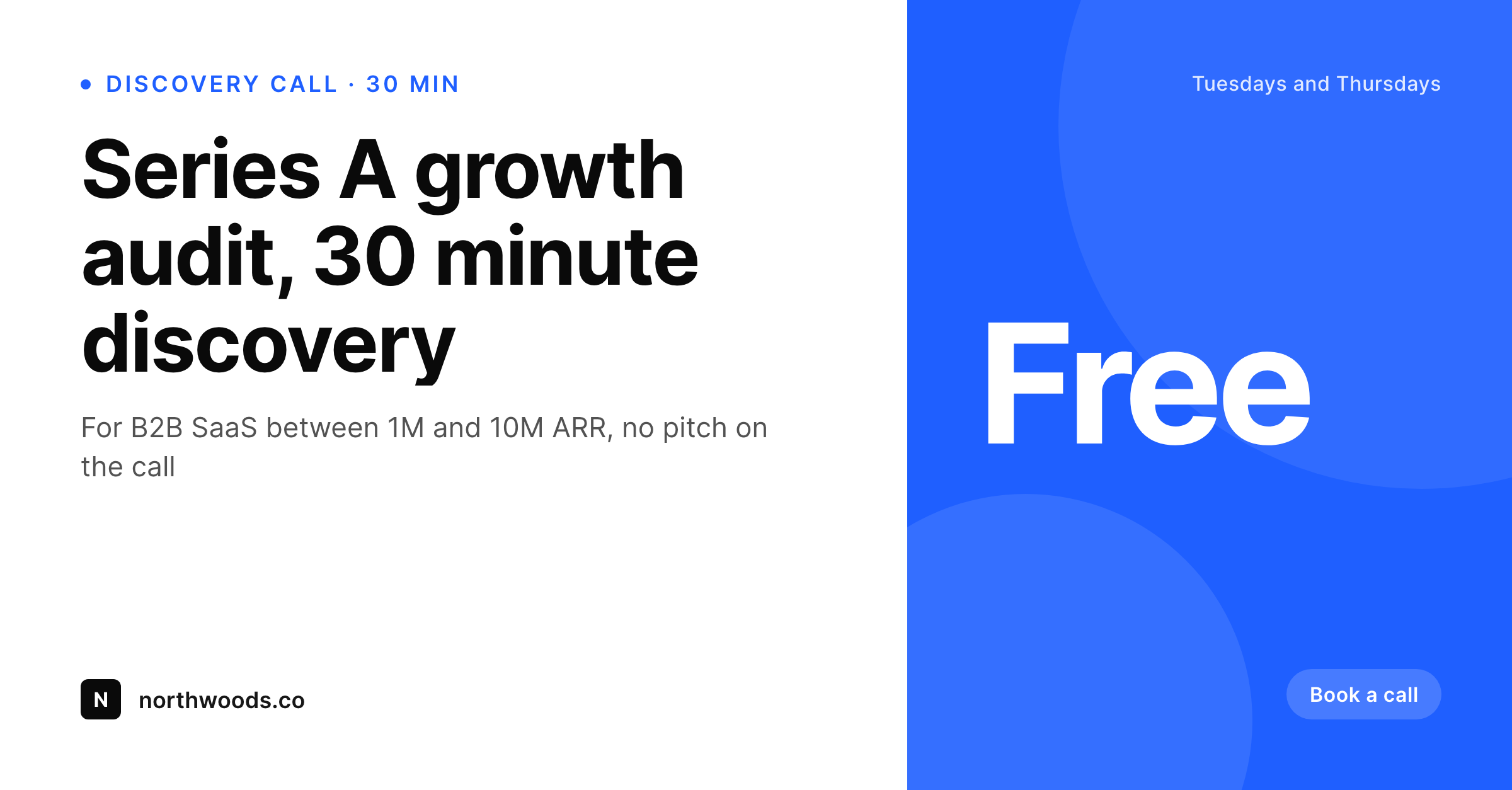
Discovery-call links should look like an offer, not a calendar
Simply Schedule Appointments is a particularly clean WordPress scheduling plugin, favoured by B2B agencies, fractional CFOs, growth consultants and SaaS sales teams who keep their scheduling layer inside their own site rather than handing it off to Calendly or SavvyCal. The plugin handles availability windows, team scheduling, payments and the booking confirmation flow with no fuss.
The bottleneck for the people running these calls is not the scheduling plugin, it is the LinkedIn post that drives the click. A consultant posts a thought-piece about Series A churn, adds the discovery-call URL at the end, and the LinkedIn share preview pulls a generic site OG image. The post argues that the consultant knows what they are talking about, and the preview undermines it by looking like it could be any site. The conversion gap between a thoughtful post with a generic preview and the same post with a tailored call card is real, and it compounds across every post.
SleekPixel reads the Simply Schedule appointment-type post and renders a 1200 by 627 LinkedIn-sized card with the call name, duration, audience qualifier and a small booking prompt. The post about Series A churn now ends with a card that says 'Series A growth audit, 30 minutes, for B2B SaaS between 1M and 10M ARR.' The same plugin underneath, a different first impression on the way in.
Workflow
From Simply Schedule type to LinkedIn-ready card
Set up the appointment type
Build the call template
Render on save
Share the booking URL
Output
What ships per appointment type
A 1200 by 627 LinkedIn-ready PNG: appointment name, duration, audience line and brand wordmark, rendered from the Simply Schedule appointment-type fields.
Comparison
Generic site OG vs appointment-aware LinkedIn card
Generic site OG
- Generic OG image undersells the specificity of a discovery call
- Call duration and audience never reach the LinkedIn preview
- Manual card design per appointment type is rarely worth the time
- Brand consistency drifts when consultants design ad-hoc images
- Updating the call description does not refresh the LinkedIn preview
SleekPixel
- Reads Simply Schedule appointment-type fields directly
- Per-type 1200 by 627 PNG sized for LinkedIn posts and blog covers
- Duration and audience qualifier render onto dedicated slots
- Bulk re-render when the brand or positioning changes
- One card style across discovery, demo and paid-session types
Features
What SleekPixel gives you for Simply Schedule Appointments
Audience qualifier
The card carries the audience line: which stage, which industry, which size company. The qualifier filters clicks to the right prospects.
Duration slot
Duration is rendered prominently so the prospect knows the commitment before booking. A 30-minute call reads differently from a 90-minute strategy session.
No-pitch promise
A small badge slot can carry signals like 'no pitch on the call' or 'audit only', which converts better than ambiguous booking prompts.
Use cases
Who runs Simply Schedule and lives on LinkedIn
Growth consultants
Independent growth, marketing and revenue consultants whose pipeline depends on LinkedIn posts converting into discovery calls.
Fractional CFOs and finance
Fractional CFOs and finance consultants who book intro audits and stage-specific sessions through their site.
B2B sales teams
Small SaaS sales teams that want LinkedIn shares of their demo links to look like a real product touchpoint.
The bigger picture
Why a discovery call deserves its own card
B2B consultants and small SaaS teams convert more discovery calls when the preview that LinkedIn renders looks like a real call rather than a generic site banner. The qualifier on the card pre-filters clicks: a prospect who is not Series A and not a SaaS company self-selects out before booking, saving the consultant the hour. The prospect who matches reads the qualifier and books with intent, knowing what the call is and what it is not.
That self-filtering is the entire point of putting the audience line on the card in the first place. SleekPixel makes that filtering possible at scale, because designing a card per appointment type by hand is fine for one or two but breaks for the eight or twelve types a mature consultant or sales team ends up running. The card system renders consistently across all of them.
Every LinkedIn share of any call URL now carries a real preview, and the consultant's pipeline starts to skew toward qualified bookings because the card itself does the qualifying.
Questions
Common questions about SleekPixel for Simply Schedule Appointments
No. SleekPixel renders share images. The scheduling, availability and payment flow stays inside Simply Schedule Appointments. If you already use Simply Schedule instead of Calendly, SleekPixel adds the LinkedIn-side card you have been missing.
Yes. The audience line is a per-type meta field. A 'Series A growth audit' card carries one qualifier; a 'pre-launch positioning workshop' card carries another. Each renders independently.
Paid sessions render with a price slot instead of a 'free' mark. Simply Schedule writes the price meta, and the template binds to it for the small mark area on the card.
It can, though most consultants keep the card timeless ('Tuesdays and Thursdays') rather than dynamic, since dynamic next-available dates require frequent re-rendering.
Yes. Simply Schedule's team feature lets multiple staff share an appointment type. The card can carry the team name or the specific person depending on how the type is configured.
Yes. Renaming the appointment type saves the post, which triggers a re-render. Existing LinkedIn posts keep their cached preview until LinkedIn re-scrapes the URL on a fresh share.
Yes. LinkedIn and Twitter use the same 1200-wide image well. Many consultants render one card and let it serve as og:image and twitter:image, since both platforms render LinkedIn-ratio images cleanly.
The template can apply auto-shrinking type sizes so a longer name like 'Pre-launch positioning workshop for B2B SaaS' fits the same slot as 'Strategy call'. The render handles overflow without manual tweaking.
Pricing
More than 1000+
happy customers
Explore our flexible licensing options tailored to your needs. Upgrade your license anytime to access more features, or opt for a lifetime license for ongoing value, including lifetime updates and lifetime support. Our hassle-free upgrade process ensures that our platform can grow with you, starting from whichever plan you choose.
Lifetime ♾️
Most popular
EUR
once
- Unlimited websites
- Lifetime updates
- Lifetime support
...or get the Bundle Deal
and save €250 🎁
💎 Want everything forever? The All Access Pass is going away on 01.08.2026.
The Bundle (unlimited sites)
Pay once, own it forever
Elevate your WordPress site with our exclusive plugin bundle that includes all of our premium plugins in one package. Enjoy lifetime updates and lifetime support. Save significantly compared to buying plugins individually.
What’s included
-
SleekAI
-
SleekByte
-
SleekMotion
-
SleekPixel
-
SleekRank
-
SleekView
€749
Continue to checkoutBrowse more
- WP Table Builder
- Mailchimp for WordPress
- LiteSpeed Cache
- WooCommerce Subscriptions
- wpForo forums
- Swift Performance
- Modern Events Calendar events
- WooCommerce Memberships
- Site Kit by Google
- WP Meta SEO
- Dynamic Content for Elementor
- WP Travel itineraries
- Sketch files
- WooCommerce Stripe Gateway
- Ninja Tables
- do vs don't cards
- MRR update cards
- company update card
- library of the week card
- industry report cards
- contributor spotlight card
- newsletter cover cards
- diversity report card
- free shipping cards
- experiment recap card
- tech stack card
- incident report cards
- whitepaper covers
- incorporation card
- podcast appearance card
- SoundCloud track art
- Buy Me a Coffee banners
- Linktree banner image
- Threads story-style images
- Twitch stream overlay images
- Facebook ad images
- YouTube Shorts covers
- LinkedIn company banners
- Instagram bio link banners
- Passes page banner
- Warpcast frame images
- Threads social images
- Etsy cover photos
- Vimeo thumbnails
- Behance banner