






SleekPixel for Fluent Booking
Fluent Booking lets you publish calendars and meeting types right inside WordPress. SleekPixel reads each meeting type and renders a LinkedIn-ready share image on save, so cold outreach links preview with duration, host and your real branding.
♾️ Lifetime License available
Booking links live or die at the preview
Fluent Booking belongs to the self-hosted booking generation: scheduling that lives inside WordPress instead of pointing customers at a third-party SaaS. Every meeting type is a real post with title, duration, host, location settings and an availability ruleset. Sales teams, consultants and agencies publish those pages and embed the booking link in newsletters, in LinkedIn outreach and at the foot of every proposal.
The preview that lands in LinkedIn or Slack is usually whichever generic OG image the WordPress theme falls back to. The thirty-minute pricing audit that should preview with a clean offer card lands with the homepage banner. Cold outreach gets one chance to look intentional in the preview window, and most booking pages waste that chance because rendering a per-page share image manually is not a sustainable practice for a sales motion.
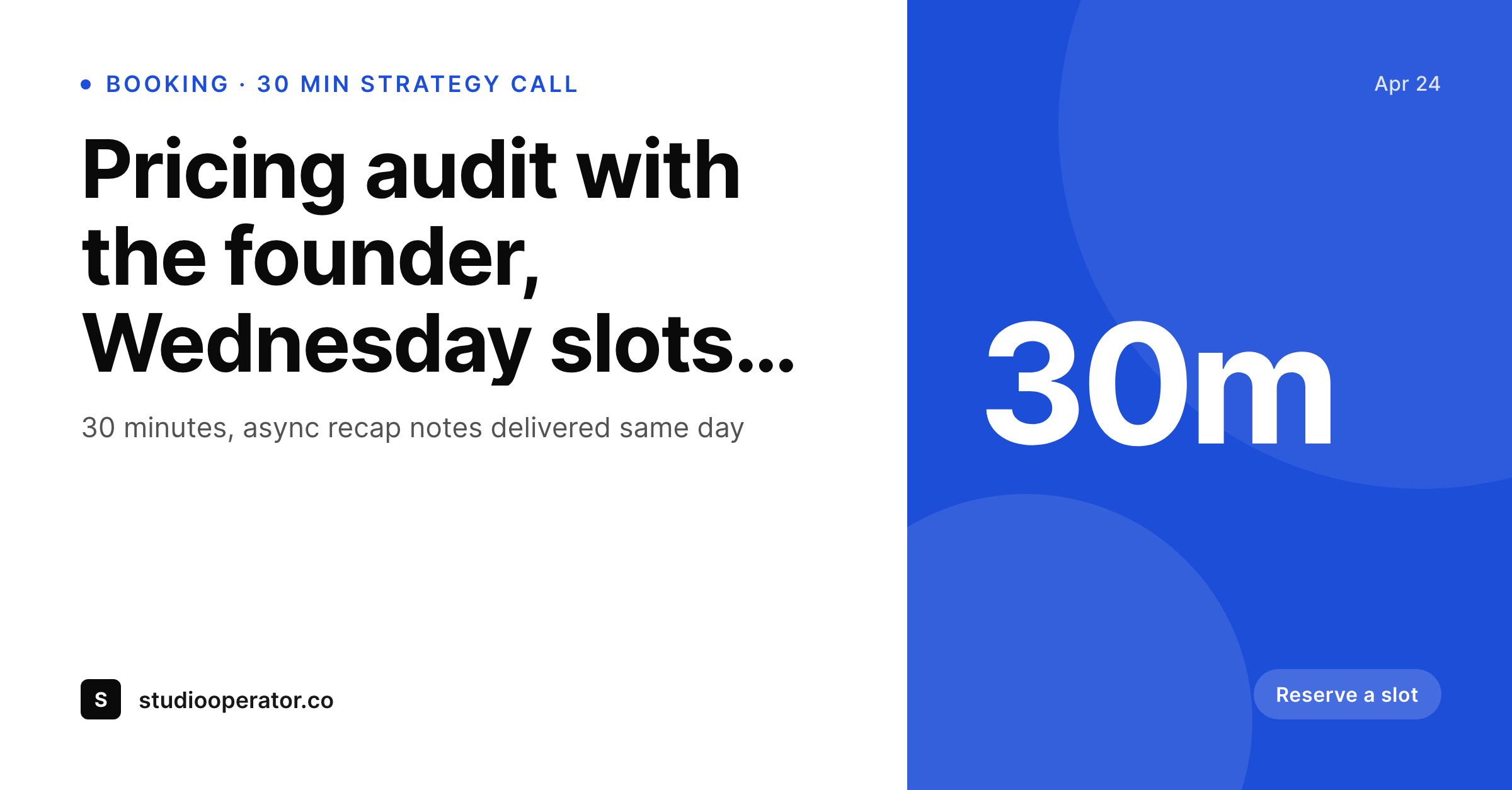
SleekPixel reads Fluent Booking meeting types on save and renders a branded card. The meeting title goes large, duration tags into the meta slot, the host's name and avatar render where the eye lands, and the brand wordmark sits in the corner. The PNG lands in uploads, og:image fires, and every booking link shares with a card that reads like the offer the page actually represents. New meeting types, renamed slots and host changes all share with consistent art because the rendering happens from the booking record.
Workflow
From booking page to share-ready in one save
Build the meeting template
Bind Fluent Booking fields
Save the meeting type
Send the link anywhere
Output
What ships with every meeting type
A 1200 by 627 LinkedIn-ready PNG: meeting title, duration, host name and brand wordmark, rendered from the Fluent Booking meeting type fields already in WordPress.
Comparison
Default theme OG vs Fluent Booking-aware rendering
Default theme OG image
- Default OG falls back to the homepage banner on every booking link
- Duration and host are missing from share previews even though they sit on the meeting type
- Renaming a meeting type leaves old share previews showing the old name forever
- Multi-host calendars all share with the same generic preview
- Cold outreach gets the same preview as the contact-us page
SleekPixel
- Reads Fluent Booking meeting type fields directly, no manual mapping
- Duration, host and meeting title render onto the card automatically
- Per-host avatars flow in from WordPress user meta
- Bulk re-render the calendar set when the brand or template changes
- Re-renders fire on save, so renamed meeting types update next share
Features
What SleekPixel gives you for Fluent Booking
Meeting-aware fields
Title, duration, host and meeting type description come from the Fluent Booking record. No remapping, no duplicate data entry.
Host avatars
Headshot from the host's WordPress user profile slots into the card. Multi-host calendars show the right face per meeting type.
Duration tag
30m, 60m, 90m read as a small badge near the title. The preview answers what kind of meeting this is before the click.
Use cases
Who shares Fluent Booking links with SleekPixel
Sales discovery calls
Outbound reps drop booking links into LinkedIn DMs. The preview shows a real offer card with the rep's name and duration, not a generic homepage.
Consulting strategy slots
Solo consultants share pricing-audit slots, strategy calls and async reviews with a card that names the deliverable and the duration.
Office hours and mentoring
Founders and educators publish open office hours. The share preview reads like a real invitation with name, role and time window.
The bigger picture
Why booking share previews drive call bookings
A booking link is a conversion endpoint disguised as a URL. The job of the link is to take a curious prospect and turn them into a calendar entry, and the share preview is the first impression that decides whether the prospect even clicks. A generic banner gives no signal that the URL leads to a real offer with a real human.
A branded card with name, duration and a clear meeting title gives that signal in three seconds, before the click. The second reason is host clarity. Multi-host calendars are the norm for agencies and consultancies, where each strategist has their own discovery slot.
Without a per-host preview, the prospect cannot tell who they are about to meet, which adds friction at exactly the wrong moment. SleekPixel reads the host record and renders the right avatar per meeting type, so the share itself communicates who the call is with. None of this changes how Fluent Booking handles availability, syncing or payment.
It just makes the preview the prospect sees match the actual offer, which is the smallest form of trust that scheduling products live on.
Questions
Common questions about SleekPixel for Fluent Booking
Round-robin meeting types do not have a fixed host until the booking is made, so the share card can either show the team avatar group or fall back to the brand. Solo-host meeting types render with the assigned host's avatar and name.
Yes. The card template reads the duration field, so a 30-minute card and a 60-minute card both come from the same template with different rendered values. If you want fully different layouts per duration, you can build template variants and switch by meeting type meta.
Paid meeting types expose price as a field on the record, which SleekPixel can render as a small badge or price label on the card. The Stripe checkout itself runs untouched at booking time.
Custom form fields are recorded against the booking itself, not the meeting type. The share card lives on the meeting type, so it stays generic to the offer. The booking confirmation flow is the right place for form data.
Fluent Booking does not aggressively manage og:image on meeting type pages. SleekPixel writes og:image and twitter:image cleanly without colliding. If your SEO plugin already sets these tags, you can let SleekPixel take precedence on booking pages only.
Availability is live and changes between renders, so the card itself shows static information. If you want a dynamic 'Next slot available Tuesday' line, that needs a re-render hook, which you can wire to a cron that re-saves meeting types daily.
The embed itself is HTML that renders the booking UI. SleekPixel handles the share image for the page that hosts the embed, so the preview matches the offer regardless of how the calendar is embedded inside.
Yes. The bulk regenerate command walks every meeting type and rebuilds the card. Useful after a logo change, a new color palette or a renaming pass across the calendar set.
Pricing
More than 1000+
happy customers
Explore our flexible licensing options tailored to your needs. Upgrade your license anytime to access more features, or opt for a lifetime license for ongoing value, including lifetime updates and lifetime support. Our hassle-free upgrade process ensures that our platform can grow with you, starting from whichever plan you choose.
Lifetime ♾️
Most popular
EUR
once
- Unlimited websites
- Lifetime updates
- Lifetime support
...or get the Bundle Deal
and save €250 🎁
💎 Want everything forever? The All Access Pass is going away on 01.08.2026.
The Bundle (unlimited sites)
Pay once, own it forever
Elevate your WordPress site with our exclusive plugin bundle that includes all of our premium plugins in one package. Enjoy lifetime updates and lifetime support. Save significantly compared to buying plugins individually.
What’s included
-
SleekAI
-
SleekByte
-
SleekMotion
-
SleekPixel
-
SleekRank
-
SleekView
€749
Continue to checkoutBrowse more
- Twitch panel images
- Spotify podcast covers
- Substack post thumbnail
- Twitch profile banner
- Open Graph images
- Flickr cover photo
- VSCO cover
- LinkedIn newsletter headers
- YouTube channel banners
- Etsy shop banners
- Discord stage banner
- WhatsApp status images
- Instagram Reels covers
- TikTok Now image
- KakaoTalk channel banners