






SleekPixel for agency
SleekPixel renders branded cards for case studies, blog posts, and client microsites — your brand on your site, the client's brand on theirs. One templating approach across the agency portfolio, with each site staying visually distinct.
♾️ Lifetime License available
Agencies ship more sites than they can hand-design
An agency's calendar is structurally different from a single brand's. The agency runs its own site — case studies, journal posts, capabilities pages — and simultaneously builds and maintains a portfolio of client sites, each with its own brand, post types, and editorial cadence. The OG image problem multiplies. Every case study on the agency site needs a card. Every blog post on every client site needs a card. Hand-designing each one is operationally untenable; defaulting to generic theme cards undermines both the agency's brand and the client's.
SleekPixel slots into a multisite or per-client install and lets each site carry its own template. The agency's case studies render with the agency's brand. A client's editorial site renders with the client's brand. The same templating approach covers both — agency designers build the templates once per brand, and the cards render automatically as content publishes. The mental model travels across projects, even when the visual identities don't.
For client work that lives on a multisite, the agency can ship the render pipeline as part of the project handoff. The client's editorial team publishes; the cards exist. The agency does not get pulled back in for graphic exports six months after launch. For the agency's own marketing — case studies, journal posts, capabilities pages — the same workflow keeps the portfolio looking consistent without the senior designers having to babysit it.
Workflow
Templating across an agency portfolio
Build the agency template
Build per-client templates
Hand off cleanly
Refresh portfolio at will
Output
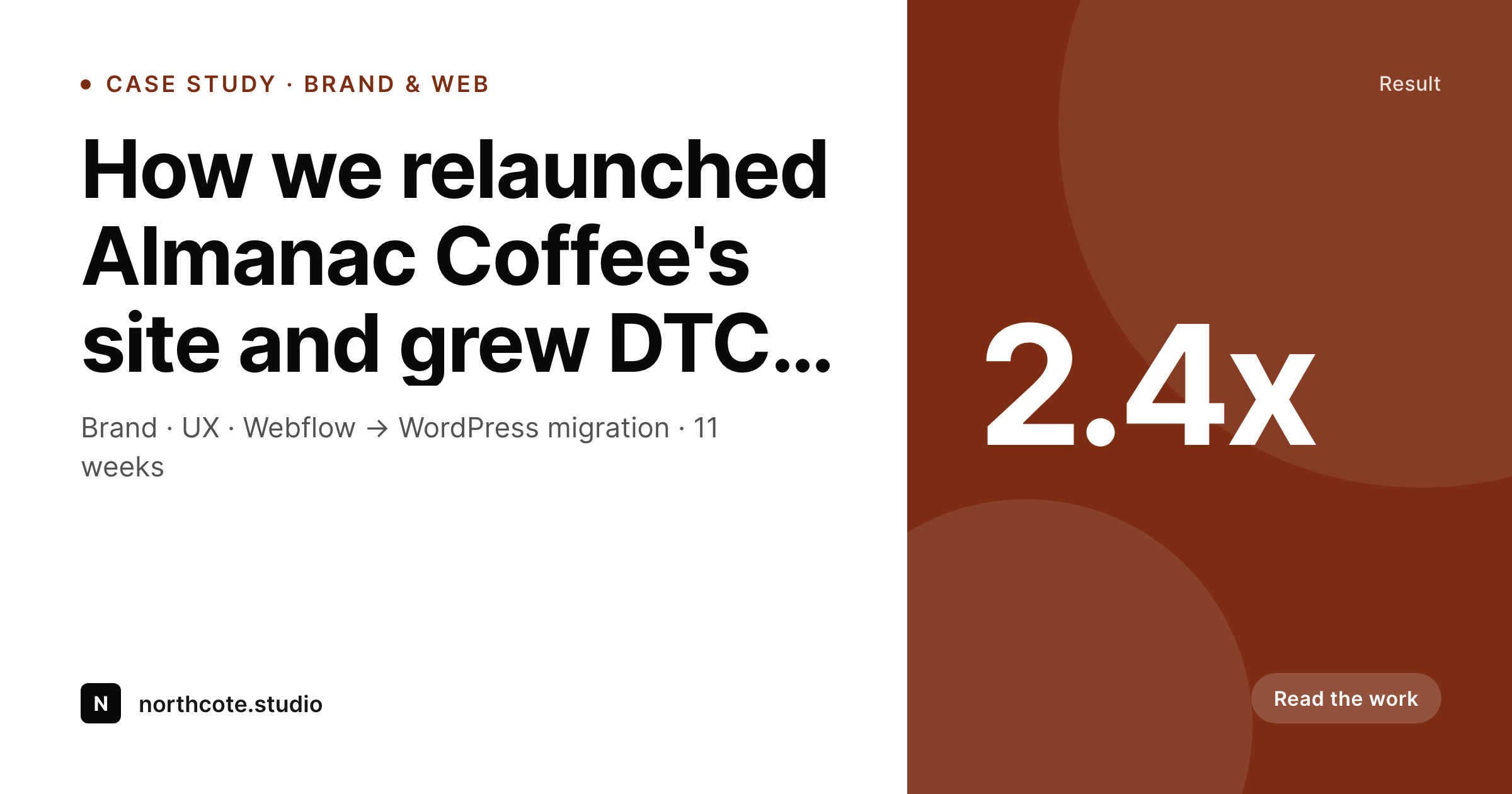
How a case study card renders
An OG card showing the case study title, scope, headline result, and agency mark — composed from the work post.
Comparison
Manual agency graphics vs rendered cards
Designer-built per project
- Senior designers babysit OG cards for both agency and client work
- Case study library reads as a series of one-off card designs
- Client sites ship with default theme OG images post-launch
- Brand refreshes for clients require redoing every card
- Agency editorial slows because every post needs a graphic
SleekPixel
- Per-site templates for agency and each client brand
- Case studies, journal posts, and client editorial all render
- Brand refresh propagates across a site with one regenerate
- Client editorial teams publish without needing the agency for graphics
- Same render approach scales across the portfolio
Features
What SleekPixel gives you for agency
Per-brand templates
Each site — agency or client — has its own template. The renderer is the same; the brand expression is the client's. Multisite or standalone installs both work.
Multiple post types
Case studies, journal posts, capability pages, and client articles can each have their own template, attached to the right post type on the right site.
Handoff-friendly
Client teams take over their site post-launch and publish on their own. The cards render on save, with no agency touchpoint required.
Use cases
How agencies use it across projects
Agency case studies
Every project the agency ships gets a brand-correct case-study card on the agency site. The portfolio reads as one body of work.
Client editorial
Editorial sites built for clients render cards for every post in the client's brand. Handoff stays clean — no graphic exports owed after launch.
Campaign microsites
Short-lived campaign sites get cards across product pages and posts. The agency reuses the templating approach without redesigning per campaign.
The bigger picture
Why agencies benefit from rendered cards
Agency economics depend on shipping more brand work than the senior designers can personally maintain. The studio model — a small group of senior designers, supported by junior staff and freelancers — works for the headline assets: brand systems, hero pages, key campaign artwork. It breaks for the long tail of OG cards across the agency's case studies and every client site the agency has shipped.
Manually designing each card forces the seniors into babysitting work; defaulting to theme cards forfeits the brand expression on the most-shared surface. SleekPixel gives the agency a way to encode a brand system once per project and let the cards render as content gets published. The agency's own portfolio looks coherent across years of case studies.
Client sites carry the brand the agency built for them on every share moment, even after the project closes. The rendering approach travels across the portfolio — same workflow, different brand expressions per site. Senior design time gets reinvested in headline work instead of card exports.
Questions
Common questions about SleekPixel for agency
Yes. SleekPixel installs per site, so a multisite running the agency at the network level and clients on subsites can have a separate template per site. Each subsite carries its own brand expression and renders its own cards independently.
Templates are HTML and CSS the client team can edit if they have the access. Most agencies document the template and lock it as part of handoff, so editorial changes happen in the post fields rather than the template file.
No. Once the template is in place, cards render on save. The client's editorial team publishes posts and the cards exist without an agency touchpoint. Agencies often build the template as part of the launch deliverable and walk away cleanly.
Yes. The render pipeline is the same; the brand expression is per client. Agencies that have built one SleekPixel setup for a client can build the next one faster, since the field-mapping pattern is reusable even when the visuals are entirely different.
Campaign sites with their own short-lived brand benefit from the same approach — a template built in the campaign's expression, applied to the campaign's posts and product pages. When the campaign ends, the site can stay live with its own coherent identity.
SleekPixel attaches templates to whichever post types you choose, so the agency's existing case-study post type — with its existing fields and ACF groups — becomes the data source. No migration required, and the case-study library remains the single source of truth.
Yes. Edit the client's template — colors, typography, layout primitives — and run a bulk regenerate on their site. Every existing post gets a card in the new brand. The agency does the work once on the template, not per article.
Yes, but the templates per client should still be brand-specific. Two clients sharing a base theme can each ship their own SleekPixel template; the renderer handles them separately. The shared theme accelerates engineering; the per-client templates protect the brand.
Pricing
More than 1000+
happy customers
Explore our flexible licensing options tailored to your needs. Upgrade your license anytime to access more features, or opt for a lifetime license for ongoing value, including lifetime updates and lifetime support. Our hassle-free upgrade process ensures that our platform can grow with you, starting from whichever plan you choose.
Lifetime ♾️
Most popular
EUR
once
- Unlimited websites
- Lifetime updates
- Lifetime support
...or get the Bundle Deal
and save €250 🎁
💎 Want everything forever? The All Access Pass is going away on 01.08.2026.
The Bundle (unlimited sites)
Pay once, own it forever
Elevate your WordPress site with our exclusive plugin bundle that includes all of our premium plugins in one package. Enjoy lifetime updates and lifetime support. Save significantly compared to buying plugins individually.
What’s included
-
SleekAI
-
SleekByte
-
SleekMotion
-
SleekPixel
-
SleekRank
-
SleekView
€749
Continue to checkoutBrowse more
- Simply Schedule Appointments
- Paid Memberships Pro
- JetEngine
- Restrict Content Pro
- LiteSpeed Cache
- Mautic campaigns
- Checkout Field Editor for WooCommerce
- Swift Performance
- Smartsheet sheets
- Rank Math Pro
- WooCommerce PDF Invoices & Packing Slips
- Xano records
- Bunny Stream
- Wishlist Member
- WooCommerce Square
- Snapchat snap images
- Beacons.ai banner
- KakaoTalk channel banners
- LinkedIn article covers
- LinkedIn company banners
- Klaviyo email banner
- Instagram ad images
- LinkedIn banner images
- Flickr cover photo
- YouTube community images
- Twitch stream overlay images
- Klaviyo email headers
- Bluesky profile banner
- Mastodon post images
- Rednote (Xiaohongshu) post