






SleekPixel for privacy update cards
Privacy updates are forwarded across customer legal and procurement teams. SleekPixel renders one og:image per update in WordPress, generated from the post fields on save.
♾️ Lifetime License available
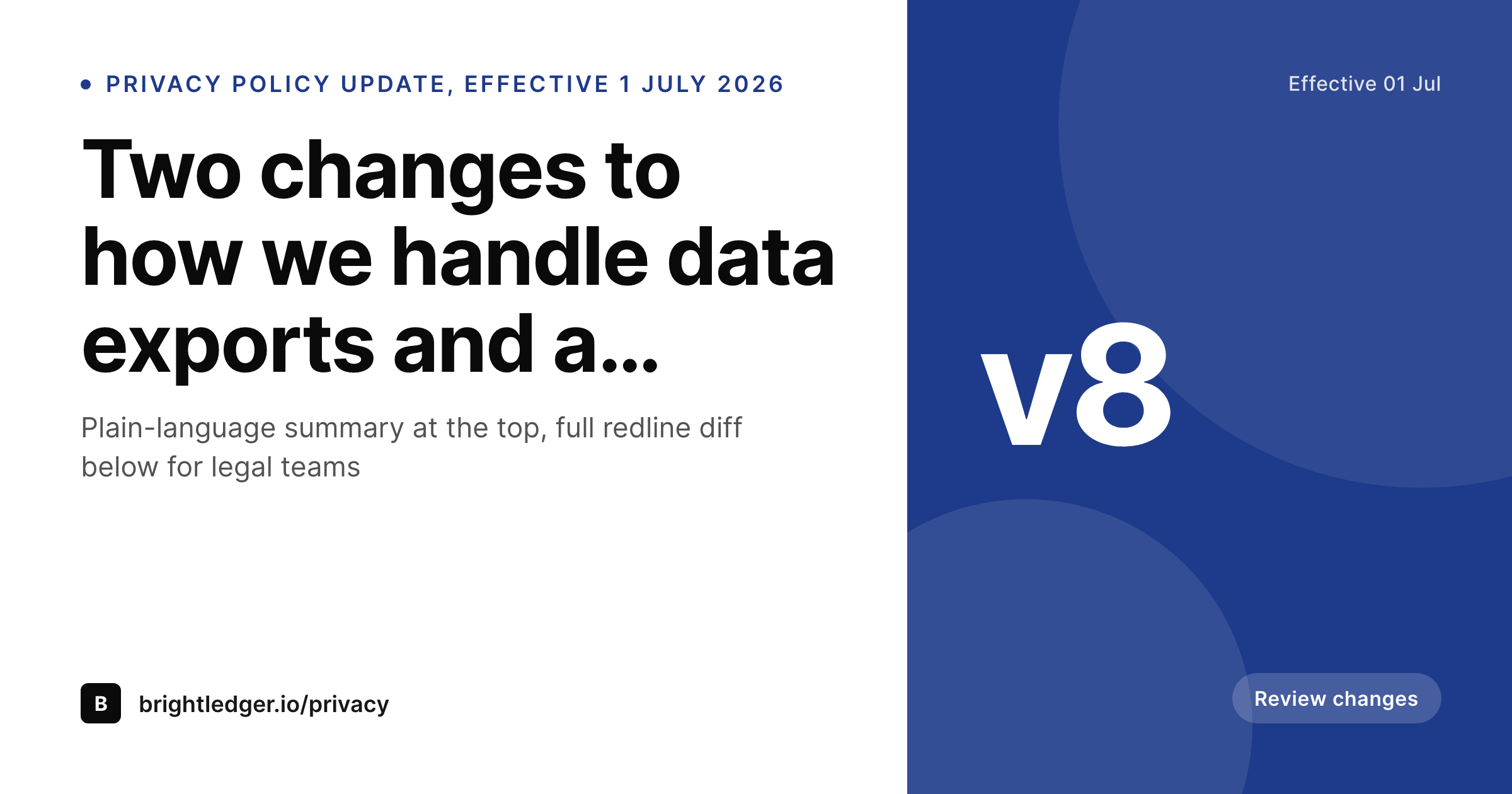
Privacy update notices travel through procurement teams
A privacy policy update reaches an audience that is mostly not the marketing list. Customer legal, procurement, and security review teams forward the notice internally, and the share preview is the first surface every one of those readers sees. A version number, an effective date, and a short change summary in the card itself help those readers triage the notice in seconds, which is exactly what their inbox-driven workflows are built for.
Companies that send these notices regularly tend to ship them with the same generic site tile every time. The result is a procurement inbox where six policy updates from the same vendor look identical, and the legal reviewer has to open each one to find out which version is which and what changed. The trust signal that comes with a clean policy update flow drops, and the friction in the renewal cycle goes up.
SleekPixel binds the privacy update card to the post. Version, effective date, change summary, and a flag for material changes bind to fields. The render fires on publish, writes the PNG to uploads, and the URL is ready for the customer email, the trust-hub feed, and the procurement portal upload.
Workflow
From policy revision to a published share card
Design the privacy update template
Configure the policy update post type
Publish the update
Revise the effective date if needed
Output
What a generated privacy update card looks like
A 1200x630 share card with the version, effective date, change summary, and material-change flag pulled from the post.
Comparison
Default privacy update image vs SleekPixel
Default policy image
- Same site logo on every policy update regardless of version
- Effective date and version hidden inside the post
- No material-change indicator in the preview
- Procurement reviewers triaging policy notices have to open every link
- No regeneration path when the effective date shifts
SleekPixel
- Render fires on publish for every privacy update
- Version, effective date, and change summary from post fields
- Material-change flag visible as a badge in the card
- Plain-language summary line in the share preview
- Effective-date shifts regenerate the card
Features
What SleekPixel gives you for privacy update cards
Version in the share
Bind the version slot to a post field. Customers can see at a glance whether the update they are receiving is v7 to v8 or a minor revision, which calibrates how much attention to give it.
Effective date visible
Show the effective date in the card. Legal reviewers triaging policy notices in their inbox can sort by date without opening every post, which is the workflow most enterprise teams have.
Material change indicator
Optional badge that flags whether the update is material, which is the signal procurement teams need to determine whether a renewal review is required.
Use cases
Where privacy update cards earn their keep
B2B SaaS legal teams
Companies that publish policy updates on a quarterly cadence. Each update gets a card that procurement and customer legal can scan in seconds.
Multi-jurisdiction operators
Companies with separate policies per region. The card carries the jurisdiction tag so customers in different regions get clear-routed updates.
Trust hubs and compliance portals
Sites that aggregate policy, advisory, and certification content. Privacy updates render alongside other notices with a consistent visual system.
The bigger picture
Why privacy updates need a real share card
Customer legal review is one of the most underweighted touchpoints in B2B SaaS, and the policy update flow is where it shows up most often. The procurement reviewer reading a Tuesday inbox of policy notices is doing triage, version number, effective date, material-change flag, and the share preview is the surface that determines whether the notice gets opened in five seconds or twenty. A purpose-built card with the version, the date, and the change summary in the preview makes the triage cheap and the renewal cycle smoother.
SleekPixel removes the design step from the legal publishing workflow, which means the policy team can ship the update on their own cadence without coordinating a creative ticket, and the trust signal stays high.
Questions
Common questions about SleekPixel for privacy update cards
Yes. Bind a jurisdiction taxonomy and render the term as a tag in the card. Customers in the EU see GDPR-flagged updates, customers in the US see CCPA-flagged updates, all from one post type.
The card itself is an image, but a redline URL can be linked from the post and rendered as a small text line in the card. Legal teams can jump straight to the diff.
Templates can read the active locale and pick a layout per language. Translated summaries and date formats render correctly without separate manual exports.
Yes. The material-change badge inverts: minor updates render with a neutral pill and material updates render with a stronger accent, both bound to the same boolean field.
SleekPixel renders inside WordPress. If the trust hub is a separate hosted product, mirror the policy update as a WordPress post for the share asset, or import via webhook.
Yes. Configure templates for OG, LinkedIn, and Twitter card sizes against the same post. All render on save and are downloadable from the editor.
Each policy update post represents one version. The card carries that version's metadata. Older versions retain their own cards in uploads, useful for archival linking.
Yes. The admin includes a bulk regenerate action that re-renders every policy update under a chosen template, useful after a trust-page redesign.
Pricing
More than 1000+
happy customers
Explore our flexible licensing options tailored to your needs. Upgrade your license anytime to access more features, or opt for a lifetime license for ongoing value, including lifetime updates and lifetime support. Our hassle-free upgrade process ensures that our platform can grow with you, starting from whichever plan you choose.
Lifetime ♾️
Most popular
EUR
once
- Unlimited websites
- Lifetime updates
- Lifetime support
...or get the Bundle Deal
and save €250 🎁
💎 Want everything forever? The All Access Pass is going away on 01.08.2026.
The Bundle (unlimited sites)
Pay once, own it forever
Elevate your WordPress site with our exclusive plugin bundle that includes all of our premium plugins in one package. Enjoy lifetime updates and lifetime support. Save significantly compared to buying plugins individually.
What’s included
-
SleekAI
-
SleekByte
-
SleekMotion
-
SleekPixel
-
SleekRank
-
SleekView
€749
Continue to checkoutBrowse more
- holiday promo card
- feature press card
- feature flag card
- AMA recap card
- patch note cards
- feature launch images
- YouTube comment card
- release day cards
- chart explainer card
- office hours recap card
- sustainability report card
- explainer video thumbnails
- metric spotlight cards
- Hacker News launch card
- podcast clip cards
- Rumble thumbnails
- X community banners
- YouTube community images
- Signal sticker pack
- Etsy shop banners
- Snapchat Spotlight covers
- Substack post headers
- GitHub README banners
- YouTube end screens
- Twitch profile banner
- Threads profile banner
- Threads story-style images
- Instagram highlight covers
- Tidal cover art
- KakaoTalk channel banners