






SleekPixel for compliance update cards
Compliance updates communicate audit milestones to customer security teams. SleekPixel renders one og:image per update in WordPress, generated from the post fields on save.
♾️ Lifetime License available
Compliance updates land in security questionnaire workflows
A compliance update, a SOC 2 Type II report renewal, an ISO 27001 surveillance audit close, a HIPAA attestation, is one of the most-referenced posts a trust hub publishes. Customer security teams pull these into questionnaire responses, procurement teams cite them in renewal reviews, and prospects link them in proof-of-compliance threads with their own auditors. The share preview is the first surface every one of those workflows touches.
The default site og:image makes all of these posts look identical. A SOC 2 renewal, an ISO surveillance audit, a HIPAA update, and a new PCI scope expansion all unfurl as the same company tile. The customer security team that has been waiting for the SOC 2 renewal cannot tell from the inbox which of the four posts is the one they need to pull into their workflow.
SleekPixel binds the compliance card to the post. Framework, audit date, status, and the change summary bind to fields. The render fires on publish, writes the PNG to uploads, and the post is ready for the customer notification, the trust-hub feed, and the security questionnaire reference. Each framework gets its own recognizable card without manual design work.
Workflow
From audit closure to a published share card
Design the compliance template
Configure the compliance post type
Publish the update
Revise scope or date if needed
Output
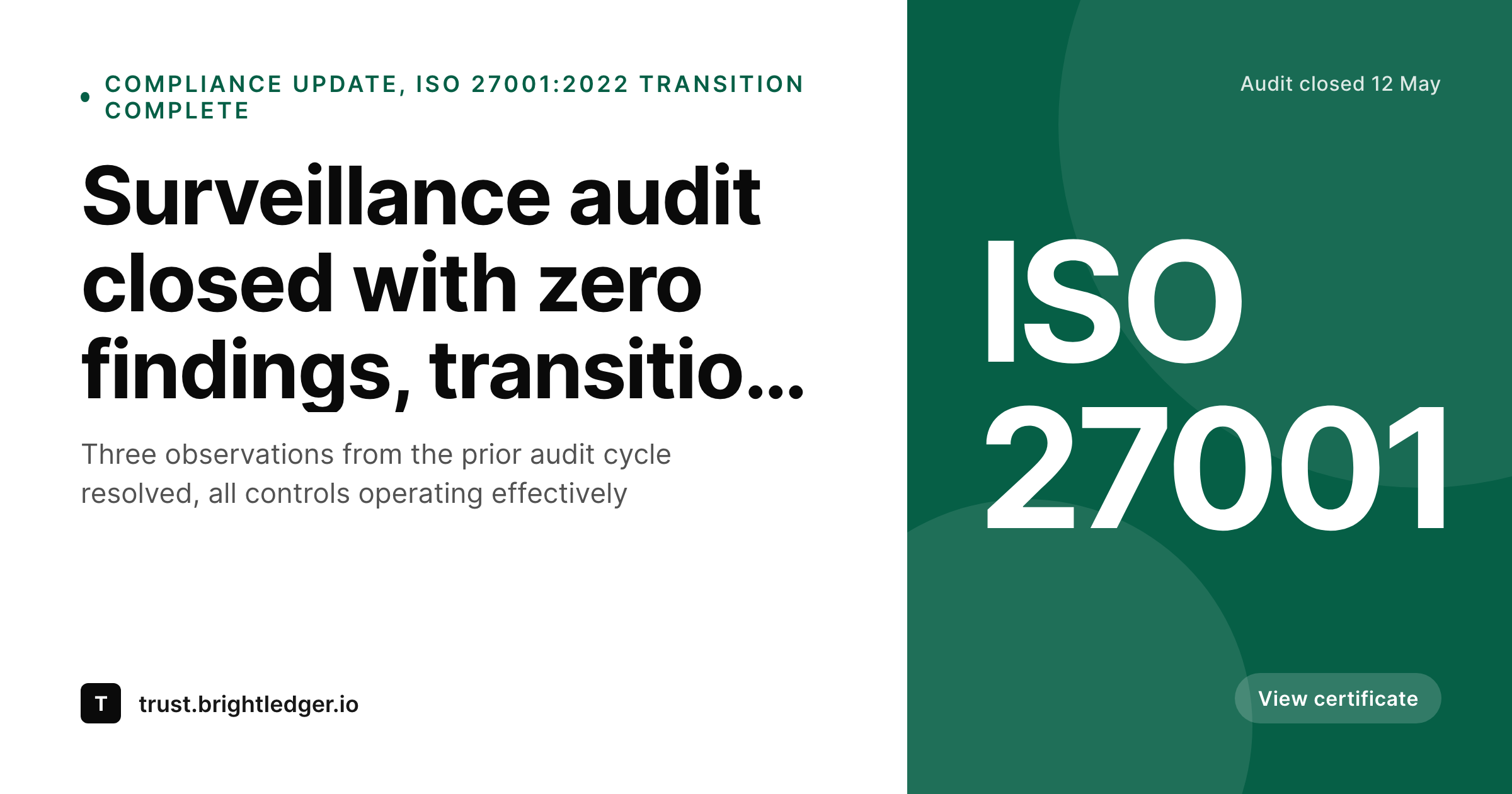
What a generated compliance card looks like
A 1200x630 share card with the framework, audit date, status, and change summary pulled from the post.
Comparison
Default compliance update image vs SleekPixel
Default compliance image
- Same trust-hub logo on every compliance milestone
- Framework name and audit date hidden inside the post
- Audit status not visible in the share preview
- Customer security teams cannot triage compliance posts by unfurl
- No regeneration path when the audit date or scope is corrected
SleekPixel
- Render fires on publish for every compliance update
- Framework, audit date, and status from post fields
- Framework logo or short mark in a fixed slot
- Status pill bound to a status field
- Scope edits regenerate the card before the next scrape
Features
What SleekPixel gives you for compliance update cards
Framework name in the share
Bind the framework slot to a post field. SOC 2, ISO 27001, HIPAA, PCI, each renders with its own name in the card so customers can identify the post in the inbox.
Audit date and status visible
Show the audit date and the status pill. Customer security teams can confirm at a glance that the new SOC 2 Type II report is for the period they need.
Scope or coverage indicator
Optional scope line that indicates which products or environments the audit covers. Multi-product companies use this to clarify scope without opening the post.
Use cases
Where compliance update cards earn their keep
B2B SaaS compliance teams
Companies maintaining SOC 2, ISO 27001, and similar frameworks. Each audit milestone gets a card matched to the framework and audit date.
Healthcare and HIPAA-covered entities
Operators that publish HIPAA-related compliance updates. The card carries the framework and the audit date, useful for downstream BAA reviews.
Payment and PCI scope operators
Companies handling cardholder data with PCI scope updates. The card communicates scope changes and re-attestation milestones to merchant customers.
The bigger picture
Why compliance updates need a card with the framework in the preview
Compliance posts have an outsized impact on the renewal and procurement cycle. A SOC 2 Type II renewal post that lands cleanly in customer security inboxes shortens the questionnaire turnaround time for every renewal that month, because the security team can immediately pull the post into their questionnaire response with a one-click reference. The share preview is the surface that makes the post pull-able, framework, date, and status in the unfurl mean the security team does not have to open the link to confirm relevance.
SleekPixel removes the design dependency from the compliance publishing workflow, which is the step that often slips when the audit team is already finishing the report under deadline pressure. The result is a trust hub that ships milestones on time with a consistent visual language across every framework.
Questions
Common questions about SleekPixel for compliance update cards
Yes. Bind a framework slot and render an SVG or PNG mark in a fixed position. Each framework has its own mark, and the card uses the right one based on the field value.
SleekPixel renders for any post status you configure. If a framework is gated behind a trust-hub login, the card still renders but the og:image can be configured to serve only to authenticated requests.
Edit the scope field on the post and save. The card re-renders, the og:image overwrites, and the next share scrape pulls the corrected scope.
The card itself is an image, but the post page can carry the gated download link. SleekPixel can render a small text line in the card that points to the report request page.
Best practice is one framework per post, but the template can render a multi-framework badge slot if a single milestone covers more than one attestation.
Yes. Bind a region or product taxonomy and use conditional templates or tags. Multi-product companies often render separate cards per product scope.
SleekPixel renders the image and writes the meta tags. The gating itself is a WordPress concern. The og:image URL can be served publicly even when the post body requires authentication.
Yes. The admin includes a bulk regenerate action that re-renders every compliance update under a chosen template, useful after a brand refresh.
Pricing
More than 1000+
happy customers
Explore our flexible licensing options tailored to your needs. Upgrade your license anytime to access more features, or opt for a lifetime license for ongoing value, including lifetime updates and lifetime support. Our hassle-free upgrade process ensures that our platform can grow with you, starting from whichever plan you choose.
Lifetime ♾️
Most popular
EUR
once
- Unlimited websites
- Lifetime updates
- Lifetime support
...or get the Bundle Deal
and save €250 🎁
💎 Want everything forever? The All Access Pass is going away on 01.08.2026.
The Bundle (unlimited sites)
Pay once, own it forever
Elevate your WordPress site with our exclusive plugin bundle that includes all of our premium plugins in one package. Enjoy lifetime updates and lifetime support. Save significantly compared to buying plugins individually.
What’s included
-
SleekAI
-
SleekByte
-
SleekMotion
-
SleekPixel
-
SleekRank
-
SleekView
€749
Continue to checkoutBrowse more
- Instagram stories
- Snapchat Spotlight covers
- YouTube Shorts covers
- LinkedIn carousel slides
- Lens Protocol posts
- Notion page covers
- Farcaster cast images
- Spotify podcast covers
- Mastodon post images
- TikTok shop images
- Slack channel headers
- Flickr cover photo
- Bluesky link cards
- Instagram Shop product images
- YouTube Shorts cover