






SleekPixel for policy update cards
Operational policies cover acceptable use, data handling, vendor management, and more. SleekPixel renders one og:image per update in WordPress, generated from the post fields on save.
♾️ Lifetime License available
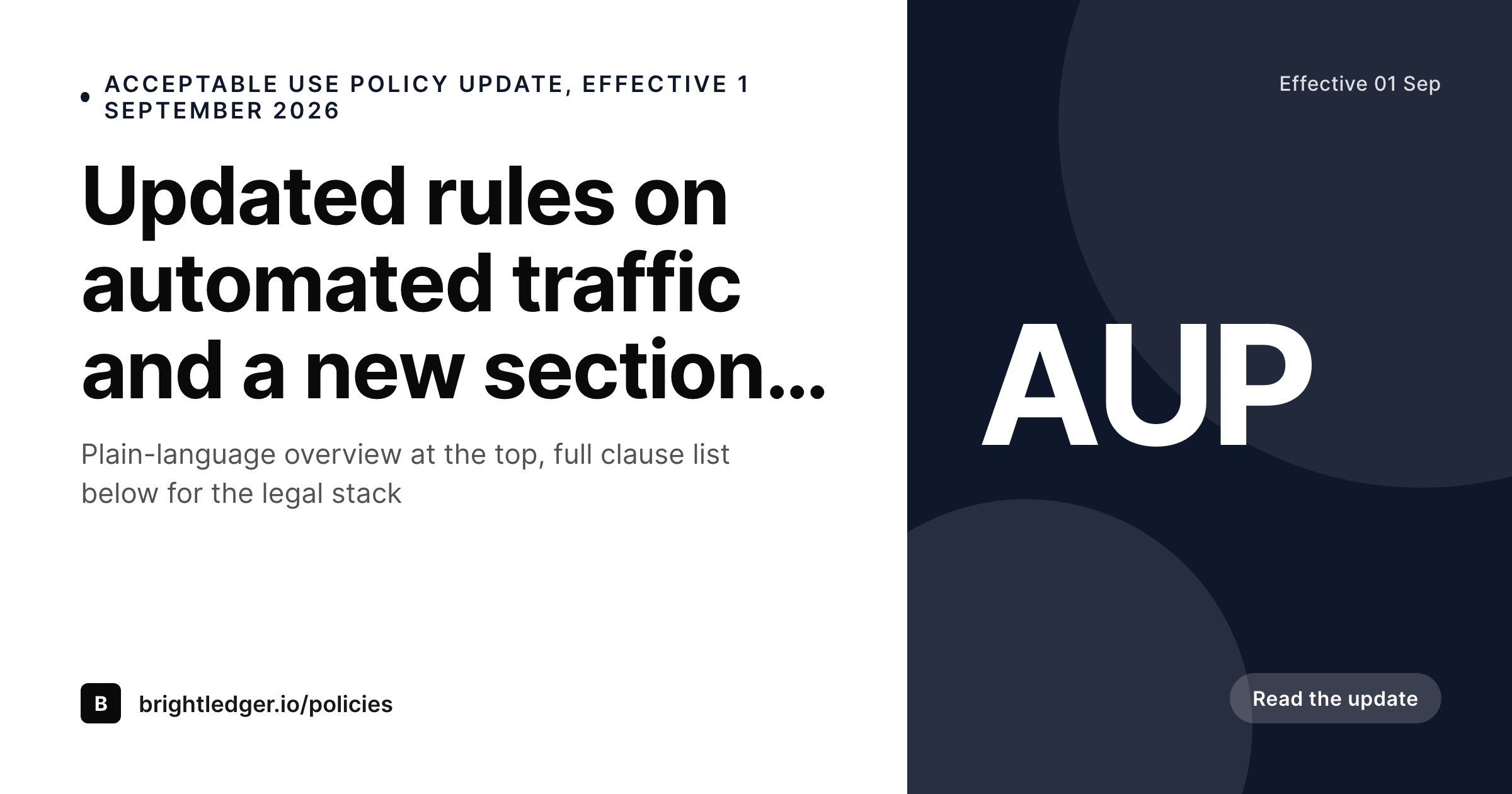
Operational policies are a quiet but constant publishing surface
Most B2B SaaS companies operate a small stack of policies beyond the high-profile privacy and terms documents. Acceptable use, data processing, vendor risk, AI use, sub-processor list, retention policy. These get updated on uneven cadences, usually a few times per year, and each update needs to reach the right internal and external teams without being lost in inbox noise.
The default approach is to push these as quiet blog posts under the site og:image, which means the policy update vanishes into the same visual queue as feature announcements and marketing posts. The trust-hub reader scrolling the policies page sees a consistent layout for the policies themselves, but the share preview on each one is generic. The signal that the company has a thoughtful, well-maintained policy stack drops at exactly the surface where a procurement reviewer is most likely to be looking.
SleekPixel binds the policy update card to the post. Policy name, version, effective date, and a short change summary bind to fields. The render fires on publish, writes the PNG to uploads, and the policy URL unfurls with the right metadata in customer email, the trust-hub feed, and the security questionnaire response.
Workflow
From policy revision to a published share card
Design the policy update template
Configure the policy update post type
Publish the update
Iterate as the policy lands
Output
What a generated policy update card looks like
A 1200x630 share card with the policy name, version, effective date, and change summary pulled from the post.
Comparison
Default policy update image vs SleekPixel
Default policy image
- Same site logo on every operational policy update
- Policy name and version missing from the share preview
- Multiple policies update at different cadences, all share the same generic tile
- Procurement reviewers cannot triage policies by unfurl alone
- No regeneration path when the effective date or scope shifts
SleekPixel
- Render fires on publish for every policy update
- Policy name, version, and effective date from post fields
- Change summary line in the share preview
- Policy category tag bound to a taxonomy term
- Effective-date shifts regenerate the card
Features
What SleekPixel gives you for policy update cards
Policy name in the share
Bind the policy name to a post field or a taxonomy term. AUP, DPA, sub-processor list, and others each render with their own name in the card.
Version in the preview
Show the version in the card. Procurement reviewers and security teams can match the version against what they have on file without opening every link.
Effective date and category
Render the effective date and the policy category as a paired signal. Operational, security, and data policies each get a tag so customers can filter at a glance.
Use cases
Where policy update cards earn their keep
B2B SaaS trust and security teams
Companies running a policy stack with quarterly updates. Each policy gets a card that customer security teams can triage in seconds.
HR and people ops policies
Companies publishing internal-facing policies under the same workflow. Code of conduct, remote work, expense policy, each renders with its own card for the intranet.
Education and EdTech operators
Operators with student data policies and AUP updates. The card carries the policy name and effective date, which is what district procurement teams are looking for.
The bigger picture
Why operational policy updates need a real share card
The operational policy stack is the part of the trust surface that customers interact with most often during procurement and renewals. AUP, DPA, sub-processor list, AI use policy, retention policy, each of these gets pulled into security questionnaires, vendor risk reviews, and renewal negotiations on a regular basis. The share preview is the first surface every one of those workflows sees, and a generic site tile flattens the entire policy stack into a single visual blur.
A purpose-built card with the policy name, version, and effective date makes the trust signal legible in the inbox, which is where most procurement work actually happens. SleekPixel removes the design dependency from the policy publishing workflow, which is the step that breaks for most companies trying to keep their trust hub consistent across a year of changes.
Questions
Common questions about SleekPixel for policy update cards
Yes. Bind a category taxonomy and render the term as a tag in the card. Operational, security, and data policies each render with their own tag.
SleekPixel writes the og:image and twitter:image meta tags. The trust-hub feed itself is a WordPress concern, RSS or JSON feed of the policy post type, and it can include the rendered image.
Yes. Bind a policy-type field, and use conditional templates. Security policies can render with one accent, operational policies with another, all from the same post type.
Templates can read the active locale and pick a layout per language. Translated summaries and date formats render correctly without separate manual exports.
Yes. Each policy update post is its own version, and the card persists in uploads. A history page can list every version with its rendered card.
Yes. Sub-processor list updates use the same post type with their own policy-name value. The card carries the version and effective date, useful for the contractual notice flow.
Yes. Configure two templates against the same post if needed, one for the public trust hub and one for the internal intranet. Both render on save.
Yes. The admin includes a bulk regenerate action that re-renders every policy update under a chosen template.
Pricing
More than 1000+
happy customers
Explore our flexible licensing options tailored to your needs. Upgrade your license anytime to access more features, or opt for a lifetime license for ongoing value, including lifetime updates and lifetime support. Our hassle-free upgrade process ensures that our platform can grow with you, starting from whichever plan you choose.
Lifetime ♾️
Most popular
EUR
once
- Unlimited websites
- Lifetime updates
- Lifetime support
...or get the Bundle Deal
and save €250 🎁
💎 Want everything forever? The All Access Pass is going away on 01.08.2026.
The Bundle (unlimited sites)
Pay once, own it forever
Elevate your WordPress site with our exclusive plugin bundle that includes all of our premium plugins in one package. Enjoy lifetime updates and lifetime support. Save significantly compared to buying plugins individually.
What’s included
-
SleekAI
-
SleekByte
-
SleekMotion
-
SleekPixel
-
SleekRank
-
SleekView
€749
Continue to checkoutBrowse more
- YouTube channel banners
- Farcaster cast images
- Depop listing images
- Instagram Reels covers
- Twitch camera frame
- Bandcamp banner
- VK community cover photos
- Twitch alert
- Shopify collection banners
- Bluesky profile banner
- GitHub README banners
- Mastodon link previews
- Patreon post thumbnails
- Audible audiobook cover
- WeChat Moments images