






SleekPixel for meetup cards
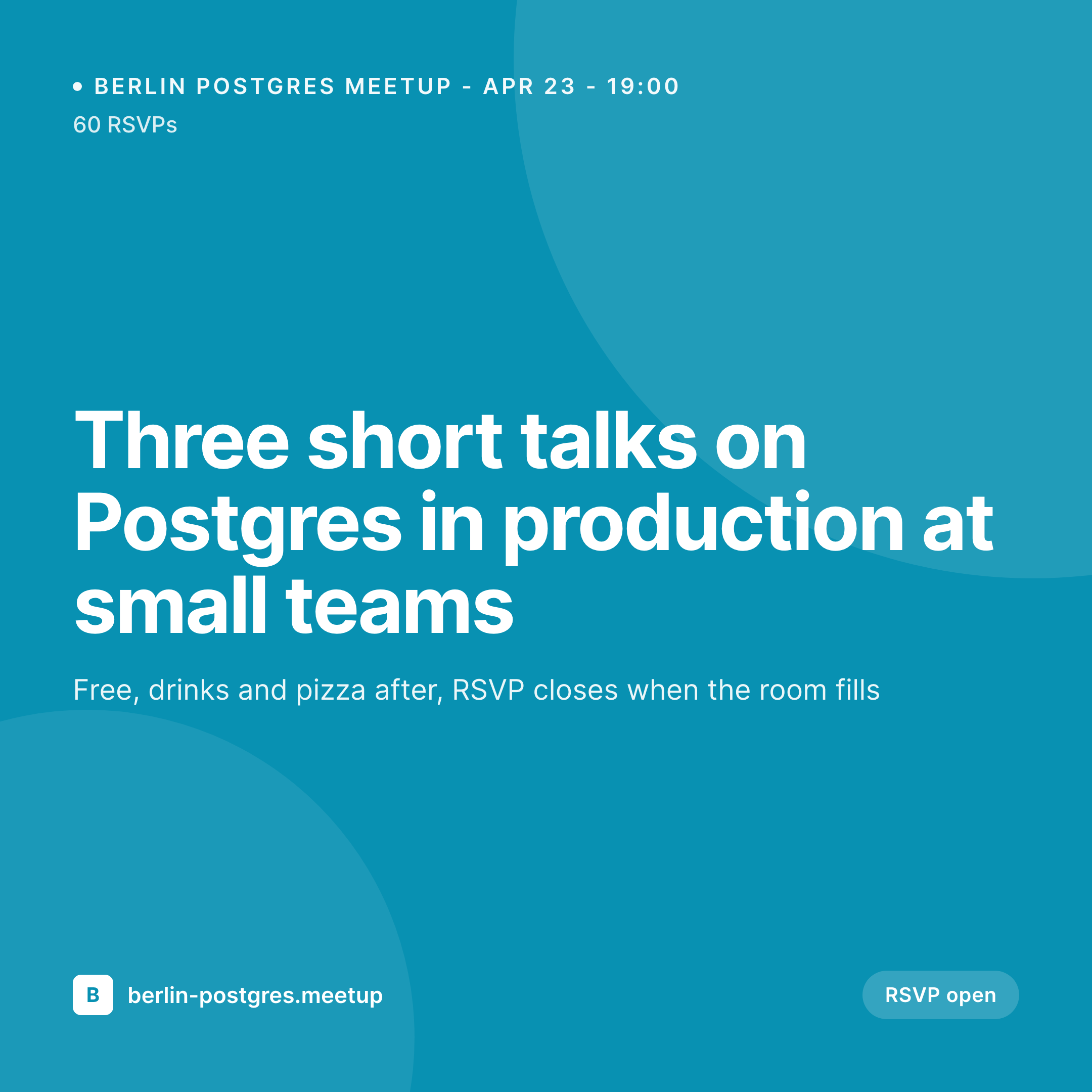
Local meetups grow on link shares from organizers and attendees. SleekPixel renders a branded share card per event with title, speakers, date, and current RSVP count.
♾️ Lifetime License available
Meetups grow on shareable event pages
Community meetups run on a monthly cadence and depend on word-of-mouth. The event page on the chapter's WordPress site is the canonical link, the one shared in Slack, on Bluesky, in the company channel. The card on that link is the asset that decides whether the share spreads, especially in a community where attendance compounds across regulars and newcomers.
The default chapter site ships a generic site logo on every event. A few chapter organizers build hand-designed cards in Canva, which works for one event and collapses by the third month of the program. The chapters that grow steadily tend to be the ones whose share cards read as a real recurring program, not a one-off invite.
SleekPixel turns each meetup post into a branded card. Title and date from the post, speakers from the linked speaker posts, venue from a custom field, RSVP count from the registration integration. The render fires on save, the share card stays current, and the chapter ships professionally month after month without any per-event design work.
Workflow
From event announce to social-ready card in one save
Design the meetup template
Create the meetup post
Organizers and attendees share the URL
RSVP fills and badge updates
Output
What a generated meetup card looks like
A 1080x1080 square PNG built from the meetup post, with title, date, venue, speaker names, and an RSVP-count badge.


Comparison
Default meetup share image vs SleekPixel
Default meetup cards image
- Same chapter logo on every event share
- Manual Canva card per event, breaks by month three
- Speaker names missing on the share, RSVP rate drops
- Venue updates never reach the existing share previews
- No RSVP count, prospective attendees miss the signal
SleekPixel
- Render fires on save for every meetup post
- Title, date, venue, and speakers from post fields
- Live RSVP count badge from the registration integration
- og:image and twitter:image written automatically
- Chapter-wide rebrand handled by a single template edit
Features
What SleekPixel gives you for meetup cards
Date and venue locked
Event date and venue ship on every card. Changes to either propagate to the share preview on the next save, so the link never advertises a stale location.
Speaker links resolved
Linked speaker posts surface their names and short titles on the card, so the lineup reads at thumbnail size and not just on the event page.
Live RSVP signal
The RSVP count pulls from the registration tool, so the share card carries the social-proof number that drives chapter growth.
Use cases
Who uses SleekPixel for meetup cards
City chapter organizers
Local language and framework meetups run on volunteer time. SleekPixel removes the per-event design step so the chapter ships consistently.
Company-hosted user groups
Product-led communities hosting regular user meetups. The branded cards keep the program visually anchored to the product without freelance design.
Campus and university clubs
Student-run technical clubs with rotating organizers. The shared template means each new organizer ships pro-looking events from day one.
The bigger picture
Why consistent meetup cards build long-running chapters
Chapters that last past their first year tend to look the same on social by month twelve as they did at the founding event. The branding compounds, the regulars recognize the share at a glance, and newcomers read the chapter as a real ongoing program worth showing up for. Chapters that drift visually, with hand-built Canva cards by whichever volunteer had time that week, fail to develop that recognition and stay in the announce-and-hope-people-come loop forever.
SleekPixel anchors the chapter's visual identity in the WordPress site itself, so every meetup post produces the same branded card no matter who edited the announcement. The signal carries across months, the chapter brand becomes legible, and the regulars start treating the program as worth bringing friends to.
Questions
Common questions about SleekPixel for meetup cards
No. SleekPixel renders the share image for your WordPress event page. Many chapters cross-post to Meetup.com or Luma for RSVP collection. SleekPixel handles only the visual share asset on the WordPress URL.
Yes. SleekPixel can read RSVP counts from any platform exposing a webhook or API, including Meetup.com, Luma, Eventbrite, Tito, and custom WordPress registration plugins.
Each month gets its own meetup post. The shared template keeps the recurring brand locked while the specific date, speakers, and venue update per event.
Yes. The 1080x1080 layout supports up to three speakers in a strip, with name and short title. Larger lineups fall back to a names-only treatment.
Yes. Use the venue field to render the platform name, for example Zoom, Discord, or Google Meet. The template treats virtual venues as first-class.
Yes. Update the template once and run the bulk regenerate command. Every past and upcoming meetup card refreshes to the new chapter brand.
Yes. SleekPixel writes og:image, twitter:image, and the matching width and height meta tags so the meetup card shows up correctly on every major platform.
The same render can be saved at a smaller size for inline embedding in the chapter newsletter or attendee reminder email.
Pricing
More than 1000+
happy customers
Explore our flexible licensing options tailored to your needs. Upgrade your license anytime to access more features, or opt for a lifetime license for ongoing value, including lifetime updates and lifetime support. Our hassle-free upgrade process ensures that our platform can grow with you, starting from whichever plan you choose.
Lifetime ♾️
Most popular
EUR
once
- Unlimited websites
- Lifetime updates
- Lifetime support
...or get the Bundle Deal
and save €250 🎁
💎 Want everything forever? The All Access Pass is going away on 01.08.2026.
The Bundle (unlimited sites)
Pay once, own it forever
Elevate your WordPress site with our exclusive plugin bundle that includes all of our premium plugins in one package. Enjoy lifetime updates and lifetime support. Save significantly compared to buying plugins individually.
What’s included
-
SleekAI
-
SleekByte
-
SleekMotion
-
SleekPixel
-
SleekRank
-
SleekView
€749
Continue to checkoutBrowse more
- Snapchat Discover tiles
- X community banners
- GitHub README banners
- VSCO cover
- LinkedIn banner images
- Spotify podcast covers
- Klaviyo email banner
- Bandcamp banner
- YouTube Shorts thumbnails
- Etsy cover photos
- Telegram channel banner
- Passes page banner
- Dailymotion thumbnails
- WhatsApp status images
- SoundCloud track art