






SleekPixel for puppy training class
Puppy fundamentals every four weeks, drop-in socialization on Saturdays, leash-walking add-ons through the spring. Each cohort post saves with a 1200x630 OG image and a matching social card.
♾️ Lifetime License available
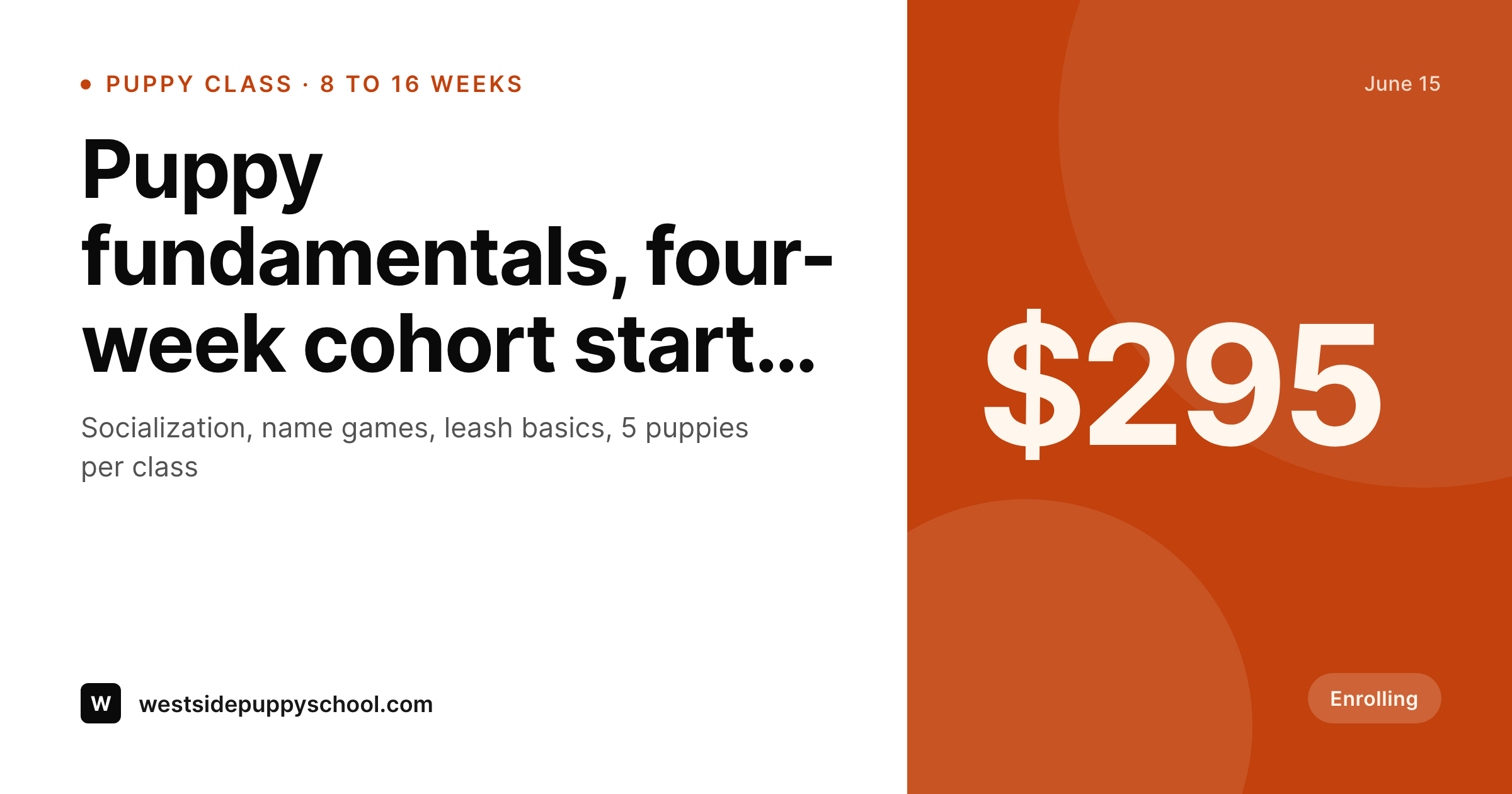
New-puppy parents search the internet at midnight
A puppy training school's customer is a person holding an eight-week-old labradoodle on a couch at midnight, scrolling Google and Instagram for the next available cohort. That cohort needs to show up with a clear start date, a cohort size, a price, and a credential badge. It needs to look like a real program. The og:image on the class page has to unfurl correctly when a friend texts the link, because half of all enrollments come from one new-puppy parent telling another.
The data is already on the school's site. The cohort CPT carries the start date, the duration, the meeting day and time, the cohort cap, the trainer, the certification, the curriculum outline, and the price. The new-puppy parent never sees those fields directly. What they see is a 1200x630 image on the class page, in the Instagram square, on Facebook when the school posts the cohort, in a DM when a friend shares the link.
SleekPixel renders that image on save. The puppy fundamentals cohort post saves, the 1200x630 OG image renders with the program name, the start date, the cohort cap, and the trainer's credential. The PNG is in uploads, the og:image wires into the class URL, the Instagram square renders alongside it. The midnight scroller sees the cohort the way the school intends.
Workflow
From cohort planning to OG-ready card
Map the cohort fields
Design one OG template
Publish the cohort
Open enrollment
Output
What gets generated per puppy cohort
A 1200x630 OG image with the cohort name, start date, cohort cap, trainer credential, and price, pulled from the cohort post fields.
Comparison
Default puppy class image vs SleekPixel
Default puppy class image
- Trainer rebuilds a Canva OG image for every cohort cycle
- Cohort cap on the image drifts from what's actually open in the booking system
- Trainer credential acronym misspelled when the staff rotates
- Drop-in socialization and structured cohort use different templates
- Cohort URL shared in a DM unfurls as the school logo, not the cohort card
SleekPixel
- Save the cohort post, the 1200x630 OG image lands in uploads
- Program name, start date, cohort cap, and credential pulled from the post
- OG format wires into the class URL so DM shares unfurl with the card
- Drop-in vs cohort templates can be conditional on a class-type field
- Single template across cohorts keeps the enrollment surfaces on-brand
Features
What SleekPixel gives you for puppy training class
Card per cohort
Every puppy fundamentals batch, drop-in socialization, and add-on session saves with its own card. Start date and price come from the post.
Age-window visible
Puppy cohorts have a tight age window (8 to 16 weeks). The card renders that window so parents self-select before clicking through.
DM-share ready
The og:image wires into the class URL, so when one parent texts the cohort to another, the link unfurls with the cohort card instead of the school logo.
Use cases
Who uses SleekPixel for puppy training classes
Vet-affiliated puppy programs
Veterinary practices running puppy fundamentals onsite render cohort cards with the practice's credential and the vet-tech instructor's name.
Independent puppy schools
Standalone puppy schools with rolling cohorts render each four-week or six-week batch as its own card from the program CPT.
Multi-trainer schools
Schools with three or four certified trainers render cohorts with the trainer's name and credential. The card reads as a school, not a single trainer.
The bigger picture
Why first-time puppy owners need a card that signals competence
A first-time puppy owner has never enrolled in a training class before, and they are choosing a school the way they would choose a pediatrician. They look at the credential badge, they look at the cohort size, they look at the language on the start-date headline, and they decide in fifteen seconds whether the school is for them. A cover image that looks like it was assembled at a different aspect ratio than its purpose, or that lists a credential that's a year out of date, or that shows a stock-photo puppy that doesn't match the school's actual work, sends the parent back to Google.
The fix is to derive every surface from the cohort record. The credential stays current because it lives in the staff record, not in a Canva file. The start date matches what the booking system is taking.
The cohort cap matches reality. A puppy school built that way reads as a credible operation in fifteen seconds, which is the whole window the parent will give it.
Questions
Common questions about SleekPixel for puppy training class
Yes. The card can render up to three credential badges per cohort. Smaller schools render one credential in the same slot, larger schools render the full stack.
Yes. Templates can be conditional on a class-type field. Drop-in renders with a recurring weekly badge, structured cohorts render with a four-week or six-week start date.
Parent-only sessions and puppy-and-parent sessions can be their own post types. Each renders with its own audience badge and the same cohort layout.
Yes. SleekPixel reads any post type and any field, so Amelia, LatePoint, BookingPress, or a plain cohort CPT all map onto the OG template.
Yes. The trainer field on the cohort post drives the trainer's name and credential into the card. Every cohort renders with the right trainer on the same brand frame.
No. SleekPixel renders the PNG and saves it to uploads. Creating the Facebook event is a manual step, and the cohort OG image can be uploaded as the event cover.
Yes. One save can render a 1200x630 OG image, a 1080x1080 Instagram square, and a 1080x1920 Story. Each format is configured once and renders together.
Editing the cohort and flipping a waitlist flag re-renders the card with a waitlist badge. The URL still resolves with a card that signals the cohort is full but the next one is open.
Pricing
More than 1000+
happy customers
Explore our flexible licensing options tailored to your needs. Upgrade your license anytime to access more features, or opt for a lifetime license for ongoing value, including lifetime updates and lifetime support. Our hassle-free upgrade process ensures that our platform can grow with you, starting from whichever plan you choose.
Lifetime ♾️
Most popular
EUR
once
- Unlimited websites
- Lifetime updates
- Lifetime support
...or get the Bundle Deal
and save €250 🎁
💎 Want everything forever? The All Access Pass is going away on 01.08.2026.
The Bundle (unlimited sites)
Pay once, own it forever
Elevate your WordPress site with our exclusive plugin bundle that includes all of our premium plugins in one package. Enjoy lifetime updates and lifetime support. Save significantly compared to buying plugins individually.
What’s included
-
SleekAI
-
SleekByte
-
SleekMotion
-
SleekPixel
-
SleekRank
-
SleekView
€749
Continue to checkoutBrowse more
- Pinterest product pin covers
- LinkedIn company banners
- Twitch profile banner
- LinkedIn article covers
- Mailchimp email headers
- Open Graph images
- Buy Me a Coffee banners
- Facebook Marketplace images
- LinkedIn document post covers
- Instagram grid tiles
- Kick stream thumbnails
- X list banners
- Etsy shop banners
- Etsy listing images
- Instagram carousel slides