






SleekPixel for demo day card
Accelerator demo days run a tight schedule and every founder wants a share image with their pitch slot, cohort badge and a one-line product description. SleekPixel renders that card from the founder's post on save, so the link preview matches the official program every time.
♾️ Lifetime License available
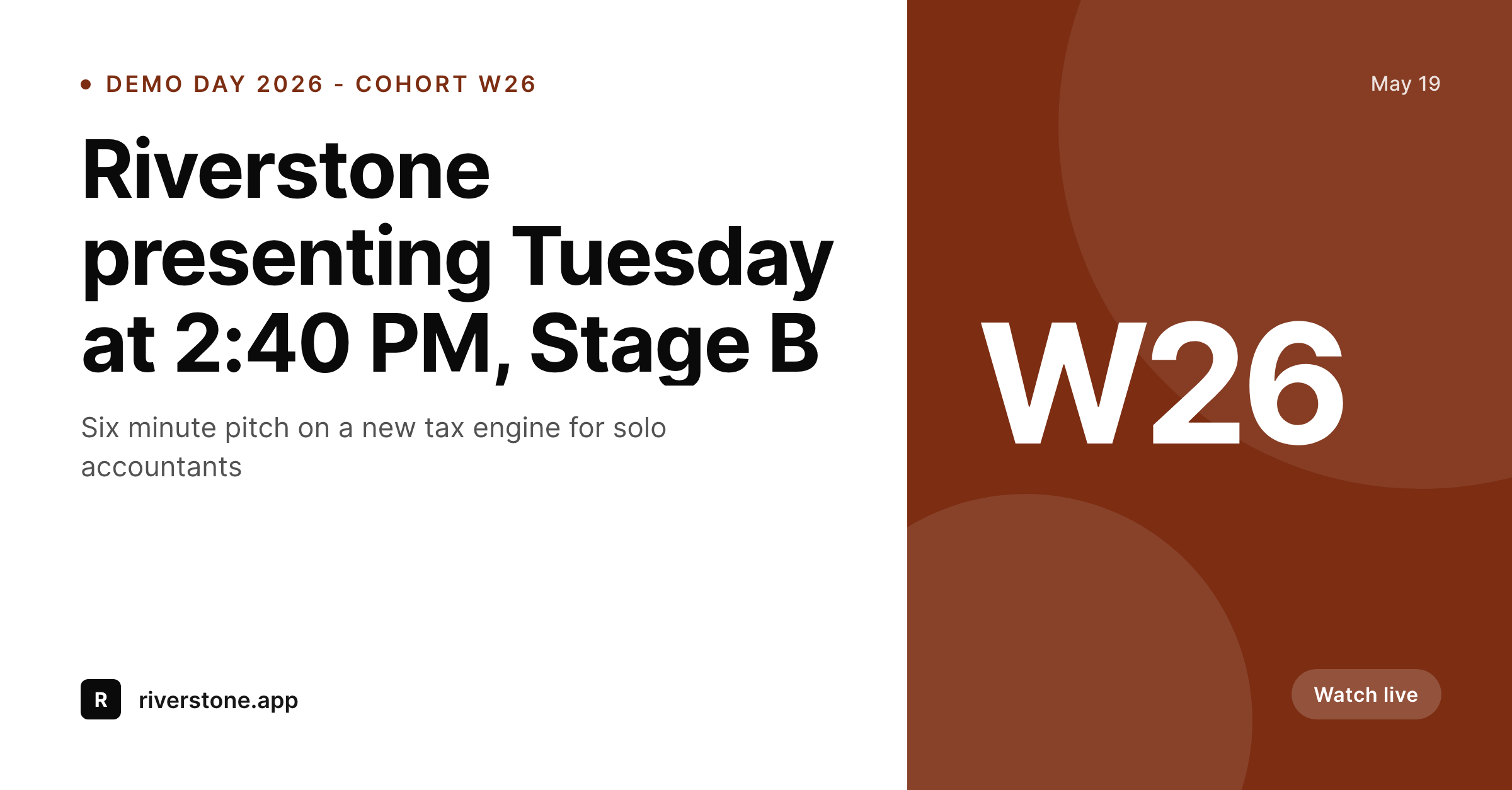
Demo day cards multiply by the size of the cohort
An accelerator cohort of forty founders means forty demo day cards. Each founder needs an image they can post on LinkedIn the morning of, a card that fits the accelerator's visual identity, lists the right pitch slot and stage, and reads as part of the program rather than as a one-off graphic. The accelerator's program team usually makes those cards by duplicating a Figma file forty times, swapping the photo, the headline and the slot, and exporting one PNG per founder.
That workflow breaks the moment the schedule shifts. A founder swaps stages with another at 11 PM the night before, and now two of the forty exported cards have the wrong time. The corrections do not always reach every channel.
SleekPixel anchors the cards to a WordPress post per founder. The program team enters the founder name, photo, slot time, stage, and pitch line as post fields. On save, SleekPixel renders a 1200x627 LinkedIn card with the cohort badge, the accelerator logo, and the founder's specific slot. When the schedule shifts at midnight, two posts get edited, two cards regenerate, and the corrected previews show up the moment any platform re-scrapes.
Workflow
From slot assignment to share-ready in one save
Build the demo day template
Create one post per founder
Save the post
Founders and program share
Output
Sample demo day card
A 1200x627 LinkedIn-sized share card with founder name, pitch slot, stage and a one-line product description.
Comparison
Figma per founder vs SleekPixel
Designer duplicates per founder
- Program team duplicates a Figma file once per founder
- Schedule shifts at midnight break a handful of exported cards
- Founder photo cropping is inconsistent across forty exports
- Cohort badge color drifts as different designers touch the file
- Backfilling past cohorts requires reopening years of Figma files
SleekPixel
- Per-founder post drives one consistent share card
- Schedule edits regenerate the card on the next save
- Cohort badge, accelerator logo and stage locked in the template
- Founder photo cropped to the template shape automatically
- Bulk regenerate past cohorts from the WordPress admin
Features
What SleekPixel gives you for demo day card
Slot-aware templates
Pitch slot, stage, and date all bind to post fields. Schedule changes on Monday night are reflected in the share card by Tuesday morning.
Founder photo handling
Headshots crop to a circle, square or full bleed based on the template. ACF or Meta Box image fields feed straight in, no per-founder editing.
Cohort badge locked
The cohort badge - W26, S26, whatever the program uses - sits in the same corner on every founder's card. Brand consistency without a brand review per founder.
Use cases
Where demo day cards earn their keep
Accelerator programs
Forty founders per cohort, two cohorts per year. The program team builds the cards once in the template and the founders publish themselves through their WordPress posts.
Founder marketing
Each founder gets a personalized, on-brand card to share on LinkedIn the day of pitching. Investors see a card that looks like the official program, not a homemade graphic.
Livestream and recap
When the demo day livestream replay is posted, the same cards from the morning carry through to recap blog posts and YouTube descriptions, building a coherent visual story for the cohort.
The bigger picture
Why demo day cards matter beyond the day itself
Demo day is the single highest-leverage marketing moment for an early-stage founder, and the share card is the part of that moment they can control without a designer. Investors scroll LinkedIn on demo day morning and see who is pitching. A founder whose card lists the accelerator cohort, the pitch slot, and a clear product line gets the meeting.
A founder whose graphic is a phone photo of a stage door does not. Multiply across a forty-founder cohort and the accelerator's brand is either reinforced forty times in one day or diluted forty times. The accelerators that take this seriously, the ones whose alumni networks compound, treat the demo day card system as part of program design.
SleekPixel turns that design into a reproducible pipeline tied to the WordPress install the accelerator already runs. Each cohort inherits the previous cohort's template, the founders publish through their own posts, and the brand stays consistent across years of demo days.
Questions
Common questions about SleekPixel for demo day card
Yes. The cohort badge can be a custom field on the founder post or a category that points to a template variant. W26 founders render with the W26 badge, S26 founders render with S26, all from the same plugin install.
Edit the post, save. SleekPixel re-renders the card with the new slot time and the og:image URL stays stable. The founder posts the same URL on demo day morning with the corrected slot in the preview.
Yes. The card layout does not care whether the venue is physical or a Zoom link. Stage and time fields can be set to room names, breakout sessions, or livestream links.
If the founder has WordPress access to their own post, yes. Most accelerators run a closed program install where the program team owns the posts and founders submit their data through a form. The render happens regardless of who saves.
Yes. Add a second template at 1080x1920 for Instagram Stories. Each founder post renders both the LinkedIn card and the Stories version on save, with both available in the Gutenberg sidebar.
If the accelerator site runs on WordPress, yes. The founder profile pages on the public site become the source of the cards, and the rendered image appears as the og:image on each profile URL.
Yes. Bulk regenerate runs the current template across all historical founder posts. Past cohorts pick up the current visual identity without anyone hand-editing forty old graphics.
Unpublish or trash the post. The card stops being referenced by the public profile URL. SleekPixel does not auto-delete the rendered PNG, so the file remains in uploads if needed for an archive.
Pricing
More than 1000+
happy customers
Explore our flexible licensing options tailored to your needs. Upgrade your license anytime to access more features, or opt for a lifetime license for ongoing value, including lifetime updates and lifetime support. Our hassle-free upgrade process ensures that our platform can grow with you, starting from whichever plan you choose.
Lifetime ♾️
Most popular
EUR
once
- Unlimited websites
- Lifetime updates
- Lifetime support
...or get the Bundle Deal
and save €250 🎁
💎 Want everything forever? The All Access Pass is going away on 01.08.2026.
The Bundle (unlimited sites)
Pay once, own it forever
Elevate your WordPress site with our exclusive plugin bundle that includes all of our premium plugins in one package. Enjoy lifetime updates and lifetime support. Save significantly compared to buying plugins individually.
What’s included
-
SleekAI
-
SleekByte
-
SleekMotion
-
SleekPixel
-
SleekRank
-
SleekView
€749
Continue to checkoutBrowse more
- LinkedIn document post covers
- Lemmy post images
- X community banners
- X social cards
- KDP paperback cover
- Instagram grid tiles
- Substack post headers
- Spotify Canvas
- Facebook event covers
- LinkedIn event banners
- Pinterest video pin covers
- Discord server icon
- Twitter/X header
- Tumblr header
- Slack channel headers