






SleekPixel for YITH Booking
YITH Booking turns WooCommerce products into bookable stays, sessions and rentals. SleekPixel reads the product title, price-per-unit, duration and cover image on save and renders a branded OG card, so every booking link previews with the real offer.
♾️ Lifetime License available
Booking listings deserve real share previews
YITH Booking is one of the most established booking extensions for WooCommerce. It powers cabin rentals, equipment hires, tour bookings, class reservations and consulting slot calendars across thousands of WordPress sites. Each bookable product carries a base price, a per-unit duration (night, hour, half-day), availability rules and usually a hero photo. The store owner shares those product links in newsletters, on social and in Google Business updates.
What lands in those previews is rarely the bookable product itself. Default WordPress OG handling falls back to the shop archive image, or to the site logo, or to a stretched cover photo cropped at the wrong ratio. The Friday night cabin offer that should preview with a clean rate card lands with whatever the theme defaults provided. Booking pages live and die by the share, and the share is consistently the weakest link.
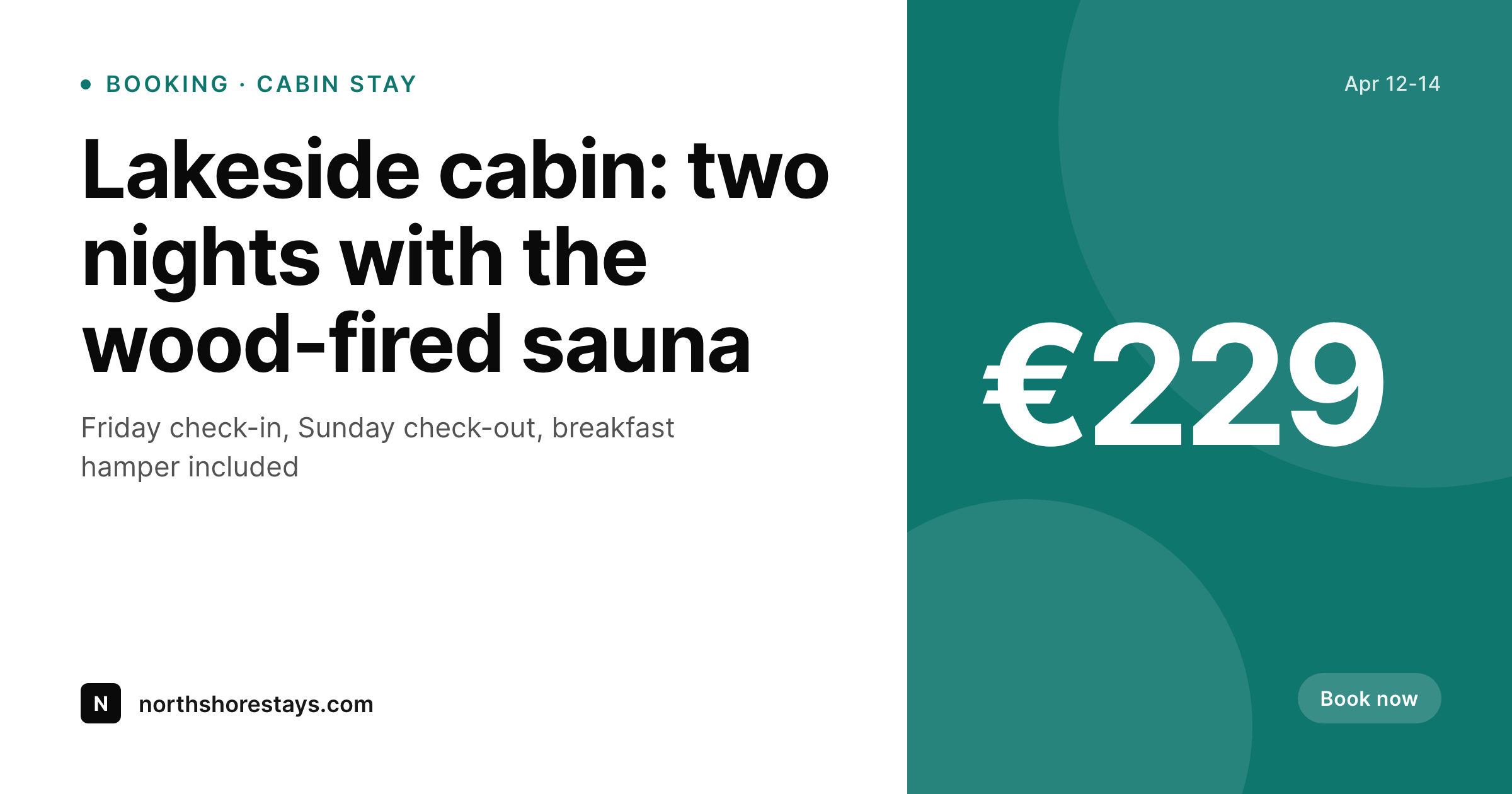
SleekPixel reads YITH Booking product fields on save and renders a real booking card. The title goes large, the per-night rate renders at the price slot, dates or duration sit as a meta line, and the cover image scales into the photo slot. The PNG lands in uploads, og:image and twitter:image fire, and every booking link from that point onward shares with a branded card. Seasonal pricing, new cabins, new tour dates and partner add-ons all share with consistent art because the rendering happens from booking data, not from a separate design queue.
Workflow
From bookable product to share-ready in one save
Build the booking template
Bind YITH fields
Save the product
Promote anywhere
Output
What ships with every bookable product
A 1200 by 630 OG image: booking title, rate, duration unit, dates and brand wordmark, rendered from the YITH Booking product fields already in the store.
Comparison
Default theme OG vs YITH-aware rendering
Default theme OG image
- Default OG falls back to the shop archive image on every booking link
- Cover photo gets cropped wrong on Twitter, LinkedIn and Slack previews
- Price-per-unit is missing from share previews even though it is on the product
- Seasonal pricing changes never reach old shared previews
- Adding a new cabin or tour means a fresh round of manual social art
SleekPixel
- Reads YITH Booking product fields directly, no manual mapping
- Per-unit rate and duration unit render onto the card automatically
- Cover image, gallery image and category badges all available as slots
- Bulk re-render the catalog when a brand or template changes
- Re-renders fire on save so price edits show up in future shares
Features
What SleekPixel gives you for YITH Booking
YITH-aware fields
Title, base rate, per-unit duration, cover image and category come from the bookable product itself. No remapping, no duplicate data entry.
Duration aware
Per-night, per-hour and per-day units render in the right grammar (€229 / night, €60 / hour). The card reads like an actual booking listing.
Seasonal-rate aware
When the active rate window changes, the next save re-renders the OG image with the new price, so future shares match the current booking page.
Use cases
What YITH Booking stores generate with SleekPixel
Vacation rentals
Cabins, cottages and apartments share with the cover photo, per-night rate and the available date range right on the card.
Tours and experiences
Half-day kayak tours, walking tours and workshops preview with title, duration and meeting-point hint instead of a stretched logo.
Equipment hire
Surfboard, e-bike and camera rentals share with rate, duration unit and a clean hero shot, so the share itself reads like a listing.
The bigger picture
Why booking share previews convert
Vacation rentals, tours and equipment hires are essentially impulse decisions stretched over a small research window. A user sees a friend's tweet about a weekend cabin, clicks through, weighs it for a day, then books. That entire decision starts at the share preview.
If the preview is the shop logo stretched over the URL, the click-through is whatever curiosity carries. If the preview is a clean booking card with the cabin photo, the per-night rate and the dates, the share itself acts as a soft sales page, and the click-through is materially higher. The second reason is rate consistency.
Booking stores routinely run seasonal pricing, last-minute discounts and new-listing launches. Manually creating share art for every rate window is unrealistic, so most listings show outdated images forever. SleekPixel inverts that, because rendering happens automatically from the same fields that drive checkout.
The card a user sees on social matches the price they see at the booking page, which is the smallest form of trust that booking products live on.
Questions
Common questions about SleekPixel for YITH Booking
Yes. Extra services and people-based pricing are stored as additional fields on the bookable product. SleekPixel can read those fields and render them on the card if you want, or you can keep the card focused on the base rate and let the booking page handle the modifiers.
The card shows whichever rate is active when the post is saved. To roll out seasonal art, save the bookable product after the new rate window takes effect, or run a bulk regenerate. Most stores set this on a cron so cards never show stale prices.
Minimum night counts and check-in day rules live on the booking product. The card itself usually just shows the per-night rate, but the template can include 'Two-night minimum' as a small meta line if that matters for the share.
Deposit and partial payment settings affect checkout, not the bookable product card. The OG image continues to show the full rate (or whatever you bind to the price slot), and the deposit flow runs at checkout as usual.
Yes. WordPress featured image is the default slot. If you keep the hero photo as the featured image and the gallery for the listing page, the share card pulls the right one automatically. You can also bind to a specific custom field if your workflow puts the hero somewhere else.
Render time per product is on the order of a second on typical hosts. Save speed is not noticeably affected. Bulk regenerations run in the background and can be paced to avoid load on busy stores.
No. SleekPixel only writes og:image and twitter:image tags. Title tag, meta description and canonical handling stay with your SEO plugin of choice. The image layer is independent.
Yes, with a small template variant. The bookable product exposes availability state via its meta. A conditional in the template can switch to a 'fully booked' style card during sold-out windows, then back to the regular card when openings return.
Pricing
More than 1000+
happy customers
Explore our flexible licensing options tailored to your needs. Upgrade your license anytime to access more features, or opt for a lifetime license for ongoing value, including lifetime updates and lifetime support. Our hassle-free upgrade process ensures that our platform can grow with you, starting from whichever plan you choose.
Lifetime ♾️
Most popular
EUR
once
- Unlimited websites
- Lifetime updates
- Lifetime support
...or get the Bundle Deal
and save €250 🎁
💎 Want everything forever? The All Access Pass is going away on 01.08.2026.
The Bundle (unlimited sites)
Pay once, own it forever
Elevate your WordPress site with our exclusive plugin bundle that includes all of our premium plugins in one package. Enjoy lifetime updates and lifetime support. Save significantly compared to buying plugins individually.
What’s included
-
SleekAI
-
SleekByte
-
SleekMotion
-
SleekPixel
-
SleekRank
-
SleekView
€749
Continue to checkout