






SleekPixel for album release cards
Artists, labels, and managers run the album landing page in WordPress. SleekPixel turns that post into a 1080x1080 release card with title, track count, runtime, and release date.
♾️ Lifetime License available
An album release is a coordinated visual push
Album release day is the loudest day in any artist's calendar. The landing page goes live, the press release drops, the artist posts on Instagram, the label posts on Twitter, the streaming services push the smart link, and friends and fellow musicians reshare. Every one of those surfaces needs a clean, consistent card. Without it, the rollout reads as fragmented even when the music is unified.
Most independent artists solve this by paying a designer for the album art and then exporting four or five social variants. Those variants are tied to a specific moment, they are great on release day, and they get harder to maintain as the album cycle goes on. The single drops a month later, the music video releases three months in, the tour announcement follows, and each new beat needs another set of cards that match the album visual identity. The designer is busy on the next project. The artist is back in Canva.
SleekPixel makes the album post the source. Title, track count, runtime, release date, cover art URL all live as fields. The template binds those fields to a square 1080x1080 card. On save, the PNG renders, the og:image gets written, and every share of the album landing page resolves to the same card. The same template can be reused for the single drop, the video release, and the tour announcement, with different fields for each.
Workflow
From release-day post to social-ready in one save
Design the release template
Build the release post
Save and publish
Coordinate the rollout
Output
What a generated album release card looks like
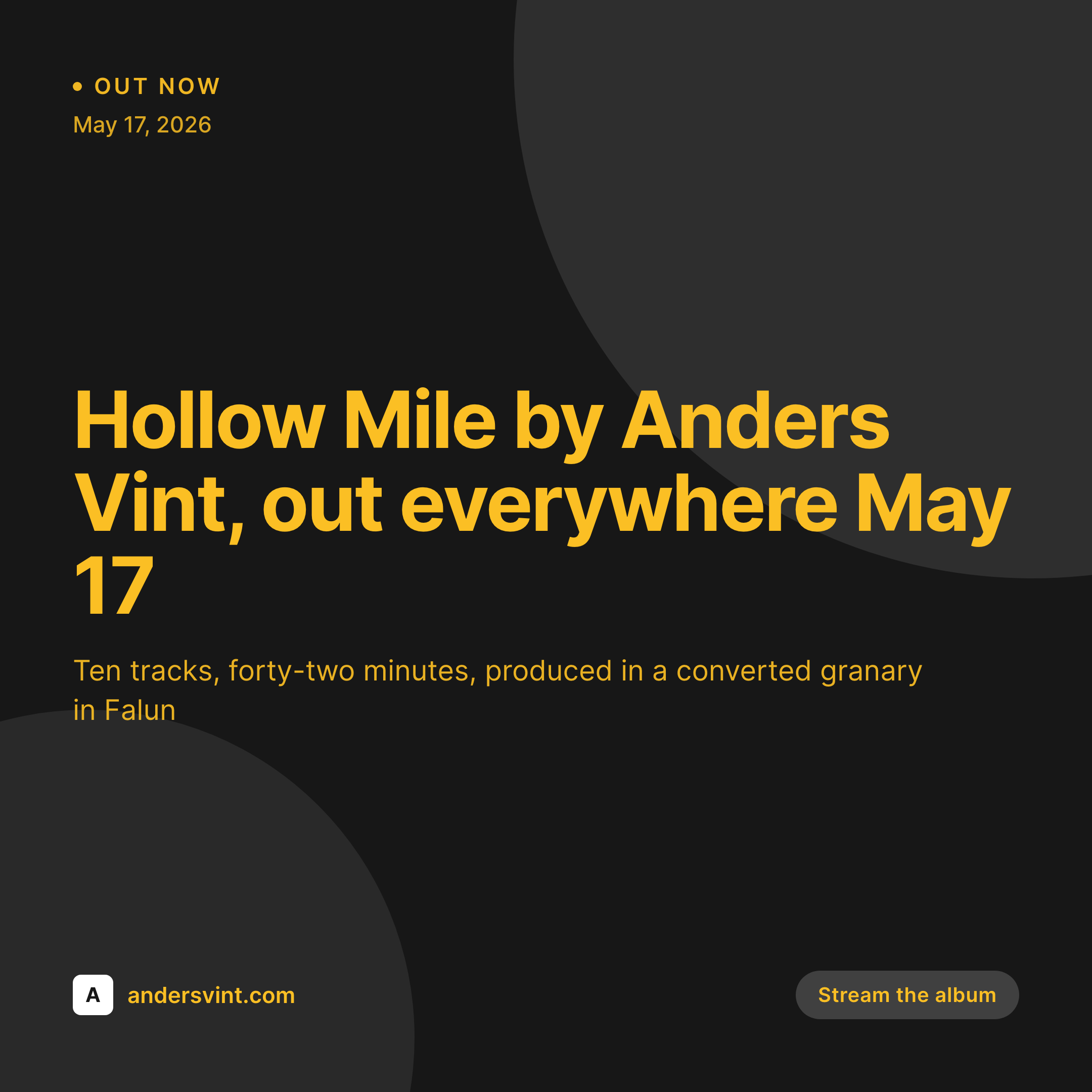
A 1080x1080 square release card with the album title, artist, runtime, track count, and release date pulled from the album post.

Comparison
Designer-exported card vs SleekPixel
Designer per-release export
- Designer ships the release-day card, follow-up announcements get nothing
- Single drop card has slightly different fonts than the album card
- Release date on the card disagrees with the actual streaming go-live
- No template enforcement, every beat in the campaign drifts visually
- Six months later, nobody can find the original designer's source files
SleekPixel
- Render fires on save for every release post
- Title, track count, runtime, and date from post fields
- Same template extends to singles, videos, and tour announcements
- Cover art layer pulled from a custom image field
- Bulk regenerate when the brand evolves between cycles
Features
What SleekPixel gives you for album release cards
Release-type aware
Templates know the difference between an LP, EP, single, and compilation. The corner mark and slot order adapt so the card communicates format at a glance.
Release date as a slot
The release date is bound to a field. Update the date if the release shifts, save, the card reflects the new go-live across every share.
Cover art layer
The album cover gets its own image layer in the template, bound to a custom field. The card always carries the right cover, scaled to the template slot.
Use cases
Where album release cards earn their keep
Independent artists
Self-releasing musicians who run their own landing pages. SleekPixel removes the per-beat design tax across the full album cycle, from announcement to tour.
Small labels
Boutique labels running ten to thirty releases a year. One template, dozens of releases, consistent visual identity across the catalog without per-release design budget.
Artist managers
Managers running rollouts for multiple acts. Each act gets its own template, the campaign beats render from the same source posts, the manager spends time on press, not on Canva.
The bigger picture
Why a single source matters for the full album cycle
An album cycle is a six to eighteen month campaign with at least a dozen visual beats: the announcement, the cover reveal, the single drops, the music video, the album release, the tour announcement, the tour dates, the merch drops, the festival appearances, the deluxe edition, the remix EP. Each beat needs a card. Most artists rely on a designer for the first three beats and then improvise the rest in Canva, which is why the campaign always reads as starting strong and ending uneven.
The artists who maintain visual consistency through the whole cycle are usually the ones working at a major label budget, which is not most artists. SleekPixel collapses the budget problem. The landing post is the source, the template extends across every beat, and the render runs on save.
An independent artist can ship a coordinated visual rollout that looks like label-quality work, because the work is done once at template time and then automated for the rest of the cycle.
Questions
Common questions about SleekPixel for album release cards
Yes. Use the release-type field to switch corner marks (LP, EP, single) and slot order, but keep the same overall design. The cycle reads as a coordinated rollout.
Yes, or from a custom image field if you prefer. SleekPixel binds an image layer to whichever source you specify. The album cover scales into the template slot at render time.
Update the date field on the post, save. The card re-renders with the new date and the og:image at the same URL stays consistent. Any shares that scrape the URL afterwards get the updated preview.
Yes. Configure square, vertical story, and OG horizontal templates against the same release post. All three render on save, each downloadable from the Gutenberg sidebar.
Yes. Bind the artist field to whatever you want shown, including "Various Artists" or a curator name. The template treats the field as text, the value is editorial.
Yes, but as static layers in the template, not as live links. The PNG is an image. The actual streaming smart link lives in the post body or in the social caption.
Yes. The pre-save landing page in WordPress can use the same template with a "Pre-save" badge instead of "Out now." On release day, update the badge field, save, the card flips to release-day mode.
Yes. Update the template, bulk regenerate all release posts, every card from announcement through tour gets re-rendered with the new brand. The campaign stays internally consistent.
Pricing
More than 1000+
happy customers
Explore our flexible licensing options tailored to your needs. Upgrade your license anytime to access more features, or opt for a lifetime license for ongoing value, including lifetime updates and lifetime support. Our hassle-free upgrade process ensures that our platform can grow with you, starting from whichever plan you choose.
Lifetime ♾️
Most popular
EUR
once
- Unlimited websites
- Lifetime updates
- Lifetime support
...or get the Bundle Deal
and save €250 🎁
💎 Want everything forever? The All Access Pass is going away on 01.08.2026.
The Bundle (unlimited sites)
Pay once, own it forever
Elevate your WordPress site with our exclusive plugin bundle that includes all of our premium plugins in one package. Enjoy lifetime updates and lifetime support. Save significantly compared to buying plugins individually.
What’s included
-
SleekAI
-
SleekByte
-
SleekMotion
-
SleekPixel
-
SleekRank
-
SleekView
€749
Continue to checkoutBrowse more
- Mastodon link previews
- Pinterest product pin covers
- Threads profile banner
- YouTube channel banners
- Spotify playlist cover
- LinkedIn carousel slides
- Threads post cover
- VSCO cover
- Behance project covers
- Reddit subreddit banners
- LinkedIn banner images
- Tumblr header
- Instagram ad images
- Weibo post images
- Douyin cover