






SleekPixel for Mighty Networks communities
Mighty Networks runs the community feed, the cohort courses, and the live events. WordPress often runs the public marketing site that introduces new members. SleekPixel renders an OG and Twitter card per network so every share unfurls with the network name, member count, and price.
♾️ Lifetime License available
Mighty Networks handles community and courses, WordPress handles the brand
Mighty Networks packs a community feed, a cohort-course engine, live events, and member chat into one product. The platform is built for hosts who want their community to feel like a real place rather than a generic forum. The marketing layer, though, almost always lives somewhere else, because the host's brand history, blog, testimonials, and SEO landing pages already run on WordPress and would not move just because a community lives on Mighty.
The WordPress side typically mirrors the network as a custom post type. Each network has a name, a description, a recurring price, a member count, and a join URL pointing at the Mighty Networks landing page. Everything is in place except the share preview, which falls back to a default banner.
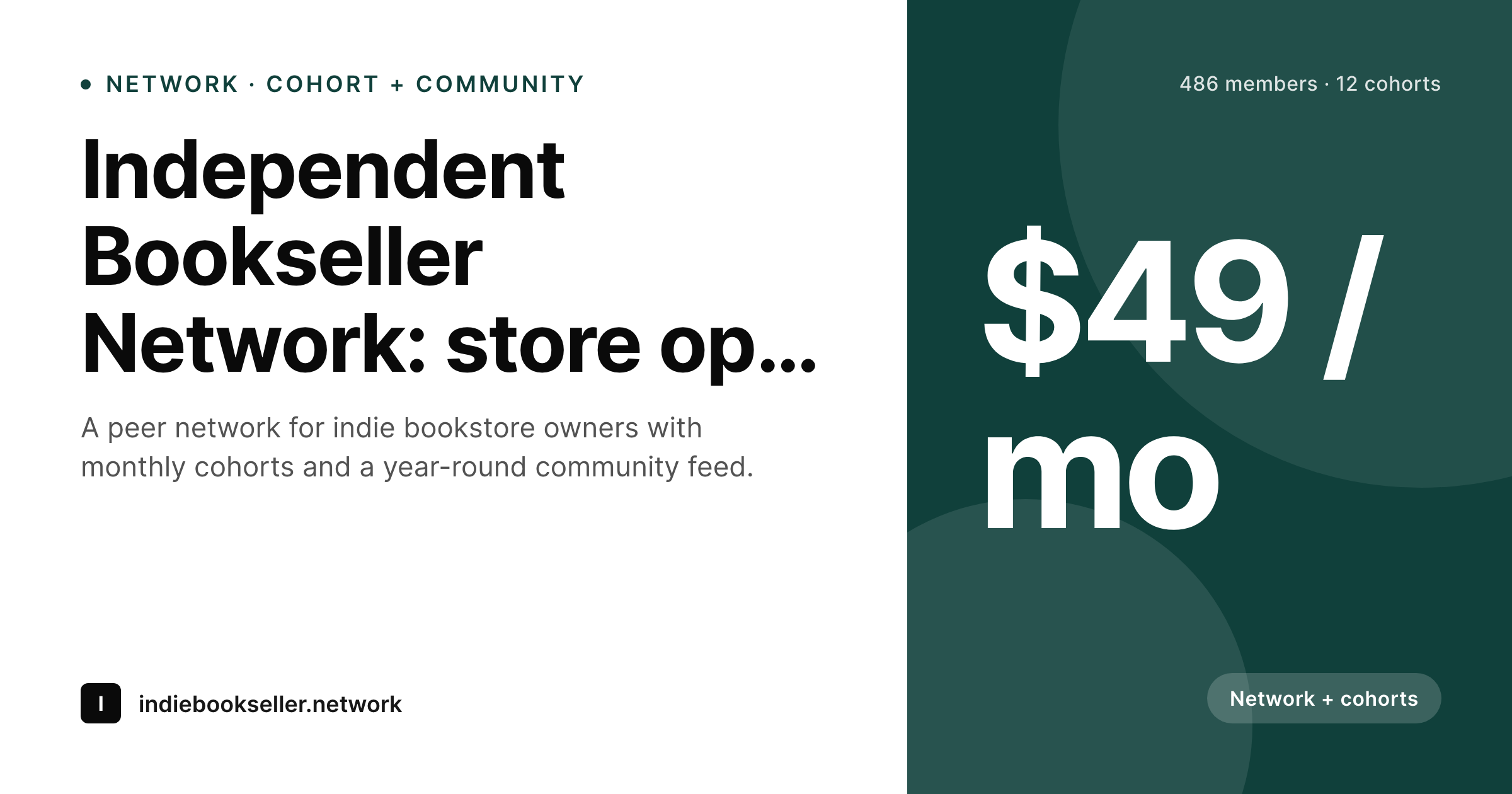
SleekPixel reads the network post fields on save and renders a card with the network name, the topic line, the member count if bound, the recurring price, and a network-plus-cohort badge if the offer includes both. The PNG lands in uploads and the og:image and twitter:image tags update for the WordPress URL. Mighty Networks itself stays unchanged, and the WordPress front door ships a real preview for every share into a tweet, a newsletter, or a podcast show notes page.
Workflow
From Mighty network to share-ready WordPress page
Build the WordPress network post type
Design the network template
Save the WordPress post
Share the front door
Output
Per-network card layout
A 1200 by 630 OG and Twitter card: network name, topic subtitle, member count, recurring price, network-plus-cohort badge, and brand wordmark, rendered from the WordPress network post.
Comparison
Default WordPress unfurl vs Mighty-aware rendering
Default theme OG
- Network landing pages unfurl with the homepage banner on the WordPress side
- Member counts and recurring price never reach the share preview
- Featured images framed for the hero look stretched at 1200 by 630
- Manual cards per cohort or per network skip after the first launch
- Brand or price changes require redoing every past landing-page card
SleekPixel
- Reads WordPress fields for each Mighty network marketed through WP
- Network-only, cohort-only, and network-plus-cohort variants share a family
- Member count, recurring price, and cohort badge render automatically
- Bulk re-render every network landing page after a brand change
- Lives on the WordPress side, no Mighty Networks plugin required
Features
What SleekPixel gives you for Mighty Networks communities
Network-aware headlines
The network name and topic line render as the card headline and subtitle. Readers see what the network is for before the click.
Cohort badge
Networks bundling cohort courses render a 'network + cohort' badge, useful for high-ticket plans where the dual offer is the headline.
Recurring price slot
Recurring price renders as a corner mark with the cadence label, signalling the offer at a glance on the share preview.
Use cases
Who runs Mighty Networks plus a WordPress front
Network-plus-course hosts
Hosts pairing a community with a cohort course on Mighty present the joint offer on WordPress, with a card that names both pieces.
Niche peer networks
Industry-specific peer networks on Mighty keep a WordPress landing page that introduces the focus and unfurls with a brand-aligned card.
Brand-led communities
Public-facing brands run a Mighty community for customers and use WordPress as the trust layer, where every share looks coordinated.
The bigger picture
Why network previews matter more than they look
Mighty Networks growth follows the same pattern as most community-led products: trust transfer from a host or peer, a URL pasted across channels, a click decision made from the preview. Without a real card, the preview names nothing, and the click depends on the surrounding copy carrying the context. With a real card, the network name, member count, and price all show up in the preview, and the reader can evaluate before clicking.
The lift is most visible during launch windows when a host drops a single URL across multiple channels in a short window. The second compounding effect applies for hosts running several networks or several tiers within one network. A consistent share preview family makes the operation feel like a real organization rather than a side project, and SleekPixel produces that consistency on every WordPress save.
The Mighty Networks platform keeps doing what it does well, and the WordPress front finally ships a preview that matches.
Questions
Common questions about SleekPixel for Mighty Networks communities
No. SleekPixel reads WordPress post fields. Mighty Networks continues to host the community, the courses, and the events. Only the WordPress landing page needs to exist for the share card to render.
Then SleekPixel has nothing to render against. The plugin only writes OG tags on WordPress URLs. Operators who keep the front on WordPress for SEO and brand benefit; those on Mighty-hosted pages rely on Mighty's previews.
Yes. A custom field on the post selects the template variant. Free, paid, and high-tier plans each get a distinct visual while sharing one template family.
Either by manual periodic update or through a small scheduled script that pulls the count and writes to a custom field. SleekPixel reads the field on render.
Yes. A 'network + cohort' badge renders when the post has the right field set, and the price slot can show the combined cost. The template chooses based on the field.
Rebrands need to be reflected on the WordPress post for the card to follow. SleekPixel binds to the WordPress fields, so as long as those update, the new card renders on the next save.
Yes. Each cohort can have its own WordPress post with cohort-specific fields like start date and seats. The template renders a cohort variant, distinct from the evergreen network card.
Rendering happens once per save as a background job. Public pageviews serve the static PNG from uploads with no per-request work. There is essentially no performance cost on the public side.
Pricing
More than 1000+
happy customers
Explore our flexible licensing options tailored to your needs. Upgrade your license anytime to access more features, or opt for a lifetime license for ongoing value, including lifetime updates and lifetime support. Our hassle-free upgrade process ensures that our platform can grow with you, starting from whichever plan you choose.
Lifetime ♾️
Most popular
EUR
once
- Unlimited websites
- Lifetime updates
- Lifetime support
...or get the Bundle Deal
and save €250 🎁
💎 Want everything forever? The All Access Pass is going away on 01.08.2026.
The Bundle (unlimited sites)
Pay once, own it forever
Elevate your WordPress site with our exclusive plugin bundle that includes all of our premium plugins in one package. Enjoy lifetime updates and lifetime support. Save significantly compared to buying plugins individually.
What’s included
-
SleekAI
-
SleekByte
-
SleekMotion
-
SleekPixel
-
SleekRank
-
SleekView
€749
Continue to checkoutBrowse more
- Mastodon post images
- Instagram Reels covers
- Substack post thumbnail
- LinkedIn carousel slides
- GitHub social preview images
- Instagram highlight covers
- Warpcast frame images
- Beacons.ai banner
- Spotify Canvas
- LinkedIn banner images
- Pinterest shop banners
- Discord stage banner
- Twitch starting soon screen
- Threads profile banners
- LinkedIn company banners