






SleekPixel for guest post card
Guest contributors rarely send a designed share image with their draft. SleekPixel renders one from the post itself, pulling the headline, the contributor's byline, and a headshot from the author field, then writes the og:image so every link preview points to the same branded card.
♾️ Lifetime License available
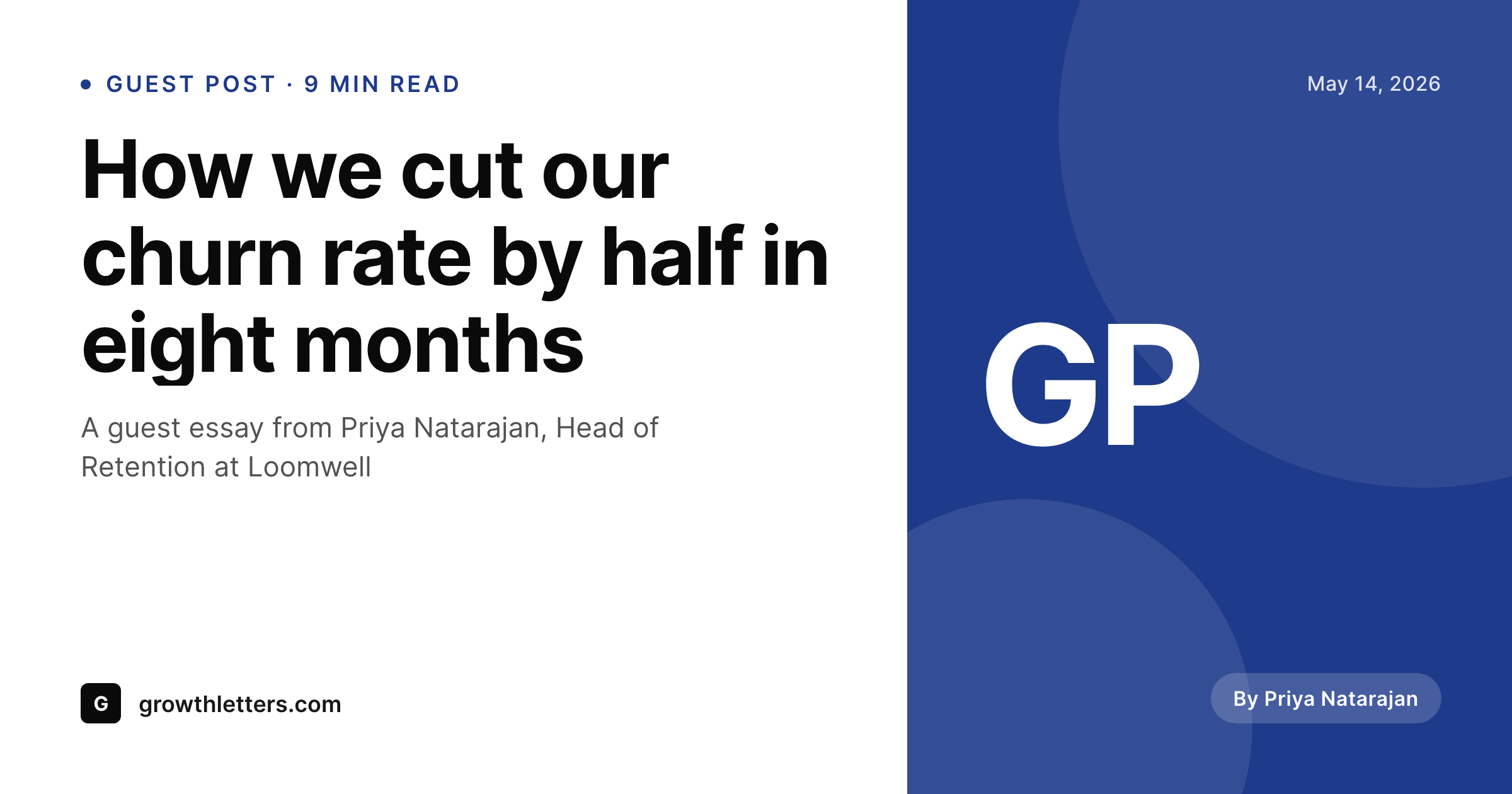
Guest posts ship without a designed share image
A guest contributor sends a draft, the editor cleans it up, schedules it, and the post goes live. Almost none of those drafts come with a designed social card. The contributor wrote good copy, not branded graphics. So the post ships with whatever the homepage og:image happens to be, or with no image at all, and the LinkedIn share looks like a placeholder.
SleekPixel fixes that without asking the contributor to do design work. The template lives on the publication's side. The author field on the post drives the byline. The featured image or a headshot custom field drives the portrait. The headline pulls from the post title. On save, SleekPixel renders a 1200x630 share card that carries the publication's branding around the contributor's name and headline, and writes the og:image meta tag automatically.
The contributor gets a polished social asset, the publication gets brand consistency across every guest piece, and the editor never opens Figma. The post is the source. The card is rendered. The link preview is correct on LinkedIn, Twitter, Slack, and email.
Workflow
From contributor draft to social-ready in one save
Build the guest template
Assign the contributor
Publish the post
Refresh when bios change
Output
Sample guest post share card
A 1200x630 OG card with the contributor's name, the publication's branding, and the post headline composed from a single template.
Comparison
Editor-designs-it-each-time vs SleekPixel
Editor designs each card
- Editor opens a Figma template and types the contributor's name in by hand
- Headshots get pasted at inconsistent sizes across posts
- Long guest headlines overflow templates designed for short titles
- If the contributor's bio gets updated, the card stays stale
- Cards never get backfilled for old guest posts that still get traffic
SleekPixel
- Author field drives byline and headshot automatically
- Headline wraps to fit the layout regardless of length
- Publication brand stays consistent across every contributor
- Update an author profile and old cards re-render in a batch
- Editor approves the post, the card renders on save
Features
What SleekPixel gives you for guest post card
Author-aware layouts
Templates bind to the WordPress author field. Display name, gravatar, or a custom headshot field populate the byline area without manual entry.
Headlines that fit
Auto-fit text shrinks long guest headlines to the available space and wraps them across two or three lines instead of cutting them off.
One template, many guests
Build the publication's guest-post template once. Every contributor's share card matches the brand without per-post design work.
Use cases
Where guest post cards earn their keep
Editorial publications
Publications that run rotating guest contributors need every byline to look like part of the same brand, not a series of one-off graphics.
B2B blogs with contributors
SaaS blogs that publish guest essays from customers and partners get consistent share cards across every contributor without editor overhead.
Industry roundup sites
Roundups that publish dozens of guest perspectives a month render share cards automatically instead of staging exports in batches.
The bigger picture
Why brand consistency matters across guest content
Guest contributors bring credibility from outside the publication, but the share preview is still the reader's first visual impression. If every guest post on the site has a different style of share card, the publication looks like a stitched-together collection of one-off pieces rather than a unified editorial voice. Most publications solve this by having an editor design a card for each guest, which works at low volume and breaks at scale.
SleekPixel turns the post itself into the source. The author field, the headline, the featured image, all become the card's content, rendered by a template the publication controls. The contributor never has to design anything.
The editor never has to open Figma. The reader sees a share card that belongs to the publication, with the contributor's name on it, in the publication's typography and palette. Consistency becomes the default rather than a target the editor has to hit every time.
Questions
Common questions about SleekPixel for guest post card
Both work. Native WordPress users drive the byline through the author field. External guest names can come from a custom field like guest_author or a Co-Authors Plus integration. Templates bind to whichever source the post uses.
By default the gravatar from the author's email. If the publication prefers a curated headshot, an ACF image field on the user profile or the post drives the portrait instead. Both paths are supported in the template editor.
Each post renders its own card with that post's headline. The byline and portrait stay consistent across all of their posts because they trace back to the same author profile.
Yes. Bulk regenerate runs the current template across selected post types or categories. Historical guest posts pick up the publication's current branding in a single batch.
The render uses the font's full glyph coverage. As long as the chosen font includes the needed characters, names render correctly. SleekPixel ships with fonts that cover Latin Extended and common diacritics, and custom fonts can be loaded.
Yes. Add a custom field for affiliation on the author profile or the post, bind it to a text layer in the template, and the card displays it under the byline.
Yes. Templates can read the Co-Authors Plus field and lay out multiple portraits and names side by side, or fall back to the first listed author if the layout only fits one byline.
No. SleekPixel writes og:image and twitter:image. Yoast or Rank Math continue to handle og:title, og:description, schema, and the rest. The two plugins coexist.
Pricing
More than 1000+
happy customers
Explore our flexible licensing options tailored to your needs. Upgrade your license anytime to access more features, or opt for a lifetime license for ongoing value, including lifetime updates and lifetime support. Our hassle-free upgrade process ensures that our platform can grow with you, starting from whichever plan you choose.
Lifetime ♾️
Most popular
EUR
once
- Unlimited websites
- Lifetime updates
- Lifetime support
...or get the Bundle Deal
and save €250 🎁
💎 Want everything forever? The All Access Pass is going away on 01.08.2026.
The Bundle (unlimited sites)
Pay once, own it forever
Elevate your WordPress site with our exclusive plugin bundle that includes all of our premium plugins in one package. Enjoy lifetime updates and lifetime support. Save significantly compared to buying plugins individually.
What’s included
-
SleekAI
-
SleekByte
-
SleekMotion
-
SleekPixel
-
SleekRank
-
SleekView
€749
Continue to checkoutBrowse more
- SDK release card
- product page
- trend report cards
- holiday greeting cards
- HIPAA compliance card
- coming soon cards
- compensation report cards
- build log cards
- principle cards
- state of industry cards
- dev changelog card
- cohort announcement card
- holiday promo card
- research report images
- certification badges
- SoundCloud track art
- Substack podcast cover
- WhatsApp status images
- Apple Podcasts covers
- Mastodon link previews
- Linktree banner image
- GitHub social preview images
- Threads social images
- Shopify collection banners
- Instagram stories
- Twitch profile banner
- YouTube end cards
- LinkedIn company banners
- YouTube podcast thumbnails
- Beacons.ai banner