






SleekPixel for urban farms
Rooftop, lot, or warehouse, the harvest gets logged in WordPress already. SleekPixel pipes crop, weight, destination, and date into a card that's ready for Instagram, restaurant DMs, and the farm site.
♾️ Lifetime License available
Tell the story of every harvest without a separate design step
Urban farms make a different argument than rural ones. The case is local, hyper-local, often visible from the buyer's window. A rooftop with 80 pounds of lettuce three blocks from the restaurant is a stronger story than the same lettuce trucked in from upstate. But that story only lands if the harvest gets documented and shared while the produce is still moving.
SleekPixel turns the harvest log post into the source of those visuals. A custom post per drop holds crop name, weight, destination restaurant or stand, and pickup date. Templates pull from those fields and render a square for the feed, a vertical for the story, and an OG image for the harvest archive on the site.
Restaurants get a same-day DM with the card. Followers see a steady run of yield posts that read as ongoing operation, not occasional photoshoot. The harvest archive on the site builds month over month without anyone reopening Canva.
Workflow
From harvest log to yield card, automatically
Set up the harvest post type
Design the template family
Connect the fields
Publish the harvest
Output
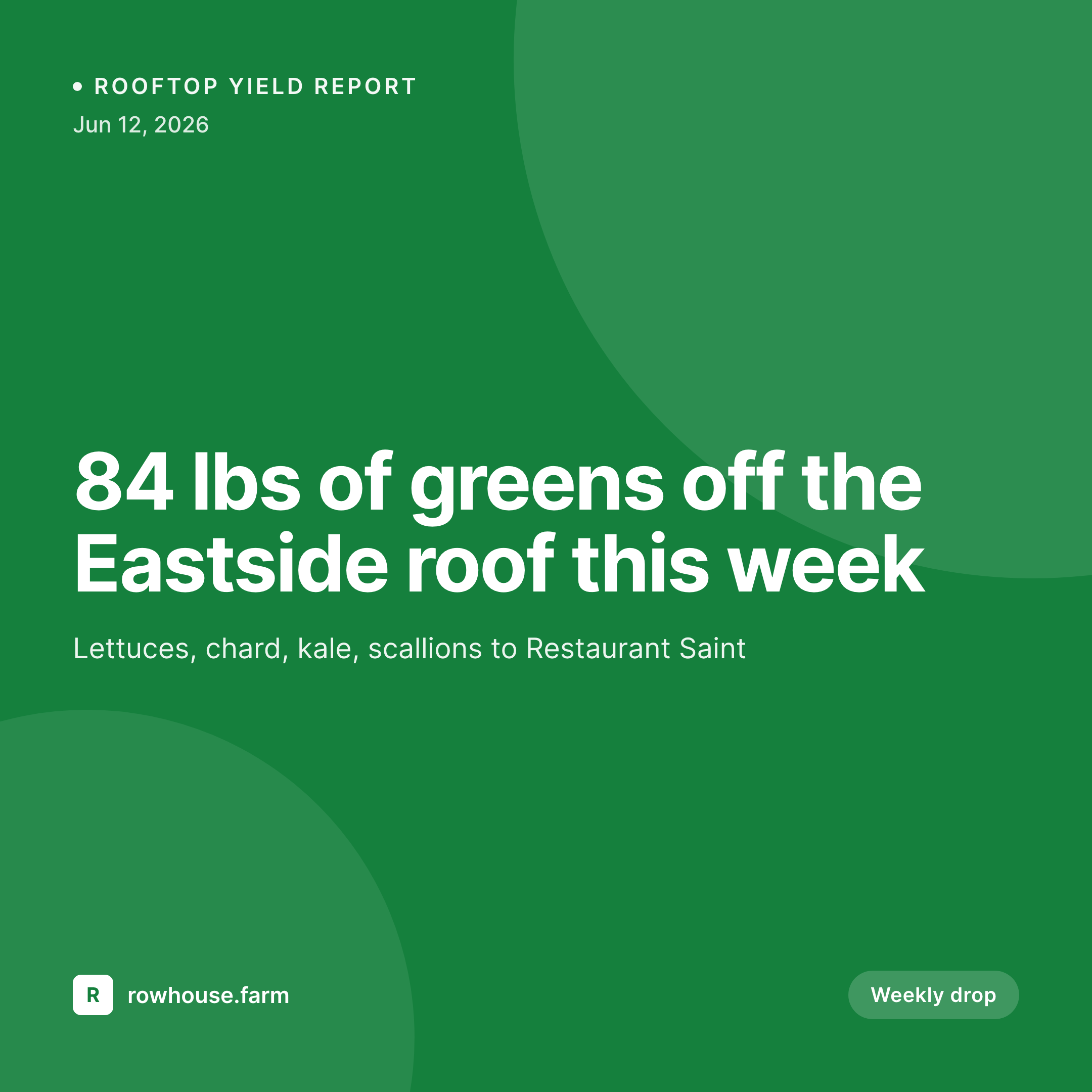
Sample weekly yield card
1080 square card from one harvest log post: crop name, weight, destination, and the rooftop name where it was grown.

Comparison
Default urban farms image vs SleekPixel
Default urban farms image
- Phone photos with no overlay, weight and destination buried in caption
- Inconsistent typography from week to week
- Restaurant DMs get a generic crate photo with no farm branding
- Yield archive page has no visual hook, just numbers in a table
- Story posts get skipped because they need a vertical version
SleekPixel
- Crop, weight, destination, and date pulled from the harvest post
- Square, vertical, and OG image rendered from one template family
- Restaurant-facing variant with the buyer's name baked into the card
- Yield archive page gets a uniform card grid as posts accumulate
- Bulk regenerate the whole season after a brand or logo update
Features
What SleekPixel gives you for urban farms
Crop-by-crop templates
Lettuce, microgreens, tomatoes, and herbs can each get a template variant routed by crop_type, so the card reflects what was actually harvested.
Restaurant-aware variants
Drop card includes the buyer's name and pickup window when the destination field is set, which doubles as a confirmation DM.
Rooftop or lot identifier
Multi-site farms tag each harvest with the growing location. The card shows where the produce came from, three blocks from where it ends up.
Use cases
Who uses SleekPixel for urban farms
Rooftop and lot operations
Single-site farms supplying a handful of restaurants and a Saturday stand get every drop documented without leaving the harvest tool.
Multi-site farm networks
Brooklyn Grange-style operations with multiple rooftops can tag each harvest by site, so the card credits the right growing location.
Farm-to-restaurant programs
Restaurants get a same-day card with their name, the crop, and the weight. Doubles as a delivery confirmation and a marketing asset for the restaurant.
The bigger picture
Why visual harvest logs matter for urban farms
Urban farms operate at the edge of legibility. A passerby can see the rooftop or the lot but cannot see what is being produced, how often, or for whom. Without consistent documentation, the operation looks experimental even when it has been running for years.
Visual harvest logs flip that perception. A feed showing 30 drop cards across a season reads as a working farm, not a community garden. The same logs do double duty as proof for new restaurant partners, who need to know the supply is real before committing to a weekly order.
Templated cards make this documentation a side effect of the work that already happens, instead of an extra evening task. The card writes itself the moment the harvest gets logged, which is the only way the practice survives a busy growing week.
Questions
Common questions about SleekPixel for urban farms
Not directly. SleekPixel reads from WordPress post fields. If you sync harvest data from those tools into WordPress (manually or via a custom integration), the fields become available to the template. The plugin focuses on rendering, not on data ingestion from external systems.
Same approach. Use a different post type or a category, set up a template variant, and bind the relevant fields. The plugin renders whatever the fields contain, so egg dozens or honey jars work the same as a pound of greens.
Yes. Add a photo field to the harvest post and bind it to a slot in the template. The template can place it inside a frame at fixed dimensions so even off-the-cuff phone photos render cleanly within the farm branding.
Yes. Stand posts can use the same template family with a different variant. Crop list, market name, and stand hours render into the card, ready for the Saturday morning story post.
Same plugin, different post type. Many urban farms run both restaurant accounts and a small CSA. The harvest post and the share post can each have their own template family, both rendered by SleekPixel on save.
Yes. Add a food_miles or carbon_saved field to the harvest post and bind it to a slot. Three-block harvests can show '0.3 miles to plate' as a real number, which is the kind of detail that lands with sustainability-focused restaurants.
SleekPixel writes PNG or JPG depending on the template. For OG image use, JPG at 85 percent quality keeps file size in the share-friendly range. For Instagram posts, PNG holds typography sharper at 1080 square.
Yes. Bulk regenerate walks every harvest post and renders the image with the current template. Useful for unified branding across the archive after a redesign or a name change.
Pricing
More than 1000+
happy customers
Explore our flexible licensing options tailored to your needs. Upgrade your license anytime to access more features, or opt for a lifetime license for ongoing value, including lifetime updates and lifetime support. Our hassle-free upgrade process ensures that our platform can grow with you, starting from whichever plan you choose.
Lifetime ♾️
Most popular
EUR
once
- Unlimited websites
- Lifetime updates
- Lifetime support
...or get the Bundle Deal
and save €250 🎁
💎 Want everything forever? The All Access Pass is going away on 01.08.2026.
The Bundle (unlimited sites)
Pay once, own it forever
Elevate your WordPress site with our exclusive plugin bundle that includes all of our premium plugins in one package. Enjoy lifetime updates and lifetime support. Save significantly compared to buying plugins individually.
What’s included
-
SleekAI
-
SleekByte
-
SleekMotion
-
SleekPixel
-
SleekRank
-
SleekView
€749
Continue to checkoutBrowse more
- Discord server banners
- Twitch profile banner
- podcast cover art
- Instagram feed posts
- LinkedIn company banners
- YouTube ad thumbnails
- VK community cover photos
- Open Graph images
- Threads profile banners
- Bluesky link cards
- Apple Music cover art
- LINE official account banners
- Mastodon link previews
- LinkedIn document post covers
- LinkedIn article covers