






SleekPixel for mushroom foragers
Species, weight, habitat, date, destination. The field log entry you already keep becomes a card for the feed, a vertical for the story, and a chef-facing notice with the buyer's name baked in.
♾️ Lifetime License available
Document the forage without slowing down the season
Foraging is a short-window business. Morel season runs three weeks, chanterelles maybe six, hen of the woods a brief slot in fall. The forager spends those weeks walking, cleaning, sorting, and delivering. The marketing side, the part that builds a name and a buyer list, tends to get whatever evening hours are left, which on a heavy week is none.
SleekPixel reads from the field log post in WordPress. Species, weight, habitat description, forage date, and destination chef or market live as fields on a per-forage post type. The template family pulls those fields and renders a square card for the feed, a vertical for the story, and a chef-facing drop notice with weight and pickup time on it.
The result is a public archive of the season as it happens. Chefs get same-day notices, market customers see a steady run of forage cards that reads as serious operation, and the forager keeps the documentation honest without losing an evening to design software.
Workflow
From field log to forage card, in season
Set up the forage post type
Design the template family
Map fields
Log the forage
Output
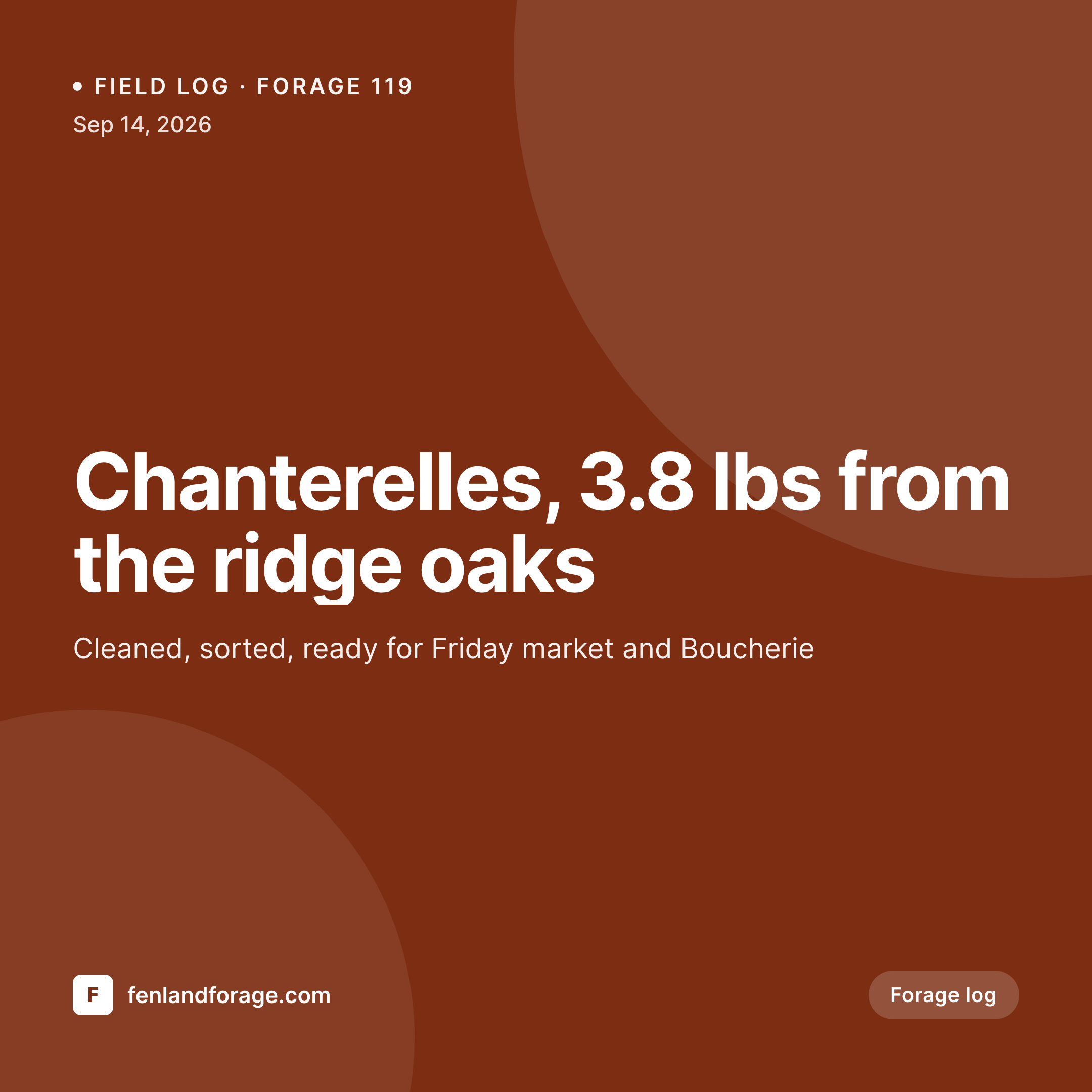
Sample forage log card
1080 square card from one forage log post: species, weight, habitat, forage date, and the destination chef or market.
Comparison
Default mushroom foragers image vs SleekPixel
Default mushroom foragers image
- Phone photos of mushrooms with no overlay or context
- Species names typed inconsistently in the caption, no archive
- Chef notices sent as plain DMs with no farm or forager branding
- Story posts skipped because they need a vertical version
- No seasonal archive, every year starts from scratch visually
SleekPixel
- Species, weight, and habitat pulled straight from the forage post
- Chef-facing variant with buyer name and pickup time baked in
- Square, vertical, and OG image rendered from one template family
- Seasonal archive page reads as a uniform card grid by date
- Bulk regenerate the archive after a logo or brand update
Features
What SleekPixel gives you for mushroom foragers
Species-routed templates
Chanterelle, morel, hen of the woods, and lobster mushroom can each have a layout variant, so the card reflects the actual species without manual switching.
Chef-facing drop variants
Notice includes the chef's name, the species, and the weight. Doubles as a delivery confirmation and a marketing asset for the restaurant.
Habitat in the card
Ridge oaks, river bottom, conifer ridge. Habitat descriptors render as a small metadata line so chefs and customers see the kind of detail that signals real fieldwork.
Use cases
Who uses SleekPixel for mushroom foragers
Solo commercial foragers
One-person operations supplying a handful of restaurants and a market stand get every forage documented without adding evening design work.
Forager-to-restaurant accounts
Foragers with standing chef relationships get a same-day card to send when the day's haul is sorted, with the buyer's name and pickup time baked in.
Foraging guilds and co-ops
Multi-forager co-ops keep a shared template family so the card brand reads as consistent across whichever forager logged the haul.
The bigger picture
Why visual forage logs matter for foragers
Foraging is a trust business. A chef paying premium prices for wild mushrooms wants to know the forager actually walked the woods, actually identified the species, and actually cleaned the haul that morning. A consistent run of forage cards, each with species, habitat, and date, is the most efficient form of that proof outside of the chef visiting the forest.
The same archive doubles as the marketing for the next season. A buyer who watched a forager post 80 forage cards across a fall season starts the next spring already convinced the operation is real. A buyer who saw nothing during the season starts the spring needing to be sold from scratch.
Templated forage cards make the documentation feasible inside a working forage season, which is why this practice catches on among the foragers who manage to build standing accounts year over year.
Questions
Common questions about SleekPixel for mushroom foragers
Yes. Add a photo field to the forage post and bind it to a slot in the template. Phone photos render cleanly within the farm or forager branding when placed inside a fixed frame.
Yes. Use a habitat descriptor field instead of a precise location field. 'Ridge oaks' or 'river bottom' renders into the card without exposing the spot. Most foragers do exactly this for the obvious reason.
The plugin renders whatever the fields contain. Some foragers include a small advisory line on the card for species that need cooking or careful identification. That can be a static field in the template, set per species.
Yes. Cultivation logs use a different post type with fields for substrate, fruiting date, and flush number. Same plugin, different template variant. Many operations run both wild and cultivated and benefit from a unified visual archive.
Yes. Add a price field to the forage post and bind it to a slot in the chef-DM template. The notice reads as a delivery confirmation with the pricing already settled.
Use a publish_publicly field on the forage post. Small hauls can be logged for the archive without being pushed to social. The card still gets rendered for the chef-DM if there is a buyer.
WordPress archive pages list forage posts, and the OG image for each becomes the thumbnail. The annual archive reads as a uniform card grid the moment posts publish, sortable by month or species.
Yes. Add a latin_name field. The template can render the Latin name as a smaller line under the common name, which is the kind of detail that lands with the chefs who care.
Pricing
More than 1000+
happy customers
Explore our flexible licensing options tailored to your needs. Upgrade your license anytime to access more features, or opt for a lifetime license for ongoing value, including lifetime updates and lifetime support. Our hassle-free upgrade process ensures that our platform can grow with you, starting from whichever plan you choose.
Lifetime ♾️
Most popular
EUR
once
- Unlimited websites
- Lifetime updates
- Lifetime support
...or get the Bundle Deal
and save €250 🎁
💎 Want everything forever? The All Access Pass is going away on 01.08.2026.
The Bundle (unlimited sites)
Pay once, own it forever
Elevate your WordPress site with our exclusive plugin bundle that includes all of our premium plugins in one package. Enjoy lifetime updates and lifetime support. Save significantly compared to buying plugins individually.
What’s included
-
SleekAI
-
SleekByte
-
SleekMotion
-
SleekPixel
-
SleekRank
-
SleekView
€749
Continue to checkoutBrowse more
- office opening card
- industry report cards
- conference banner cards
- template download card
- new arrival cards
- integration launch card
- case study banner
- expectation vs reality cards
- panel discussion card
- newsletter
- conference recap card
- explainer essay card
- company update card
- music recommendation cards
- AppSumo launch card
- LinkedIn event banners
- Twitter/X header
- Instagram highlight covers
- LinkedIn post images
- LinkedIn article covers
- Amazon Storefront banners
- Substack post headers
- Instagram Reels covers
- Nostr note images
- Signal sticker pack
- Patreon cover images
- Discord server icon
- Medium article headers
- Passes page banner
- Dribbble shot covers