






SleekPixel for conference banner cards
Conference founders and organizers carry the brand on their LinkedIn banners year-round. SleekPixel renders the wide banner from the event post, so a date change or ticket-state flip propagates with a save.
♾️ Lifetime License available
Founder LinkedIn banners are the longest-running announce surface
Conference founders, organizers, and program chairs set their LinkedIn banner to the event for months at a time. That banner is seen by every visitor to their profile, every connection scrolling through the network, every recruiter touching base. It is the longest-running announce surface in the whole event marketing cycle, and it tends to be the asset that ages the worst because it lives outside the WordPress post-save loop.
A static Canva banner gets uploaded once, then never updates when the dates lock in, the venue moves, or early-bird closes. The organizer ends up with a banner that says tickets opening soon three weeks after tickets opened, or last year's date a month before this year's event. The signal degrades every week the banner stays out of date.
SleekPixel renders the conference banner from the event post itself. Edition, dates, venue, and ticket-state all bind to the same data the rest of the site uses, so a save on the event post regenerates the 1584x396 banner and the founder grabs the fresh PNG without having to reopen a Canva file.
Workflow
From event post save to organizer-ready banner
Design the banner template
Save the event post
Organizers upload the banner
Ticket state flips and banner refreshes
Output
What a generated conference banner looks like
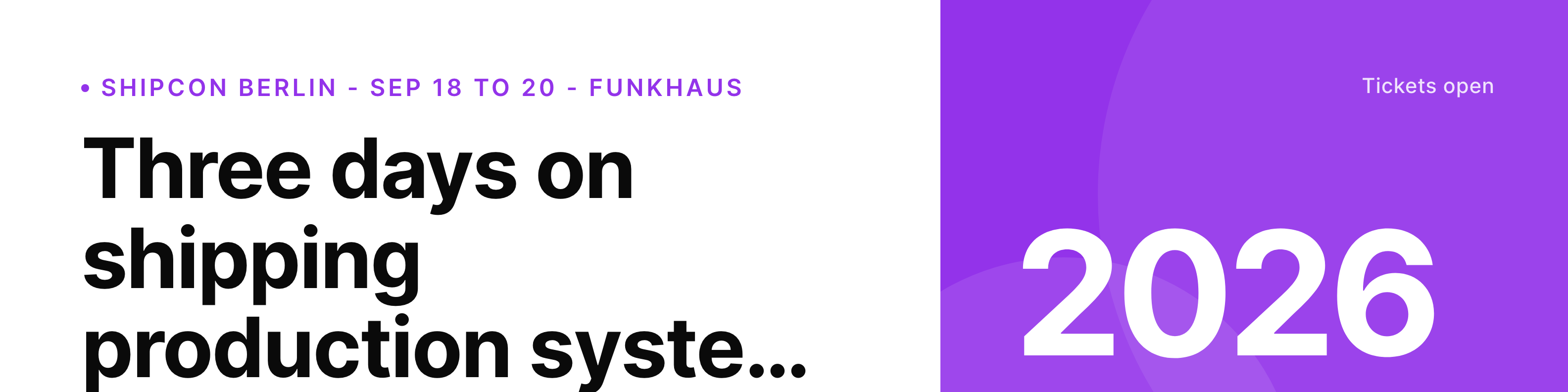
A 1584x396 LinkedIn-tuned banner built from the conference event post, with edition, dates, venue, ticket-state badge, and the locked event masthead.
Comparison
Default conference banner vs SleekPixel
Default conference banner cards image
- Static Canva banner, never updates when dates change
- Last year's edition still on founder profiles a month in
- Tickets opening soon visible after tickets opened
- Venue change leaves the banner advertising the old location
- Each organizer uploads a slightly different version
SleekPixel
- Render fires on save for the event post
- Edition, dates, venue, and ticket-state bound to the same fields
- Single 1584x396 banner regenerates for every organizer to grab
- Ticket-state badge updates as early-bird, regular, and final phases roll
- Organizer-specific variants pull the right contact line per profile
Features
What SleekPixel gives you for conference banner cards
Wide-format render
The banner template targets 1584x396 specifically, the LinkedIn profile banner aspect, with safe zones for mobile cropping.
Date and venue locked to post
Every banner reads the same event-post fields the website uses. A venue change updates the banner without anyone reopening a design file.
Organizer variants
Each organizer can have their own variant with a small contact line so the team brand stays consistent across the whole organizing committee.
Use cases
Who uses SleekPixel for conference banner cards
Conference founders and chairs
The face of the event on LinkedIn for six to nine months. SleekPixel keeps their banner current to the schedule and the ticket state.
Organizing teams
Multi-person organizing committees that want a consistent banner. Per-organizer variants keep the brand locked while letting individual contacts surface.
Sponsor and partner contacts
Sales and partnerships leads who use their LinkedIn banner to drive sponsor inquiries during the announce wave. Their banner stays in sync with the rest of the campaign.
The bigger picture
Why founder banners are an underused conference asset
The longest-running announce surface for any conference is the LinkedIn banner of the people running it. Founders, chairs, and senior organizers set their banner to the event months in advance and leave it there until the doors open. The audience seeing that banner is exactly the audience the conference needs, peers, prospective speakers, sponsors checking the program.
A banner that ages out, that says coming soon when it is actually next month, or last year's dates when next year's program is set, leaks the credibility the rest of the campaign is trying to build. SleekPixel ties the banner to the same event post that drives the rest of the site, so every save keeps the longest-running surface current and the organizing team carries an accurate brand year-round.
Questions
Common questions about SleekPixel for conference banner cards
No. LinkedIn does not expose a profile-banner upload API. SleekPixel renders the PNG and stores it in the event admin, the organizer downloads and uploads to LinkedIn manually.
Yes. Set up a second template targeting the Twitter header dimensions, bound to the same event-post fields. Both render on save.
Use a per-user variant. The plugin can render a banner per organizing-team user with their email or handle surfaced in a small line on the wide banner.
Yes. Set the ticket-state as a field on the event post. Early-bird, regular, final, sold out, the badge updates whenever the field changes and the post saves.
Yes. The template supports a small sponsor strip if your sponsorship tier includes banner placement. Logos pull from linked sponsor posts.
Yes. Each edition is its own event post. The current-edition banner regenerates whenever you save the post for the next event, leaving the past edition's banner archived.
Yes. The venue field can render the platform name and a short URL fragment. The banner treats virtual venues as first-class.
That is a separate render. The website hero is usually 1920 wide and lives on the event homepage. SleekPixel can drive that template too, bound to the same event post.
Pricing
More than 1000+
happy customers
Explore our flexible licensing options tailored to your needs. Upgrade your license anytime to access more features, or opt for a lifetime license for ongoing value, including lifetime updates and lifetime support. Our hassle-free upgrade process ensures that our platform can grow with you, starting from whichever plan you choose.
Lifetime ♾️
Most popular
EUR
once
- Unlimited websites
- Lifetime updates
- Lifetime support
...or get the Bundle Deal
and save €250 🎁
The Bundle (unlimited sites)
Pay once, own it forever
Elevate your WordPress site with our exclusive plugin bundle that includes all of our premium plugins in one package. Enjoy lifetime updates and lifetime support. Save significantly compared to buying plugins individually.
What’s included
-
SleekAI
-
SleekByte
-
SleekMotion
-
SleekPixel
-
SleekRank
-
SleekView
€749
Continue to checkout