






SleekPixel for microgreen growers
Variety, tray number, cut weight, days to harvest, destination chef. The data your grow rack already produces turns into a square card, a story vertical, and a chef-facing drop notice, rendered from the cycle post.
♾️ Lifetime License available
Tell the tray story without leaving the cycle workflow
Microgreen operations are tight loops. Seed Monday, cut Friday, deliver Saturday. The whole production rhythm is measured in trays and days, and most small operations run lean enough that the grower is also the seeder, the harvester, the driver, and the marketer. Marketing tends to be the first thing that slips when the rack is full.
SleekPixel reads from the cycle post in WordPress. Variety, tray number, cut weight, days to harvest, and the destination chef or stand live as fields on a per-cycle post type. The template family pulls those fields and renders a square card for the feed, a vertical for the story, and a chef-facing drop notice with the buyer's name baked in.
Chefs get a same-day notice with their order details. Followers see a steady run of cut cards that reads as ongoing operation. The grower never has to reopen Canva on a Friday afternoon when the trays still need to get cut.
Workflow
From cycle log to cut card, every Friday
Set up the cycle post type
Design the template family
Map the fields
Cut and publish
Output
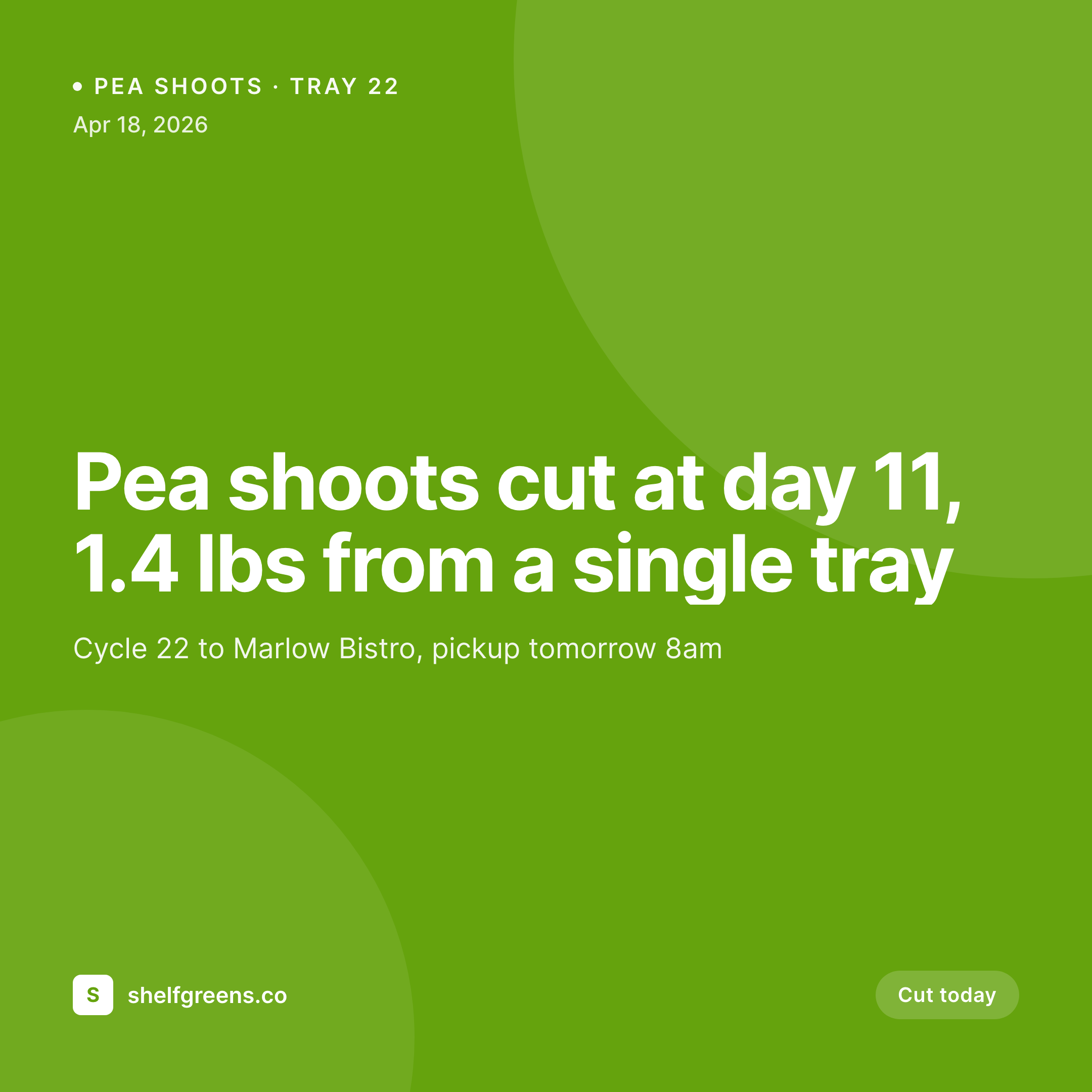
Sample tray yield card
1080 square card from one cycle log post: variety, tray number, cut weight, days to harvest, and the destination chef.
Comparison
Default microgreen growers image vs SleekPixel
Default microgreen growers image
- Phone shots of trays with no overlay, weight buried in caption
- Chef drop notices typed by hand into a DM, no farm branding
- Inconsistent typography from one cut to the next
- Story posts skipped because they need a vertical version
- No archive page, so the catalog of cuts lives in scrollback
SleekPixel
- Variety, tray number, and weight pulled straight from the cycle post
- Days-to-harvest renders as a number, not buried in body copy
- Chef-facing variant with the buyer's name and pickup time baked in
- Square, vertical, and OG image rendered from one template family
- Bulk regenerate the catalog after a logo or brand color update
Features
What SleekPixel gives you for microgreen growers
Variety-routed templates
Pea shoots, sunflower, radish, and a salad mix can each have a layout variant. Card reflects the actual variety, no manual switching needed.
Chef-facing variants
Drop notice includes the chef's name, the order weight, and the pickup window. Doubles as a confirmation DM and a marketing asset for the restaurant.
Days-to-harvest in the card
Seed-to-cut day count renders as a small metric, which is the detail chefs care about and the detail competitors usually leave out.
Use cases
Who uses SleekPixel for microgreen growers
Solo and two-person operations
Small grow racks supplying a handful of restaurants and a Saturday stand get every cut documented without taking time off the harvest.
Restaurant-account microgreen suppliers
Growers running standing weekly orders for 5 to 30 restaurants give every chef a same-day drop card with their name and order on it.
Farmers-market microgreen stands
Saturday stand posts share a template family with the weekly cuts, so the market visual reads as part of the same brand as the restaurant program.
The bigger picture
Why visual cut logs matter for microgreen growers
Microgreens live or die on freshness perception. A chef choosing between two suppliers wants to see that the greens get cut the morning of delivery, not three days before. A consistent run of cut cards on the supplier's feed, each with a cut date and a destination restaurant, is the most efficient way to communicate that freshness without a sales call.
The same archive works for new chef outreach. A prospective restaurant account checking the grower's Instagram is looking for proof that the operation is real and active. A tidy run of cut cards going back six months is that proof.
A patchwork of forgotten weeks reads as risk. Templated cut cards keep the proof building without adding labor to the only afternoon of the week when the operation is already at peak load.
Questions
Common questions about SleekPixel for microgreen growers
Not directly. SleekPixel reads from WordPress post fields. If you copy cycle data into the post (or use a sync plugin to bring sheet rows into custom fields), those fields become available to the template.
Yes. Stand posts can use the same template family with a different variant. Cuts available, market name, and stand hours render into the card, ready for Saturday morning story posts.
Yes. Add pickup_time and order_total fields to the cycle post and bind them to slots in the chef-DM template. The rendered notice reads as a delivery confirmation, branded as the farm.
Use a multi-variety field on the cycle post. The template can render a list of varieties with weight each, or you can split into multiple cycle posts. Either approach keeps the per-cut accounting intact.
If you store seed_date and harvest_date as fields, the template can compute the difference and render days_to_harvest as a number. Most small farms set this up once and forget it.
Yes. WordPress archive pages list cycle posts, and the OG image for each becomes the thumbnail. The annual catalog reads as a uniform card grid the moment cycles publish.
Yes. Living-tray sales can have their own post type with retail fields like tray_count and price. The template variant decides which fields to show, so the same plugin handles both wholesale and direct-to-consumer.
Use a per-box post type or extend the cycle post with a box_id field. The card can include the box number, member name, and contents, which doubles as a delivery confirmation for the customer.
Pricing
More than 1000+
happy customers
Explore our flexible licensing options tailored to your needs. Upgrade your license anytime to access more features, or opt for a lifetime license for ongoing value, including lifetime updates and lifetime support. Our hassle-free upgrade process ensures that our platform can grow with you, starting from whichever plan you choose.
Lifetime ♾️
Most popular
EUR
once
- Unlimited websites
- Lifetime updates
- Lifetime support
...or get the Bundle Deal
and save €250 🎁
💎 Want everything forever? The All Access Pass is going away on 01.08.2026.
The Bundle (unlimited sites)
Pay once, own it forever
Elevate your WordPress site with our exclusive plugin bundle that includes all of our premium plugins in one package. Enjoy lifetime updates and lifetime support. Save significantly compared to buying plugins individually.
What’s included
-
SleekAI
-
SleekByte
-
SleekMotion
-
SleekPixel
-
SleekRank
-
SleekView
€749
Continue to checkoutBrowse more
- weekly recap banner
- listicle thumbnail
- book recommendation cards
- SOC 2 announcement card
- diversity report card
- conference banner cards
- office hours recap card
- partnership card
- deal of the day banners
- acquisition announcement cards
- customer spotlight cards
- lesson thumbnail cards
- Twitter thread card
- compliance update cards
- product update images
- Instagram Reels covers
- Poshmark listing images
- Etsy shop banners
- Passes page banner
- Substack post thumbnail
- VK community cover photos
- Instagram bio link banners
- Pinterest product pin covers
- Behance banner
- Notion page covers
- Dribbble shot covers
- Telegram channel images
- Bluesky feed banner
- Pinterest shop banners
- LinkedIn showcase page banners