






SleekPixel for creameries
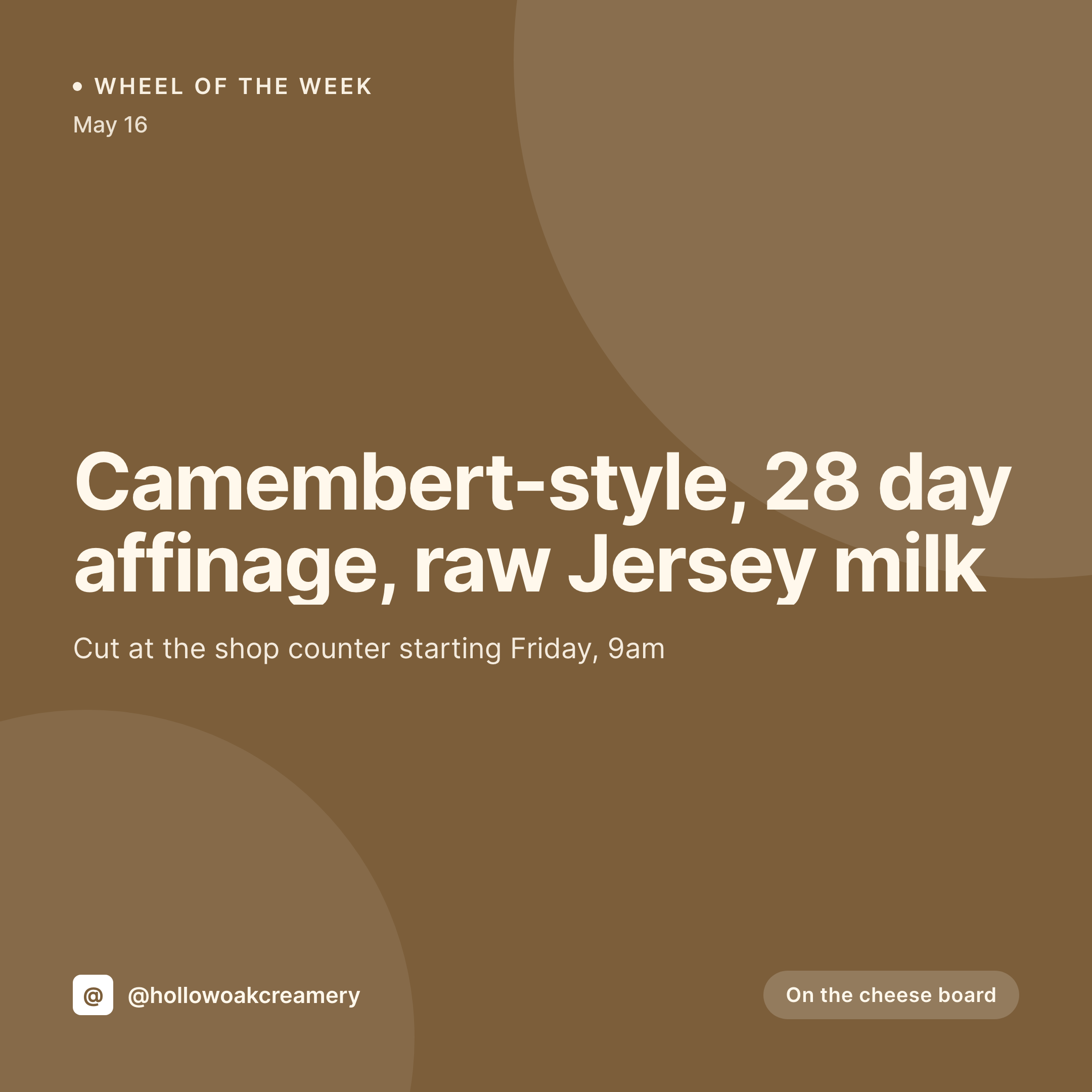
Style, milk source, affinage days, raw or pasteurized, counter availability. Every cheese already has those fields on the product post. SleekPixel renders the 1080x1080 card on save, ready for the morning the wheel goes on the board.
♾️ Lifetime License available
A creamery's calendar runs on cut days, not posting schedules
A small creamery is a slow business with a strict clock. A wheel that started aging in February is ready in early May, and the day it gets cut at the counter is the day the regulars want to know. Miss that morning and the wheel is gone by Sunday. The website carries the cheese as a product or a batch post, with the style, the milk source, the herd, the affinage time, and the cut date all already typed.
Most creameries still rebuild the Instagram tile by hand. Open a Canva template, paste in the cheese name, retype the affinage count, drop in the herd photo, export, upload. A few cuts in, the typography drifts, the herd photo never matches, and the regulars stop trusting that the post on the grid is actually on the counter.
SleekPixel renders the tile straight from the batch post. Cheese name, style, affinage days, milk source, cut date, and stock status come out of the fields that already exist. Save the post the night before cut day and the 1080x1080 card lands in uploads. The counter manager downloads it from the sidebar, posts at open, and the people who care about Friday's Camembert show up before the second hour.
Workflow
From cheese post to cut-day card
Map the cheese fields
Design one square template
Save the batch
Post at open
Output
What renders for each wheel
A 1080x1080 square card with the cheese style, affinage days, milk source, raw or pasteurized status, and counter cut date pulled from the batch or product post.

Comparison
Default creameries image vs SleekPixel
Default creameries image
- Cheesemaker rebuilds a Canva tile for every new wheel and cut day
- Affinage count on the card drifts from the actual aging log
- Herd or breed photo gets swapped inconsistently between batches
- Raw vs pasteurized status sometimes posts wrong, which is a labeling problem
- Counter cut date on the post lags behind what the cheesemonger is doing
SleekPixel
- Save the batch post, the wheel card lands in uploads at 1080x1080
- Affinage days, milk source, and style read straight from custom fields
- Counter status, on the board, last cuts, sold out, renders as a variant
- OG image wires to the batch URL so DMs and SMS share clean previews
- One template across the cheese list keeps the creamery on-brand
Features
What SleekPixel gives you for creameries
Affinage clock baked in
Start date and target aging period live on the batch post, so the card always shows the count the cheesemaker actually wrote down.
Milk source on the card
Herd, breed, raw or pasteurized, single-farm or blended. The fields you fill for the regulatory label are the fields the card pulls.
Counter status variants
On the board, last cuts left, sold out. Each state renders as a card variant tied to the product status on the post.
Use cases
Who uses SleekPixel for creameries
Farmstead creameries
Single-herd farmsteads with a tasting room render a tile per wheel with the herd name, style, and pickup window.
Wholesale and shop counters
Creameries supplying restaurants and cheese counters render a card per SKU with case sizes, pricing tier, and arrival window.
Seasonal and reserve wheels
A spring-milk Tomme or a reserve wash-rind drops with its own card, release window, and tasting notes pulled from the post.
The bigger picture
Why creameries need the wheel card to ship on the morning of the cut
A creamery's audience is patient about aging and impatient about availability. People will wait six months for a Camembert that pleased them last year, then drive twenty minutes to be at the counter when the new wheel is cut. The deciding factor is whether they saw the post the night before or the morning of.
If the card goes out at 4pm on Friday, the wheel is half-gone. If it never goes out, the regulars feel slighted and the next-best customers walk past. The website already knows the cheese, the affinage, the cut date, and the counter hours.
Treating the social card as something the batch post renders on save closes the gap between what the cheesemaker put in the log and what the regulars see on their phone. The grid then reads as one creamery across two years of styles, which is the surface where loyal cheese buyers decide where to spend their twenty dollars.
Questions
Common questions about SleekPixel for creameries
Yes. Set the start date as a field on the post and let the template compute days at render time. Re-rendering the card on the cut date shows the actual age, not a stale guess.
Both. SleekPixel reads any post type and any field, so a WooCommerce product, a Batch CPT, or a hybrid setup all map to the same template.
Yes. When the stock or counter-status field flips, the card re-renders with a sold-out or last-cuts variant. The OG image updates so the shared link reflects the counter.
Counter signage can be built with the same template family, but legal labels typically need a separate workflow. SleekPixel handles the social and OG image side.
No. SleekPixel saves the rendered PNG to the WordPress uploads folder. Posting stays a manual step or runs through a third-party scheduler the counter staff already uses.
Yes. A single save can render a 1080x1080 grid card, a 1080x1920 story, and a 1200x630 OG image from the same batch fields.
Curated boxes can be their own product or post type. The card renders the box name, the included styles, and the pickup or ship window.
Edit the template once and bulk regenerate. Every wheel in the catalog gets a fresh card in the new identity, so the brand stays cohesive across the cheese list.
Pricing
More than 1000+
happy customers
Explore our flexible licensing options tailored to your needs. Upgrade your license anytime to access more features, or opt for a lifetime license for ongoing value, including lifetime updates and lifetime support. Our hassle-free upgrade process ensures that our platform can grow with you, starting from whichever plan you choose.
Lifetime ♾️
Most popular
EUR
once
- Unlimited websites
- Lifetime updates
- Lifetime support
...or get the Bundle Deal
and save €250 🎁
💎 Want everything forever? The All Access Pass is going away on 01.08.2026.
The Bundle (unlimited sites)
Pay once, own it forever
Elevate your WordPress site with our exclusive plugin bundle that includes all of our premium plugins in one package. Enjoy lifetime updates and lifetime support. Save significantly compared to buying plugins individually.
What’s included
-
SleekAI
-
SleekByte
-
SleekMotion
-
SleekPixel
-
SleekRank
-
SleekView
€749
Continue to checkoutBrowse more
- Lemon8 post
- YouTube end screens
- Discord server banners
- Discord event cover
- Twitter header banners
- Pinterest pins
- Bluesky link cards
- LinkedIn banner images
- Signal sticker pack
- YouTube Shorts cover
- YouTube ad thumbnails
- Stan Store cover
- Threads story-style images
- SoundCloud track art
- Substack post headers