






SleekPixel for olive oil producers
Cultivar, mill date, acidity, polyphenols, grove, lot number. The numbers that matter to buyers already live on the product. SleekPixel renders the 1080x1080 card on save so the new release ships with the data, not a stock olive branch.
♾️ Lifetime License available
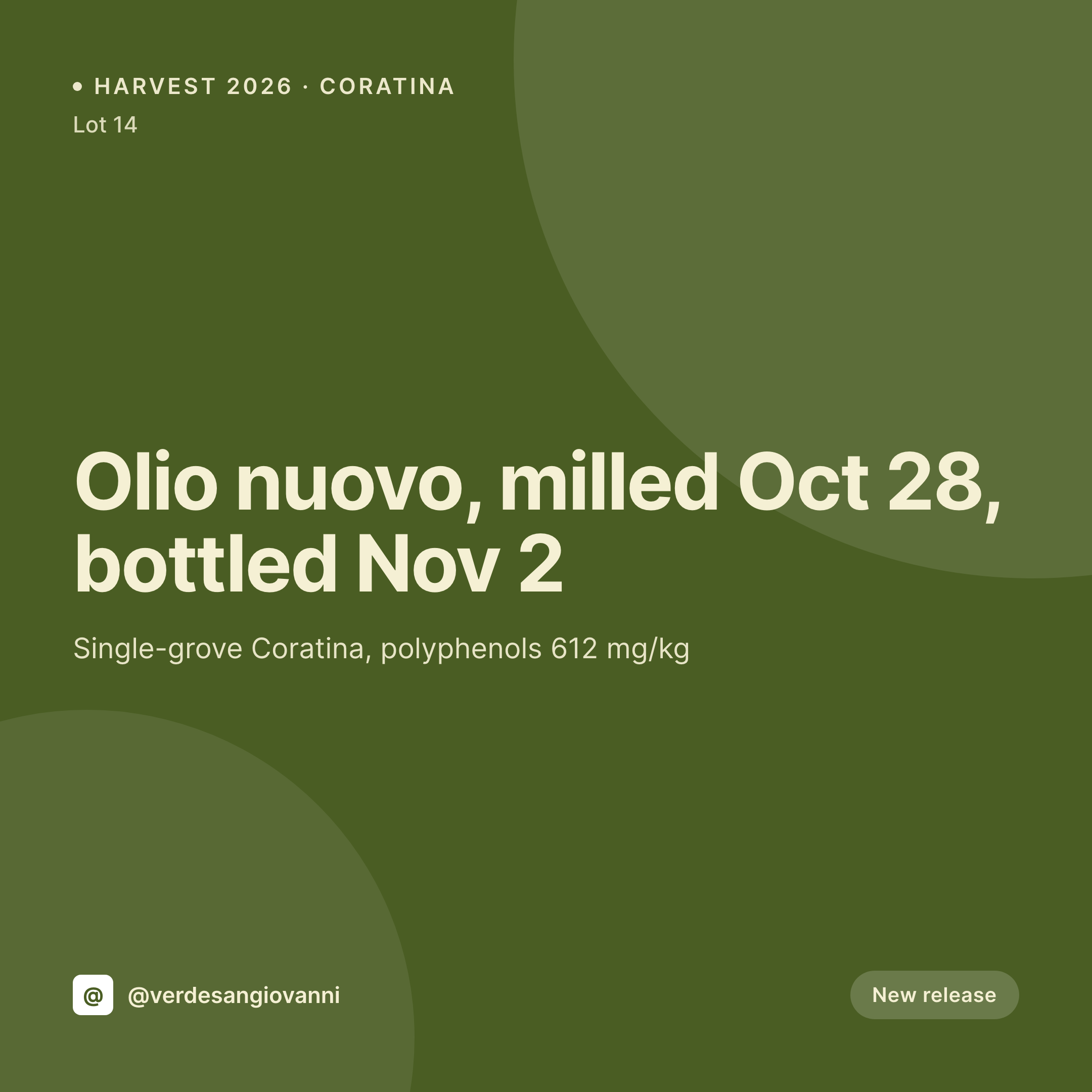
Olive oil buyers read numbers, not generic branch photos
Single-estate olive oil is sold on specifics. Cultivar, milling date, days from tree to mill, free fatty acid percentage, polyphenol count, grove altitude, lot size. A buyer comparing two Tuscan oils on Instagram makes the decision in five seconds based on whether the post tells them anything real or whether it is another shot of green branches against blue sky.
The product post on the producer's WordPress site already carries that information. Often it is structured carefully because the export labels need it. What the post does not usually carry is a social card that surfaces those same numbers in the right place at the right time of year. The harvest goes from grove to mill to bottle, the website is updated, and the social card is rebuilt by hand from a Canva template that loses its kerning every November.
SleekPixel renders the lot card straight from the bottling post. Cultivar, mill date, acidity, polyphenols, grove, and lot number come out of the fields that already exist for the label. Save the post on bottling day and the 1080x1080 card lands in uploads. The producer posts the new release with the actual data on the tile, not a vague harvest greeting, and the buyers who care about polyphenols see a number they can compare.
Workflow
From bottling post to lot card
Map the lot fields
Design the lot template
Save the bottling
Post the release
Output
What renders for each lot
A 1080x1080 square card with cultivar, mill date, acidity, polyphenols, grove name, and lot number pulled from the bottling or product post.
Comparison
Default olive oil producers image vs SleekPixel
Default olive oil producers image
- Producer rebuilds a Canva tile each harvest and the numbers get retyped
- Polyphenol and acidity values on the card drift from the lab report
- Cultivar and grove get confused between Coratina and Frantoio across lots
- Bottling date on the card lags behind what the cellar log says
- Stock olive branch photo replaces actual product data, which buyers notice
SleekPixel
- Save the bottling post, the lot card lands in uploads at 1080x1080
- Cultivar, mill date, acidity, and polyphenols pulled from custom fields
- Grove, altitude, and lot number render straight from the export label fields
- OG image wires to the lot URL so trade and DTC shares stay accurate
- One template across cultivars keeps the estate on-brand harvest to harvest
Features
What SleekPixel gives you for olive oil producers
Cultivar and grove on the card
Coratina, Frantoio, Picholine, Koroneiki, Arbequina. Cultivar field drives the layout variant, the grove and altitude render from the post.
Lab numbers in the right places
Acidity, polyphenols, peroxide index, and tasting notes read from the same fields the producer fills for the export label.
Harvest and mill dates
Pick date, mill date, days from tree to mill, and bottling date all render onto the card. Buyers who care about freshness see the numbers.
Use cases
Who uses SleekPixel for olive oil producers
Single-estate producers
Each lot from a single grove renders a card with cultivar, altitude, lab numbers, and the milling story.
Export and trade catalog
Trade-facing lots render cards with case sizes, MOQ, lot ID, and the certification line, ready to send to a distributor's buyer.
DTC and shop subscribers
Olio nuovo subscribers and shop members get a card per release with what is shipping this month and what the numbers look like.
The bigger picture
Why olive oil producers need the lot card to carry the actual numbers
Olive oil sits in a category where buyers educate themselves fast. A subscriber to a single-estate Coratina knows what 612 mg of polyphenols means and uses that number to decide whether the new harvest is a buy or a skip. A trade buyer comparing producers reads the acidity percentage before they read the founder's bio.
Posting another stock photo of a green grove against a blue sky telegraphs that the producer is selling olive oil the way mass-market brands sell it, which is the wrong signal at the wrong moment. Treating the social card as the byproduct of the bottling post means the cultivar, the grove, the mill date, and the lab numbers ride along automatically. The grid reads as one estate across every harvest, the data the producer worked to put on the label also lives on the tile, and the buyers who care can compare lots without leaving Instagram.
New buyers see a producer that respects the category.
Questions
Common questions about SleekPixel for olive oil producers
Yes. Add the certification as a field and the template renders the corresponding logo. Lots without certification render without it cleanly.
Yes. A polyphenol mg/kg field and an acidity percent field render their values onto the card directly. Re-run lab numbers after retests and the card re-renders.
Both. SleekPixel reads any post type and any field, so a WooCommerce product, a Bottling CPT, or a hybrid setup all map onto the same template.
Yes. Use the cultivar field as a variant switch. Coratina, Frantoio, and Picholine can each have a different accent color or background while sharing the master layout.
No. SleekPixel saves the PNG to uploads. Posting stays manual or runs through a third-party scheduler the estate already uses.
Yes. When a lot sells through or is replaced by the next harvest, the field flips and the card re-renders with a sold-out or next-harvest variant.
Subscription boxes can be their own product, with the included lots as a repeater field. The card renders the box, the lots inside, and the next ship date.
Edit the template once and bulk regenerate. Every past lot card refreshes in the new identity, so the archive matches the next harvest's labels.
Pricing
More than 1000+
happy customers
Explore our flexible licensing options tailored to your needs. Upgrade your license anytime to access more features, or opt for a lifetime license for ongoing value, including lifetime updates and lifetime support. Our hassle-free upgrade process ensures that our platform can grow with you, starting from whichever plan you choose.
Lifetime ♾️
Most popular
EUR
once
- Unlimited websites
- Lifetime updates
- Lifetime support
...or get the Bundle Deal
and save €250 🎁
💎 Want everything forever? The All Access Pass is going away on 01.08.2026.
The Bundle (unlimited sites)
Pay once, own it forever
Elevate your WordPress site with our exclusive plugin bundle that includes all of our premium plugins in one package. Enjoy lifetime updates and lifetime support. Save significantly compared to buying plugins individually.
What’s included
-
SleekAI
-
SleekByte
-
SleekMotion
-
SleekPixel
-
SleekRank
-
SleekView
€749
Continue to checkoutBrowse more
- interview card
- song of the day cards
- compliance update cards
- OKR recap card
- essay card
- music recommendation cards
- code snippet card
- scheduled maintenance card
- team spotlight cards
- command of the day card
- open startup cards
- dashboard screenshot cards
- weekly recap cards
- headcount card
- holiday greeting cards
- Fansly banner
- Threads post cover
- LinkedIn banner images
- Ko-fi banners
- Apple Podcasts covers
- Lemon8 post
- Lemmy post images
- LinkedIn showcase page banners
- Threads social images
- Reddit subreddit banners
- Patreon cover images
- Twitch profile banner
- LinkedIn event banners
- YouTube playlist covers
- LinkedIn article covers