






SleekPixel for seafood restaurants
Day-boat species, oyster bar selections, and market prices live in WordPress already. SleekPixel renders an Instagram square and an OG image the moment the morning post is updated.
♾️ Lifetime License available
The catch changes every morning, the art should too
A serious seafood restaurant runs on what the boats brought in. Halibut today, fluke tomorrow, swordfish if the weather held, oysters that change variety with the season. The website's menu page lists species and ports, but the customer making a six-thirty reservation never reads the menu page. They scroll Instagram, see a halibut shot from last August, and decide on a different restaurant. The signal exists at the kitchen, it just never reaches the surface where the customer is deciding.
SleekPixel reads from a daily-catch post type in WordPress. The chef updates one post each morning with the species in, the ports of origin, the market price code, and a hero shot. On save, the Instagram square and the OG image render from those fields. The square downloads from the sidebar, ready to drop into the app between prep and lunch service. The OG image fires whenever the menu URL is shared in DMs, on the Resy page, or in the Google Business profile.
The kitchen still calls the dock, the chef still picks the species, and the website carries the day's catch to the customer's phone in the same shift it arrived on the truck.
Workflow
From morning catch to feed-ready square
Build the catch template
Map the catch post type
Save the morning catch
Post and share
Output
What renders for a daily catch
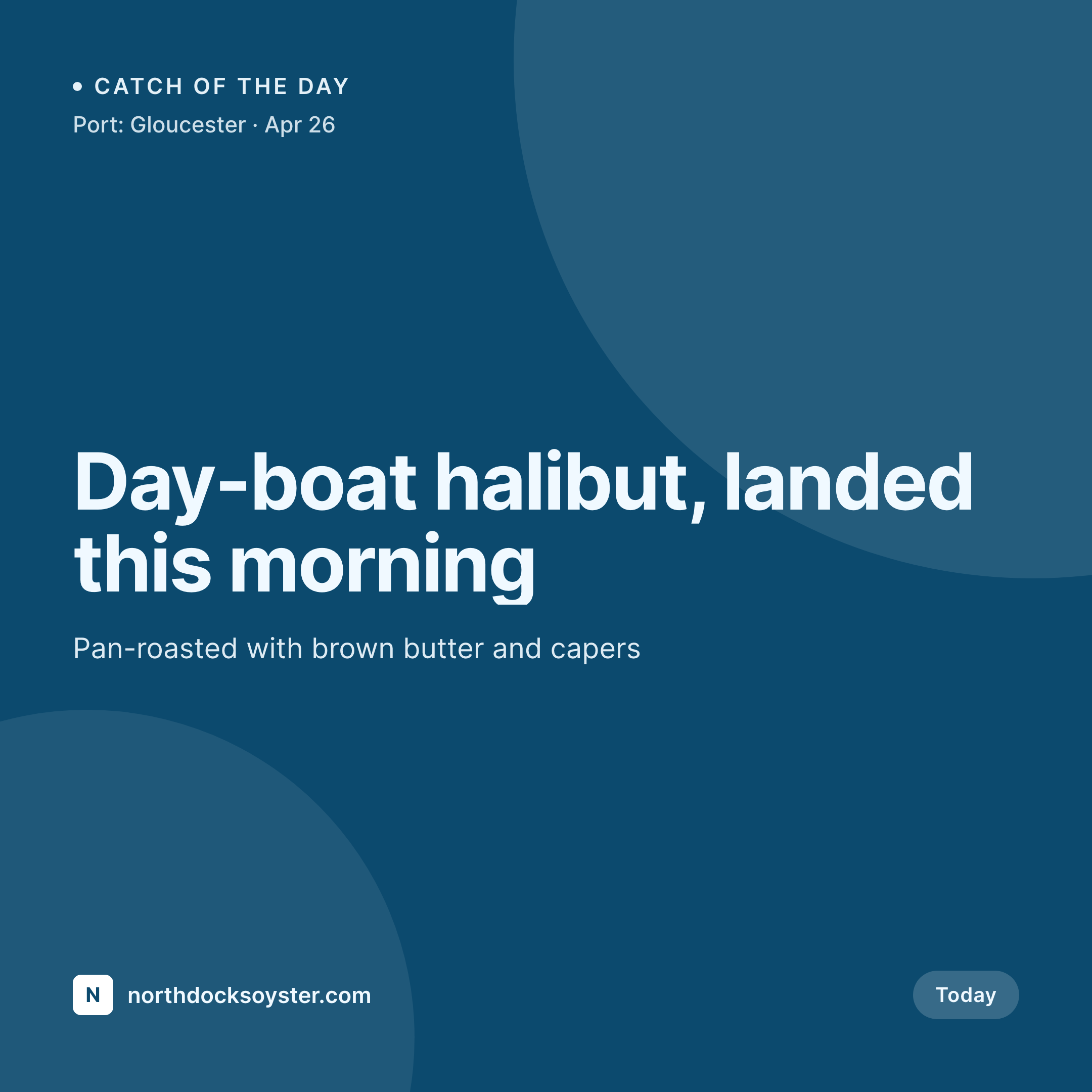
A 1080 square Instagram post built from the daily-catch post: species, the port of origin, today's preparation, and a market-price code.
Comparison
Default seafood restaurant image vs SleekPixel
Default seafood restaurant image
- Same halibut photo from last August reused for every species this week
- Market prices typed into the caption, not the image, so screenshots lose context
- Port of origin and dock name never make it onto the visual
- Oyster bar selections updated on a chalkboard nobody photographs
- OG image is the cafe logo, so a tasting menu link shares as a logo
SleekPixel
- Species, port of origin, and preparation pulled from one daily post
- Market price renders as MP with the actual figure below if it's set
- Oyster bar selections render as a list strip under the headline catch
- Story version downloads from the sidebar for printable shift specials
- Menu page OG image refreshes the moment the morning post is saved
Features
What SleekPixel gives you for seafood restaurants
Port of origin baked in
Gloucester, Cape May, Montauk renders as a small line under the species, signaling sourcing to customers who care about the dock.
Oyster bar selections
Today's oyster lineup renders as a strip across the bottom of the card, with variety names and counts pulled from a repeating field.
Market price logic
Market price renders as MP when the field is empty and as the actual figure when set, no manual swap between fixed and market days.
Use cases
Who uses SleekPixel for seafood restaurants
Day-boat catch updates
One post per morning, one render per morning, the catch reaches the customer before the reservation window opens.
Raw bar and tasting menus
Oyster bar updates and seasonal tasting menus render from separate templates that share visual DNA with the catch card.
Lobster bake and clambake nights
Event nights render their own cards with date, port, and cover price, keeping seasonal programming on its own track.
The bigger picture
Why daily catch art is worth more than another menu photo
Seafood is the one cuisine where freshness is the entire pitch, and freshness has to be signaled in a way the customer can verify before they book. A reused stock photo of a salmon fillet does the opposite of the work, it tells the customer the kitchen is treating today the same as last August. A daily catch card with the species, the port of origin, and the preparation reads like a kitchen that knows what landed that morning, which is the only thing a real seafood program needs to communicate.
The art also matters for the customer who cares about sourcing. A small line that reads Gloucester or Cape May reaches the diner who has been reading about by-catch and overfishing, and signals that the kitchen has a position. Auto-rendered art from a single morning post means that signal goes out every day, not just on the days someone has the time to sit down with Canva.
Questions
Common questions about SleekPixel for seafood restaurants
Yes. The template uses conditional logic, so an empty market-price field renders MP and a filled field renders the actual figure. The chef writes the day's number once into the post and the image handles the rest.
Yes. The port field is a repeater, so a halibut sourced from two day boats renders both ports comma-separated, or stacked depending on layout. Multi-port cards are common for raw bar selections.
Add the badge as an image in a custom field on the post or as a taxonomy term, and the template renders it in a fixed corner. The badge stays current as certifications update without restructuring the template.
SleekPixel renders the reservation URL into the image as text, the same way it handles any URL. It does not integrate with the reservation platforms directly, since the platforms manage bookings on their own surfaces.
Yes. A service taxonomy on the post drives template variants. Lunch renders a simpler card without the tasting-menu strip, dinner renders with the strip. Both bind to the same daily-catch post.
Saving the post re-renders the image, and the OG cache on social platforms refreshes on the next scrape. The Instagram square in the sidebar updates immediately, so a sold-out swordfish gets crossed out without rebuilding the design.
Yes. Allergen taxonomy renders as small icons in a fixed row, and the template can conditionally include a larger callout when the day's catch is heavy on shellfish. Most kitchens prefer the icon approach for consistency with the printed menu.
Yes. Every saved catch post keeps its rendered image in uploads, and a catch archive page on the site can pull from those files. Customers reading back through the past month see the actual species the kitchen ran, not a single hero shot.
Pricing
More than 1000+
happy customers
Explore our flexible licensing options tailored to your needs. Upgrade your license anytime to access more features, or opt for a lifetime license for ongoing value, including lifetime updates and lifetime support. Our hassle-free upgrade process ensures that our platform can grow with you, starting from whichever plan you choose.
Lifetime ♾️
Most popular
EUR
once
- Unlimited websites
- Lifetime updates
- Lifetime support
...or get the Bundle Deal
and save €250 🎁
💎 Want everything forever? The All Access Pass is going away on 01.08.2026.
The Bundle (unlimited sites)
Pay once, own it forever
Elevate your WordPress site with our exclusive plugin bundle that includes all of our premium plugins in one package. Enjoy lifetime updates and lifetime support. Save significantly compared to buying plugins individually.
What’s included
-
SleekAI
-
SleekByte
-
SleekMotion
-
SleekPixel
-
SleekRank
-
SleekView
€749
Continue to checkoutBrowse more
- Etsy cover photos
- Tumblr header
- Shopify collection banners
- Kindle book cover
- Ghost feature images
- VSCO cover
- Etsy listing images
- Substack podcast cover
- Bluesky link cards
- Pinterest product pin covers
- Mastodon link previews
- Facebook Shop product images
- TikTok profile banners
- Lemmy post images
- Facebook Marketplace images