






SleekPixel for smoke shop
Smoke shops live on heady restocks and weekend drops. SleekPixel renders 1080 by 1080 Instagram cards from each product, with maker, joint size, and a 21+ cue composed in, ready when the case is restocked.
♾️ Lifetime License available
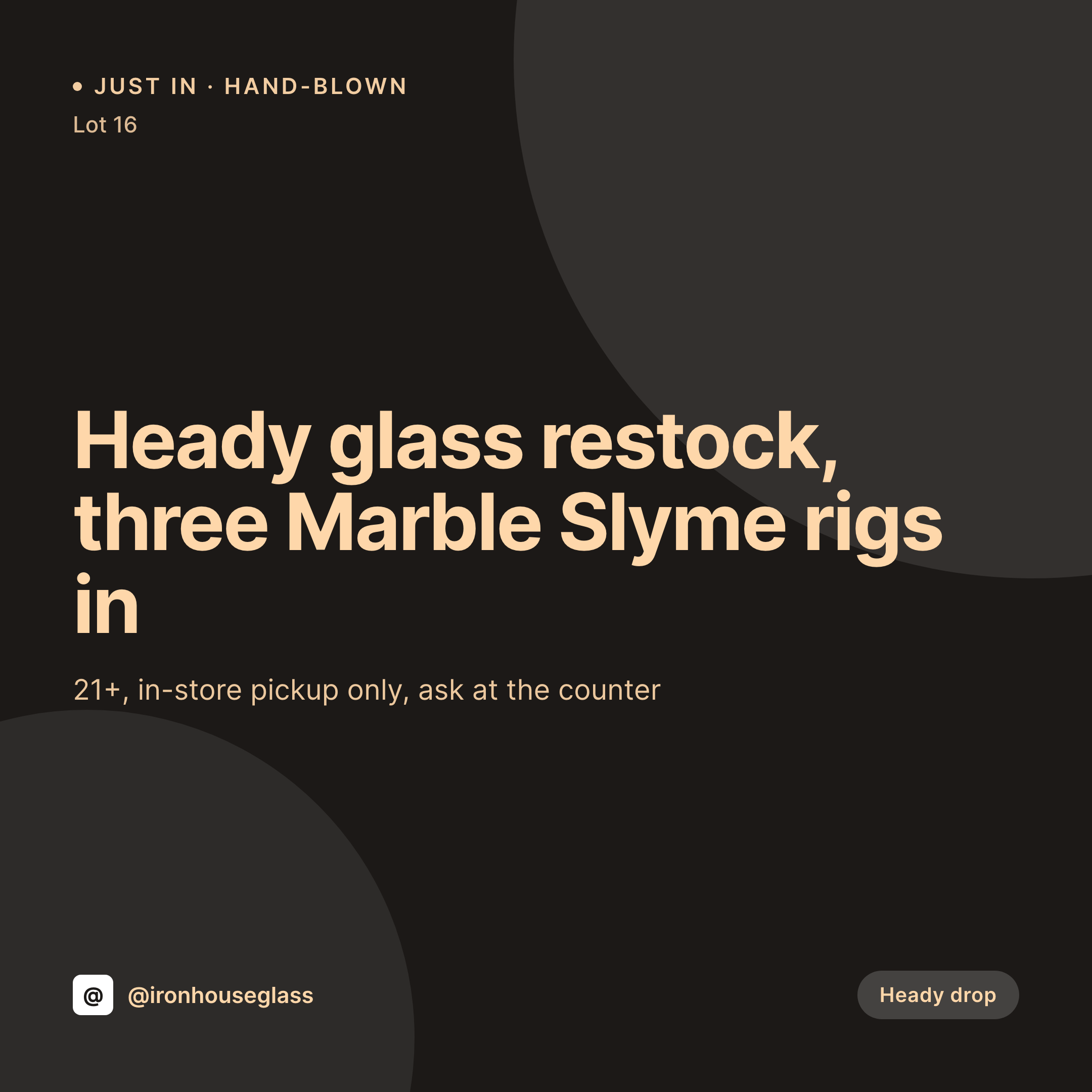
Heady restocks and accessory drops are the whole feed
A smoke shop's Instagram is built around one thing: the case. A heady piece lands from a glassblower, the staff sets it on the lower shelf, and a card has to go up before regulars stop by on Saturday. Most shops post a phone photo with a price typed in the corner. It works for one piece and falls apart by the third drop, because the maker name changes, the joint size matters for some buyers, and the 21+ cue gets dropped in half the posts.
SleekPixel turns each product post into a Story-ready square. Maker, joint size, percolator type, glass thickness, and age cue live as fields on the product. The template pulls those fields, composes them into a 1080 by 1080 layout, and saves a PNG ready to upload the moment the case is restocked.
The same product page drives the drop card, the restock variant, the sold-out card, and the bundle deal without redesign. The team updates the product, the card regenerates, and the social shift stops eating a Saturday morning.
Workflow
From case restock to feed card in one save
Model the catalog
Design the template family
Map the fields
Post the drop
Output
Sample heady drop card
1080 by 1080 square composed from a product post: piece name, maker, joint size, price, and shop handle. Pulled from the catalog fields.

Comparison
Phone-typed drop card vs SleekPixel for smoke shops
Phone-typed drop card
- Phone photo with a price typed in the corner, no consistent brand mark
- Maker name dropped from the post on the busiest weeks
- Joint size and glass thickness hidden in DMs instead of on the card
- Age cue inconsistent across drops
- Sold-out variant rarely posted, regulars walk in disappointed
SleekPixel
- 1080 by 1080 cards rendered per piece, paper, and accessory
- Maker, joint size, and price pulled from product fields
- 21+ cue locked into a reserved safe zone, every card, every time
- Bulk regenerate the catalog after a rebrand or label refresh
- Falls back gracefully if a maker or joint-size field is missing
Features
What SleekPixel gives you for smoke shop
Per-piece templates
Different layouts for heady glass, production glass, papers, and accessories. SleekPixel routes by product type so the visual hierarchy fits each line.
Maker and specs baked in
Maker name, joint size, perc type, and price pull from custom fields. Nothing retyped per drop, and nothing missing on the busiest weekends.
Age cue locked in
The 21+ marker sits in a reserved safe zone of the template, kept consistent across every product and every region.
Use cases
Where smoke shops use it
Heady drops
A new piece arrives, the product post updates, and the feed card regenerates with the maker, joint size, and case position.
Multi-store chains
Two or three storefronts share a catalog but differ on case stock. The same template handles per-store fields without re-design.
Counter staff posting
Shift leads can post a fresh drop without opening Canva. The product post is the source, the square card is the result.
The bigger picture
Why smoke shops live or die on weekend cadence
A smoke shop's regulars decide where to spend on Saturday by Friday night, and the deciding factor is which shop's case looks freshest in the feed. The shops that win the weekend aren't the ones with the cheapest production glass, they're the ones whose feed reads as a cohesive case with proper maker credits and a reliable age cue. Templated cards remove the friction that kills cadence, so every drop ships on time with its maker and specs, the sold-out flip happens by the time regulars walk in, and the visual identity stays consistent across the year of weekly restocks.
Questions
Common questions about SleekPixel for smoke shop
Yes. Products can live as WooCommerce items or as a custom post type. SleekPixel reads whichever fields you map.
Yes. Bind a maker field on the product and the template renders the credit. Useful for heady drops where the maker name is the whole sell.
Yes. The 21+ marker sits in a reserved safe zone of the template and stays on every card without anyone retyping it per post.
Map stock as a per-location field on the product. The card can show a stock-by-store line if multiple stores share the catalog.
Yes. The same template family extends to 1080 by 1920 Stories and Reels covers. Render once, post across surfaces.
Yes, with WPML or Polylang. The product has a translation per language and SleekPixel renders one card per locale.
No. The image is rendered once on save and saved as a static PNG. Product pages load it the same way they load any other image.
Edit the template, run a bulk regenerate against the product post type, and every piece and accessory inherits the new look without anyone retyping a drop post.
Pricing
More than 1000+
happy customers
Explore our flexible licensing options tailored to your needs. Upgrade your license anytime to access more features, or opt for a lifetime license for ongoing value, including lifetime updates and lifetime support. Our hassle-free upgrade process ensures that our platform can grow with you, starting from whichever plan you choose.
Lifetime ♾️
Most popular
EUR
once
- Unlimited websites
- Lifetime updates
- Lifetime support
...or get the Bundle Deal
and save €250 🎁
💎 Want everything forever? The All Access Pass is going away on 01.08.2026.
The Bundle (unlimited sites)
Pay once, own it forever
Elevate your WordPress site with our exclusive plugin bundle that includes all of our premium plugins in one package. Enjoy lifetime updates and lifetime support. Save significantly compared to buying plugins individually.
What’s included
-
SleekAI
-
SleekByte
-
SleekMotion
-
SleekPixel
-
SleekRank
-
SleekView
€749
Continue to checkoutBrowse more
- Facebook ad images
- LinkedIn post images
- Mailchimp email headers
- Snapchat Spotlight covers
- Kindle book cover
- YouTube Shorts thumbnails
- TikTok ad images
- Patreon tier images
- Substack podcast cover
- Twitch profile banner
- Twitch offline banners
- Threads profile banner
- Bandcamp banner
- Flickr cover photo
- LinkedIn ad images