






SleekPixel for Miro boards
Miro is where the workshop runs, but the readout that ships to clients and stakeholders usually leaks out as a blurry zoom-out of the board. SleekPixel reads workshop metadata synced into WordPress and renders branded share cards per board or per readout, so the framing on social and in newsletters looks like the firm.
♾️ Lifetime License available
A zoomed-out Miro is not a readout
Design studios, strategy consultancies and innovation teams run a lot of their high-stakes work in Miro. Brand strategy offsites, journey mapping sessions, research synthesis, ideation workshops, all leave behind a board with hundreds or thousands of sticky notes, frames and connections. The board itself is dense by design and the value of running the session is in the synthesis, not in the raw artifact.
When the readout ships to the client (a recap email, a LinkedIn post about the engagement, a case-study cover), the temptation is to use a thumbnail of the Miro board. The thumbnail is unreadable at share dimensions, the sticky note colors clash with the brand, and the share preview undersells the depth of the work that just happened. Strategy work loses presentation quality at the moment when presentation quality matters most.
SleekPixel sits on the WordPress side. Workshops or readouts get a WordPress post (manually, or via a Miro to WordPress sync if the studio has one). The post carries the workshop name, date, facilitator, participant count and key outcome. SleekPixel renders a 1200 by 630 card from those fields with the studio wordmark. The readout post on the studio blog shares with a real card, not a board thumbnail.
Workflow
From Miro workshop to branded readout card
Write the readout post
Build the readout template
Save and render
Share the readout URL
Output
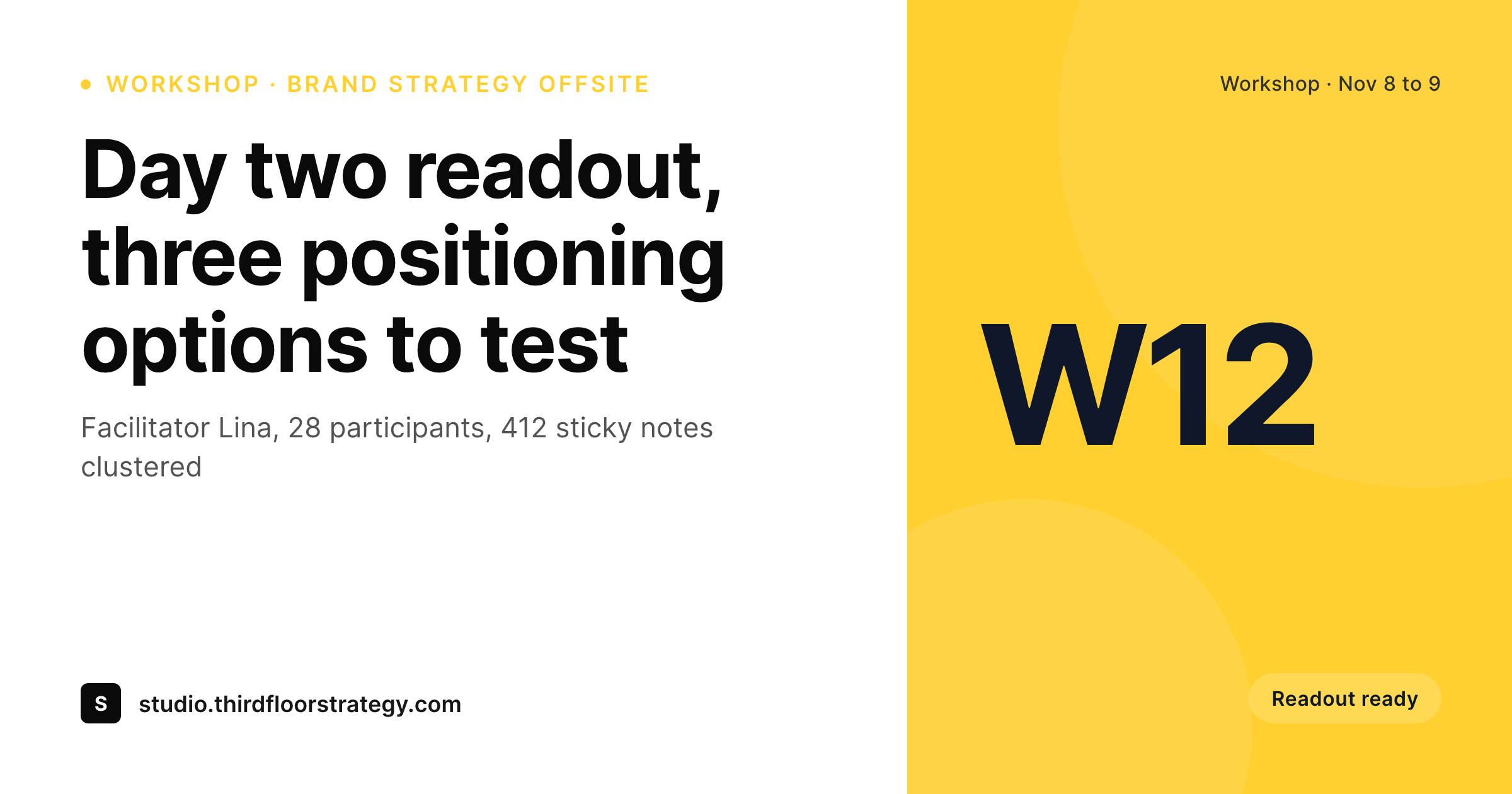
Sample Miro workshop readout card
A 1200 by 630 OG image: workshop name, date range, facilitator credit, participant count and brand wordmark, rendered from the WordPress readout post.
Comparison
Miro board thumbnail vs SleekPixel readout card
Miro board thumbnail
- Board thumbnails are unreadable at OG and Twitter card sizes
- Sticky-note colors clash with the firm's brand palette
- Facilitator and participant credits never reach the share preview
- Workshop date, location and outcome are invisible on the thumbnail
- Every client engagement reuses the same generic thumbnail aesthetic
SleekPixel
- Reads WordPress fields synced from Miro board metadata or set manually
- Workshop name, date, facilitator and outcome bind cleanly to slots
- Re-renders when the readout post is updated post-engagement
- Bulk re-render the engagement back catalog after a rebrand
- Leaves Miro boards themselves untouched, only the WordPress side renders
Features
What SleekPixel gives you for Miro boards
Facilitator credits
Each card slots in the lead facilitator and any co-facilitators. The readout share carries the team's names without anyone retyping the engagement roster.
Workshop date framing
Single-day and multi-day offsites each render cleanly. The card shows a date or a date range, which gives the readout share a sense of scale.
Outcome line
A single outcome line (positioning options, journey themes, ideation count) renders as the card subtitle so the share telegraphs the value of the session.
Use cases
Who shares Miro workshops as branded cards
Design studio readouts
Brand and product studios share workshop readouts on their blog with a branded card per engagement. The studio's case-study archive reads as a coherent body of work.
Strategy consultancy recaps
Strategy firms publish public versions of client offsites with the sensitive details removed. The card carries date, facilitator and the headline strategic frame.
Workshop training providers
Facilitator-training programs share recaps of each cohort with branded cards. Participants forward the share to their networks with a real preview attached.
The bigger picture
Why workshop readouts are a brand surface
Design and strategy work is judged on the readout as much as on the engagement itself. The board is the working surface, the readout is the artifact that the rest of the world sees, and the share preview is the first half-second of that artifact. A Miro thumbnail collapses a two-day offsite into an illegible mosaic of stickies.
A branded card with the workshop name, the date range and the facilitator does the opposite: a prospect or a former client clicking the share link arrives with the right expectations and reads the readout as a structured deliverable. Across a year of engagements, the cumulative effect on the studio's positioning is real. Every readout participates in the same visual identity, every case-study cover and every social share reinforces that this firm runs structured sessions and ships clean outcomes.
SleekPixel does not replace Miro and does not pretend to. Miro keeps running the working sessions. WordPress becomes the brand layer for the readout, and the card renders from the fields you maintain there.
Questions
Common questions about SleekPixel for Miro boards
No. SleekPixel reads WordPress post fields. Workshop metadata can be set manually on the readout post, or pushed in from Miro via the Miro REST API or a Zapier scenario watching for new boards in a team. Once the post exists, SleekPixel renders the card.
Not as a live render. The recommended pattern is to pull out three to five key insights from the synthesis and render them as text fields on the card. A live mosaic of stickies is rarely useful at share dimensions anyway.
The readout post on WordPress can be sanitized: workshop name swapped for a project codename, client name redacted, outcome described at a high level. The card renders from what you put in those fields, so confidentiality is controlled at the post level.
Yes. The template family can include multiple variants: a five-day design sprint variant, a one-day LDJ variant, a multi-week research synthesis variant. The variant selects on a 'workshop type' post field.
The template can render up to three or four facilitator names cleanly. Beyond that, a 'plus three' overflow renders to keep the card readable. For research synthesis sessions with many contributors, a 'team' credit reads better than a list.
Yes. Miro AI summaries can be copied into the readout post body and used to fill in the outcome field on the card. The card stays clean and brand-aligned while the post body carries the AI-generated synthesis.
Yes, by including the Miro link in the readout post body. Clients and stakeholders who want to explore the working artifact can follow through, while public sharers see the clean branded card.
Yes. A CSV of past workshops with the right fields can populate WordPress posts in bulk, then SleekPixel renders cards for the entire back catalog in a single queued job. The studio's archive gets a consistent visual layer retroactively.
Pricing
More than 1000+
happy customers
Explore our flexible licensing options tailored to your needs. Upgrade your license anytime to access more features, or opt for a lifetime license for ongoing value, including lifetime updates and lifetime support. Our hassle-free upgrade process ensures that our platform can grow with you, starting from whichever plan you choose.
Lifetime ♾️
Most popular
EUR
once
- Unlimited websites
- Lifetime updates
- Lifetime support
...or get the Bundle Deal
and save €250 🎁
💎 Want everything forever? The All Access Pass is going away on 01.08.2026.
The Bundle (unlimited sites)
Pay once, own it forever
Elevate your WordPress site with our exclusive plugin bundle that includes all of our premium plugins in one package. Enjoy lifetime updates and lifetime support. Save significantly compared to buying plugins individually.
What’s included
-
SleekAI
-
SleekByte
-
SleekMotion
-
SleekPixel
-
SleekRank
-
SleekView
€749
Continue to checkoutBrowse more
- LinkedIn newsletter headers
- TikTok shop images
- X social cards
- Facebook Marketplace images
- Facebook group banners
- Dailymotion thumbnails
- Signal sticker pack
- Fanvue page banner
- Kick channel banners
- Instagram stories
- Threads story-style images
- LinkedIn ad images
- Lemon Squeezy product covers
- Pinterest Idea Pins
- Douyin thumbnails