






SleekPixel for VR arcade
Free-roam titles, seated experiences, and private bays already live on the booking page. SleekPixel renders a 1080x1080 tile per experience with duration, player count, and headset type already on the image.
♾️ Lifetime License available
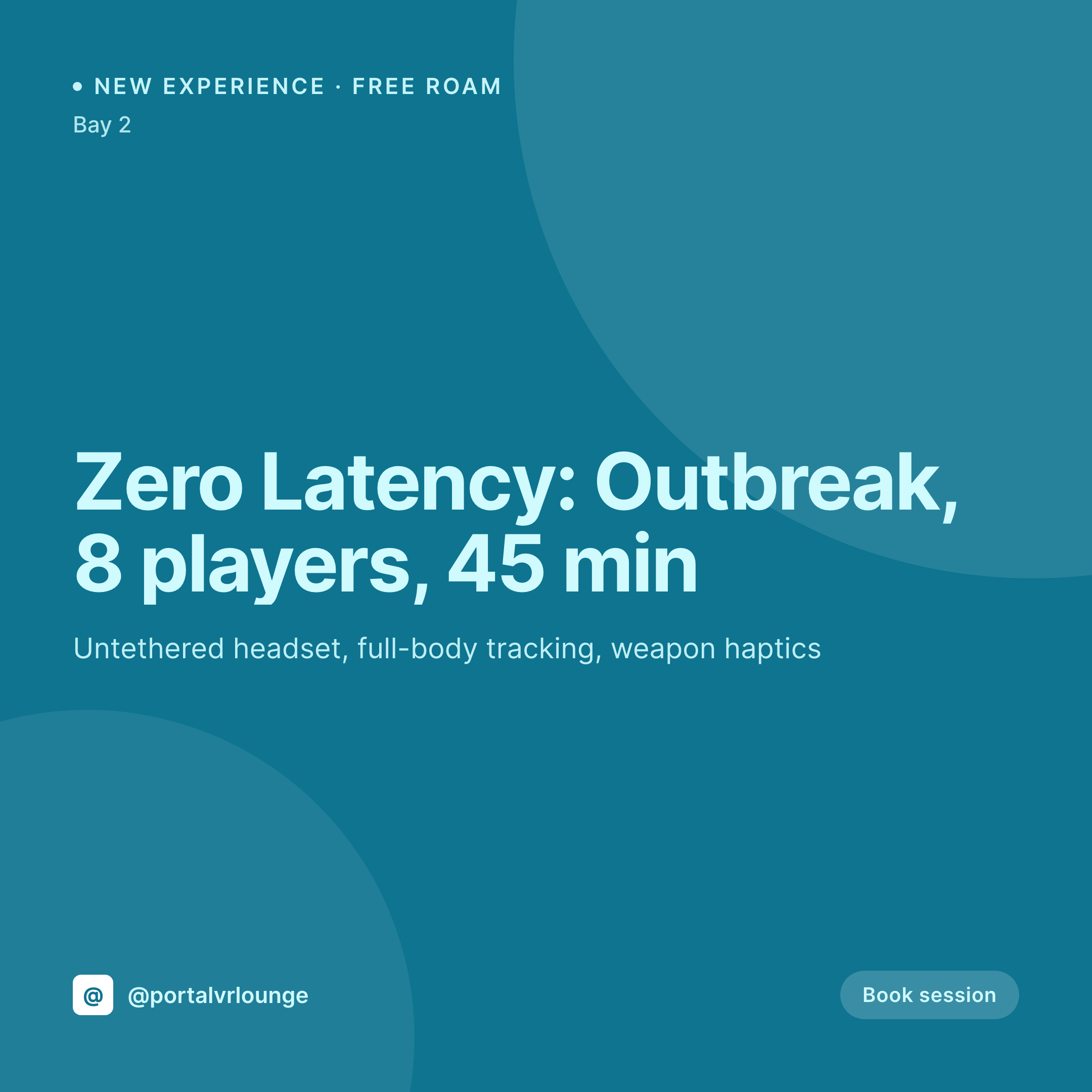
New titles drop monthly and the bays turn every 45 minutes
A VR arcade swaps titles monthly. A new Zero Latency free-roam, a new seated horror experience, a new arena shooter. Each title has its own duration, its own player count range, its own headset and tracking setup, and its own pricing. The booking page on the site already lists them. The Instagram tile, the one that drives walk-ins for the weekend, is the part that takes the manager an afternoon in Canva.
The data is on WordPress. Most VR arcades run an experience CPT with fields for title, duration, min and max players, headset, and price, plus a separate bay CPT for the physical resources. The site reads the right info on each experience page. The tile is where the work duplicates, because the manager retypes those same fields into a graphic tool every time a title drops.
SleekPixel renders the tile from the experience post. The new title saves with its duration, player count, and hardware, and the 1080x1080 PNG lands in uploads. Each booking slot also gets an OG card so a shared booking link previews correctly on Discord, Messenger, and iMessage.
Workflow
From booking page to posted experience tile
Map the experience fields
Design the session template
Publish the new title
Front desk posts it
Output
What gets generated per experience
A 1080x1080 Instagram tile with the experience title, duration, player count range, headset type, and price pulled live from the booking post.

Comparison
Default VR arcade image vs SleekPixel
Default VR arcade image
- Manager opens Canva each month to make a tile for the new title drop
- Player count range on the tile does not match what the booking page accepts
- Free-roam, seated, and arena experiences all end up with different fonts
- Headset and tracking type are buried in the caption, never on the tile
- Discord shares of booking links use a stale Open Graph image
SleekPixel
- Every experience post saves with a 1080x1080 session tile
- Duration, player count, headset type, and price pulled live from fields
- OG card renders for booking URL so Discord and iMessage previews are clean
- Same template covers free-roam, seated, and arena experiences
- Bulk regenerate after a price or title change so every card refreshes
Features
What SleekPixel gives you for VR arcade
Title and hardware
The experience title and the headset or tracking type render on the tile, so customers know if it is a Quest 3, a Vive, or a Zero Latency arena before they book.
Duration on the image
30, 45, or 60 minute sessions pull from the experience field. The duration tag is right on the tile so the booking is not a surprise at the desk.
Discord-friendly previews
The OG image for a booking link renders in the same save. A shared link in Discord shows the correct title, duration, and price.
Use cases
Who uses SleekPixel for VR arcades
New title drops
Monthly Zero Latency and arena title drops each render with title, duration, and player count, ready to launch on social the same day.
Private bay rentals
Bachelor parties, birthdays, and corporate team nights render with party size and selected experiences on the card the host can share.
Tournament announcements
Esports nights and LAN-style VR tournaments get a tile pulling event date, prize pool, and qualifying rules from the event post.
The bigger picture
Why VR arcades need the tile to match the experience post
A VR arcade competes on the title library and the hardware. Customers care whether the headset is a Quest 3 or a tethered PCVR rig, whether the experience is free-roam or seated, and whether the duration is 30 or 60 minutes. That information is on the site, because the booking page has to be accurate or the desk has to refund a confused group at check-in.
Treating the tile as a rendering of the experience post means the title, duration, headset, and price stay in sync between the Instagram grid and the booking flow. The manager focuses on swapping titles and maintaining headsets instead of rebuilding Canva tiles, and the Discord channel where most regulars hang out gets clean previews when a booking link is shared.
Questions
Common questions about SleekPixel for VR arcade
Yes. Free-roam arenas are just experiences with a bigger player count and a different hardware field. The template renders the player count range and arena type as tags on the tile.
Yes. Every booking URL gets an OG image rendered alongside the Instagram tile in the same save. Discord, Messenger, and iMessage previews show the right title and duration.
Experience type is a field or taxonomy. The template can show a small icon distinguishing seated from standing, so customers know what to expect before booking.
Yes. Booking products are still WooCommerce products. SleekPixel reads the resource, duration, and capacity fields and renders the tile on save.
Yes. Templates can be conditional on category. Free-roam uses one layout, seated horror another, arena shooters a third. All pull from the same experience fields.
No. Rendering runs on save in the admin. The front end serves the cached PNG. Social previews load instantly from the cached og:image meta.
No. SleekPixel renders the image to uploads with og:image meta. Posting is a manual step or handled by a separate scheduling or Discord bot.
A 1080x1920 story renders alongside the square tile in the same save. When a bay opens up late, the story can be posted as a walk-in alert with the right title and duration.
Pricing
More than 1000+
happy customers
Explore our flexible licensing options tailored to your needs. Upgrade your license anytime to access more features, or opt for a lifetime license for ongoing value, including lifetime updates and lifetime support. Our hassle-free upgrade process ensures that our platform can grow with you, starting from whichever plan you choose.
Lifetime ♾️
Most popular
EUR
once
- Unlimited websites
- Lifetime updates
- Lifetime support
...or get the Bundle Deal
and save €250 🎁
💎 Want everything forever? The All Access Pass is going away on 01.08.2026.
The Bundle (unlimited sites)
Pay once, own it forever
Elevate your WordPress site with our exclusive plugin bundle that includes all of our premium plugins in one package. Enjoy lifetime updates and lifetime support. Save significantly compared to buying plugins individually.
What’s included
-
SleekAI
-
SleekByte
-
SleekMotion
-
SleekPixel
-
SleekRank
-
SleekView
€749
Continue to checkoutBrowse more
- office opening card
- checklist cards
- trademark card
- Trustpilot review cards
- scheduled maintenance card
- investor update card
- G2 badge cards
- year-end recap card
- Yelp review cards
- shareholder letter card
- Stripe Atlas card
- reading list cards
- security advisory cards
- bundle deal cards
- podcast appearance card
- Discord server icon
- Pinterest product pin covers
- Tidal cover art
- YouTube Shorts covers
- SoundCloud track art
- Twitter header banners
- Lemon8 post
- Snapchat Discover tiles
- Beacons.ai banner
- Facebook event covers
- Fansly banner
- LinkedIn carousel slides
- Threads profile banner
- YouTube Shorts thumbnails
- YouTube ad thumbnails