






SleekPixel for Calendarista bookings
Calendarista handles the calendar, the seats and the checkout on WordPress. SleekPixel renders a per-service OG image from the same fields, so every class, tour and appointment link shares with a card that shows what is actually being booked.
♾️ Lifetime License available
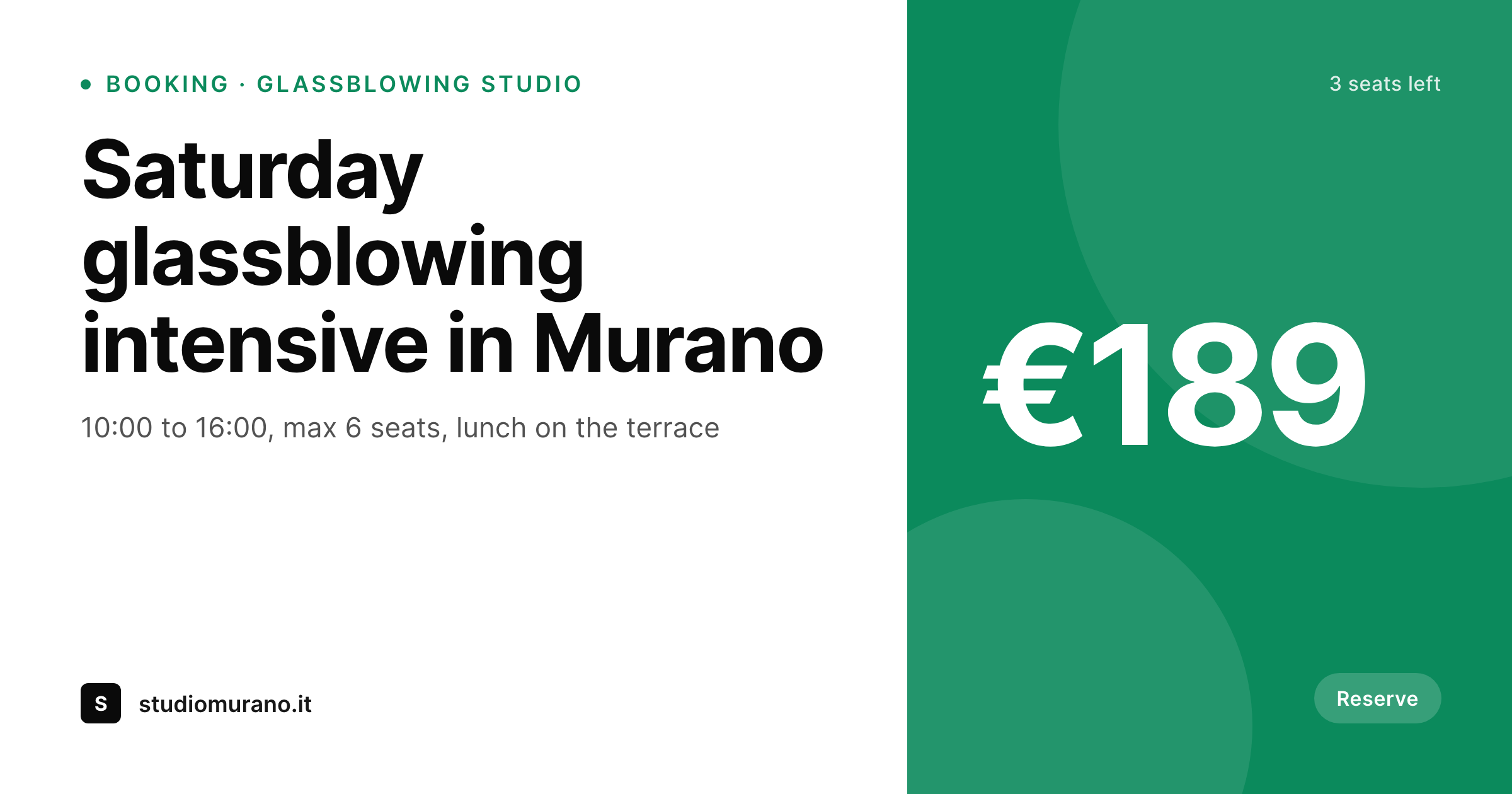
The booking page is detailed, the share preview is generic
Calendarista is one of the more capable WordPress scheduling plugins for studios, tour operators, classes and consultancy work. The service page carries everything that matters: the date grid, the seat count, the price tiers, the cancellation policy. The booking flow is competent, the calendar logic is correct, and the actual customer experience inside the page is fine.
What is rarely fine is the share preview. A glassblowing studio posts the link to its Saturday intensive into a community Slack and the preview shows the studio's homepage banner. A walking tour operator drops the Thursday slot into a hotel WhatsApp group and the card is the same generic crop that every other URL on the domain shares. The booking page itself was specific. The card representing it on the way in was not.
SleekPixel reads the Calendarista service post and the meta that defines the offering, then renders a 1200 by 630 OG image with the service name, schedule, price, and a small mark of seats remaining. Every link forwarded into chat, email or social arrives looking like the specific class or appointment it represents, not like a generic page on the studio's site.
Workflow
From Calendarista service to branded share card
Publish the service in Calendarista
Build the service template
Render on save
Share the service link
Output
What ships with every Calendarista service
A 1200 by 630 OG and Twitter card: service title, schedule line, price mark and brand wordmark, rendered from the Calendarista service fields.
Comparison
Default service OG vs Calendarista-aware card
Default theme OG
- Every Calendarista service shares with the same site-wide OG image
- Schedule and seat count never reach the share preview
- Pricing tiers and currency are missing from the card
- Updates to the schedule do not re-trigger an image refresh
- Designing share art per class across a studio's calendar is unrealistic
SleekPixel
- Reads the Calendarista service post and meta directly
- Per-service OG image with title, schedule and price line
- Seat count and currency render onto the card consistently
- Bulk re-render when the brand template changes
- No external image API, renders on the same WordPress install
Features
What SleekPixel gives you for Calendarista bookings
Schedule-aware slot
The card has a dedicated line for the day and time window, so a Saturday class reads differently from a Thursday afternoon tour at a glance.
Price and seats
Price slot binds to the highest published tier; the small mark area can carry seats remaining or 'fully booked' so the card matches reality.
Re-renders on save
When a service post is updated through Calendarista, SleekPixel re-renders the PNG. Old shares keep their old card; new shares pick up the new one.
Use cases
Who shares Calendarista services as cards
Studios and workshops
Glassblowing, pottery, photography and cooking studios that take direct bookings for fixed classes through Calendarista.
Tours and experiences
Walking tours, food tours and small-group experiences whose bookable slots get forwarded into hotel groups and travel forums.
Consultancy slots
Solo consultants and small agencies who publish discovery calls and paid sessions as Calendarista services.
The bigger picture
Why booking links deserve a real preview
Studios and small operators live on referrals, and referrals on the modern web travel as URLs pasted into chats. The Calendarista checkout itself is fine work, but if the link that brings someone there shows a generic homepage banner, the introduction is wasted. A hotel concierge sharing a Saturday cooking class to a guest gets a card that says 'cooking class on Saturday at 14:00, two seats left, 95 euros' instead of a card that says the studio's name.
That tiny shift in specificity is the difference between the guest tapping through and the guest scrolling past. SleekPixel does not change anything inside the booking flow. The calendar, the seat allocation and the payment are still Calendarista.
What changes is the moment before the click, which is exactly where bookings are won and lost for studios that do not have a marketing team running paid acquisition. Over a season of word-of-mouth shares, the cumulative impact of a real card on every link is what fills the Saturday slots that used to need a follow-up email to close.
Questions
Common questions about SleekPixel for Calendarista bookings
No. The booking flow, the calendar logic, the seat allocation and the payment all stay inside Calendarista. SleekPixel only reads the service post and renders an image attached to that URL.
Any WordPress post meta that Calendarista writes, plus standard post fields like title, excerpt and featured image. Most templates bind to title, schedule, price and seat count.
Yes. The seat count slot can render conditional text: 'X seats left', 'last seat' or 'fully booked'. The card re-renders the next time the service post saves after a booking.
For recurring services, the template can render the next upcoming date. For multi-day, the schedule slot shows the full date range. Calendarista exposes both as meta, so the template picks the appropriate field.
Re-renders trigger on post save. When the operator edits the service price in Calendarista and saves, the PNG re-renders within seconds. Existing shares already on social keep their old card until the platform re-scrapes.
Yes. SleekPixel supports per-category template assignment. A glassblowing studio that sells classes and private rentals can use one template for classes and another for private sessions.
Yes. Translation plugins like WPML and Polylang store translated meta per language. SleekPixel renders one PNG per language version, so the Italian and English service pages each share with their own card.
Calendarista does not set og:image on service pages. SleekPixel injects the meta tag on the service URL, falling back to whatever SEO plugin (Yoast, Rank Math) is active for non-Calendarista pages.
Pricing
More than 1000+
happy customers
Explore our flexible licensing options tailored to your needs. Upgrade your license anytime to access more features, or opt for a lifetime license for ongoing value, including lifetime updates and lifetime support. Our hassle-free upgrade process ensures that our platform can grow with you, starting from whichever plan you choose.
Lifetime ♾️
Most popular
EUR
once
- Unlimited websites
- Lifetime updates
- Lifetime support
...or get the Bundle Deal
and save €250 🎁
💎 Want everything forever? The All Access Pass is going away on 01.08.2026.
The Bundle (unlimited sites)
Pay once, own it forever
Elevate your WordPress site with our exclusive plugin bundle that includes all of our premium plugins in one package. Enjoy lifetime updates and lifetime support. Save significantly compared to buying plugins individually.
What’s included
-
SleekAI
-
SleekByte
-
SleekMotion
-
SleekPixel
-
SleekRank
-
SleekView
€749
Continue to checkoutBrowse more
- recap card
- policy update cards
- case study
- growth experiment card
- LinkedIn update cards
- trick of the day cards
- infographic headers
- keynote cards
- reading list cards
- Stripe Atlas card
- behind the build card
- data visualization cards
- explainer video thumbnails
- mental model cards
- music recommendation cards
- WeChat Moments images
- GitHub README banners
- Mailchimp email headers
- Facebook post images
- Warpcast frame images
- Shopify product images
- TikTok Now image
- Dailymotion thumbnails
- YouTube Shorts thumbnails
- YouTube end cards
- Open Graph images
- Threads social images
- YouTube playlist covers
- SoundCloud track art
- Facebook cover photos