






SleekPixel for LinkedIn update cards
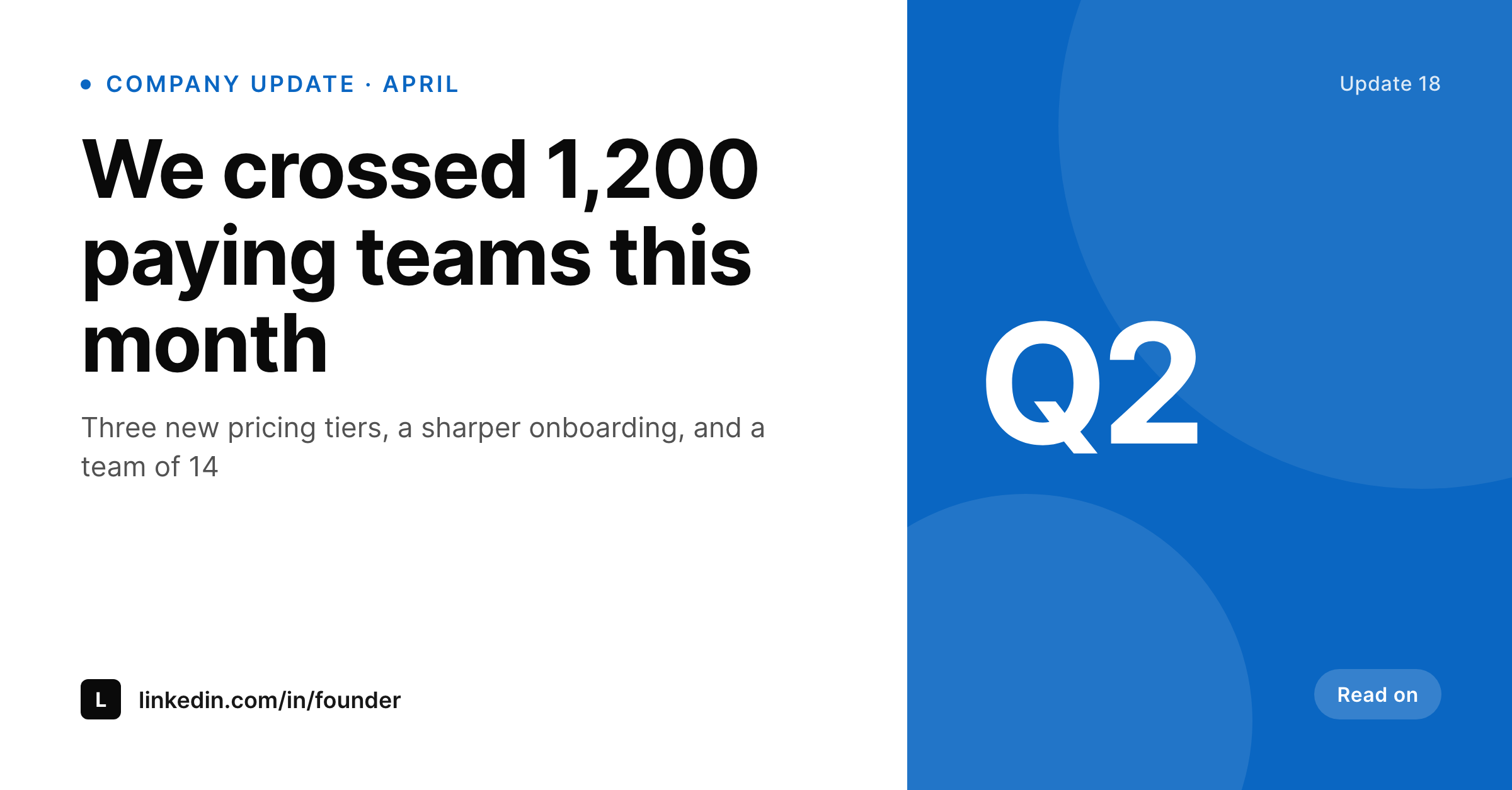
Founders and operators post company updates to LinkedIn weekly. SleekPixel turns each WordPress update post into a 1200x627 image with the headline, milestone number, and brand mark already laid out, ready to attach in the LinkedIn composer.
♾️ Lifetime License available
LinkedIn updates plateau at the same plain-text format
Most company updates on LinkedIn look the same: a long paragraph, a thumbs-up emoji, no image. Posts with an image consistently get more reach, but designing one per update means opening Figma or Canva, copying yesterday's file, swapping a few numbers, and exporting. By the third update of the month that workflow is gone and the posts go back to text only.
SleekPixel renders the update card from the update post itself. Title, the lead milestone number, the brand mark, and a small meta line bind to fields on a WordPress update post. The 1200x627 PNG sits in the uploads folder, the og:image meta tag points at it on the web archive, and the SleekPixel sidebar in Gutenberg exposes a download button for the LinkedIn composer.
The result is a year of updates that look like they came from the same company, without a designer in the loop. Updates that were going to be plain text become updates with a card. Updates that already had a card get the same template instead of three different exports.
Workflow
From WordPress update to LinkedIn post
Design the 1200x627 template
Bind to the update post type
Publish the update
Attach in LinkedIn
Output
What the LinkedIn update card looks like
A 1200x627 image that fits LinkedIn's post preview without cropping. Headline, milestone, brand mark, and a small meta line in fixed slots.
Comparison
Plain-text update vs SleekPixel LinkedIn update card
Plain-text LinkedIn post
- Plain-text posts blend into a fast-scrolling feed
- Designing a card per update dies after a few weeks of cadence
- Numbers and dates get retyped into Figma instead of pulled from a source
- Brand colors drift across updates as different people export files
- No connection between the LinkedIn card and the website archive
SleekPixel
- 1200x627 LinkedIn post card rendered per WordPress update
- Headline, milestone, and meta line bind to post fields
- Sidebar download button in Gutenberg for the LinkedIn composer
- Same image serves as og:image on the web archive
- Template change re-renders every past update with the new look
Features
What SleekPixel gives you for LinkedIn update cards
Milestone slot
A dedicated slot for the lead number so the card reads in a half-second. Bind it to a WordPress field and it stays in the same position on every update.
Per-pillar accent
Different update pillars get different accent colors. Product updates in one color, hiring in another, fundraising in a third. A category field flips it.
Composer-ready download
The Gutenberg sidebar exposes the rendered PNG. Open the LinkedIn composer in another tab, drag the file in, post the update with the image attached.
Use cases
Where LinkedIn update cards earn their keep
Founders posting weekly
A weekly update post becomes a recognizable visual signature in the LinkedIn feed without weekly design work.
Operators sharing internal wins
COOs and heads of product share team milestones with a card that already carries the company palette and milestone number.
Marketing leads with a cadence
A marketing team running a quarterly update cadence batches drafts on the website, then exports cards from the sidebar one at a time as they post.
The bigger picture
Why a recognizable update card is worth more than a fresh design each week
The LinkedIn feed scrolls fast and the eye stops on shapes it recognizes. A weekly company update with the same accent stripe, the same milestone slot, and the same brand mark becomes a visual signature inside a quarter. People who follow the founder learn to pause for those posts.
The temptation to redesign every card kills that signature, because two different cards in a row read as two different brands. SleekPixel removes the cost of the consistent card so the team posts more updates with the card than without. Over six months that is twenty-six updates that all look like the same company, which is more than most founders manage with a designer in the loop.
Questions
Common questions about SleekPixel for LinkedIn update cards
LinkedIn renders the attached PNG as a static post image. There is no autoplay in the standard post composer. If you want motion, render a still frame here and pair it with a separate video upload.
LinkedIn shows a 1200x627 image close to full bleed in the feed and crops slightly at certain widths. SleekPixel templates keep the headline and milestone inside the safe center band so the focal area survives every crop.
Yes. Register multiple templates and route by a category field on the update post. Product updates can use one template, hiring updates another, with shared brand fonts and accents tied to the pillar.
No. SleekPixel produces the PNG and exposes a download button in Gutenberg. Publishing to LinkedIn happens in the LinkedIn composer or in a scheduling tool. The asset is ready, the publishing step is yours.
Yes. Bind a placeholder to the WordPress user profile photo or to an ACF image field on the update post. The renderer crops it into the photo slot in the template.
The PNG is the same for both. Company pages and personal profiles both accept a 1200x627 image attachment. Use the same template across both surfaces for a consistent look.
Yes. Edit the template and trigger batch regenerate in SleekPixel. Every existing update writes a new PNG at the same upload URL, so the website archives refresh immediately and you can re-share the older cards if you want.
Yes. SleekPixel writes the og:image meta tag at a priority that overrides Yoast, Rank Math, and other SEO plugins by default. You can adjust priority if you want the SEO plugin to win, but the LinkedIn preview will reflect whichever image is set on og:image.
Pricing
More than 1000+
happy customers
Explore our flexible licensing options tailored to your needs. Upgrade your license anytime to access more features, or opt for a lifetime license for ongoing value, including lifetime updates and lifetime support. Our hassle-free upgrade process ensures that our platform can grow with you, starting from whichever plan you choose.
Lifetime ♾️
Most popular
EUR
once
- Unlimited websites
- Lifetime updates
- Lifetime support
...or get the Bundle Deal
and save €250 🎁
💎 Want everything forever? The All Access Pass is going away on 01.08.2026.
The Bundle (unlimited sites)
Pay once, own it forever
Elevate your WordPress site with our exclusive plugin bundle that includes all of our premium plugins in one package. Enjoy lifetime updates and lifetime support. Save significantly compared to buying plugins individually.
What’s included
-
SleekAI
-
SleekByte
-
SleekMotion
-
SleekPixel
-
SleekRank
-
SleekView
€749
Continue to checkout