






SleekPixel for Squarespace products
Squarespace handles the storefront, WordPress handles the editorial. SleekPixel renders branded share images for WordPress posts that mirror or promote Squarespace products, so every shared link previews with a real card.
♾️ Lifetime License available
Squarespace catalog, WordPress journal
Squarespace Commerce is a polished hosted storefront popular with design-led small brands: ceramics, prints, apparel, candles, home goods. Many of those brands eventually add a separate WordPress site for blog content, partly because SEO on WordPress is more flexible, partly because long-form editorial is easier to maintain there. The storefront stays on Squarespace, the journal moves to WordPress.
When the founder writes a journal post about a new product, the post lives on the WordPress side. The buy button on that post links out to the Squarespace product URL. The social share of the journal post pulls the WordPress page's OG image, not the Squarespace product's. By default that is the WordPress site's logo, identical for every product mention.
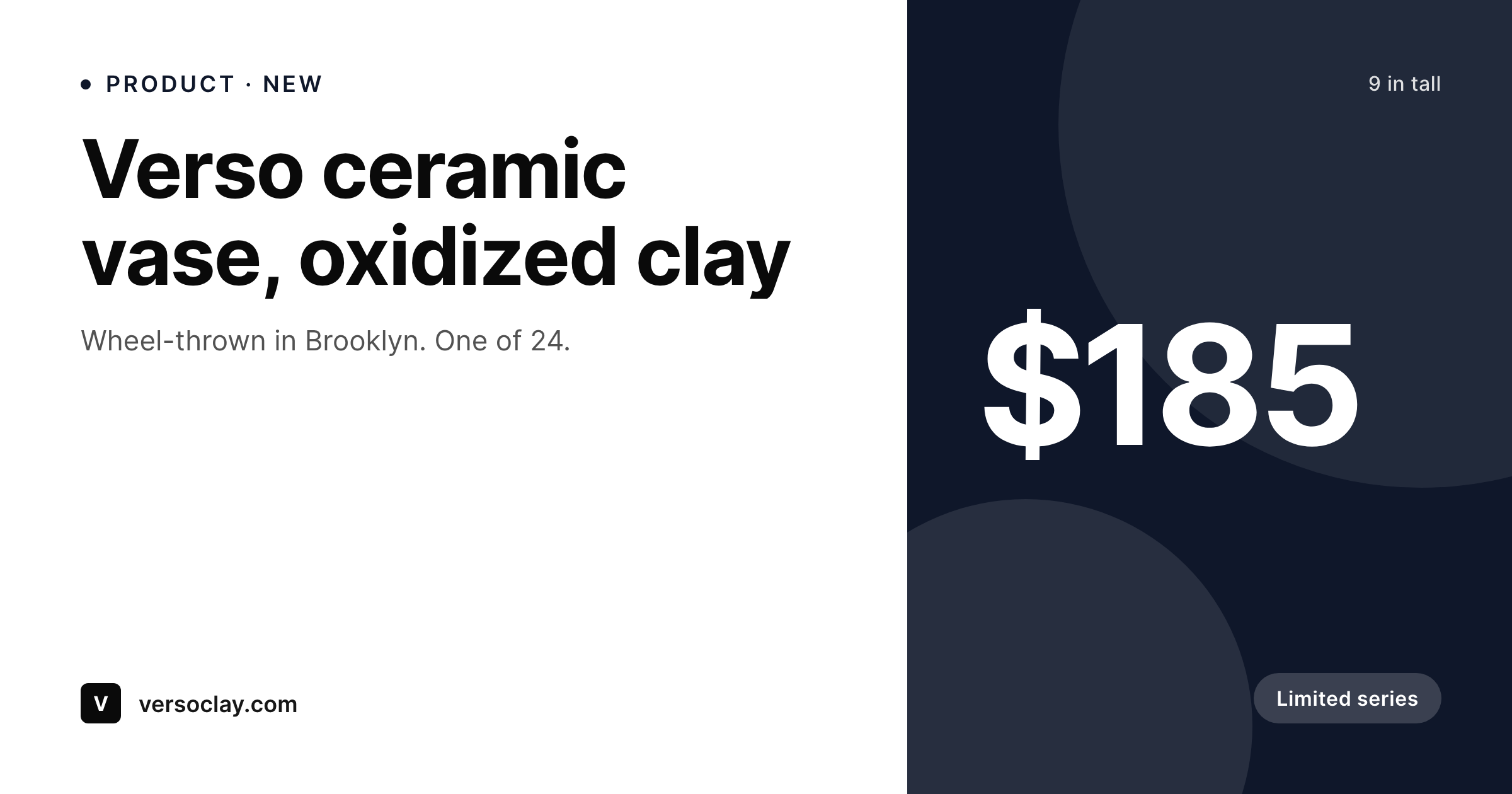
SleekPixel reads the product fields stored on the WordPress page, title, price, image, badge, and renders a real share card on save. The Squarespace storefront stays untouched. The WordPress side gets the share images it needs to make each product mention land with a recognizable preview pointing to the Squarespace checkout.
Workflow
From journal post to share-ready
Set up the WordPress fields
Build the design-led template
Publish the journal post
Share with intent
Output
What ships with every Squarespace product mention
A 1200 by 630 OG image with product title, price, image, badge, and brand wordmark, rendered from the fields on the WordPress post.
Comparison
Default OG vs Squarespace-aware rendering on WordPress
Default site OG image
- Every product mention shares with the same WordPress site logo
- Price stays invisible in the share even when prominent on the page
- Limited-series or one-of badges never make it to social previews
- Brand refresh means redoing every product post's art by hand
- Pinterest and Twitter pull stretched site banners on every product share
SleekPixel
- Reads product fields from ACF or block attributes on the WordPress post
- Title, price, image, and limited-series badges render onto the card
- Per-collection template variants for ceramics, prints, apparel, etc.
- Brand tokens applied once across the whole catalog of mentions
- Bulk re-render when the template or accent palette changes
Features
What SleekPixel gives you for Squarespace products
Design-led templates
Small-brand operators care about how the card looks. Templates support custom fonts, full-bleed imagery, and quiet typography for design-led catalogs.
Edition and series badges
One-of, edition-of-24, and limited-series flags render conditionally so collectors recognize the rarity in the preview itself.
Per-collection palettes
Ceramics, prints, and apparel each get a different accent token so the share previews feel cohesive within each line.
Use cases
Who uses SleekPixel for Squarespace products
Design-led brands with WordPress blogs
Studios that built the storefront on Squarespace but moved the blog to WordPress for SEO depth. SleekPixel handles share images on the WordPress side.
Journal posts about new arrivals
Every journal post about a new piece becomes a real product card in the social share, instead of the same studio logo as every other post.
Press and collector pages
Press feature pages and collector-targeted landing pages get matching share art so newsletter and DM shares look professional.
The bigger picture
Why design-led brands need design-led share cards
A studio that throws ceramics by hand and writes a careful journal post about a new piece has invested a lot in the moment of recognition. The wheel time, the photography, the writing, the layout. When that post is shared, the share preview is the first impression on the audience that did not see the post directly.
If the preview is the same studio logo as every other post, the recognition is generic and the click-through is whatever curiosity carries. If the preview is a real product card with the actual piece, edition number, and price, the share announces what was made. The audience that follows the studio gets a feed of work, not a feed of logos.
The second reason is operational: a small studio does not have a designer on retainer. The catalog grows piece by piece, and each new journal post would otherwise require a fresh round of social art that nobody has time to make. SleekPixel renders from the data already on the post, so each new piece gets a coherent share image without anyone interrupting the actual work to design one.
The Squarespace store stays simple, the WordPress journal stays editorial, and the share previews stay current.
Questions
Common questions about SleekPixel for Squarespace products
No. SleekPixel is a WordPress plugin and runs on a WordPress site. Squarespace does not support third-party server plugins. The integration works by rendering share images for the WordPress pages that mention or promote Squarespace products.
Manually in most setups. The founder writes the journal post, fills ACF fields for title, price, and image, and adds a buy button linking to the Squarespace product URL. Some operators automate this via Zapier; most start with manual entry.
Only when the WordPress side updates. Squarespace prices and WordPress fields are not synced natively. If prices change often, a small Zapier or webhook can mirror them; if not, the share image reflects whatever was on the post at last save.
Yes. Collection or category lives as a taxonomy term on the WordPress side. Templates switch layout, accent, or typography based on the term, so ceramics, prints, and apparel each get their own visual treatment.
No. Squarespace storefront pages are rendered by Squarespace and live on the Squarespace domain. SleekPixel only handles WordPress URLs. Squarespace's own share image settings would manage previews for the storefront.
Same answer: those systems handle their own pages on the Squarespace side. SleekPixel handles share images for WordPress pages that promote member tiers or booking offerings linked to Squarespace.
Yes. Templates support full-bleed image layouts with the typography overlaid. For design-led catalogs where the product photo is the hero, this layout often outperforms the side-by-side layout.
No. Rendering happens on save, not on page load. Visitor traffic hits cached files. Bulk re-render through the admin runs in the background without blocking editing or publishing.
Pricing
More than 1000+
happy customers
Explore our flexible licensing options tailored to your needs. Upgrade your license anytime to access more features, or opt for a lifetime license for ongoing value, including lifetime updates and lifetime support. Our hassle-free upgrade process ensures that our platform can grow with you, starting from whichever plan you choose.
Lifetime ♾️
Most popular
EUR
once
- Unlimited websites
- Lifetime updates
- Lifetime support
...or get the Bundle Deal
and save €250 🎁
💎 Want everything forever? The All Access Pass is going away on 01.08.2026.
The Bundle (unlimited sites)
Pay once, own it forever
Elevate your WordPress site with our exclusive plugin bundle that includes all of our premium plugins in one package. Enjoy lifetime updates and lifetime support. Save significantly compared to buying plugins individually.
What’s included
-
SleekAI
-
SleekByte
-
SleekMotion
-
SleekPixel
-
SleekRank
-
SleekView
€749
Continue to checkoutBrowse more
- Telegram channel cover images
- Ko-fi banners
- Twitch starting soon screen
- Ghost feature images
- Facebook event covers
- X Space banners
- Mastodon profile header
- Etsy cover photos
- Vimeo thumbnails
- Spotify Canvas
- Shopify collection banners
- Kick stream thumbnails
- Open Graph images
- Threads social images
- LinkedIn post images